Every accounting team I've talked to dreads the last week of the month. The financial close hasn't fundamentally changed in 20 years: pull a trial balance from the ERP, paste it into Excel, write variance explanations in Word, email the deck to stakeholders. Sixty to eighty hours of mostly mechanical work, compressed into five to ten business days.
The painful part isn't the numbers — it's the narrative. Someone has to look at every line where actuals diverge from budget, figure out why, and write a sentence that sounds like a human analyst composed it. For a mid-size company with 300 GL accounts and three reporting segments, that's potentially 900 individual explanations. Most of them will say something like "higher than expected spend due to timing" — because the analyst is exhausted and doesn't have time to dig deeper.
I built this copilot because I kept seeing the same pattern: smart finance professionals spending the majority of their close time on the least valuable part of the job. The variance narrative is important — it drives management decisions — but it's also the most amenable to AI assistance because it's contextual, repetitive, and follows predictable patterns.
In this two-part series, I'll show you how to build a Financial Close & Variance Review Copilot using Azure OpenAI, LangGraph (Python) or Semantic Kernel (C#), and Azure AI Search for historical context retrieval.
What You'll Learn
- How to orchestrate a multi-agent financial close workflow with LangGraph and Semantic Kernel
- ERP data normalization — handling the chaos of real-world general ledger data
- Generating context-aware variance commentary using GPT-4o with historical retrieval
- Materialthreshold logic for routing variances to human reviewers
- ROI framework for justifying this build internally
How Finance Teams Close Today
The standard month-end close workflow looks roughly like this: the ERP exports a trial balance at period-end, a finance analyst downloads it to Excel, applies VLOOKUP-based formulas to map actuals against a separate budget spreadsheet, calculates the variances, and then — the soul-crushing part — manually writes commentary on every line that's over a threshold (say, $10K or 5% of budget).
The problems compound quickly:
- No institutional memory. When a new analyst joins, they have no idea why revenue spiked in March last year. That context lives in someone's email or a comment in an old Excel file.
- Inconsistent commentary quality. The first 50 variances get thoughtful explanations. By variance 200, the analyst is writing "timing differences" for everything.
- Error-prone reconciliation. Manual mapping between GL account codes and budget line items breaks silently when the chart of accounts changes mid-year.
- No triage logic. Every variance gets the same amount of attention regardless of materiality, which means truly important variances are buried in noise.
The Real Cost
A typical mid-size company (500–2,000 employees) spends 60–120 person-hours on monthly variance commentary alone. At a fully-loaded cost of $80/hour for a senior finance analyst, that's $4,800–$9,600 per month — or up to $115,000 per year — on work that GPT-4o can do in minutes.
And because the close is time-pressured, there's rarely capacity to do it better. The existing process is entrenched not because it's good, but because there hasn't been a viable alternative. Until now.
The Copilot Approach
The core idea is straightforward: instead of an analyst doing each step manually, a set of coordinated AI agents handles the mechanical work — data extraction, variance calculation, commentary generation, and triage — while keeping humans in the loop for review and approval.
This is explicitly not a fully autonomous system. The copilot generates a first draft of everything; the analyst reviews, edits, and approves. The goal is to cut close time from 5–10 days to 1–2 days, not to eliminate the analyst role.
Why agent orchestration rather than a single large prompt? Because each step has distinct characteristics:
- Data ingestion is deterministic — it should never hallucinate a number.
- Variance calculation is pure arithmetic — no LLM needed here at all.
- Commentary generation is where the LLM earns its keep — contextual, nuanced, with access to historical patterns.
- Triage requires business rule logic — threshold-based routing that finance teams can configure.
Mixing these into a single prompt would be unreliable and unmaintainable. Separate agents with clear responsibilities are easier to test, debug, and audit — which matters a lot in a finance context.
Tech Stack
- Python: LangGraph for agent orchestration, LangChain for Azure OpenAI integration
- C#: Semantic Kernel with Azure OpenAI connector
- Azure OpenAI: GPT-4o for commentary generation
- Azure AI Search: Vector search over historical commentary for context retrieval
- ERP integration: REST API or ODBC connector (SAP, Oracle, NetSuite, Dynamics 365)
Architecture Overview
The system is structured as a sequential pipeline of five agents, each responsible for a
discrete step in the close process. The pipeline is stateful — each agent reads from and
writes to a shared FinancialCloseState object that accumulates data as it
flows through.
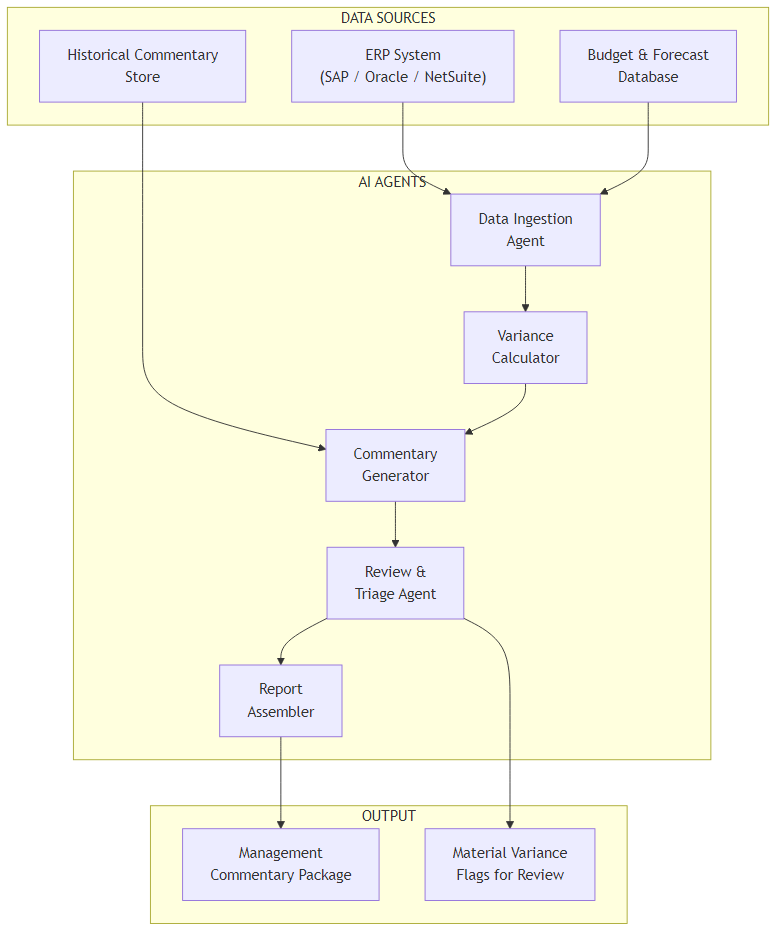
Here's what each component does:
- Data Ingestion Agent — Connects to the ERP via REST API or ODBC, pulls the trial balance for the close period, and normalizes account codes to a standard chart of accounts structure.
- Variance Calculator — Pure arithmetic: computes actuals vs. budget and actuals vs. prior year for each account. No LLM involved — deterministic and auditable.
- Commentary Generator — For each variance line above the materiality threshold, retrieves relevant historical context from Azure AI Search, then calls GPT-4o to draft a variance explanation.
- Review & Triage Agent — Applies business rules to classify variances as auto-approved (below materiality, consistent with historical patterns) or flagged for human review.
- Report Assembler — Combines auto-approved commentary and human-reviewed items into a structured management commentary package ready for export.
The separation between the Variance Calculator and Commentary Generator is deliberate. Finance teams need to trust the numbers independently of the narrative. By keeping calculation as a pure function with no LLM involvement, you can audit the variance math without worrying about model drift.
Core Implementation
State Model
Everything the pipeline needs lives in a single state object passed between agents. In LangGraph this is a TypedDict; in Semantic Kernel it's a plain C# class.
from typing import TypedDict, List, Optional

class FinancialCloseState(TypedDict):
    period: str              # "2026-03"
    gl_data: List[dict]      # Normalized GL actuals from ERP
    budget_data: List[dict]  # Budget/forecast by account
    variances: List[dict]    # Calculated variance lines
    commentary: List[dict]   # AI-generated commentary per line
    material_flags: List[dict]  # Variances requiring human review
    report: Optional[str]    # Final assembled report (HTML/DOCX)
public class FinancialCloseState
{
public string Period { get; set; } = string.Empty; // "2026-03"
public List<GlEntry> GlData { get; set; } = new();
public List<BudgetEntry> BudgetData { get; set; } = new();
public List<VarianceResult> Variances { get; set; } = new();
public List<CommentaryItem> Commentary { get; set; } = new();
public List<MaterialFlag> MaterialFlags { get; set; } = new();
public string? Report { get; set; }
}Orchestration Graph
The pipeline is a linear graph — each node runs sequentially and writes its output back to state. The only branching happens at the triage node, where variances split into auto-approved and flagged-for-review paths.
from langgraph.graph import StateGraph, END

def build_close_pipeline(config: CloseConfig) -> StateGraph:
    workflow = StateGraph(FinancialCloseState)

    # Register agent nodes
    workflow.add_node("ingest", DataIngestionAgent(config).run)
    workflow.add_node("calculate", VarianceCalculator(config).run)
    workflow.add_node("generate_commentary", CommentaryGenerator(config).run)
    workflow.add_node("triage", TriageAgent(config).run)
    workflow.add_node("assemble", ReportAssembler(config).run)

    # Linear pipeline with triage branching
    workflow.set_entry_point("ingest")
    workflow.add_edge("ingest", "calculate")
    workflow.add_edge("calculate", "generate_commentary")
    workflow.add_edge("generate_commentary", "triage")
    workflow.add_conditional_edges(
        "triage",
        lambda state: "needs_review" if state["material_flags"] else "assemble",
        {
            "needs_review": "assemble",  # Assembler handles both paths
            "assemble": "assemble",
        }
    )
    workflow.add_edge("assemble", END)

    return workflow.compile()


async def run_close(period: str, config: CloseConfig) -> FinancialCloseState:
    pipeline = build_close_pipeline(config)
    initial_state = FinancialCloseState(
        period=period,
        gl_data=[], budget_data=[], variances=[],
        commentary=[], material_flags=[], report=None
    )
    return await pipeline.ainvoke(initial_state)
public class FinancialClosePipeline
{
private readonly DataIngestionAgent _ingest;
private readonly VarianceCalculator _calculator;
private readonly CommentaryGenerator _commentary;
private readonly TriageAgent _triage;
private readonly ReportAssembler _assembler;
public FinancialClosePipeline(CloseConfig config, Kernel kernel)
{
_ingest = new DataIngestionAgent(config);
_calculator = new VarianceCalculator(config);
_commentary = new CommentaryGenerator(kernel, config);
_triage = new TriageAgent(config);
_assembler = new ReportAssembler(config);
}
public async Task<FinancialCloseState> RunAsync(string period)
{
var state = new FinancialCloseState { Period = period };
state = await _ingest.RunAsync(state);
state = await _calculator.RunAsync(state);
state = await _commentary.RunAsync(state);
state = await _triage.RunAsync(state);
state = await _assembler.RunAsync(state);
return state;
}
}Challenge #1 — ERP Data Normalization
This is the part that trips up most implementations. Real-world ERP systems are messy.
SAP uses alphanumeric account codes like 4000000. NetSuite uses numeric
codes in a completely different range. Dynamics 365 lets clients define their own chart
of accounts structure. Your budget spreadsheet was probably built by someone who left
two years ago and uses account names slightly different from what's in the ERP.
The normalization step needs to map all of this to a consistent internal structure before any variance calculation can happen. I handle this with a configurable mapping layer:
from dataclasses import dataclass
from typing import Dict, List

@dataclass
class AccountMapping:
    erp_code: str
    category: str      # "Revenue", "COGS", "OpEx", "CapEx"
    subcategory: str   # "Product Revenue", "Salary", etc.
    reporting_line: str  # Maps to management report line

class DataIngestionAgent:
    def __init__(self, config: CloseConfig):
        self.erp_client = ERPClient(config.erp)
        # Load mapping from config — not hardcoded
        self.account_map: Dict[str, AccountMapping] = config.load_account_mapping()

    async def run(self, state: FinancialCloseState) -> FinancialCloseState:
        raw_gl = await self.erp_client.get_trial_balance(state["period"])

        normalized = []
        unmapped = []
        for entry in raw_gl:
            mapping = self.account_map.get(entry["account_code"])
            if mapping is None:
                unmapped.append(entry["account_code"])
                continue  # Skip rather than silently misclassify
            normalized.append({
                "account_code": entry["account_code"],
                "account_name": entry["description"],
                "category": mapping.category,
                "subcategory": mapping.subcategory,
                "reporting_line": mapping.reporting_line,
                "actual": float(entry["net_amount"]),
                "period": state["period"],
            })

        if unmapped:
            # Surface unmapped accounts as warnings, not errors
            state["material_flags"] = state.get("material_flags", []) + [
                {"type": "unmapped_account", "accounts": unmapped}
            ]

        state["gl_data"] = normalized
        return state
public class DataIngestionAgent
{
private readonly IErpClient _erp;
private readonly Dictionary<string, AccountMapping> _accountMap;
public DataIngestionAgent(CloseConfig config)
{
_erp = ErpClientFactory.Create(config.Erp);
_accountMap = config.LoadAccountMapping();
}
public async Task<FinancialCloseState> RunAsync(FinancialCloseState state)
{
var rawGl = await _erp.GetTrialBalanceAsync(state.Period);
var normalized = new List<GlEntry>();
var unmapped = new List<string>();
foreach (var entry in rawGl)
{
if (!_accountMap.TryGetValue(entry.AccountCode, out var mapping))
{
unmapped.Add(entry.AccountCode);
continue; // Skip — don't silently misclassify
}
normalized.Add(new GlEntry
{
AccountCode = entry.AccountCode,
AccountName = entry.Description,
Category = mapping.Category,
Subcategory = mapping.Subcategory,
ReportingLine = mapping.ReportingLine,
Actual = entry.NetAmount,
Period = state.Period
});
}
if (unmapped.Any())
{
state.MaterialFlags.Add(new MaterialFlag
{
Type = "unmapped_account",
Accounts = unmapped
});
}
state.GlData = normalized;
return state;
}
}Why Skip Rather Than Guess?
Silently mapping an unknown account to "Other" means the variance report will be wrong — and nobody will know. Surfacing unmapped accounts as warnings forces the finance team to fix the mapping before close, which is the right behaviour. Finance accuracy is non-negotiable.
Challenge #2 — Context-Aware Variance Commentary
Generating variance commentary is where the LLM does its most important work — and where it's most likely to produce garbage if you're not careful. The two failure modes I see most often are: commentary that's generic to the point of uselessness ("variance due to business activities"), and commentary that confidently makes up context that doesn't exist.
The fix for both is retrieval-augmented generation: before calling GPT-4o, fetch relevant historical commentary from Azure AI Search — what was said about this account in prior closes. This grounds the model's output in real institutional knowledge.
COMMENTARY_PROMPT = """\
You are a senior financial analyst writing variance commentary for a management report.

Current period: {period}
Account: {account_name} ({category} / {subcategory})
Actual:       ${actual:>12,.0f}
Budget:       ${budget:>12,.0f}
Variance:     ${variance:>12,.0f}  ({variance_pct:+.1f}% vs budget)
Prior year:   ${prior_year:>12,.0f}  ({yoy_pct:+.1f}% YoY)

Historical context from prior closes:
{historical_context}

Instructions:
- Write exactly 2-3 sentences
- Be specific: reference the variance amount and direction
- If historical context suggests a pattern, acknowledge it
- Do NOT invent business events not supported by the context
- Use professional financial language (not "a lot", "very")
- If context is insufficient, write a factual observation only
"""

class CommentaryGenerator:
    async def run(self, state: FinancialCloseState) -> FinancialCloseState:
        commentary = []
        for variance in state["variances"]:
            if abs(variance["variance_pct"]) < self.config.materiality_pct:
                continue  # Below threshold — no commentary needed

            # Retrieve historical context via Azure AI Search
            context = await self.search_client.hybrid_search(
                query=f"{variance['account_name']} variance {variance['category']}",
                filter=f"period ge '{self._prior_periods(3)}'",
                top_k=3
            )
            context_text = "\n".join(
                f"- {c['period']}: {c['commentary']}" for c in context
            )

            prompt = COMMENTARY_PROMPT.format(
                **variance, historical_context=context_text or "No prior context available."
            )
            text = await self.llm.chat(
                [{"role": "user", "content": prompt}],
                temperature=0.3,  # Low temp = consistent, professional tone
                max_tokens=150
            )
            commentary.append({
                "account_code": variance["account_code"],
                "account_name": variance["account_name"],
                "variance": variance["variance"],
                "variance_pct": variance["variance_pct"],
                "commentary": text.strip(),
                "confidence": "rag" if context else "no_context",
            })

        state["commentary"] = commentary
        return state
public class CommentaryGenerator
{
private readonly Kernel _kernel;
private readonly ISearchClient _search;
private readonly CloseConfig _config;
private const string CommentaryPrompt = """
You are a senior financial analyst writing variance commentary for a management report.
Current period: {{period}}
Account: {{account_name}} ({{category}} / {{subcategory}})
Actual: ${{actual:N0}}
Budget: ${{budget:N0}}
Variance: ${{variance:N0}} ({{variance_pct:+0.0}}% vs budget)
Historical context from prior closes:
{{historical_context}}
Write exactly 2-3 sentences. Be specific. Do NOT invent business events.
Use professional financial language.
""";
public async Task<FinancialCloseState> RunAsync(FinancialCloseState state)
{
var commentary = new List<CommentaryItem>();
foreach (var variance in state.Variances)
{
if (Math.Abs(variance.VariancePct) < _config.MaterialityPct)
continue;
var context = await _search.HybridSearchAsync(
query: $"{variance.AccountName} variance {variance.Category}",
filter: $"period ge '{PriorPeriods(3)}'",
topK: 3);
var contextText = context.Any()
? string.Join("\n", context.Select(c => $"- {c.Period}: {c.Commentary}"))
: "No prior context available.";
var args = new KernelArguments
{
["period"] = variance.Period,
["account_name"] = variance.AccountName,
["category"] = variance.Category,
["subcategory"] = variance.Subcategory,
["actual"] = variance.Actual,
["budget"] = variance.Budget,
["variance"] = variance.Variance,
["variance_pct"] = variance.VariancePct,
["historical_context"] = contextText
};
var result = await _kernel.InvokePromptAsync(
CommentaryPrompt, args,
executionSettings: new OpenAIPromptExecutionSettings
{
Temperature = 0.3f,
MaxTokens = 150
});
commentary.Add(new CommentaryItem
{
AccountCode = variance.AccountCode,
AccountName = variance.AccountName,
Variance = variance.Variance,
VariancePct = variance.VariancePct,
Commentary = result.ToString().Trim(),
Confidence = context.Any() ? "rag" : "no_context"
});
}
state.Commentary = commentary;
return state;
}
}The temperature: 0.3 Choice
I use 0.3 rather than 0 here because finance commentary benefits from some linguistic variety — reading 200 identically-structured sentences is painful for reviewers. But I keep it low enough to prevent creative fabrication. If you need fully deterministic output for audit purposes, use 0 and accept the repetitive prose.
ROI and Business Value
Finance leadership will ask for numbers before approving this build, so let's be honest about what the ROI looks like.
What You Can Realistically Expect
- Close cycle reduction: 5–10 days → 2–3 days (the remaining time is human review, not mechanical work)
- Commentary time savings: 60–80 hours/month → 10–15 hours/month for a 300-account close
- Commentary quality: Consistent, professional tone across all 300+ lines (vs. quality degradation from fatigue)
- Unmapped account detection: Surfaced automatically rather than discovered after a bad board presentation
The ROI calculation is straightforward once you have your numbers:
| Item | Before | After | Monthly Saving |
|---|---|---|---|
| Variance commentary (Sr. Analyst @ $80/hr) | 75 hrs | 12 hrs | $5,040 |
| Data extraction & reconciliation | 20 hrs | 2 hrs | $1,440 |
| Azure OpenAI API costs (GPT-4o) | — | ~$45/month | −$45 |
| Net monthly saving | ~$6,435 |
Build and integration time for a capable team is typically 4–6 weeks. At a $6,400/month saving, that's a payback period of less than two months. The compelling part isn't the cost saving though — it's the 3-day close. Getting financial results to management seven days earlier changes how fast the business can react to problems.
One caveat: this ROI assumes a reasonably well-maintained chart of accounts and a budget that actually exists in machine-readable form. If either of those is missing, you need to solve those first.
What's Next
In this article I covered the core architecture: state model design, the five-agent pipeline, ERP normalization, and RAG-augmented commentary generation. The implementation is functional — you can run a close end-to-end with this code.
But running something in a test environment and running it in production for a real finance close are very different things. Part 2 covers:
- Real cost numbers: How many tokens does a 300-account close actually consume, and what does that cost per month?
- Observability: How do you trace a commentary back to the specific prompt, context, and model call that generated it — for audit purposes?
- Python vs C# decision: When Semantic Kernel's enterprise patterns outweigh LangGraph's ecosystem breadth
- When NOT to use this: The scenarios where a well-structured Excel template beats an AI copilot
Ready for Part 2?
Part 2 covers production considerations: cost analysis, observability, and when NOT to use this approach.
Read Part 2 →Code examples are conceptually complete but omit error handling, retry logic, and configuration loading for clarity. Production deployments need all three.
Want More Practical AI Tutorials?
I write about building production AI systems with Azure, Python, and C#. Subscribe for practical tutorials delivered twice a month.
Subscribe to Newsletter →