NSW's largest infrastructure builds are running late and over budget by pattern, not by accident. Western Sydney Airport and the Parramatta Light Rail have both tracked toward cost and schedule overruns approaching 30%, driven by three recurring failure points: static schedules that ignore real-world risk, rework that consumes 10–15% of total project cost, and compliance reviews that stall approvals for weeks at a time.
Digital maturity lags at exactly the firms carrying the largest programs — Tier 1 contractors like CPB Contractors, Lendlease, and John Holland manage enormous volumes of scheduling, site, and compliance data, much of it still processed manually or in disconnected systems. That gap is now closing. AI tools built specifically for construction scheduling, site monitoring, and compliance checking have matured to the point where mid-size and large builders can deploy them without an internal data science function.
The pattern that works is not a wholesale digital transformation. It is a bounded, 12–24 month engagement that bridges the skills gap on one or two specific problems and delivers a 25–40% productivity jump on the areas it touches. This article covers the three AI applications delivering the clearest results in construction right now, what changed to make them accessible, and a practical framework for implementing them.
What You'll Learn
- Why AI adoption in construction is accelerating in 2026
- How AI scheduling tools cut delays by 30–40%
- How drone and IoT site monitoring improves progress accuracy by 25%
- How AI compliance automation cuts RFIs and claims by up to 50%
- A practical 6-phase implementation framework
- Where to start if you have no in-house AI team
Reading time: ~8 minutes | Decision time: 30 minutes to identify your starting point
Why AI Is Now Accessible for Construction
Three barriers kept AI out of reach for most construction firms until recently: the cost of drone and sensor hardware, the difficulty of integrating AI with entrenched tools like Primavera P6 and MS Project, and the lack of clean, structured project data to train models on. All three have shifted. Drone hardware costs have fallen sharply while flight-planning software has become largely automated. Scheduling AI now ships as an add-on module for Primavera and MS Project rather than a replacement platform, which means firms can pilot it without re-platforming their entire scheduling function. And the widespread adoption of Building Information Modelling (BIM) and cloud-based construction management platforms like Procore has given AI models a structured data source to work from — something that simply didn't exist for most firms a few years ago.
The same digital-maturity gap and the same opportunity show up on major builds outside NSW. WA's METRONET rail program and Queensland's Cross River Rail face comparable scheduling and compliance pressure at similar scale, and Tier 1 contractors working across state lines are increasingly expected to bring the same AI-assisted delivery approach wherever they operate.
Win 1: AI Scheduling — Cut Delays 30–40%
The problem: A construction schedule built in Primavera or MS Project is a snapshot, not a living plan. It assumes weather holds, materials arrive on time, and subcontractors are available when booked. In practice, none of those assumptions hold reliably across a multi-year program, and the static plan doesn't reflect the drift until someone notices the critical path has already slipped. This is a primary driver behind the roughly 30% time overruns tracked on major NSW infrastructure builds.
The AI win: AI scheduling tools ingest live weather forecasts and supply chain signals, simulate the effect of likely disruptions on the critical path, and auto-reschedule the tasks that would otherwise slip — before the slip happens rather than after. Firms running this consistently report a 30–40% reduction in delay exposure.
AI simulates weather and supply disruptions and auto-reschedules the affected tasks — cutting delay exposure by 30–40% on the packages it covers.
Easy starting point: Integrate an AI scheduling module directly into the Primavera or MS Project environment your planners already use, and scope the pilot to a single package — one building, one road segment, one structure — rather than the full program. This keeps the data requirements manageable and gives planners a direct before-and-after comparison.
Win 2: Site Monitoring — Boost Progress Accuracy 25%
The problem: Manual site walks and hand-recorded percent-complete assessments miss variances between what's actually built and what the schedule assumes. Material and equipment theft or loss typically runs 1–2% of project value — losses that often go undetected until a stocktake or an audit, well after the fact.
The AI win: Drone flyovers and IoT sensors feed imagery and positional data into an AI model that compares the physical site against the BIM model in near real time. It produces an accurate percent-complete figure automatically and flags discrepancies — missing material, out-of-sequence work, unauthorised access to equipment laydown areas — as they occur rather than at the next scheduled walk. This delivers roughly 25% better progress and safety accuracy over manual assessment.
Drone and IoT AI tracks the site in real time against the BIM model, delivering 25% better progress and safety accuracy than manual site walks.
Easy starting point: Start with a weekly drone flyover on one active site, feeding an automated percent-complete report to the project team. This requires no change to existing scheduling or compliance systems and produces a visible result within the first few weeks.
Win 3: Compliance Automation — Slash RFIs and Claims by Up to 50%
The problem: Work Health and Safety (WHS) documentation and design compliance reviews routinely delay approvals by weeks, because someone has to manually check every submission against the relevant standard. On a program with hundreds of subcontractor packages, this becomes a structural bottleneck rather than an occasional hold-up.
The AI win: AI compliance tools automatically check submitted documents — WHS plans, design changes, subcontractor packages — against the applicable standards and flag non-conformances before they turn into a formal Request for Information (RFI) or a contractual claim. Firms using this approach have cut RFI volume by up to 50%.
AI auto-checks submissions against standards before they reach a reviewer's desk, cutting RFI volume by up to 50% on the document types it covers.
Easy starting point: Apply compliance automation to subcontract approvals first. It's a high-volume, well-structured document set, which makes it the fastest path to a measurable result before extending the same approach to broader WHS or design compliance review.
Common Pitfall: Skipping Data Readiness
The most common failure pattern is jumping straight into a scheduling or compliance pilot before the underlying BIM or Procore data is clean and structured. When the input data is inconsistent, the AI's predictions and flags are unreliable, and teams lose confidence in the tool before it's had a fair test. The Data Readiness phase below is not optional overhead — it is what determines whether the pilot succeeds.
The 6-Phase Implementation Framework
Construction firms adopting AI scheduling, site monitoring, or compliance automation typically follow a structured 6-phase path rather than a single big-bang deployment. For tier-1 projects, the full framework runs $500,000–$5,000,000 depending on scope and number of packages covered, spread across 12–24 months.
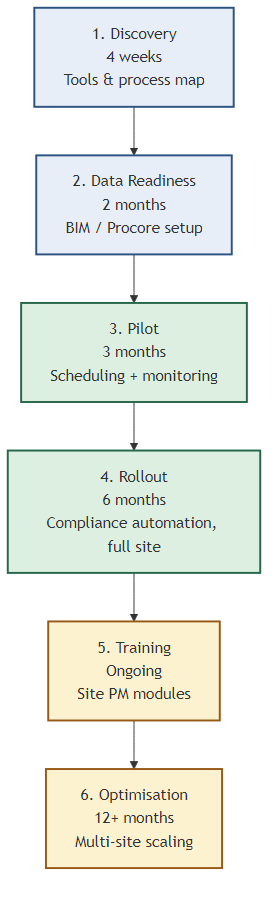
- Discovery (4 weeks): Map the current scheduling, monitoring, and compliance tools and processes in use, and identify where AI can be layered in without disrupting live work.
- Data Readiness (2 months): Set up or clean BIM and Procore data feeds so the AI models have structured input to work from.
- Pilot (3 months): Run AI scheduling and site monitoring together on one package, with clear before-and-after metrics.
- Rollout (6 months): Extend the pilot's scope and bring compliance automation online across the full site or program.
- Training (ongoing): Site project manager modules to embed the new workflow into day-to-day operations.
- Optimisation (12+ months): Extend the approach across multiple sites and refine the models against a growing dataset.
The total impact firms report across a full implementation is a 25–40% productivity gain, along with a measurable reduction in disputes — a direct result of catching scheduling risk, site variances, and compliance gaps earlier in the process rather than after they've become a claim.
Where to Start
The framework above covers all three wins together, but most organisations without an in-house AI team get better early results by picking one starting point rather than attempting all three at once. Firms already running Primavera or MS Project natively tend to see the fastest return from AI scheduling, since the integration builds on a tool planners already trust. Firms without a strong scheduling discipline, or those most concerned about site security and progress tracking, often find drone-based site monitoring the lowest-friction starting point — it requires no change to existing scheduling or compliance systems and produces visible results within weeks. Compliance automation is generally best attempted after the Data Readiness phase, since its accuracy depends directly on having structured, consistent document flows already in place.
Implementation Checklist
- Map current scheduling, monitoring, and compliance tools and workflows
- Confirm BIM/Procore (or equivalent) data is structured enough for AI ingestion
- Select one project package for a 3-month pilot
- Choose AI scheduling, site monitoring, or compliance automation as the pilot focus — not all three at once
- Assign a site PM as the internal champion for training rollout
- Plan on a 12–24 month horizon for full multi-site optimisation
Sources: NSW Policymaker, Infraworx, Sydney Build Expo, The Pod Canberra.
Questions About Implementing AI in Construction?
If you're weighing up where to start or want to talk through how these applications fit your specific operation, feel free to reach out.
Get in Touch →