What You'll Learn
- Why answer-only chatbots stall out and what "auto-resolve" actually requires
- How to design a state graph that classifies, retrieves, plans, and executes actions on a ticket
- How to build tool-calling guardrails so an agent can safely issue refunds and touch orders
- How to calibrate a confidence gate that decides auto-resolve vs. escalate
- Real per-ticket cost numbers and an honest list of when this approach isn't worth building
1. Introduction
Most "AI support agent" projects I've seen stop at answering questions. A customer asks where their order is, the bot searches a knowledge base, and it replies with something plausible. That's useful, but it's not resolution — the ticket still sits in a queue because someone has to actually look up the order, verify eligibility, and issue the refund or replacement. The AI did the easy 20% and left the actual work for a human.
I built this because I kept running into the same gap on support teams: deflection bots that answer FAQs but can't touch a single backend system, sitting next to human agents who spend most of their time on the same handful of repetitive actions — refund a cancelled order, update a subscription tier, reset an account flag. The bot and the human weren't collaborating, they were just splitting the queue by difficulty, with all the actionable work landing on the human side.
Teams that feel this most are the ones with high ticket volume and a narrow set of well-defined, repeatable actions — e-commerce order support, SaaS billing and subscription changes, account management. If your support queue is 40% "where's my refund" and "cancel my subscription," you have a strong case for an agent that doesn't just draft a reply but actually executes the resolution, with a human only in the loop for the ambiguous or high-risk cases.
2. Current Approach & Limitations
The typical baseline is a two-tier system: a retrieval-augmented chatbot for FAQ-style questions, and a human queue for everything else, including anything that requires touching an order, a billing record, or an account. Some teams add "smart routing" — a classifier that tags ticket category and priority — but routing isn't resolution. It just gets the ticket to the right human faster.
The limitations compound in a few specific ways. First, the chatbot's confidence and the actual correctness of an action are two different things — a bot can sound certain about a refund amount and be wrong, and there's no mechanism forcing it to check. Second, these systems are stateless per-turn; they don't carry a structured record of what was looked up, what was decided, and why, which makes post-hoc review nearly impossible. Third, the cost of a fully human-handled repetitive ticket is fixed and doesn't scale — a $180K/year support team handling 50,000 tickets a month is spending a meaningful chunk of its time on tickets that follow the same three or four resolution patterns every time.
3. The Solution Approach
The core idea is to treat resolution as a pipeline with an explicit decision point, not a single LLM call that both decides and acts. A ticket moves through classification, knowledge retrieval, action planning, tool execution, and then a confidence gate that decides whether the agent closes the ticket itself or hands it to a person — with everything it did along the way captured in an audit trail.
The benefit isn't just automation, it's calibrated automation. The agent auto-resolves the tickets it's actually confident about and escalates the rest, rather than either over-trusting itself (bad refunds, angry customers) or under-trusting itself (a chatbot that answers questions but never acts). In my testing, the split ends up somewhere around 55-65% auto-resolved for order-status, subscription-change, and small-refund categories, with the rest routed to humans — which is a very different economic proposition than a bot that can only ever answer, never act.
The stack: Azure OpenAI (GPT-4o for planning and response generation, GPT-4o-mini for cheap classification), Azure AI Search for the knowledge base and policy documents, a set of typed "tools" that wrap the existing order/billing/account APIs, and Cosmos DB for state and audit logging. Orchestration is LangGraph on the Python side and a straightforward sequential orchestrator built on Semantic Kernel on the C# side.
4. Architecture Overview
Tickets come in from email, a chat widget, or a support API, and get normalized into a common shape before anything else happens. From there, the pipeline is linear with one branch point and one decision gate:
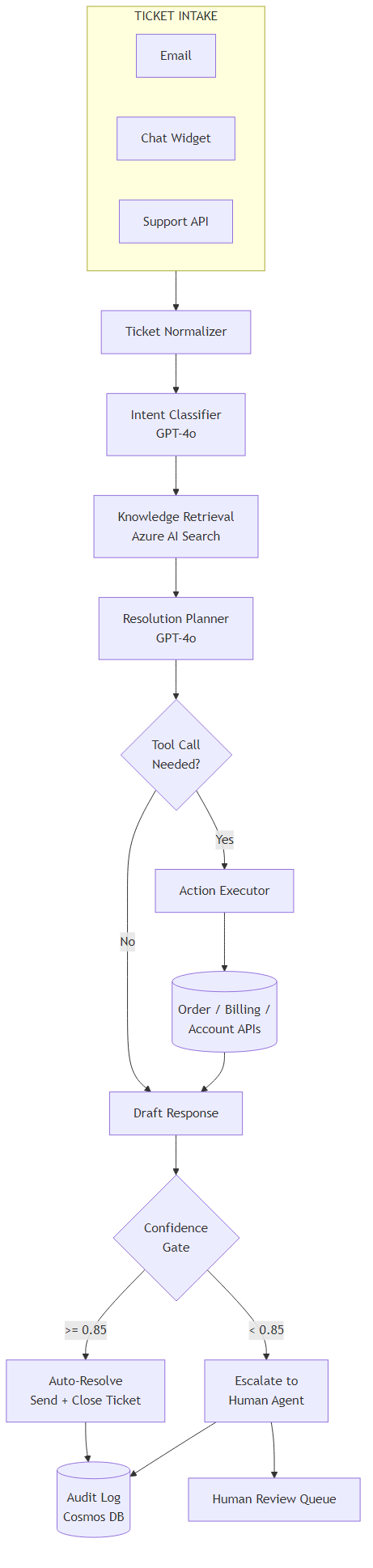
The classifier tags the ticket's category and gives a confidence score. Knowledge retrieval pulls relevant policy documents and KB articles scoped to that category. The resolution planner — the same model call that drafts the eventual response — decides whether the ticket needs a tool call (issue a refund, look up an order, change a subscription) or can be answered from the retrieved knowledge alone. If tools are needed, the executor runs them against real backend APIs with guardrails in place, and the results feed back into the response draft.
Everything then passes through a confidence gate that combines classification confidence, retrieval relevance, and whether any tool call failed or was rejected by a guardrail. Above the threshold, the agent sends the response and closes the ticket. Below it, the ticket — along with everything the agent tried and found — goes to a human review queue instead of a cold handoff.
5. Core Implementation
The state object is the backbone of the whole pipeline — every node reads from it and writes back to it, and it doubles as the audit record once the ticket resolves.
from enum import Enum
from typing import Optional
from pydantic import BaseModel, Field


class ResolutionStatus(str, Enum):
    PENDING = "pending"
    AUTO_RESOLVED = "auto_resolved"
    ESCALATED = "escalated"
    FAILED = "failed"


class RetrievedDoc(BaseModel):
    doc_id: str
    title: str
    content: str
    relevance_score: float


class PlannedAction(BaseModel):
    tool_name: str
    arguments: dict
    requires_confirmation: bool = False


class TicketState(BaseModel):
    ticket_id: str
    customer_id: str
    channel: str
    subject: str
    body: str
    category: Optional[str] = None
    classification_confidence: float = 0.0
    retrieved_docs: list[RetrievedDoc] = Field(default_factory=list)
    planned_actions: list[PlannedAction] = Field(default_factory=list)
    executed_actions: list[dict] = Field(default_factory=list)
    response_draft: Optional[str] = None
    resolution_confidence: float = 0.0
    status: ResolutionStatus = ResolutionStatus.PENDING
    escalation_reason: Optional[str] = None
    audit_trail: list[dict] = Field(default_factory=list)
public enum ResolutionStatus
{
    Pending,
    AutoResolved,
    Escalated,
    Failed
}

public record RetrievedDoc(string DocId, string Title, string Content, double RelevanceScore);

public record PlannedAction(
    string ToolName,
    Dictionary<string, object> Arguments,
    bool RequiresConfirmation = false);

public class TicketState
{
    public string TicketId { get; init; } = "";
    public string CustomerId { get; init; } = "";
    public string Channel { get; init; } = "";
    public string Subject { get; init; } = "";
    public string Body { get; init; } = "";
    public string? Category { get; set; }
    public double ClassificationConfidence { get; set; }
    public List<RetrievedDoc> RetrievedDocs { get; set; } = new();
    public List<PlannedAction> PlannedActions { get; set; } = new();
    public List<Dictionary<string, object>> ExecutedActions { get; set; } = new();
    public string? ResponseDraft { get; set; }
    public double ResolutionConfidence { get; set; }
    public ResolutionStatus Status { get; set; } = ResolutionStatus.Pending;
    public string? EscalationReason { get; set; }
    public List<Dictionary<string, object>> AuditTrail { get; set; } = new();
}
The graph wiring is where the branch and the gate live. I keep the conditional edges explicit rather than letting the model decide control flow — the model decides what to do (which category, which tools), but the graph decides what happens next based on that output.
from langgraph.graph import StateGraph, END


def build_ticket_graph():
    graph = StateGraph(TicketState)
    graph.add_node("classify", classify_ticket)
    graph.add_node("retrieve", retrieve_knowledge)
    graph.add_node("plan", plan_resolution)
    graph.add_node("execute_tools", execute_tools)
    graph.add_node("gate", confidence_gate)
    graph.add_node("auto_resolve", auto_resolve)
    graph.add_node("escalate", escalate_to_human)

    graph.set_entry_point("classify")
    graph.add_edge("classify", "retrieve")
    graph.add_edge("retrieve", "plan")
    graph.add_conditional_edges(
        "plan",
        lambda s: "execute_tools" if s.planned_actions else "gate",
        {"execute_tools": "execute_tools", "gate": "gate"},
    )
    graph.add_edge("execute_tools", "gate")
    graph.add_conditional_edges(
        "gate",
        lambda s: "auto_resolve" if s.resolution_confidence >= 0.85 else "escalate",
        {"auto_resolve": "auto_resolve", "escalate": "escalate"},
    )
    graph.add_edge("auto_resolve", END)
    graph.add_edge("escalate", END)
    return graph.compile()
public class TicketOrchestrator
{
    private const double AutoResolveThreshold = 0.85;
    private readonly TicketClassifier _classifier;
    private readonly KnowledgeRetriever _retriever;
    private readonly ResolutionPlanner _planner;
    private readonly ToolExecutor _executor;
    private readonly TicketResolver _resolver;

    public async Task<TicketState> ResolveAsync(TicketState state)
    {
        state = await _classifier.ClassifyAsync(state);
        state = await _retriever.RetrieveAsync(state);
        state = await _planner.PlanAsync(state);

        if (state.PlannedActions.Count > 0)
            state = await _executor.ExecuteAsync(state);

        state.ResolutionConfidence = ComputeGateConfidence(state);

        state = state.ResolutionConfidence >= AutoResolveThreshold
            ? await _resolver.AutoResolveAsync(state)
            : await _resolver.EscalateAsync(state);

        return state;
    }
}
Classification uses the cheaper model with a strict JSON schema — there's no reason to spend GPT-4o tokens deciding whether a ticket is a refund request or a password reset. I use structured outputs rather than parsing free text; it removes an entire class of "the model almost returned valid JSON" bugs.
import json
from openai import AzureOpenAI

client = AzureOpenAI(azure_endpoint=AZURE_ENDPOINT, api_version="2024-10-21")

CLASSIFY_SYSTEM_PROMPT = """You classify support tickets into one of: order_status,
refund_request, subscription_change, password_reset, billing_dispute,
general_question, other. Return a confidence (0-1) that the category is correct."""


def classify_ticket(state: TicketState) -> TicketState:
    response = client.chat.completions.create(
        model="gpt-4o-mini",
        messages=[
            {"role": "system", "content": CLASSIFY_SYSTEM_PROMPT},
            {"role": "user", "content": f"Subject: {state.subject}\n\n{state.body}"},
        ],
        response_format={"type": "json_schema", "json_schema": CLASSIFICATION_SCHEMA},
        temperature=0,
    )
    result = json.loads(response.choices[0].message.content)
    state.category = result["category"]
    state.classification_confidence = result["confidence"]
    state.audit_trail.append({"step": "classify", "result": result})
    return state
public class TicketClassifier
{
    private readonly ChatClient _chatClient;

    public async Task<TicketState> ClassifyAsync(TicketState state)
    {
        var messages = new List<ChatMessage>
        {
            new SystemChatMessage(ClassifySystemPrompt),
            new UserChatMessage($"Subject: {state.Subject}\n\n{state.Body}")
        };

        var options = new ChatCompletionOptions
        {
            ResponseFormat = ChatResponseFormat.CreateJsonSchemaFormat(
                "ticket_classification", ClassificationSchema),
            Temperature = 0
        };

        var response = await _chatClient.CompleteChatAsync(messages, options);
        var result = JsonSerializer.Deserialize<ClassificationResult>(
            response.Value.Content[0].Text);

        state.Category = result!.Category;
        state.ClassificationConfidence = result.Confidence;
        state.AuditTrail.Add(new() { ["step"] = "classify", ["result"] = result });
        return state;
    }
}
Retrieval is a hybrid search against Azure AI Search — vector similarity for semantic match, plus a category filter so a subscription-change ticket doesn't pull refund policy documents just because the wording overlaps.
from azure.search.documents.models import VectorizedQuery


def retrieve_knowledge(state: TicketState) -> TicketState:
    query_vector = embed_query(f"{state.subject} {state.body}")
    results = search_client.search(
        search_text=state.body,
        vector_queries=[
            VectorizedQuery(vector=query_vector, k_nearest_neighbors=5, fields="content_vector")
        ],
        filter=f"category eq '{state.category}' or category eq 'general'",
        select=["doc_id", "title", "content"],
        top=5,
    )
    state.retrieved_docs = [
        RetrievedDoc(
            doc_id=r["doc_id"],
            title=r["title"],
            content=r["content"],
            relevance_score=r["@search.score"],
        )
        for r in results
    ]
    return state
public async Task<TicketState> RetrieveAsync(TicketState state)
{
    var queryVector = await _embedder.EmbedAsync($"{state.Subject} {state.Body}");

    var options = new SearchOptions
    {
        Filter = $"category eq '{state.Category}' or category eq 'general'",
        Size = 5
    };
    options.VectorSearch = new()
    {
        Queries = { new VectorizedQuery(queryVector) { KNearestNeighborsCount = 5, Fields = { "content_vector" } } }
    };

    var response = await _searchClient.SearchAsync<KnowledgeDoc>(state.Body, options);
    await foreach (var result in response.Value.GetResultsAsync())
    {
        state.RetrievedDocs.Add(new RetrievedDoc(
            result.Document.DocId, result.Document.Title,
            result.Document.Content, result.Score ?? 0));
    }
    return state;
}
6. Key Technical Challenge #1: Making Tool Calls Safe
The tricky part isn't getting the model to call a tool — function calling is well-trodden ground at this point. The tricky part is making sure the tool itself refuses to do something wrong even if the model's judgment is off. I treat the LLM's tool call as a proposal, not an authorization. The actual authorization logic lives in the tool implementation, outside the model's control entirely.
For a refund tool, that means a hard dollar ceiling for auto-approval, an eligibility check against the order's actual state (not what the model believes the order's state to be), and an idempotency key derived from the ticket ID so a retried tool call — whether from a graph re-run or a transient API failure — can't double-refund a customer. If the tool raises, that's not a crash to handle upstream; it's a signal that gets folded directly into the confidence gate.
REFUND_LIMIT_USD = 200.0


class RefundError(Exception):
    pass


def issue_refund(order_id: str, amount: float, reason: str, idempotency_key: str) -> dict:
    if amount > REFUND_LIMIT_USD:
        raise RefundError(
            f"Refund ${amount} exceeds auto-approval limit of ${REFUND_LIMIT_USD}"
        )

    order = orders_api.get_order(order_id)
    if order.status not in {"delivered", "cancelled"}:
        raise RefundError(
            f"Order {order_id} is not eligible for refund (status={order.status})"
        )

    return billing_api.create_refund(
        order_id=order_id,
        amount=amount,
        reason=reason,
        idempotency_key=idempotency_key,
    )


def execute_tools(state: TicketState) -> TicketState:
    for action in state.planned_actions:
        try:
            handler = TOOL_REGISTRY[action.tool_name]
            key = f"{state.ticket_id}:{action.tool_name}"
            result = handler(**action.arguments, idempotency_key=key)
            state.executed_actions.append(
                {"tool": action.tool_name, "result": result, "ok": True}
            )
        except RefundError as e:
            state.executed_actions.append(
                {"tool": action.tool_name, "error": str(e), "ok": False}
            )
            state.escalation_reason = str(e)
    state.audit_trail.append({"step": "execute_tools", "actions": state.executed_actions})
    return state
public class RefundTool
{
    private const decimal RefundLimitUsd = 200m;
    private readonly IOrdersApi _ordersApi;
    private readonly IBillingApi _billingApi;

    public async Task<RefundResult> IssueRefundAsync(
        string orderId, decimal amount, string reason, string idempotencyKey)
    {
        if (amount > RefundLimitUsd)
            throw new RefundException(
                $"Refund ${amount} exceeds auto-approval limit of ${RefundLimitUsd}");

        var order = await _ordersApi.GetOrderAsync(orderId);
        if (order.Status is not ("delivered" or "cancelled"))
            throw new RefundException(
                $"Order {orderId} is not eligible for refund (status={order.Status})");

        return await _billingApi.CreateRefundAsync(orderId, amount, reason, idempotencyKey);
    }
}

public async Task<TicketState> ExecuteAsync(TicketState state)
{
    foreach (var action in state.PlannedActions)
    {
        try
        {
            var idempotencyKey = $"{state.TicketId}:{action.ToolName}";
            var result = await _toolRegistry[action.ToolName]
                .InvokeAsync(action.Arguments, idempotencyKey);
            state.ExecutedActions.Add(new()
                { ["tool"] = action.ToolName, ["result"] = result, ["ok"] = true });
        }
        catch (RefundException ex)
        {
            state.ExecutedActions.Add(new()
                { ["tool"] = action.ToolName, ["error"] = ex.Message, ["ok"] = false });
            state.EscalationReason = ex.Message;
        }
    }
    return state;
}
Guardrails Belong in the Tool, Not the Prompt
I initially tried enforcing the refund limit through prompt instructions ("never approve refunds over $200"). It worked until it didn't — a long ticket thread with enough surrounding context occasionally talked the model past its own instructions. Moving the limit into the tool function itself, where it's a plain if statement with no model in the loop, made it unconditional.
7. Key Technical Challenge #2: Calibrating the Confidence Gate
Here's what surprised me: the hardest part of this project wasn't the agent logic, it was deciding when to trust it. A single confidence number from the classifier isn't enough — a ticket can be classified correctly with high confidence and still fail because the retrieved knowledge was thin or a tool call was rejected. I ended up combining three independent signals into one gate score rather than relying on any single model's self-reported confidence.
The weighting (0.4 classification, 0.3 retrieval, 0.3 action outcome) came from running a labelled batch of a few hundred historical tickets through the pipeline and comparing the gate's auto-resolve decision against what a human reviewer said should have happened, then adjusting weights until false auto-resolves dropped to a level I was comfortable with. A failed tool call caps the score outright — a guardrail rejection is a strong enough signal that no combination of the other two should override it.
def confidence_gate(state: TicketState) -> TicketState:
    retrieval_confidence = max(
        (d.relevance_score for d in state.retrieved_docs), default=0.0
    )
    has_failed_action = any(not a.get("ok", True) for a in state.executed_actions)
    action_confidence = 0.0 if has_failed_action else 1.0

    weighted = (
        0.4 * state.classification_confidence
        + 0.3 * min(retrieval_confidence, 1.0)
        + 0.3 * action_confidence
    )

    if has_failed_action:
        weighted = min(weighted, 0.5)

    state.resolution_confidence = round(weighted, 3)
    state.audit_trail.append({"step": "gate", "confidence": state.resolution_confidence})
    return state
public double ComputeGateConfidence(TicketState state)
{
    var retrievalConfidence = state.RetrievedDocs.Count > 0
        ? state.RetrievedDocs.Max(d => d.RelevanceScore)
        : 0.0;

    var hasFailedAction = state.ExecutedActions
        .Any(a => a.TryGetValue("ok", out var ok) && ok is false);
    var actionConfidence = hasFailedAction ? 0.0 : 1.0;

    var weighted = 0.4 * state.ClassificationConfidence
                 + 0.3 * Math.Min(retrievalConfidence, 1.0)
                 + 0.3 * actionConfidence;

    if (hasFailedAction) weighted = Math.Min(weighted, 0.5);

    return Math.Round(weighted, 3);
}
The trade-off here is that a stricter gate means more human review load, and a looser gate means more risk of a wrong auto-resolve reaching a customer. I'd rather ship with the threshold set conservatively (0.85) and tune it down gradually as the audit trail builds evidence that specific categories are reliably safe to trust at a lower bar.
8. Cost Analysis
Per ticket, the token cost is small: classification runs on GPT-4o-mini at roughly 800 input tokens and 50 output tokens (about $0.0003), the query embedding for retrieval is negligible, and the planning-and-response call on GPT-4o runs closer to 2,500 input tokens — ticket body plus retrieved documents — and 400 output tokens, landing around $0.019. Call it $0.02–$0.03 per ticket end to end, including escalated ones, since the same pipeline runs regardless of the final routing decision.
Infrastructure is where the fixed costs live: Azure AI Search on an S1 tier runs about $250/month, Cosmos DB in serverless mode for state and audit logs is roughly $25–40/month at moderate volume, and Azure Functions on a consumption plan is close to free at this scale. At 10,000 tickets a month, that's roughly $200–300 in tokens plus $300 in infrastructure — call it $500-600/month, or about $0.05-0.06 per ticket fully loaded.
Compare that to a human agent's fully loaded cost per ticket, which typically runs $3-8 depending on market and ticket complexity. Even with a conservative 55% auto-resolve rate, at 10,000 tickets/month that's 5,500 tickets no longer requiring a human touch — somewhere between $16,500 and $44,000 a month in avoided labor cost against roughly $600 in platform cost. The math works even at much lower auto-resolve rates; the platform cost is small enough that the breakeven point isn't the hard part.
| Cost Item | Estimate |
|---|---|
| Classification (GPT-4o-mini) | ~$0.0003 / ticket |
| Planning + response (GPT-4o) | ~$0.019 / ticket |
| Azure AI Search (S1) | ~$250 / month fixed |
| Cosmos DB (serverless) | ~$25-40 / month |
| Azure Functions (consumption) | ~$10-20 / month |
| Fully loaded, 10K tickets/mo | ~$0.05-0.06 / ticket |
9. Observability & Debugging
Every node in the graph gets its own OpenTelemetry span, tagged with ticket ID, category, and confidence at each step. That level of granularity matters here specifically because the failure modes aren't crashes — they're a classifier being confident about the wrong category, or a gate score sitting just above threshold on a ticket that shouldn't have auto-resolved. Without per-step tracing, all you'd see is "ticket auto-resolved" with no way to reconstruct why.
from opentelemetry import trace

tracer = trace.get_tracer("ticket-resolution-agent")


def traced_node(name):
    def decorator(fn):
        def wrapper(state: TicketState) -> TicketState:
            with tracer.start_as_current_span(name) as span:
                span.set_attribute("ticket.id", state.ticket_id)
                span.set_attribute("ticket.category", state.category or "unclassified")
                result = fn(state)
                span.set_attribute("ticket.confidence", result.resolution_confidence)
                span.set_attribute("ticket.status", result.status.value)
                return result
        return wrapper
    return decorator


@traced_node("classify")
def classify_ticket(state: TicketState) -> TicketState:
    ...
private static readonly ActivitySource ActivitySource = new("TicketResolutionAgent");

public async Task<TicketState> ClassifyAsync(TicketState state)
{
    using var activity = ActivitySource.StartActivity("classify");
    activity?.SetTag("ticket.id", state.TicketId);

    state = await ClassifyInternalAsync(state);

    activity?.SetTag("ticket.category", state.Category ?? "unclassified");
    activity?.SetTag("ticket.confidence", state.ClassificationConfidence);
    return state;
}
Traces flow into Azure Monitor / Application Insights, where I track three numbers weekly: auto-resolve rate by category, escalation rate by category, and — the one that actually matters — the rate of human reviewers overturning an auto-resolved ticket after the fact, sampled from the audit trail. That last number is the real signal for whether the gate threshold is set correctly.
10. Technology Choices
Python Implementation
Why choose Python: If your team writes Python, you get access to the richest AI/ML ecosystem, and LangGraph in particular is a natural fit for this kind of explicit state-machine pipeline.
- Library ecosystem — LangChain, LangGraph, thousands of AI tools
- Rapid prototyping — quick iteration, Jupyter support
- Community — most AI tutorials are Python-first
C#/.NET Implementation
Why choose C#: If your backend is .NET — and most order/billing/account systems in enterprise support stacks are — you get first-party Microsoft support and enterprise patterns, plus you're not bridging languages to call your own APIs.
- Native Azure integration — first-party SDKs, Microsoft-maintained
- Enterprise patterns — dependency injection, strong typing
- Production-ready — battle-tested at scale
The Bottom Line
Python team? Use Python. C#/.NET team? Use C#. Don't fight your stack.
11. Azure Infrastructure
The moving pieces: Azure OpenAI for GPT-4o and GPT-4o-mini, Azure AI Search for hybrid retrieval over the knowledge base, Cosmos DB for ticket state and the audit trail, and Azure Functions (or a small container) fronting the tool implementations so they're independently deployable and testable from the orchestration layer.
Azure AI Foundry Agent Service
Azure AI Foundry Agent Service is now generally available, providing managed orchestration for AI systems.
- Built-in routing and workflows
- Managed state persistence
- Native Azure OpenAI integration
- Observability through Azure Monitor
Check Azure AI Foundry Agent Service for current pricing.
12. ROI / Business Value
The framework I use is simple: monthly savings = (tickets/month × auto-resolve rate × human cost per ticket) − platform cost. At 10,000 tickets/month, a 55% auto-resolve rate, and a conservative $4/ticket human cost, that's 5,500 × $4 = $22,000 in avoided labor against roughly $600 in platform cost — a clear win even before accounting for faster resolution times on the tickets that do auto-resolve, which run in seconds rather than the hours or days a queued ticket typically waits.
The metric that matters beyond raw savings is first-contact resolution rate on the auto-resolved subset — if those tickets stay closed and don't bounce back as a new ticket within a week, that's the strongest signal the gate is calibrated correctly. I'd treat any drop in that rate as a reason to raise the threshold before it's a reason to celebrate the auto-resolve percentage going up.
13. When NOT to Use This Approach
Skip This If...
- Ticket volume is low. Under a few hundred tickets a month, the fixed infrastructure cost and the calibration effort aren't worth it — a human queue is simpler and cheaper.
- Actions are high-stakes or irreversible. Large refunds, account deletions, anything with legal or medical implications — the cost of a wrong auto-resolve is too high relative to the savings.
- Your backend APIs aren't reliable or well-defined. Tool guardrails only work if the systems they call give trustworthy answers about order status, eligibility, and so on. If those APIs are flaky or the data is inconsistent, you're automating on a bad foundation.
- Compliance requires a human signature on the action. Some regulated environments mandate human sign-off regardless of how confident an automated system is — build the assistive tooling, not the auto-resolve path.
- Human touch is part of your brand. If white-glove, always-human support is a differentiator for you, automating away the interaction undermines the thing customers are paying for.
14. Key Takeaways
- Resolution requires action, not just an answer — the gap between a chatbot and a resolution agent is tool calling with real guardrails.
- Put authorization logic in the tool itself, not the prompt. Prompts can be talked around; an
ifstatement in a refund function can't. - A single confidence number isn't enough to gate auto-resolve — combine classification, retrieval, and action-outcome signals, and let a failed guardrail cap the score outright.
- The per-ticket token cost is close to a rounding error compared to human labor cost — the real cost driver is fixed infrastructure, which amortizes quickly at any meaningful ticket volume.
- Trace every node, and track the overturn rate on auto-resolved tickets, not just the auto-resolve rate — that's the number that tells you whether the gate is actually calibrated.
- This isn't the right tool for low volume, high-stakes actions, unreliable backend APIs, or businesses where human-delivered support is the product.
Want More Practical AI Tutorials?
I write about building production AI systems with Azure, Python, and C#. Subscribe for practical tutorials delivered twice a month.
Subscribe to Newsletter →