What You'll Learn
- How the ingestion and query paths of a vector-search RAG pipeline fit together
- How embeddings and cosine similarity find paraphrases that keyword search misses
- Why vector search always returns results, and how a calibrated threshold lets the pipeline abstain
- How metadata filtering and exact versus approximate search behave, with measured timings
- How to test the pipeline offline with a fake embedder and a mocked LLM
The Problem
Keyword search breaks the moment a user phrases a question differently from the source. Someone asks "Am I allowed to log in from my sofa?" and the policy says "Employees may work remotely up to three days per week." The two share no useful words. Synonym lists patch individual cases, but you never finish writing them.
Vector search fixes the paraphrase problem by comparing meaning instead of words. I built this pipeline because the part most tutorials skip is the one that bites in production: vector search always returns something. Ask it for the capital of France and it hands back the four nearest chunks of your HR policy, ranked, with scores. Pass those to an LLM and you get a fluent answer built on irrelevant evidence.
So the goal here is not just "retrieve similar text." It is a pipeline that finds paraphrases, shows its retrieval results, and says "I couldn't find that" when the evidence isn't there.
The Shape of a Real Solution
The pipeline has two paths that meet at the vector store.
- Ingestion (offline): split documents into chunks, embed them in batches, normalise each vector, and store it with metadata (chunk ID, document ID, page, text).
- Query (online): embed the question with the same model, search with an optional metadata filter, apply a similarity threshold, then either build a prompt from numbered sources or abstain.
Two principles run through it. Retrieval results are an output, not an internal detail: every answer carries the chunks, documents, pages and scores behind it. And "no answer" is a valid result with its own code path, one that costs almost nothing because it never calls the LLM.
Architecture Overview
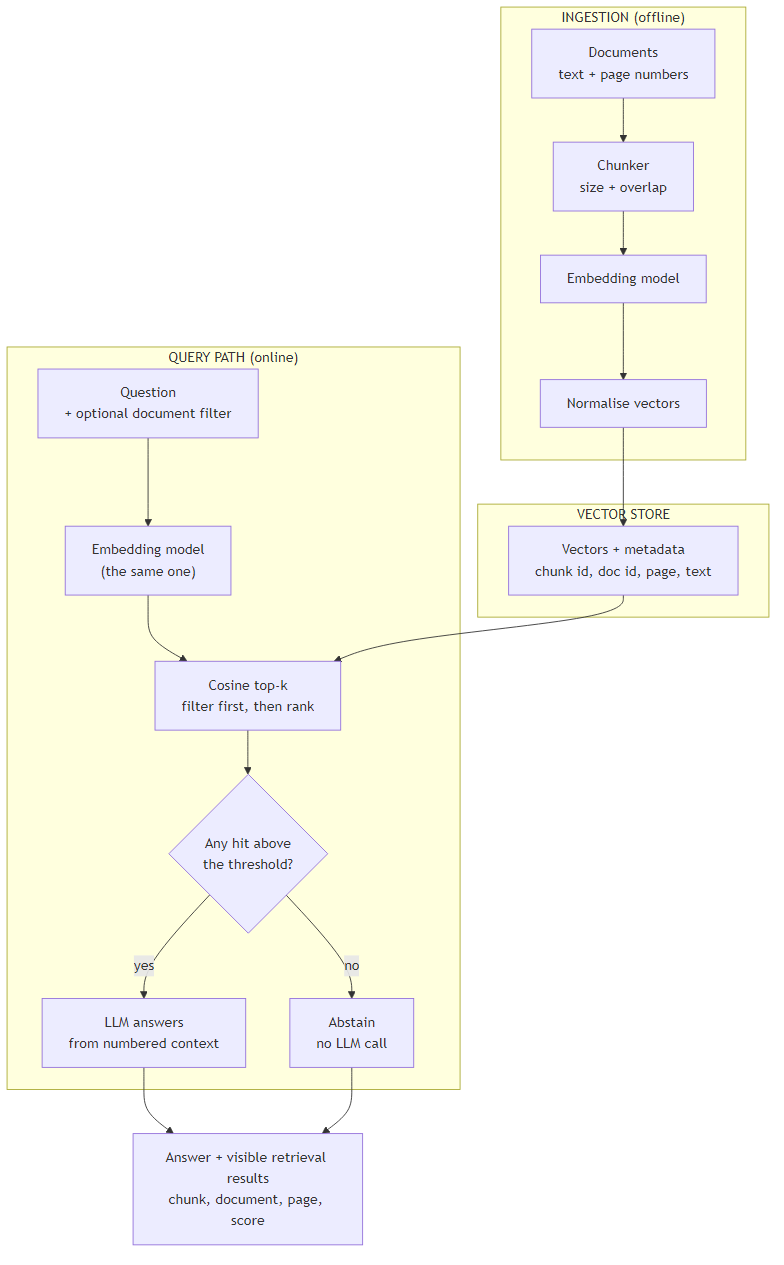
- One embedding model on both sides. Vectors from different models aren't comparable, so changing the model means re-embedding the whole corpus.
- Normalise once, at ingest. With unit-length vectors, cosine similarity is just a dot product.
- The threshold decision sits before the LLM, so irrelevant retrievals never reach the prompt.
- The embedder and the LLM are injected, which is what makes the whole pipeline testable offline.
Core Implementation: Ingestion
An embedding is a list of numbers (a vector) produced by a model so that texts with similar meaning land close together. Cosine similarity measures the angle between two vectors: 1 means the same direction, 0 means unrelated, negative means opposed. Scores are not percentages, and their useful range depends on the model, which matters later when we pick a threshold.
public interface IEmbedder
{
    Task<IReadOnlyList<float[]>> EmbedAsync(IReadOnlyList<string> texts, CancellationToken ct = default);
}

public interface ILlm
{
    Task<string> CompleteAsync(string prompt, CancellationToken ct = default);
}

public record Chunk(string Id, string DocId, int Page, string Text);
public record ChunkRecord(Chunk Chunk, float[] Vector);

public static class Vectors
{
    // Normalise once at ingest; after that, cosine similarity is just a dot product.
    public static float[] Normalise(float[] v)
    {
        double norm = Math.Sqrt(v.Sum(x => (double)x * x));
        if (norm == 0) throw new ArgumentException("zero vector");
        return v.Select(x => (float)(x / norm)).ToArray();
    }

    public static double Dot(float[] a, float[] b)
    {
        double sum = 0;
        for (int i = 0; i < a.Length; i++) sum += (double)a[i] * b[i];
        return sum;
    }
}

public static class Ingestion
{
    public static async Task IngestAsync(IReadOnlyList<Chunk> chunks, IEmbedder embedder,
                                         VectorStore store, int batchSize = 64,
                                         CancellationToken ct = default)
    {
        for (int i = 0; i < chunks.Count; i += batchSize)
        {
            var batch = chunks.Skip(i).Take(batchSize).ToList();
            var vectors = await embedder.EmbedAsync(batch.Select(c => c.Text).ToList(), ct);
            store.Add(batch.Zip(vectors, (c, v) => new ChunkRecord(c, Vectors.Normalise(v))));
        }
    }
}
import math
from dataclasses import dataclass
from typing import Protocol


class Embedder(Protocol):
    def embed(self, texts: list[str]) -> list[list[float]]: ...


class Llm(Protocol):
    def complete(self, prompt: str) -> str: ...


@dataclass(frozen=True)
class Chunk:
    id: str
    doc_id: str
    page: int
    text: str


@dataclass(frozen=True)
class ChunkRecord:
    chunk: Chunk
    vector: tuple[float, ...]


@dataclass(frozen=True)
class Hit:
    chunk: Chunk
    score: float


@dataclass(frozen=True)
class Answer:
    text: str
    hits: list[Hit]
    abstained: bool


def normalise(v: list[float]) -> tuple[float, ...]:
    norm = math.sqrt(sum(x * x for x in v))
    if norm == 0:
        raise ValueError("zero vector")
    return tuple(x / norm for x in v)


def ingest(chunks: list[Chunk], embedder: Embedder, store: VectorStore, batch_size: int = 64) -> None:
    for i in range(0, len(chunks), batch_size):
        batch = chunks[i:i + batch_size]
        vectors = embedder.embed([c.text for c in batch])
        store.add([ChunkRecord(c, normalise(v)) for c, v in zip(batch, vectors)])
The tricky part is small but easy to miss. Embedding APIs accept many inputs per call, and batching cuts latency and request counts, so ingestion sends chunks in batches rather than one at a time. Each stored record keeps the chunk text and its source metadata next to the vector, so a hit can be shown and cited without a second lookup.
One thing this in-memory store doesn't do, and a real one must: ingestion should be idempotent. Key records by chunk ID and replace them on re-run (an upsert). Otherwise re-ingesting a document silently doubles its chunks, and every question about it returns the same passage twice and crowds a different one out of the top k.
Core Implementation: Search
The store holds records and answers one question: which chunks are closest to this query vector? This version is exact. It scores every record and sorts, which is the simplest thing that is also correct.
public record Hit(Chunk Chunk, double Score);

public class VectorStore
{
    private readonly List<ChunkRecord> _records = new();

    public int Count => _records.Count;

    public void Add(IEnumerable<ChunkRecord> records) => _records.AddRange(records);

    // Exact search. Filter first, then rank, so a filter can't push good matches out of the top k.
    public List<Hit> Search(float[] query, int k, string? docId = null) =>
        _records.Where(r => docId is null || r.Chunk.DocId == docId)
                .Select(r => new Hit(r.Chunk, Vectors.Dot(query, r.Vector)))
                .OrderByDescending(h => h.Score)
                .Take(k)
                .ToList();
}
class VectorStore:
    def __init__(self) -> None:
        self._records: list[ChunkRecord] = []

    def __len__(self) -> int:
        return len(self._records)

    def add(self, records: list[ChunkRecord]) -> None:
        self._records.extend(records)

    def search(self, query: tuple[float, ...], k: int, doc_id: str | None = None) -> list[Hit]:
        # Exact search. Filter first, then rank, so a filter can't push good matches out of the top k.
        candidates = (r for r in self._records if doc_id is None or r.chunk.doc_id == doc_id)
        hits = [Hit(r.chunk, sum(a * b for a, b in zip(query, r.vector))) for r in candidates]
        return sorted(hits, key=lambda h: -h.score)[:k]
Notice the order: filter first, then rank. If you rank the whole corpus and filter afterwards, a document filter can leave you with fewer than k results, or none, because the top hits all belonged to other documents.
Key Technical Challenge: Vector Search Always Answers
Here's the part that surprised me when I first ran it. There is no "no match" in nearest-neighbour search. A question about something your documents never mention still returns the k closest chunks. Those chunks have lower scores, but nothing in the retrieval step tells you they are irrelevant. Only a threshold does.
The answer function applies one. Hits below the minimum score are dropped, and if none remain the pipeline abstains without calling the LLM. The abstention still returns the raw hits so you can see what was retrieved and how low the scores were.
public record Answer(string Text, IReadOnlyList<Hit> Hits, bool Abstained);

public class RagService(IEmbedder embedder, VectorStore store, ILlm llm,
                        double minScore = 0.35, int k = 4)
{
    public const string NotFound = "I couldn't find that in the documents.";

    public async Task<Answer> AskAsync(string question, string? docId = null,
                                       CancellationToken ct = default)
    {
        var query = Vectors.Normalise((await embedder.EmbedAsync(new[] { question }, ct))[0]);
        var hits = store.Search(query, k, docId);          // always returns up to k, however irrelevant
        var relevant = hits.Where(h => h.Score >= minScore).ToList();
        if (relevant.Count == 0)
            return new Answer(NotFound, hits, Abstained: true);   // no LLM call: nothing to ground on

        var context = string.Join("\n\n", relevant.Select((h, i) =>
            $"[{i + 1}] {h.Chunk.DocId}, page {h.Chunk.Page}: {h.Chunk.Text}"));
        var prompt = "Answer using only the context. If it does not contain the answer, say so.\n\n" +
                     $"Context:\n{context}\n\nQuestion: {question}";
        return new Answer(await llm.CompleteAsync(prompt, ct), relevant, Abstained: false);
    }
}
NOT_FOUND = "I couldn't find that in the documents."


def answer(question: str, embedder: Embedder, store: VectorStore, llm: Llm,
           k: int = 4, min_score: float = 0.35, doc_id: str | None = None) -> Answer:
    query = normalise(embedder.embed([question])[0])
    hits = store.search(query, k, doc_id)            # always returns up to k, however irrelevant
    relevant = [h for h in hits if h.score >= min_score]
    if not relevant:
        return Answer(NOT_FOUND, hits, abstained=True)   # no LLM call: nothing to ground on

    context = "\n\n".join(f"[{i}] {h.chunk.doc_id}, page {h.chunk.page}: {h.chunk.text}"
                          for i, h in enumerate(relevant, 1))
    prompt = ("Answer using only the context. If it does not contain the answer, say so.\n\n"
              f"Context:\n{context}\n\nQuestion: {question}")
    return Answer(llm.complete(prompt), relevant, abstained=False)
The threshold can't be copied from a blog post. Scores depend on the embedding model and your text, so calibrate it. Collect 30 to 50 real questions, label each as answerable or not, record the best retrieval score for each, and pick the threshold that separates them best. The function below does that, and it prefers the higher threshold on ties because a false answer usually costs more than a false abstention.
public static class Calibration
{
    // samples: (best retrieval score for a question, whether the corpus can answer it)
    public static double CalibrateThreshold(IReadOnlyList<(double Score, bool Answerable)> samples)
    {
        double bestT = 0;
        int bestCorrect = -1;
        foreach (var t in samples.Select(s => s.Score).Distinct().OrderBy(s => s))
        {
            int correct = samples.Count(s => (s.Score >= t) == s.Answerable);
            if (correct >= bestCorrect) { bestT = t; bestCorrect = correct; }   // prefer the higher threshold on ties
        }
        return bestT;
    }
}
def calibrate_threshold(samples: list[tuple[float, bool]]) -> float:
    """samples: (best retrieval score for a question, whether the corpus can answer it)."""
    best_t, best_correct = 0.0, -1
    for t in sorted({score for score, _ in samples}):
        correct = sum((score >= t) == answerable for score, answerable in samples)
        if correct >= best_correct:                  # prefer the higher threshold on ties
            best_t, best_correct = t, correct
    return best_t
Two failure modes pull in opposite directions. Too low a threshold lets irrelevant context through and the model answers confidently from it. Too high and the pipeline refuses questions it could have answered. The prompt instruction "say so if the context does not contain the answer" is a second line of defence, not a substitute for the threshold.
The visible hits are also your debugging tool. When an answer is wrong, the retrieval results tell you which of three problems you have. If the right chunk isn't in the hits at all, the problem is upstream: chunking, or an embedding model that doesn't represent your text well. If it is present but ranked low, the question and the passage are phrased too differently, and a better query or a hybrid search may help. If the right chunk is the top hit and the answer is still wrong, retrieval did its job and the fault is in the prompt or the model. Without the hits you can't tell these apart.
Key Technical Challenge: Filtering and Indexing
Real corpora need metadata filters: only this document, only this department, only this year. Stores differ in whether they filter before or after the nearest-neighbour search, so check your store's behaviour rather than assuming. Post-filtering is the one that quietly returns too few results.
Indexing is the other decision. Exact search compares the query to every vector. Approximate indexes such as HNSW trade a little recall for speed on large collections, and add parameters to tune. I measured exact search before deciding I needed anything else. These are normalised random 1,536-dimension float32 vectors, top 4, using numpy on one machine, so they show speed and memory, not retrieval quality:
| Vectors | Memory | Median search | 95th percentile |
|---|---|---|---|
| 10,000 | 61 MB | 2.3 ms | 2.6 ms |
| 50,000 | 307 MB | 11.4 ms | 12.2 ms |
Time grew about five times for five times the vectors, so it scales linearly. If that holds, a million vectors would take roughly 230 ms and about 6 GB, which is the extrapolated point where approximate indexes start to earn their complexity. For a corpus of tens of thousands of chunks, exact search is fast enough, and it can't miss a nearest neighbour.
What This Costs
Cost has three parts: embedding the corpus once, embedding each question, and the LLM call for answered questions. I use OpenAI's published list prices at the time of writing, with about 1.3 tokens per English word as a rough conversion.
| Item | Assumption | Cost |
|---|---|---|
| Embed the corpus once | 10 million words, about 13 million tokens | $0.26 with text-embedding-3-small, $1.69 with text-embedding-3-large |
| Vector memory (in-memory store) | about 66,700 chunks of 150 words, 1,536 dimensions, float32 | about 410 MB |
| Answered question | about 900 input and 150 output tokens (4 chunks plus prompt) | about $0.00135 with GPT-5.4 mini; about $0.0045 with GPT-5.4 |
| Abstained question | one query embedding of about 15 tokens | about $0.0000003 |
Cost Reality
Per 1,000 answered questions that is about $1.35 with GPT-5.4 mini and $4.50 with GPT-5.4, so generation dominates and embedding is nearly free. The expensive event is changing the embedding model, because every vector must be recomputed. Prices are OpenAI's direct list prices, not Azure's, and they change, so check current pricing.
The cheapest lever on the generation side is k. Each extra 150-word chunk adds roughly 195 tokens to every prompt, so moving from 4 chunks to 8 about doubles the context cost per answered question. The threshold helps here too, because chunks that don't clear it never reach the prompt, which keeps k a ceiling instead of a fixed spend.
Observability
Log what the retrieval step did, not what it read. For each question, record the filter used, the chunk IDs with their scores and ranks, how many cleared the threshold, whether the pipeline abstained, and whether an LLM call was made.
Two aggregates are worth watching: the abstention rate, which shifts when your documents or your users' questions change, and the distribution of top-1 scores, which drifts if you swap embedding models by accident. Avoid logging question text or chunk text by default, since both can contain personal or confidential data.
Testing
The embedder and the LLM are the only parts that depend on a model, so I replace both. The embedder returns hand-built four-dimensional vectors, and the LLM is a fake that counts its calls. Everything else (batching, normalisation, search, filtering, thresholding, prompt building) runs as ordinary code.
The tests cover the brief's two demonstrations. A paraphrase with no shared words is found by vector search, and a keyword baseline finds nothing for it. An off-topic question still returns k hits, all below the threshold. The call-count assertions prove the control flow: an abstained question makes zero LLM calls, and an answered one makes exactly one.
The vectors encode an assumption, that a good model places paraphrases close together. These tests prove the pipeline handles that geometry correctly, not that any real model embeds well. I haven't included similarity scores from a real model in this article, because they depend on the model and your text. Run the pipeline against your own deployment and look at the scores for your own questions.
using System.Text.RegularExpressions;
using Xunit;

public class VectorRagTests
{
    static readonly HashSet<string> Stop = new() { "am", "i", "to", "in", "from", "my", "a", "the", "is", "of" };

    static readonly List<Chunk> Chunks = new()
    {
        new("c1", "remote-work", 1, "Employees may work remotely up to three days per week."),
        new("c2", "leave", 1, "Full-time employees accrue 20 days of annual leave."),
        new("c3", "travel", 1, "Flights over 10 hours may be booked in business class."),
    };

    // Hand-built 4-d vectors: axes are remote-work, leave, travel and "something else".
    // They encode the ASSUMPTION that a good embedding model places paraphrases close together.
    static readonly Dictionary<string, float[]> Vecs = new()
    {
        [Chunks[0].Text] = new float[] { 1, 0, 0, 0 },
        [Chunks[1].Text] = new float[] { 0, 1, 0, 0 },
        [Chunks[2].Text] = new float[] { 0, 0, 1, 0 },
        ["Am I allowed to log in from my sofa?"] = new[] { 0.9f, 0.1f, 0.1f, 0f },   // paraphrase
        ["What is the capital of France?"] = new[] { 0.2f, 0.1f, 0.1f, 0.97f },      // off topic
    };

    class FakeEmbedder : IEmbedder
    {
        public int Calls;
        public Task<IReadOnlyList<float[]>> EmbedAsync(IReadOnlyList<string> texts, CancellationToken ct = default)
        {
            Calls++;
            return Task.FromResult<IReadOnlyList<float[]>>(texts.Select(t => Vecs[t]).ToList());
        }
    }

    class FakeLlm : ILlm
    {
        public int Calls;
        public List<string> Prompts = new();
        public Task<string> CompleteAsync(string prompt, CancellationToken ct = default)
        {
            Calls++; Prompts.Add(prompt);
            return Task.FromResult("You may work remotely three days a week.");
        }
    }

    static IEnumerable<string> Tokens(string s) => Regex.Matches(s.ToLowerInvariant(), "[a-z]+").Select(m => m.Value);

    static List<Chunk> KeywordHits(string query, IEnumerable<Chunk> chunks)
    {
        var q = Tokens(query).Where(t => !Stop.Contains(t)).ToHashSet();
        return chunks.Where(c => Tokens(c.Text).Any(q.Contains)).ToList();
    }

    static async Task<(FakeEmbedder, FakeLlm, VectorStore, RagService)> PipelineAsync()
    {
        var embedder = new FakeEmbedder(); var llm = new FakeLlm(); var store = new VectorStore();
        await Ingestion.IngestAsync(Chunks, embedder, store);
        embedder.Calls = 0;                                 // count only query-time calls
        return (embedder, llm, store, new RagService(embedder, store, llm));
    }

    [Fact]
    public async Task Ingest_BatchesAndStoresUnitVectors()
    {
        var embedder = new FakeEmbedder(); var store = new VectorStore();
        await Ingestion.IngestAsync(Chunks, embedder, store, batchSize: 2);
        Assert.Equal(2, embedder.Calls);                     // 3 chunks in batches of 2
        Assert.Equal(3, store.Count);
        Assert.Equal(1.0, Vectors.Dot(Vectors.Normalise(new float[] { 3, 4, 0, 0 }), Vectors.Normalise(new float[] { 3, 4, 0, 0 })), 5);
    }

    [Fact]
    public async Task SemanticMatch_IsFound_WhereKeywordSearchFindsNothing()
    {
        var (_, _, _, rag) = await PipelineAsync();
        const string q = "Am I allowed to log in from my sofa?";
        Assert.Empty(KeywordHits(q, Chunks));                // no shared words at all
        var result = await rag.AskAsync(q);
        Assert.Equal("c1", result.Hits[0].Chunk.Id);
        Assert.False(result.Abstained);
    }

    [Fact]
    public async Task VectorSearch_ReturnsKHits_EvenForAnIrrelevantQuestion()
    {
        var (_, _, store, _) = await PipelineAsync();
        var hits = store.Search(Vectors.Normalise(Vecs["What is the capital of France?"]), 3);
        Assert.Equal(3, hits.Count);                         // it never returns "nothing"
        Assert.True(hits.Max(h => h.Score) < 0.35);          // but none of it is relevant
    }

    [Fact]
    public async Task Abstains_WithoutCallingTheLlm_WhenNothingClearsTheThreshold()
    {
        var (_, llm, _, rag) = await PipelineAsync();
        var result = await rag.AskAsync("What is the capital of France?");
        Assert.True(result.Abstained);
        Assert.Equal(RagService.NotFound, result.Text);
        Assert.Equal(0, llm.Calls);                          // nothing to ground an answer on
        Assert.Equal(3, result.Hits.Count);                  // retrieval stays visible
    }

    [Fact]
    public async Task Answers_WithExactlyOneLlmCall_AndCitesTheSource()
    {
        var (_, llm, _, rag) = await PipelineAsync();
        var result = await rag.AskAsync("Am I allowed to log in from my sofa?");
        Assert.Equal(1, llm.Calls);
        Assert.Contains("[1] remote-work, page 1:", llm.Prompts[0]);
        Assert.Contains(Chunks[0].Text, llm.Prompts[0]);
        Assert.Equal(new[] { "c1" }, result.Hits.Select(h => h.Chunk.Id));
    }

    [Fact]
    public async Task MetadataFilter_RestrictsResultsToOneDocument()
    {
        var (_, _, _, rag) = await PipelineAsync();
        var result = await rag.AskAsync("Am I allowed to log in from my sofa?", docId: "leave");
        Assert.All(result.Hits, h => Assert.Equal("leave", h.Chunk.DocId));
    }

    [Fact]
    public void ZeroVector_IsRejected() =>
        Assert.Throws<ArgumentException>(() => Vectors.Normalise(new float[] { 0, 0, 0, 0 }));

    [Fact]
    public void Calibration_SeparatesAnswerableFromUnanswerableQuestions()
    {
        var samples = new List<(double, bool)>
            { (0.82, true), (0.71, true), (0.55, true), (0.48, false), (0.30, false), (0.22, false) };
        Assert.Equal(0.55, Calibration.CalibrateThreshold(samples));   // the lowest score that still separates them
    }
}
import re

import pytest

from vector_rag import Chunk, NOT_FOUND, VectorStore, answer, calibrate_threshold, ingest, normalise

STOP = {"am", "i", "to", "in", "from", "my", "a", "the", "is", "of"}

CHUNKS = [
    Chunk("c1", "remote-work", 1, "Employees may work remotely up to three days per week."),
    Chunk("c2", "leave", 1, "Full-time employees accrue 20 days of annual leave."),
    Chunk("c3", "travel", 1, "Flights over 10 hours may be booked in business class."),
]

# Hand-built 4-d vectors: axes are remote-work, leave, travel and "something else".
# They encode the ASSUMPTION that a good embedding model places paraphrases close together.
VECTORS = {
    CHUNKS[0].text: [1, 0, 0, 0],
    CHUNKS[1].text: [0, 1, 0, 0],
    CHUNKS[2].text: [0, 0, 1, 0],
    "Am I allowed to log in from my sofa?": [0.9, 0.1, 0.1, 0],   # paraphrase of remote work
    "What is the capital of France?": [0.2, 0.1, 0.1, 0.97],      # off topic
    "Can I take annual leave?": [0.1, 0.9, 0, 0],
}


class FakeEmbedder:
    def __init__(self):
        self.calls = 0

    def embed(self, texts):
        self.calls += 1
        return [VECTORS[t] for t in texts]


class FakeLlm:
    def __init__(self):
        self.calls, self.prompts = 0, []

    def complete(self, prompt):
        self.calls += 1
        self.prompts.append(prompt)
        return "You may work remotely three days a week."


def keyword_hits(query, chunks):
    q = set(re.findall(r"[a-z]+", query.lower())) - STOP
    return [c for c in chunks if q & set(re.findall(r"[a-z]+", c.text.lower()))]


@pytest.fixture
def pipeline():
    embedder, llm, store = FakeEmbedder(), FakeLlm(), VectorStore()
    ingest(CHUNKS, embedder, store)
    embedder.calls = 0                                  # count only query-time calls
    return embedder, llm, store


def test_ingest_batches_and_stores_unit_vectors():
    embedder, store = FakeEmbedder(), VectorStore()
    ingest(CHUNKS, embedder, store, batch_size=2)
    assert embedder.calls == 2 and len(store) == 3      # 3 chunks in batches of 2
    assert abs(sum(x * x for x in normalise([3, 4, 0, 0])) - 1) < 1e-9


def test_semantic_match_is_found_where_keyword_search_finds_nothing(pipeline):
    embedder, llm, store = pipeline
    question = "Am I allowed to log in from my sofa?"
    assert keyword_hits(question, CHUNKS) == []         # no shared words at all
    result = answer(question, embedder, store, llm)
    assert result.hits[0].chunk.id == "c1" and not result.abstained


def test_vector_search_returns_k_hits_even_for_an_irrelevant_question(pipeline):
    embedder, _, store = pipeline
    hits = store.search(normalise(VECTORS["What is the capital of France?"]), k=3)
    assert len(hits) == 3                               # it never returns "nothing"
    assert max(h.score for h in hits) < 0.35            # but none of it is relevant


def test_abstains_without_calling_the_llm_when_nothing_clears_the_threshold(pipeline):
    embedder, llm, store = pipeline
    result = answer("What is the capital of France?", embedder, store, llm)
    assert result.abstained and result.text == NOT_FOUND
    assert llm.calls == 0                               # nothing to ground an answer on
    assert len(result.hits) == 3                        # retrieval stays visible


def test_answers_with_exactly_one_llm_call_and_cites_the_source(pipeline):
    embedder, llm, store = pipeline
    result = answer("Am I allowed to log in from my sofa?", embedder, store, llm)
    assert llm.calls == 1
    assert "[1] remote-work, page 1:" in llm.prompts[0]
    assert CHUNKS[0].text in llm.prompts[0]
    assert [h.chunk.id for h in result.hits] == ["c1"]


def test_metadata_filter_restricts_results_to_one_document(pipeline):
    embedder, llm, store = pipeline
    result = answer("Am I allowed to log in from my sofa?", embedder, store, llm, doc_id="leave")
    assert all(h.chunk.doc_id == "leave" for h in result.hits)


def test_zero_vector_is_rejected():
    with pytest.raises(ValueError):
        normalise([0, 0, 0, 0])


def test_calibration_separates_answerable_from_unanswerable_questions():
    samples = [(0.82, True), (0.71, True), (0.55, True), (0.48, False), (0.30, False), (0.22, False)]
    assert calibrate_threshold(samples) == 0.55         # the lowest score that still separates them
Technology Choices
C#/.NET Implementation
Why choose C#: If your backend is .NET, you get first-party Microsoft support and enterprise patterns.
- Native Azure integration — the Azure OpenAI SDK provides an embedding client, as in the adapter below
- Enterprise patterns — dependency injection for the embedder and LLM, immutable records for chunks and hits
- Production-ready — ingestion fits a background service and the query path an ASP.NET Core endpoint
Python Implementation
Why choose Python: If your team writes Python, you get access to the richest AI/ML ecosystem.
- Library ecosystem — numpy for fast exact search, plus most vector stores' client libraries
- Rapid prototyping — quick iteration on thresholds and chunking in a notebook
- Community — most RAG examples and evaluation tooling are Python-first
The Bottom Line
C#/.NET team? Use C#. Python team? Use Python. Don't fight your stack. Both versions pass the same eight tests. The in-memory store here is the part to replace: Azure AI Search or another vector store can provide the retrieval layer behind the same search interface.
The adapters below connect the embedder interface to Azure OpenAI. I compiled the C# one against the Azure SDK and constructed the Python client offline, but I haven't called a live endpoint, so treat them as a starting point and check the current API version.
using Azure.AI.OpenAI;
using OpenAI.Embeddings;

public class AzureEmbedder(AzureOpenAIClient client, string deployment) : IEmbedder
{
    private readonly EmbeddingClient _embeddings = client.GetEmbeddingClient(deployment);

    public async Task<IReadOnlyList<float[]>> EmbedAsync(IReadOnlyList<string> texts,
                                                         CancellationToken ct = default)
    {
        var result = await _embeddings.GenerateEmbeddingsAsync(texts, cancellationToken: ct);
        return result.Value.Select(e => e.ToFloats().ToArray()).ToList();
    }
}
from openai import AzureOpenAI


class AzureEmbedder:
    def __init__(self, endpoint: str, api_key: str, deployment: str,
                 api_version: str = "2024-10-21"):        # use the current GA version
        self._client = AzureOpenAI(azure_endpoint=endpoint, api_key=api_key, api_version=api_version)
        self._deployment = deployment

    def embed(self, texts: list[str]) -> list[list[float]]:
        response = self._client.embeddings.create(model=self._deployment, input=texts)
        return [item.embedding for item in response.data]
A managed store such as Azure AI Search adds what the in-memory one lacks: persistence, concurrent updates, approximate indexes and built-in filters. The cost is another service to run, plus its own filter semantics to learn. Even then I'd keep the in-memory store for tests, because it makes the retrieval logic checkable in milliseconds with no network.
Engineering Trade-offs
Vector search pays off when users paraphrase, the corpus is too big to read in one prompt, and answers live in specific passages. It adds an ingestion pipeline, a model dependency and a threshold to maintain.
When to Skip or Rethink This
- The corpus fits in the context window. Send the documents and skip retrieval.
- Queries are identifiers or exact strings. Part numbers, error codes and names are better served by keyword search, and often by a hybrid of both.
- You need aggregation. "How many policies mention X?" is a query, not a retrieval problem.
- You trust a default threshold. Any number you didn't calibrate on your own questions is a guess.
Many teams end up at hybrid search, running keyword and vector search together and merging the results, because each covers the other's blind spot: vectors handle paraphrase, keywords handle exact identifiers. I'd start with vector search alone, measure where it fails on your own questions, and add the keyword leg only if the failures look like identifiers and exact phrases.
The next steps are citations with source verification and a retrieval evaluation harness. Both build on the visible hits this pipeline already returns.
Key Takeaways
- Vector search matches meaning, so it finds paraphrases that keyword search misses.
- It always returns k results, relevant or not. A calibrated threshold is what lets the pipeline abstain.
- Normalise vectors at ingest so cosine similarity is a dot product, and use one embedding model on both paths.
- Filter before ranking so a metadata filter can't empty your results.
- Exact search is fast enough for tens of thousands of chunks: 11.4 ms for 50,000 in my measurement.
- Inject the embedder and the LLM, and assert call counts to prove the control flow.
Interview Questions
What is an embedding? A vector produced by a model so that texts with similar meaning are close together. Search then becomes a geometry problem instead of a string-matching one.
Why cosine similarity? It compares direction and ignores vector length, which suits text embeddings. With normalised vectors it reduces to a dot product, which is cheap to compute.
When do you need a vector index? When exact search gets too slow or memory-heavy. Exact search scaled linearly in my test (11.4 ms for 50,000 vectors), and approximate indexes like HNSW trade a little recall for speed beyond that.
How do you choose a retrieval threshold? Calibrate it. Label real questions as answerable or not, record the top score for each, and pick the value that separates them, favouring abstention when a wrong answer is costly.
How does metadata filtering interact with search? Filtering before ranking guarantees k results from the allowed set. Filtering afterwards can return too few, so check how your store behaves.
Want More Practical AI Tutorials?
I write about building production AI systems with Azure, Python, and C#. Subscribe for practical tutorials delivered twice a month.
Subscribe to Newsletter →