Consulting firms charge premium rates for insight decks. The dirty secret is that 80% of the time goes to data wrangling — not thinking.
A senior consultant at a strategy firm recently told me it takes her team three days to answer a single board question: "Why did Q3 revenue drop 12%?" One analyst writes SQL queries. Another exports to Excel and builds pivot tables. She spends a morning reading the output, then half a day writing the narrative. Then a partner reviews and rewrites half of it anyway.
The actual analytical thinking? Four hours. The rest is mechanical.
Existing tools don't solve this. BI dashboards (Tableau, Power BI) visualise data but don't write narratives. General-purpose LLMs like ChatGPT can write, but can't touch your warehouse. And custom SQL tools require users who know SQL — which excludes most partners and principals.
What's needed is a system that takes a natural language question, queries the right data, finds the story in the numbers, and writes a board-ready narrative. That's what I built: a four-agent pipeline that goes from NL question to slide-ready output in under 30 minutes.
What You'll Learn
- How to chain four specialised agents in a sequential pipeline (NL Query → Analyst → Strategist → Reporter)
- NL-to-SQL generation with schema context injection — without hallucinating table names
- How to write an Exec Reporter Agent that produces board language, not data language
- Query result caching with Cosmos DB to avoid re-running expensive warehouse queries
- The ROI case: 4-6 analyst hours → 20-30 minutes per deck
The Manual Pipeline and Why It Fails
When a client asks "What's driving the margin compression in our European business?", here's what typically happens inside a consulting engagement:
- Request lands — Partner briefs the analytics team (30 min meeting)
- Analyst writes SQL — Navigating a schema with 200+ tables, iterating on queries (60-90 min)
- Export to Excel — Pivot tables, period comparisons, variance calculations (45 min)
- Manual trend identification — Reading the output, comparing to prior periods (60-90 min)
- Narrative draft — Writing PowerPoint bullets in "board language" (90-120 min)
- Senior review — Partner rewrites half the deck anyway (60 min)
Total: 6-8 hours of analyst time, plus partner review. For a large engagement with weekly board updates, that's 40+ analyst hours per month on a single deliverable.
The Real Problem Isn't Speed
It's iteration cost. When the client changes the question mid-engagement ("actually, break it down by product line, not region"), the entire pipeline restarts. Changing one variable in a manual process means re-running everything. That's what makes insight generation so expensive.
There's also a quality consistency problem. The narrative depends on who writes it. A junior analyst produces a different story than a senior manager from the same data. The LLM doesn't have that variance problem — given the same data and the same prompt, it writes the same narrative every time.
The Four-Agent Pipeline
I built this as a sequential pipeline rather than a routing architecture. Unlike systems where agents compete to handle a request, each agent here adds a layer of transformation before passing to the next. The question flows through four distinct cognitive phases:
| Agent | Input | Output | Cognitive Role |
|---|---|---|---|
| NL Query Agent | Natural language question + schema | SQL + query results | Data retrieval |
| Data Analyst Agent | Raw query results | Trends, drivers, anomalies | Pattern recognition |
| Strategist Agent | Analytical findings | Business context, implications | Business framing |
| Exec Reporter Agent | Strategy context + findings | Board-ready narrative | Communication |
The tech stack: Azure OpenAI GPT-4o for reasoning at each agent, Azure Synapse Analytics for the data warehouse, Cosmos DB for caching query results (warehouse queries are expensive), Python with LangGraph or C# with Semantic Kernel for orchestration.
Why Sequential, Not Parallel?
Each agent depends on the previous agent's output. The Analyst can't find trends until there's data. The Strategist can't frame implications until the Analyst has identified what changed. The Reporter can't write a narrative until there's a strategy to communicate. This is a dependency chain, not independent tasks — so sequential is the right architecture.
Architecture Overview
Here's the full system. The consultant asks a natural language question; it flows through four agents before emerging as a board-ready narrative.
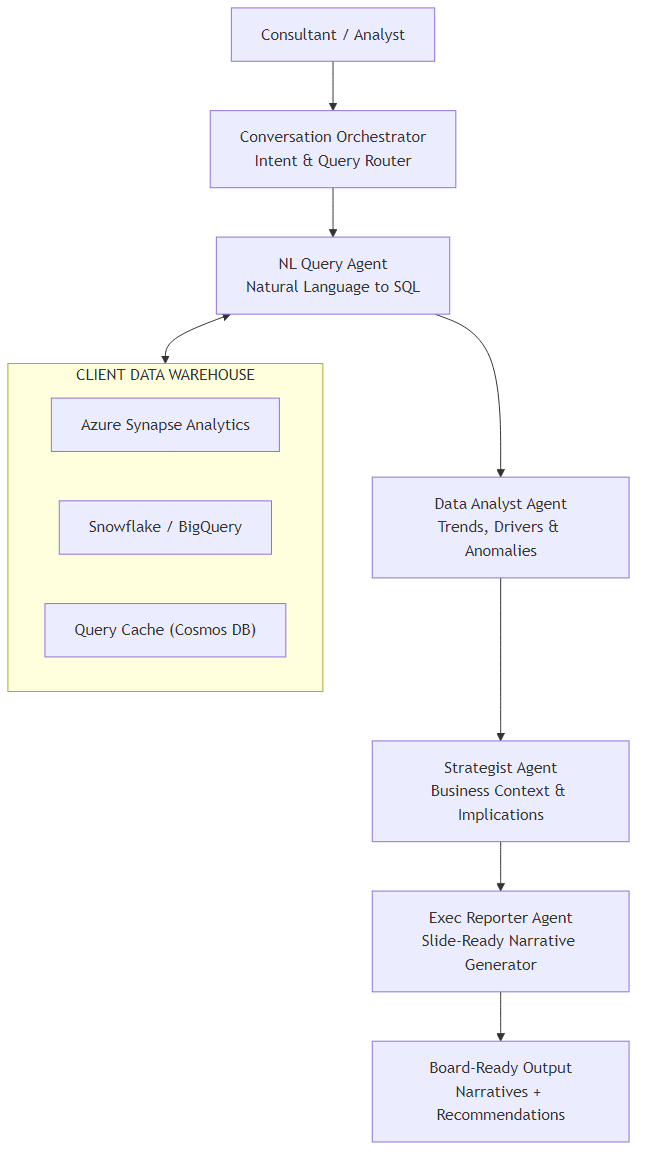
A few design decisions worth explaining:
- Query Cache (Cosmos DB) — Warehouse queries against Synapse can take 10-60 seconds and cost real money. If the same question (or a similar one) was asked earlier in the session, we return cached results. Cache TTL is 4 hours — fresh enough for weekly board prep, cheap enough to be practical.
- Schema injection at the NL Query Agent — The relevant table definitions are retrieved and injected into the prompt. The agent only sees the tables it needs, not all 200+. This prevents hallucinated column names.
- Strategist Agent uses client context — At engagement start, the consultant uploads a brief (client background, sector, strategic priorities). The Strategist Agent reads this to frame findings in client-specific terms, not generic ones.
Core Implementation
State Model
The state flows through all four agents. Each agent reads what it needs and writes its output back to state.
from typing import TypedDict, List, Optional
from dataclasses import dataclass

@dataclass
class AnalystFinding:
    metric: str
    period_current: float
    period_prior: float
    change_pct: float
    direction: str          # "up" | "down" | "flat"
    is_anomaly: bool
    contributing_factors: List[str]

@dataclass
class StrategyContext:
    headline: str           # one-line takeaway for the board
    business_implication: str
    risk_level: str         # "low" | "medium" | "high"
    recommended_actions: List[str]
    caveats: List[str]

class InsightsState(TypedDict):
    session_id: str
    client_brief: str           # uploaded at engagement start
    nl_question: str
    intent: str                 # "trend" | "driver" | "comparison" | "recommendation"
    schema_context: str         # relevant table DDL injected for this question
    generated_sql: str
    query_results: List[dict]
    cached: bool                # True if results came from Cosmos DB cache
    analyst_findings: List[dict]   # serialised AnalystFinding
    strategy_context: dict         # serialised StrategyContext
    narrative: str                 # final board-ready output
data_loaded_at: str # ISO timestamppublic record AnalystFinding(
string Metric,
double PeriodCurrent,
double PeriodPrior,
double ChangePct,
string Direction, // "up" | "down" | "flat"
bool IsAnomaly,
List<string> ContributingFactors
);
public record StrategyContext(
string Headline,
string BusinessImplication,
string RiskLevel, // "low" | "medium" | "high"
List<string> RecommendedActions,
List<string> Caveats
);
public class InsightsState
{
public string SessionId { get; set; } = "";
public string ClientBrief { get; set; } = "";
public string NlQuestion { get; set; } = "";
public string Intent { get; set; } = "";
public string SchemaContext { get; set; } = "";
public string GeneratedSql { get; set; } = "";
public List<Dictionary<string, object>> QueryResults { get; set; } = [];
public bool Cached { get; set; }
public List<AnalystFinding> AnalystFindings { get; set; } = [];
public StrategyContext? StrategyContext { get; set; }
public string Narrative { get; set; } = "";
public DateTime DataLoadedAt { get; set; }
}Orchestration Graph
In Python, LangGraph makes the sequential pipeline explicit. Every node is a function that takes the state and returns an updated state.
from langgraph.graph import StateGraph, END
from agents import classify_intent, nl_query, analyze_data, strategize, report

def build_insights_pipeline() -> CompiledGraph:
    workflow = StateGraph(InsightsState)

    workflow.add_node("classify_intent", classify_intent)
    workflow.add_node("nl_query",        nl_query)
    workflow.add_node("analyze_data",    analyze_data)
    workflow.add_node("strategize",      strategize)
    workflow.add_node("report",          report)

    # Sequential pipeline — no branching needed
    workflow.set_entry_point("classify_intent")
    workflow.add_edge("classify_intent", "nl_query")
    workflow.add_edge("nl_query",        "analyze_data")
    workflow.add_edge("analyze_data",    "strategize")
    workflow.add_edge("strategize",      "report")
    workflow.add_edge("report",          END)

    return workflow.compile()

async def run_pipeline(question: str, client_brief: str, session_id: str) -> str:
    graph = build_insights_pipeline()
    final_state = await graph.ainvoke({
        "session_id": session_id,
        "client_brief": client_brief,
        "nl_question": question,
    })
return final_state["narrative"]public class InsightsPipeline(
Kernel kernel,
NlQueryAgent nlQueryAgent,
DataAnalystAgent analystAgent,
StrategistAgent strategistAgent,
ExecReporterAgent reporterAgent)
{
public async Task<string> RunAsync(
string question,
string clientBrief,
string sessionId)
{
var state = new InsightsState
{
SessionId = sessionId,
ClientBrief = clientBrief,
NlQuestion = question
};
// Sequential pipeline — each step mutates state
state.Intent = await ClassifyIntentAsync(question);
await nlQueryAgent.QueryAsync(state);
await analystAgent.AnalyzeAsync(state);
await strategistAgent.StrategizeAsync(state);
await reporterAgent.ReportAsync(state);
return state.Narrative;
}
private async Task<string> ClassifyIntentAsync(string question)
{
var prompt = $"""
Classify this consulting question into ONE category:
- trend: asking about change over time
- driver: asking about root cause or contributing factors
- comparison: comparing segments, regions, or products
- recommendation: asking what to do
Question: {question}
Return ONLY the category name.
""";
var result = await kernel.InvokePromptAsync(prompt,
new KernelArguments(),
executionSettings: new OpenAIPromptExecutionSettings
{
Temperature = 0, MaxTokens = 10
});
return result.ToString().Trim().ToLower();
}
}Key Challenge #1 — NL-to-SQL Without Hallucinations
This is the hardest part of the system. Large data warehouses have hundreds of tables with cryptic names, complex joins, and overlapping concepts. Ask GPT-4o to write SQL against a 200-table schema without guidance and it will confidently hallucinate table names that don't exist.
The solution is schema injection: before generating SQL, retrieve the relevant table definitions and inject them directly into the prompt. The agent only sees what it needs.
Schema Retrieval
I pre-index the warehouse schema into Azure AI Search (one document per table: name, columns, description, sample joins). At query time, a semantic search retrieves the top 5 most relevant tables for this question.
NL_TO_SQL_PROMPT = """
You are a SQL expert for a consulting analytics warehouse.

AVAILABLE TABLES (only use these — do NOT invent table or column names):
{schema_context}

Write a single SQL query that answers this question:
{nl_question}

Rules:
- Use only the tables and columns listed above
- Include period filters (default to last 12 months unless specified)
- Add meaningful column aliases (e.g., revenue_usd not amt)
- Return ONLY the SQL, no explanation

SQL:
"""

async def nl_query(state: InsightsState) -> InsightsState:
    # Check cache first
    cache_key = _make_cache_key(state["nl_question"])
    cached = await cosmos_cache.get(cache_key)
    if cached:
        state["query_results"] = cached["results"]
        state["generated_sql"] = cached["sql"]
        state["cached"] = True
        return state

    # Retrieve relevant schema
    schema = await schema_search.semantic_search(
        state["nl_question"], top_k=5
    )
    state["schema_context"] = _format_schema(schema)

    # Generate SQL
    prompt = NL_TO_SQL_PROMPT.format(
        schema_context=state["schema_context"],
        nl_question=state["nl_question"],
    )
    sql = await llm.chat(
        messages=[
            {"role": "system", "content": "Return SQL only. No markdown fences."},
            {"role": "user", "content": prompt}
        ],
        temperature=0,
    )
    state["generated_sql"] = sql.strip()

    # Execute against Synapse
    results = await synapse_client.execute(state["generated_sql"])
    state["query_results"] = results
    state["cached"] = False

    # Cache for 4 hours
    await cosmos_cache.set(cache_key, {
        "sql": state["generated_sql"],
        "results": results
    }, ttl_hours=4)

return statepublic class NlQueryAgent(
Kernel kernel,
ISchemaSearchService schemaSearch,
ISynapseClient synapseClient,
IQueryCache cache)
{
private const string SqlPrompt = """
You are a SQL expert for a consulting analytics warehouse.
AVAILABLE TABLES (only use these):
{{schema}}
Write a single SQL query that answers:
{{question}}
Rules:
- Use ONLY the tables and columns listed above
- Include period filters (default last 12 months)
- Add meaningful column aliases
- Return ONLY the SQL, no explanation
""";
public async Task QueryAsync(InsightsState state)
{
// Check cache first
var cacheKey = MakeCacheKey(state.NlQuestion);
var cached = await cache.GetAsync(cacheKey);
if (cached is not null)
{
state.QueryResults = cached.Results;
state.GeneratedSql = cached.Sql;
state.Cached = true;
return;
}
// Retrieve relevant schema
var schema = await schemaSearch.SemanticSearchAsync(
state.NlQuestion, topK: 5);
state.SchemaContext = FormatSchema(schema);
// Generate SQL
var args = new KernelArguments
{
["schema"] = state.SchemaContext,
["question"] = state.NlQuestion
};
var settings = new OpenAIPromptExecutionSettings
{
Temperature = 0
};
var sqlResult = await kernel.InvokePromptAsync(
SqlPrompt, args, executionSettings: settings);
state.GeneratedSql = sqlResult.ToString().Trim();
// Execute against Synapse
state.QueryResults = await synapseClient.ExecuteAsync(state.GeneratedSql);
state.Cached = false;
// Cache for 4 hours
await cache.SetAsync(cacheKey,
new CachedQuery(state.GeneratedSql, state.QueryResults),
TimeSpan.FromHours(4));
}
}Why Temperature=0 for SQL Generation?
SQL is deterministic. There's a correct query or there isn't. Temperature above 0 introduces random variation that might produce a subtly different query each time — different column ordering, different joins, different filters. With temp=0, the same question always produces the same SQL, which makes debugging and caching predictable.
Key Challenge #2 — Writing Board Language, Not Data Language
This is where most analytics AI tools fail. They produce output that sounds like it was written by a data analyst ("Revenue was $4.2M in Q3, down 12.3% from $4.8M in Q2, with the largest variance in the EMEA segment at -18.7%"). A board member reads this and reaches for the ibuprofen.
Board language is different. It's structured around decisions, not data points. It leads with the headline. It explains implications, not observations. It ends with recommendations, not summaries.
| Data Language | Board Language |
|---|---|
| "Revenue down 12.3% Q3 vs Q2" | "EMEA price erosion is outpacing volume growth — action required before Q4." |
| "EMEA variance was -18.7%, highest of all regions" | "The problem is concentrated: EMEA accounts for 70% of the revenue miss." |
| "Customer count increased 4% while revenue declined" | "We are acquiring customers while giving away margin. The mix has shifted toward low-value contracts." |
The Exec Reporter Agent is specifically prompted to translate analyst findings into this style. Critically, it receives both the analytical findings and the strategy context — so it has the "what happened" and the "so what" before it writes the "here's what to do."
EXEC_REPORTER_PROMPT = """
You are a senior strategy consultant writing for the board of directors.

ANALYTICAL FINDINGS:
{findings}

STRATEGIC CONTEXT:
{strategy}

CLIENT BRIEF:
{client_brief}

Write a board-ready narrative that:
1. Opens with a single headline (the most important thing to know)
2. Explains the situation in 2-3 sentences — business implications, not data points
3. Identifies the 2-3 most important drivers (specific and causal, not descriptive)
4. Provides 2-3 concrete recommended actions with clear owners and timelines
5. Flags any caveats or data limitations

Style rules:
- Write for a CEO who has 90 seconds to read this
- Never use hedge words ("somewhat", "fairly", "relatively")
- Never repeat the same information twice
- Lead with implications, not observations
- Be specific: "EMEA contracts under €50k" not "smaller contracts"

Return JSON with keys: headline, situation, drivers (array), recommendations (array), caveats (array)
"""

async def report(state: InsightsState) -> InsightsState:
    prompt = EXEC_REPORTER_PROMPT.format(
        findings=json.dumps(state["analyst_findings"], indent=2),
        strategy=json.dumps(state["strategy_context"], indent=2),
        client_brief=state["client_brief"],
    )
    response = await llm.chat(
        messages=[
            {"role": "system", "content": "Return valid JSON only."},
            {"role": "user",   "content": prompt}
        ],
        response_format={"type": "json_object"},
        temperature=0.2,  # slight creativity for narrative quality
    )
    output = json.loads(response)
    state["narrative"] = _format_slide_narrative(output)
    return state

def _format_slide_narrative(output: dict) -> str:
    """Format JSON output into slide-ready text."""
    lines = [
        f"## {output['headline']}\n",
        f"{output['situation']}\n",
        "**Key Drivers:**"
    ]
    for d in output["drivers"]:
        lines.append(f"- {d}")
    lines.append("\n**Recommended Actions:**")
    for r in output["recommendations"]:
        lines.append(f"- {r}")
    if output.get("caveats"):
        lines.append("\n*Caveats: " + "; ".join(output["caveats"]) + "*")
return "\n".join(lines)public class ExecReporterAgent(Kernel kernel)
{
private const string ReporterPrompt = """
You are a senior strategy consultant writing for the board.
Analytical Findings: {{findings}}
Strategic Context: {{strategy}}
Client Brief: {{clientBrief}}
Write a board-ready narrative:
1. Single headline — most important thing to know
2. Situation in 2-3 sentences (implications, not data)
3. Top 2-3 drivers (specific and causal)
4. 2-3 concrete recommendations with owners and timelines
5. Caveats if any
Style: CEO reading in 90 seconds. No hedges. Lead with implications.
Return JSON: headline, situation, drivers[], recommendations[], caveats[]
""";
public async Task ReportAsync(InsightsState state)
{
var args = new KernelArguments
{
["findings"] = JsonSerializer.Serialize(state.AnalystFindings),
["strategy"] = JsonSerializer.Serialize(state.StrategyContext),
["clientBrief"] = state.ClientBrief
};
var settings = new OpenAIPromptExecutionSettings
{
Temperature = 0.2,
ResponseFormat = typeof(BoardNarrative)
};
var result = await kernel.InvokePromptAsync(
ReporterPrompt, args, executionSettings: settings);
var narrative = JsonSerializer.Deserialize<BoardNarrative>(
result.ToString())!;
state.Narrative = FormatSlideNarrative(narrative);
}
private static string FormatSlideNarrative(BoardNarrative n)
{
var sb = new StringBuilder();
sb.AppendLine($"## {n.Headline}\n");
sb.AppendLine($"{n.Situation}\n");
sb.AppendLine("**Key Drivers:**");
foreach (var d in n.Drivers)
sb.AppendLine($"- {d}");
sb.AppendLine("\n**Recommended Actions:**");
foreach (var r in n.Recommendations)
sb.AppendLine($"- {r}");
if (n.Caveats.Count > 0)
sb.AppendLine($"\n*Caveats: {string.Join("; ", n.Caveats)}*");
return sb.ToString();
}
}
public record BoardNarrative(
string Headline,
string Situation,
List<string> Drivers,
List<string> Recommendations,
List<string> Caveats
);ROI and Business Value
Let me put real numbers on this. A mid-size strategy consulting firm with 10 analysts, each producing two client insight updates per week:
| Metric | Manual Process | With AI Pipeline | Saving |
|---|---|---|---|
| Time per insight deck | 4-6 hours | 20-30 minutes | ~85% |
| Analyst hours per week (10 analysts) | 100-120 hrs | 7-10 hrs | 90+ hrs/week |
| Time to iterate on changed question | 2-4 hours | <5 minutes | 95%+ |
| Narrative consistency across analysts | Variable | Consistent | — |
The Real ROI: Iteration Speed
The biggest value isn't the time saved on the first pass — it's the cost of iteration. When a partner says "run that analysis by product line instead of region" at 4pm the day before a board presentation, the manual answer is "we'll have it tomorrow morning." With this pipeline, the answer is "give me 5 minutes."
That changes what's possible in a client relationship. You can answer follow-up questions in real time during the meeting, rather than promising a follow-up deck.
The system pays for itself if it saves one analyst two hours per week. Azure OpenAI costs for this pipeline run approximately $0.80-$1.20 per insight deck (GPT-4o pricing at ~$10/M output tokens, with an average of 3,000 output tokens across all four agents). Synapse query costs vary by warehouse size but are typically $0.05-0.15 per query with result caching reducing repeat query costs to zero.
The framework for deciding when this investment makes sense:
- You produce board-level insights on a recurring cadence (weekly, fortnightly)
- The underlying questions change frequently (not fixed dashboards)
- Your analysts spend more than 2 hours per deck on data extraction, not interpretation
- You have at least 3 analysts whose time you can redeploy to higher-value work
What's Next
This first part covered the core architecture: the four-agent pipeline, NL-to-SQL with schema injection, and the Exec Reporter that writes in board language rather than data language. The system works. It produces genuinely useful output that consultants tell me they're surprised they didn't have before.
But there are real questions I haven't answered yet: What does it actually cost to run at scale? How do you trace a bad narrative back to the agent that produced it? When is this approach the wrong choice — and what should you do instead?
Part 2 covers all of that: real token costs per deck, observability patterns for tracing agent decisions, the Python vs C# decision for consulting engagements, Azure infrastructure specifics including Foundry Agent Service, and five scenarios where you shouldn't build this at all.
Ready for Part 2?
Part 2 covers production considerations: real token costs, observability, Azure infrastructure, and when NOT to build this.
Read Part 2 →This article demonstrates a multi-agent analytics pipeline for consulting insight generation. Production implementations require error handling for failed SQL execution, rate limiting on LLM calls, and appropriate data governance controls for client data.
Want More Practical AI Tutorials?
I write about building production AI systems with Azure, Python, and C#. Subscribe for practical tutorials delivered twice a month.
Subscribe to Newsletter →