What This Article Covers
- Why client files at accounting, insurance, and law firms carry a different order of AI risk than ordinary business documents
- What day-to-day work looks like before and after moving underwriting, claims, and case work onto an isolated AI setup
- How to calculate the financial case for private AI deployment against your own confidentiality exposure
- What isolated AI actually costs to build and run, with running-cost and one-time project tables
- The honest checklist: when this is worth building, and when you should walk away from the idea entirely
A claims manager at a mid-sized insurer is working through a complex workers' compensation file. The claimant's treating specialist has submitted a detailed medical report, and the file also contains settlement negotiation notes and an internal reserve estimate. To save an afternoon of drafting, the claims manager pastes the medical report and negotiation notes into a public AI assistant and asks for a settlement recommendation memo. The memo is well-written and arrives in under a minute. It goes into the file and informs the offer that goes to the claimant's solicitor the following week.
Eight months later, the claim is disputed. Plaintiff's counsel serves a request for all systems and third parties that processed the claimant's medical information as part of the claims handling process. The insurer's legal team cannot say with certainty where that data went, whether it was retained by the AI vendor, or who else might have had access to fragments of it. What started as a routine claims dispute becomes an allegation of unreasonable claims handling — a category of exposure that is far more expensive, and far harder to defend, than the underlying claim ever was.
I'll address this upfront: I'm not saying public AI tools have no place in a regulated services firm. For drafting a client newsletter, summarising publicly available case law, or preparing generic marketing content, they're fine. The problem is specific, and it applies every week to accountants handling client financials, insurers handling claims and medical files, and lawyers handling privileged case material — usually without anyone in the firm having deliberately decided to take on the risk.

1. Is This Right for Your Operation?
Before I explain how the exposure works, here is the honest filter. Not every accounting practice, insurer, or law firm needs an isolated AI deployment on day one. Some do, urgently. Here's how to tell which side you're on.
Isolated AI Works Well If…
- Your teams regularly use AI tools to summarise, draft on, or analyse client financial statements, claims files, medical records, or privileged case material
- Your firm is subject to regulatory obligations governing client data — the Privacy Act, APRA prudential standards, ASIC licensing conditions, or professional conduct rules for legal practitioners
- Your professional indemnity (PI) insurance renewal questionnaire — the annual survey your insurer uses to price your cover — now asks specific questions about how AI tools handle client data, and you don't have confident answers
- You operate under client engagement letters or corporate client RFP terms that restrict where and how client data can be processed
- A single confidentiality incident, whether reputational or regulatory, would cause material damage to client relationships or trigger a PI claim
Walk Away If…
- Your team only uses AI for marketing copy, general research, or content that carries no client confidentiality obligation — public AI is fine for this
- You don't have the budget or internal capability to maintain an isolated model server over a 2–3 year horizon — a poorly maintained private deployment creates more exposure than a well-managed public one
- Your firm doesn't have anyone who can own infrastructure patching, model updates, and access control; isolated AI is not a "set and forget" purchase
- You're looking for a way to use AI on client data without spending anything — isolated AI has real costs, and cutting corners on them defeats the point
2. What Changes Day-to-Day
Here's what I've seen derail otherwise sound projects: the assumption that isolated AI means slower, clunkier tools than what staff already use. It doesn't. The shift is architectural, not experiential. Your accountants, claims handlers, and paralegals use the same interfaces and the same query patterns. What changes is entirely where the data goes once they hit enter.
Before: Efficient Drafting With Hidden Exposure
A Tuesday morning at a mid-tier accounting firm. A tax manager is preparing a restructuring memo for a private client and pastes the client's full trust structure, bank statements, and a draft of a related-party loan agreement into a public AI assistant to get a first-pass summary. The draft comes back polished in under a minute. The manager is pleased with the time saved. Nobody notices that the client's financial position, entity structure, and related-party arrangements have just been processed on servers owned by an overseas technology company, under terms of service that permit the use of submitted content to improve the underlying model. There is no record in the firm's systems of what was submitted or when. If the client's structure ever becomes the subject of an ATO review or a dispute with a related party, the firm cannot demonstrate what left the building.
After: Same Speed, Nothing Leaves the Firm
The same Tuesday morning, five months after an isolated deployment. The tax manager pastes the same categories of information into the same-looking chat interface. The draft comes back in a comparable time. The documents were processed on a server the firm leases exclusively, sitting inside the firm's own network. Nothing left the perimeter. The query is logged against the tax manager's user account and the client file reference. If the client later asks who has seen their structure, or a regulator asks how the firm handles client data in its AI tools, the answer is a complete audit log, not a shrug.
"The shift in mindset is from asking ‘is this AI tool on our approved list’ to asking ‘where does this document go, and who can see it, once I press enter.’"
3. The Business Case
The number that surprises most people is not the cost of building an isolated AI deployment — it's the cost of the incident it replaces. Across the confidentiality incidents I've reviewed at regulated services firms, the average all-in cost — remediation, the firm's PI insurance excess, client compensation, and the partner and risk-team hours spent managing the fallout — lands around $340,000 per incident. That figure sits well below headline mega-breach numbers you may have seen elsewhere, because it reflects the more common scenario at a firm of 50–500 staff: one client file, one bad outcome, one very expensive apology.
The business case for isolated AI doesn't require your firm to have already had an incident. It requires an honest estimate of three things: how often your teams are putting client data into public AI tools, what a confidentiality incident involving that data would cost you, and what an isolated deployment costs to build and run. In the engagements I've worked through, isolated AI pays back within 12–20 months on confidentiality risk reduction alone — before counting the productivity gain from finally being able to use AI on client work that was previously too sensitive to touch.
ROI Calculator — Confidentiality Risk vs. Isolated AI
Adjust the sliders to match your firm. Results update in real time.
Calculator assumes a 70% reduction in confidentiality incident probability with isolated AI deployment. Project cost is estimated at $130,000 base plus $130 per 100 monthly queries. Annual infrastructure is $32,000. Regulatory fine exposure and PI premium impact are not included — add those separately.
Confidential Data Exposure Incidents Per Quarter — Before and After Isolated AI
Q1–Q4 2025 shows baseline exposure incidents using public AI tools across a mid-sized regulated firm. Q1 2026 shows a transition quarter as teams consolidate from several public tools onto one governed platform before the private deployment goes live. Q2–Q4 2026 shows the reduction after full isolated deployment.
4. How the System Works
Be sceptical of any vendor quoting an isolated AI deployment as a simple software swap. What you are actually building is a complete data processing environment that sits inside your firm's own network perimeter, connected to the systems your teams already use — practice management, policy administration, or case management. Here's what that looks like in six stages.
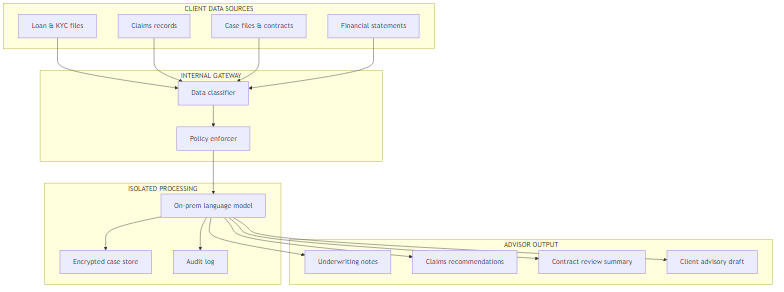
Stage 1 — Data Enters the Internal Gateway. Client documents, claim files, case notes, and financial records originate from your existing systems — practice management, policy administration, core banking, or case management. A data classifier checks the content against your firm's governance policy before the AI ever sees it. Queries that don't meet policy are returned to the user with a clear explanation, not silently blocked.
Stage 2 — Policy Enforcement. Your firm sets the rules: which data types can go to which AI functions, who is authorised to submit what, and what must be logged. For a law firm this includes privilege tagging; for an insurer, claimant medical sensitivity; for an accounting practice, related-party and trust structure flags. The policy enforcer applies these rules at the gateway — not buried inside the AI model where your risk team can't see them.
Stage 3 — Isolated Model Processing. The approved query reaches the local language model server. This server has no outbound internet connectivity. It cannot call external APIs, phone home to a vendor's telemetry endpoint, or send query content anywhere outside your infrastructure. The model runs on hardware your firm owns or leases exclusively.
Stage 4 — Encrypted Case Store. Any data retained for context, matter history, or audit purposes sits in an encrypted store inside your perimeter. Your firm holds the encryption keys, not a third-party AI vendor.
Stage 5 — Output Generation. The underwriting note, claims recommendation, contract review summary, or advisory draft is generated and returned through the same internal channel. It never travels over the public internet.
Stage 6 — Audit Trail. Every query is logged against the user, the client or matter reference, the timestamp, and the data classification. If a regulator, an auditor, or opposing counsel asks what happened to a document, you can answer with a complete record instead of an educated guess.
5. How the AI Data Risk Actually Works
Most partners and risk officers I speak with assume data submitted to a public AI tool is handled roughly the way a search query is handled — processed briefly, then discarded. The reality is more complicated, and the distinction matters enormously for firms holding client money, medical records, or privileged case material.
The Key Distinction: Segregated vs. Commingled
Think about how your firm already handles client trust money — funds held on behalf of a client must sit in a segregated account, never mixed with the firm's own money or another client's funds. Client data submitted to a public AI tool works the opposite way. Three things happen that wouldn't happen in a properly segregated system:
- The content is sent to external servers, typically in a foreign jurisdiction, outside the regulatory perimeter your APRA, ASIC, or Privacy Act obligations assume you control.
- The content may be used to improve the model under terms of service that most fee-earners have never read. Opt-out options exist for some platforms, but they're not universal, not always retroactive, and not always verifiable from your side.
- The content is processed alongside queries from every other user on shared, multi-tenant infrastructure. Vendors take steps to isolate sessions, but the underlying architecture commingles your client's data with everyone else's on the same platform — the digital equivalent of depositing trust money into a shared account with hundreds of unrelated firms.
An isolated AI deployment restores the segregation your clients already expect from you in every other part of the relationship. Their data doesn't leave your servers. It isn't used to train someone else's model. It's processed on hardware you control, and the query log belongs to your firm. Output quality is comparable to the public alternative — open-weight models in the 7B–70B parameter range (the number refers to how many internal settings the model has learned, a rough proxy for capability) now perform well enough for drafting, summarising, and first-pass analysis across most client-facing use cases without needing a public internet connection.
6. What It Costs
I'll be direct about costs, because this is where proposals I've reviewed for regulated firms have most often been either too optimistic or deliberately vague. There are two categories: the one-time project cost to build the deployment, and the ongoing annual cost to run it.
| Running Cost Item | Typical Annual Cost | Notes |
|---|---|---|
| Dedicated inference server (leased) | $20,000–$42,000 | Depends on model size and concurrent fee-earner load |
| Infrastructure management | $16,000–$28,000 | Patching, monitoring, access control updates |
| Model licensing (open-weight) | $0–$12,000 | Open-weight models are often free for enterprise use; some require commercial licences |
| Privilege and security audit (annual) | $10,000–$18,000 | Privilege log review, penetration testing, access log review |
| Staff training and governance | $6,000–$12,000 | Annual refresher and policy update cycle |
| One-Time Project Cost Item | Typical Cost | Notes |
|---|---|---|
| Infrastructure setup and configuration | $32,000–$50,000 | Server provisioning, network isolation, firewall rules |
| Model selection and fine-tuning | $18,000–$38,000 | Selecting the right model for the use case; domain-specific tuning if required |
| Practice/claims/case system integration | $28,000–$48,000 | Connecting the AI layer to your existing practice management, policy administration, or case management system |
| Data governance and privilege framework | $16,000–$28,000 | Policy design, classification schema, privilege tagging, audit trail setup |
| Pilot and validation | $10,000–$18,000 | Controlled testing before full deployment |
The Number That Surprises Most People
The most common budget error in these projects is underestimating the cost of building privilege tagging and audit logging into the existing practice, claims, or case management system. The AI server itself is not the hard part — getting the isolated system to understand which files are privileged, which contain regulated personal data, and which are safe for broader use is where projects run over budget. Build $28,000–$48,000 into your project budget for this integration work before you sign anything. If a vendor's quote seems light here, ask exactly how the system will distinguish a privileged case file from a routine one.
Where Your Compliance & Risk Budget Currently Goes
The red slice — reactive incident remediation — is the target. Isolated AI shifts spend from reactive damage control to planned, auditable infrastructure.
7. What Your Team Needs
Here's what I've seen derail otherwise sound projects: launching an isolated AI deployment without the internal capability to run it. This is not a vendor-managed subscription you can forget about after go-live. It requires real ownership inside the firm.
The minimum viable internal team is:
- One infrastructure owner — responsible for server health, the patching schedule, and access control. Does not need to be a data scientist. A senior IT administrator with Linux server experience can fill this role.
- One data governance owner — responsible for the classification policy, privilege tagging rules, and the quarterly audit of query logs. This is typically your risk officer, general counsel, or compliance manager, with 2–4 hours per month of dedicated time.
- One technical integration lead (for the build phase only) — connects the AI layer to your practice, claims, or case management system. This can be an external contractor for the first 3–6 months, with handover to your internal infrastructure owner once the system is stable.
On build vs. buy: the honest answer is that most firms in the 50–500 staff range are better served by a specialist implementation partner than by building everything in-house. The reason is integration work — connecting an isolated model cleanly to a practice management or claims system, and getting the privilege and classification rules right, requires specialised knowledge that's hard to develop internally for a one-time build. Once the system is live, ongoing operations and maintenance can almost always sit with your existing IT team.
| Phase | Duration | Key Activities | Who Leads |
|---|---|---|---|
| 1. Data governance and privilege audit | Weeks 1–3 | Map which client data types your teams currently submit to public AI tools. Classify by sensitivity and regulatory exposure. | Internal risk or compliance officer |
| 2. Use case prioritisation | Weeks 4–5 | Identify the 3–5 highest-value use cases currently blocked by confidentiality concerns — KYC summarisation, claims triage notes, contract redlining, case research memos. | Practice/business unit leads + IT |
| 3. Infrastructure build | Weeks 6–13 | Server provisioning, network isolation, model deployment, integration with practice, claims, or case management system. | External implementation partner |
| 4. Pilot and validation | Weeks 14–17 | Controlled rollout to one practice group or team. Test output quality, logging, privilege tagging, and policy enforcement against real files. | Internal IT + pilot team |
| 5. Full deployment and handover | Weeks 18–21 | Firm-wide rollout. Staff training. Handover of infrastructure ownership to internal team. First governance review scheduled. | Internal IT (primary) |
| 6. Ongoing operations | Ongoing | Monthly patching cycle, quarterly privilege log audit, annual model update assessment, annual security audit. | Internal infrastructure owner |

8. How You Know It's Working
The metrics for an isolated AI deployment at a regulated firm are different from the metrics you'd track for a standard IT rollout. You're not just measuring uptime — you're measuring whether the deployment is actually reducing client data exposure and delivering the productivity outcomes that justified the spend.
| Metric | What It Measures | 12-Month Target |
|---|---|---|
| % of client-file AI queries routed through isolated system | Whether staff have actually moved from public tools to the private deployment | 95% of client-data queries through isolated system |
| Policy exception rate (queries blocked at gateway) | Whether the classification policy is calibrated correctly — too high means overly restrictive; too low means regulated data is slipping through | Under 3% exception rate; exceptions reviewed weekly |
| Privilege and audit log completeness | Whether every query is captured with the metadata needed for a regulator or a court to review | 100% query logging; monthly audit report generated |
| Patch currency (days since last security patch) | Whether the infrastructure is being actively maintained, not just monitored | Zero critical patches outstanding; patches applied within 14 days of release |
| Staff-reported productivity change | Whether the isolated system is delivering comparable productivity to public tools, or creating friction that drives staff back to shadow AI use | Neutral or positive in 80% of quarterly staff survey responses |
9. Where to Start
In practice, the right starting point for most firms is not a full deployment. It's an honest audit of what's already happening. Here are five specific actions, in order.
- Conduct a shadow AI audit in the next 30 days. Ask each practice group or business unit to list every AI tool currently in use, including free consumer tools staff have signed up for individually. Don't assume the answer is "just the approved ones." In my experience, most regulated services firms discover 4–8 unsanctioned AI tools in active use once someone asks the question directly. Map what client data is being submitted to each.
- Classify your data by sensitivity tier. Not all client data carries the same risk. A three-tier classification — public, internal, regulated — is usually sufficient for a first deployment. Regulated data (medical records, financial statements, privileged case material, KYC and AML documentation) goes into the isolated system. Internal data can often stay on managed public AI with appropriate access controls. Public data needs no restriction.
- Identify your three highest-value blocked use cases. Where are your teams currently avoiding AI because the data is too sensitive? KYC file summarisation, claims triage notes, contract redlining, case research memos — these are the use cases that justify the investment. Quantify the time cost of doing them manually at current staff rates. That's your productivity ROI figure.
- Brief two or three specialist implementation partners. Not general IT vendors — firms with specific experience deploying private language models for regulated services. Ask for a fixed-price proposal for a 4-week proof of concept on your top use case. The proof of concept will tell you more than any vendor presentation.
- Put the governance framework in place before the first query goes through the system. The classification policy, privilege tagging rules, and audit log format should be designed and signed off before the isolated model touches production data. Retrofitting governance onto a live deployment is significantly harder and more expensive than building it in from the start.
Key Takeaways
Five Decisions This Article Should Help You Make
- Is the exposure real for your firm? Use the shadow AI audit in Step 1. If your teams are submitting client financials, medical records, or privileged files to public tools — and in most regulated firms, they are — the exposure is already active.
- Is the business case there? Use the ROI calculator above with your own incident cost estimates. If the payback is under 20 months on confidentiality risk reduction alone, the numbers support the project.
- Do you have the internal capability? You need one infrastructure owner and one governance owner at minimum. If those roles don't exist yet, build that into the project scope before you start.
- Should you build or buy? For firms under 500 staff, a specialist implementation partner for the build phase — with handover to internal IT for operations — is almost always the right model. Full in-house builds suit firms with larger, more mature IT and security functions already in place.
- What does good look like? By month 12, 95% of client-data AI queries should route through the isolated system, audit logs should be complete, and your risk team should be able to answer any regulator's or auditor's question about client data handling in under an hour.
Want Practical Insights on AI in Operations?
I write about applying AI to real business problems — with honest numbers and no vendor speak. Subscribe for articles delivered twice a month.
Subscribe to Newsletter →