What You'll Learn
- How to design a multi-tool LangGraph agent for portfolio analysis and scenario planning
- How to model financial state and calculations in a way an LLM can orchestrate reliably
- How to handle multi-turn "what if" conversations without losing context
- The specific guardrails you need when AI is touching financial projections
Why I Built This
I got tired of spreadsheets that couldn't answer "what if."
I have a reasonable portfolio — a mix of index funds, a few individual stocks, some super. Every time I wanted to model a scenario — "What if I increase contributions by $300 a month?" or "What happens to my retirement timeline if I take a two-year career break?" — I'd end up opening Excel, updating cells manually, and losing track of which version was which. The calculators you find online are even worse: they take a few inputs and spit out a single number, with no memory of what you asked five minutes ago.
Financial advisers are great, but a 45-minute session costs money and doesn't let you iterate in real time. I wanted something that knew my actual portfolio, understood my situation, and let me explore scenarios conversationally — the same way I'd talk to a knowledgeable friend who happened to be good with numbers.
So I built a multi-agent AI system using Azure OpenAI GPT-4o and LangGraph. It connects to portfolio data stored in Azure Cosmos DB, fetches live market data when needed, and orchestrates four specialised tools — a Portfolio Analyser, a Scenario Planner, a Risk Assessor, and a Market Data Fetcher — based on what the user actually asks.
What This Is (and Isn't)
This is a personal planning tool, not a licensed financial adviser. It does not give regulated advice. It helps individuals understand their own portfolio data and explore scenarios — think of it as a very capable calculator with a conversational interface. Part 2 covers the regulatory and compliance considerations in detail.
What People Actually Do Today
The current landscape for personal financial planning falls into three buckets, and none of them are quite right.
Spreadsheets are flexible but fragile. Every scenario is a new tab. Formulas break when you copy them. You have to manually update assumptions. And they have zero conversational ability — you can't ask your spreadsheet "how does this compare to last month's scenario?"
Online calculators are easy but shallow. They take three inputs (starting balance, monthly contribution, interest rate) and give you a projected number. They don't know anything about your actual holdings, can't fetch real market data, and treat everyone's situation identically.
Human advisers are contextual and knowledgeable, but expensive for frequent use and unavailable at 11pm when you're in the middle of a decision. A good adviser session happens quarterly, not every time you're curious about a scenario.
The Core Problem
None of these approaches combine personalisation (knowing your actual data), interactivity (responding to follow-up questions), and availability (accessible when you need it). That gap is exactly what a well-designed AI agent can fill.
The Solution: A Multi-Tool Financial Agent
The core insight is that financial planning questions are tool-routing problems. "What's my current allocation?" requires a portfolio lookup. "What if I contribute more?" requires a scenario calculation. "Am I taking too much risk for my age?" requires risk analysis. "What did the ASX do last week?" requires market data.
LangGraph lets you model this as a graph of nodes, where an orchestrator decides which tool to invoke based on the user's intent. The tools themselves are deterministic — they do real calculations, not LLM hallucinations — and the LLM's job is to understand what the user wants and interpret the results in plain English.
Tech stack:
- Azure OpenAI GPT-4o — orchestration and natural language understanding
- LangGraph (Python) / Semantic Kernel (C#) — agent framework
- Azure Cosmos DB — portfolio data persistence
- Redis Cache — market data caching (avoid hammering APIs)
- Bing Search API — live market prices when needed
Why This Architecture Works
The LLM never touches raw numbers directly. It routes to tools, gets back structured results, and narrates the response. This means the calculations are always deterministic — the LLM doesn't hallucinate your projected balance, it asks the Scenario Planner tool for it and reads back the result.
Architecture Overview
The system follows a clear flow: user query → intent classification → tool dispatch → structured results → plain-English response.
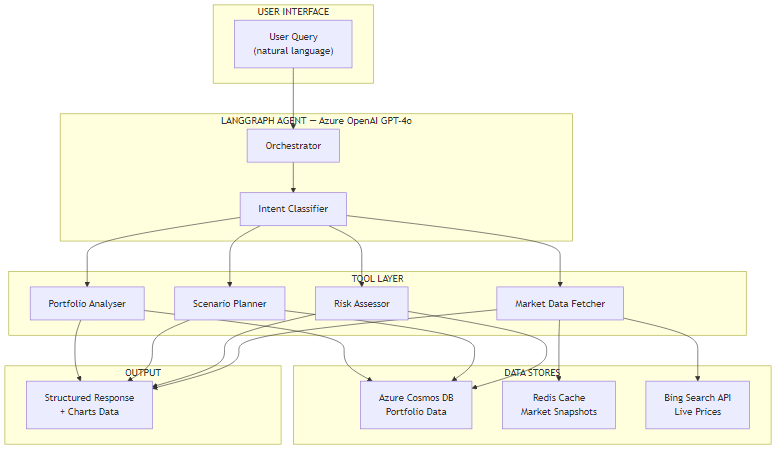
The four tools have clearly separated responsibilities:
| Tool | What It Does | Data Source |
|---|---|---|
| Portfolio Analyser | Fetches current holdings, calculates allocation percentages, identifies drift from target | Azure Cosmos DB |
| Scenario Planner | Runs compound growth calculations for given parameters, supports multiple scenarios in one session | Cosmos DB + user input |
| Risk Assessor | Calculates volatility, beta exposure, age-appropriateness of current allocation | Cosmos DB + market data |
| Market Data Fetcher | Retrieves current prices, index values, and macro data; caches results in Redis | Bing Search API + Redis |
The key architectural decision was keeping these tools narrow and composable. The orchestrator can call them in sequence — "first analyse the portfolio, then run the scenario against it" — and the results chain naturally.
Core Implementation
The Portfolio State Model
I built this because the LLM needed a consistent representation of portfolio state to pass between tools. Without a well-typed model, you end up with tools that each return different shapes of data and the orchestrator has to guess how to interpret them.
from dataclasses import dataclass, field
from typing import Annotated
from langgraph.graph import MessagesState

@dataclass
class Holding:
    ticker: str
    name: str
    units: float
    current_price: float
    asset_class: str  # "equities", "bonds", "cash", "property"
    target_weight: float  # percentage, e.g. 0.40 for 40%

    @property
    def current_value(self) -> float:
        return self.units * self.current_price

class PortfolioState(MessagesState):
    """Agent state — passed between all nodes in the graph."""
    user_id: str
    holdings: list[Holding]
    total_value: float
    cash_balance: float
    scenario_history: list[dict]  # accumulates across turns
    last_tool_called: str
    intent: str  # "analyse" | "scenario" | "risk" | "market"
public record Holding(
string Ticker,
string Name,
decimal Units,
decimal CurrentPrice,
string AssetClass, // "equities", "bonds", "cash", "property"
decimal TargetWeight // e.g. 0.40m for 40%
)
{
public decimal CurrentValue => Units * CurrentPrice;
}
public class PortfolioState
{
public string UserId { get; set; } = string.Empty;
public List<Holding> Holdings { get; set; } = new();
public decimal TotalValue { get; set; }
public decimal CashBalance { get; set; }
public List<ScenarioResult> ScenarioHistory { get; set; } = new();
public string LastToolCalled { get; set; } = string.Empty;
public string Intent { get; set; } = string.Empty; // "analyse" | "scenario" | "risk" | "market"
}The Orchestrator Graph
The orchestrator is a LangGraph StateGraph that routes between tools based on the intent classifier's output. The tricky part is that financial questions often span multiple tools — "Am I diversified enough and what would rebalancing cost?" needs both the Portfolio Analyser and the Scenario Planner. I handle this with a sequential dispatch loop.
from langgraph.graph import StateGraph, END
from langchain_openai import AzureChatOpenAI

llm = AzureChatOpenAI(
    azure_deployment="gpt-4o",
    api_version="2024-08-01-preview",
)

def classify_intent(state: PortfolioState) -> PortfolioState:
    """Determine which tool(s) to call based on the last user message."""
    last_message = state["messages"][-1].content
    response = llm.invoke([
        {"role": "system", "content": INTENT_SYSTEM_PROMPT},
        {"role": "user", "content": last_message}
    ])
    state["intent"] = response.content.strip().lower()
    return state

def route_to_tool(state: PortfolioState) -> str:
    """Edge function — returns the next node name."""
    intent_map = {
        "analyse": "portfolio_analyser",
        "scenario": "scenario_planner",
        "risk": "risk_assessor",
        "market": "market_data_fetcher",
    }
    return intent_map.get(state["intent"], "portfolio_analyser")

# Build the graph
builder = StateGraph(PortfolioState)
builder.add_node("classify_intent", classify_intent)
builder.add_node("portfolio_analyser", run_portfolio_analyser)
builder.add_node("scenario_planner", run_scenario_planner)
builder.add_node("risk_assessor", run_risk_assessor)
builder.add_node("market_data_fetcher", run_market_data_fetcher)
builder.add_node("compose_response", compose_response)

builder.set_entry_point("classify_intent")
builder.add_conditional_edges("classify_intent", route_to_tool)

for tool_node in ["portfolio_analyser", "scenario_planner", "risk_assessor", "market_data_fetcher"]:
    builder.add_edge(tool_node, "compose_response")

builder.add_edge("compose_response", END)
graph = builder.compile(checkpointer=MemorySaver())
using Microsoft.SemanticKernel;
using Microsoft.SemanticKernel.ChatCompletion;
public class PortfolioOrchestrator
{
private readonly Kernel _kernel;
private readonly IChatCompletionService _chat;
public PortfolioOrchestrator(Kernel kernel)
{
_kernel = kernel;
_chat = kernel.GetRequiredService<IChatCompletionService>();
}
public async Task<string> ProcessAsync(
string userMessage,
PortfolioState state,
CancellationToken ct = default)
{
var history = new ChatHistory();
history.AddSystemMessage(ORCHESTRATOR_SYSTEM_PROMPT);
// Add prior conversation turns for context
foreach (var turn in state.ScenarioHistory.TakeLast(6))
history.AddUserMessage(turn["user"]);
history.AddUserMessage(userMessage);
// Semantic Kernel auto-invokes the registered plugins
var settings = new PromptExecutionSettings
{
FunctionChoiceBehavior = FunctionChoiceBehavior.Auto()
};
var result = await _chat.GetChatMessageContentAsync(
history, settings, _kernel, ct);
state.ScenarioHistory.Add(new Dictionary<string, string>
{
["user"] = userMessage,
["assistant"] = result.Content ?? string.Empty
});
return result.Content ?? string.Empty;
}
}Challenge #1: Making Financial Calculations LLM-Safe
Here's what surprised me when I first built this: if you let the LLM do the maths, it sometimes gets it wrong. Not always, not dramatically, but enough that you can't trust it with compound growth calculations over 30 years. A 0.1% error in year 1 becomes a meaningful number by year 30.
The solution was strict separation: the LLM classifies intent and narrates results, but every calculation happens in deterministic Python/C# code. The Scenario Planner tool receives structured parameters and returns structured results — the LLM never computes a dollar figure itself.
from langchain.tools import tool
from decimal import Decimal, ROUND_HALF_UP

@tool
def scenario_planner(
    starting_balance: float,
    monthly_contribution: float,
    annual_return_rate: float,  # e.g. 0.07 for 7%
    years: int,
    inflation_rate: float = 0.025,
    label: str = "scenario"
) -> dict:
    """
    Run a deterministic compound growth scenario.
    Returns nominal and real (inflation-adjusted) projected values.
    Never estimate — always compute from exact inputs.
    """
    balance = Decimal(str(starting_balance))
    monthly_rate = Decimal(str(annual_return_rate)) / 12
    monthly_contrib = Decimal(str(monthly_contribution))
    inflation_monthly = Decimal(str(inflation_rate)) / 12
    months = years * 12
    total_contributed = Decimal("0")

    for _ in range(months):
        balance = balance * (1 + monthly_rate) + monthly_contrib
        total_contributed += monthly_contrib

    nominal = float(balance.quantize(Decimal("0.01"), rounding=ROUND_HALF_UP))
    # Real value: deflate by inflation
    real = float(
        (balance / (1 + inflation_monthly) ** months)
        .quantize(Decimal("0.01"), rounding=ROUND_HALF_UP)
    )
    gain = nominal - starting_balance - float(total_contributed)

    return {
        "label": label,
        "years": years,
        "starting_balance": starting_balance,
        "total_contributed": float(total_contributed),
        "nominal_value": nominal,
        "real_value": real,
        "total_gain": round(gain, 2),
        "effective_annual_return": annual_return_rate,
    }
using Microsoft.SemanticKernel;
using System.ComponentModel;
public class ScenarioPlannerPlugin
{
[KernelFunction("scenario_planner")]
[Description("Run a deterministic compound growth scenario. Never estimate — always compute.")]
public ScenarioResult RunScenario(
[Description("Starting portfolio balance")] decimal startingBalance,
[Description("Monthly contribution amount")] decimal monthlyContribution,
[Description("Annual return rate as decimal, e.g. 0.07 for 7%")] decimal annualReturnRate,
[Description("Number of years to project")] int years,
[Description("Annual inflation rate, default 2.5%")] decimal inflationRate = 0.025m,
[Description("Label for this scenario")] string label = "scenario")
{
var balance = startingBalance;
var monthlyRate = annualReturnRate / 12;
var inflationMonthly = inflationRate / 12;
var totalContributed = 0m;
var months = years * 12;
for (int i = 0; i < months; i++)
{
balance = balance * (1 + monthlyRate) + monthlyContribution;
totalContributed += monthlyContribution;
}
var realValue = balance / (decimal)Math.Pow((double)(1 + inflationMonthly), months);
return new ScenarioResult
{
Label = label,
Years = years,
StartingBalance = startingBalance,
TotalContributed = Math.Round(totalContributed, 2),
NominalValue = Math.Round(balance, 2),
RealValue = Math.Round(realValue, 2),
TotalGain = Math.Round(balance - startingBalance - totalContributed, 2),
EffectiveAnnualReturn = annualReturnRate
};
}
}The Trade-off Here
Using Decimal in Python (and decimal in C#)
instead of float adds a small performance cost. For 30-year monthly
projections (360 iterations) it's negligible. The benefit is precision — no
floating-point drift accumulating across hundreds of iterations.
Challenge #2: Multi-Turn Scenario Conversations
The second challenge was state across turns. A user might ask: "What if I contribute $500/month for 10 years?" — get an answer — then follow up with "Now show me the same thing but with 8% returns instead of 7%." The second question only makes sense if the agent remembers the first scenario's parameters.
In practice, you'll find that naive implementations lose this context whenever a new
conversation turn starts. I solved this with two things: LangGraph's
MemorySaver checkpointer for Python (which persists state between
invocations), and a rolling ScenarioHistory list in the state that
accumulates scenarios across the whole session.
async def run_with_session(user_message: str, session_id: str) -> str:
    """Invoke the graph with persistent state per session."""
    config = {
        "configurable": {
            "thread_id": session_id,  # LangGraph uses this to restore state
            "user_id": session_id,
        }
    }

    # The checkpointer automatically restores prior state for this thread_id
    result = await graph.ainvoke(
        {"messages": [HumanMessage(content=user_message)]},
        config=config
    )

    # scenario_history accumulates — the agent can refer to "the first scenario"
    return result["messages"][-1].content

# Example: session remembers prior scenarios
session = "user-123-session-abc"
r1 = await run_with_session("What if I invest $500/month for 10 years at 7%?", session)
# Returns: "At 7% annual return, your $500/month would grow to $86,491 over 10 years..."

r2 = await run_with_session("Now try 8% returns instead", session)
# LangGraph restores prior state — the agent knows the $500/month and 10-year params
# Returns: "At 8%, the same scenario projects to $91,473 — that's $4,982 more..."
// In Semantic Kernel, maintain ChatHistory per session in a dictionary or Redis
public class SessionManager
{
private readonly Dictionary<string, (ChatHistory History, PortfolioState State)> _sessions = new();
public async Task<string> ProcessAsync(
string sessionId,
string userMessage,
PortfolioOrchestrator orchestrator)
{
// Restore or create session
if (!_sessions.TryGetValue(sessionId, out var session))
{
session = (new ChatHistory(), new PortfolioState());
_sessions[sessionId] = session;
}
var (history, state) = session;
history.AddUserMessage(userMessage);
// ScenarioHistory in state persists across calls within this session
var response = await orchestrator.ProcessAsync(userMessage, state);
history.AddAssistantMessage(response);
return response;
}
}The tricky part is deciding how much history to include in each LLM call. Including all 20 turns from a long session runs up your token bill. I settled on a sliding window of the 6 most recent scenario results plus the current holdings summary — enough context for natural follow-ups without burning tokens on ancient history.
Business Value
I'm building this for personal use, so my "ROI" is personal — but the framework applies to any context where an organisation might want to give employees or customers this kind of tool.
| Use Case | Before | After |
|---|---|---|
| Run a scenario | 15–30 min in Excel | 30 seconds, conversational |
| Compare two scenarios | Duplicate tab, align assumptions | Follow-up question |
| Understand current allocation | Log in to each platform, aggregate manually | Single query to the agent |
| Risk check against age | Research rules of thumb online | Direct answer with your specific numbers |
When This Pays Off
This approach is worth the engineering effort when users need to explore multiple scenarios in a single session, or when personalisation (using their actual data) matters. If you just need a static projection calculator, build a simpler tool. The multi-agent architecture earns its complexity through multi-turn context and data-awareness.
What's Next
This is the architecture and core implementation. You've seen how to model portfolio state, orchestrate tools with LangGraph (Python) and Semantic Kernel (C#), make financial calculations LLM-safe, and maintain scenario context across a multi-turn session.
Part 2 goes into the production realities: what does it actually cost to run this per user per month, how do you trace and debug an agent that touched three tools to answer one question, and — critically — when should you NOT use AI for financial planning at all?
Ready for Part 2?
Part 2 covers production considerations: cost analysis, observability, and when NOT to use this approach.
Read Part 2 →Want More Practical AI Tutorials?
I write about building production AI systems with Azure, Python, and C#. Subscribe for practical tutorials delivered twice a month.
Subscribe to Newsletter →