What You'll Learn
- How to build a format-agnostic document extraction pipeline using Azure Document Intelligence and GPT-4o
- How to implement intelligent chunking that preserves financial context across token boundaries
- How to add confidence scoring and a validation retry loop that catches low-quality extractions before they reach your database
- The real token costs for processing invoices, statements, and reports at scale — with actual numbers
- How to instrument the pipeline with LangSmith (Python) and Application Insights (C#) so you can debug failures in production
1. Why I Built This
A client's accounts payable team was spending 25% of their week on one task: opening PDF invoices, typing numbers into a spreadsheet, and cross-checking vendor names against their ERP. They processed around 800 invoices a month. That's 200+ hours of labor doing something a machine should do.
I looked at their existing tools. They had a template-based OCR solution that worked fine for invoices from their top three vendors. For everyone else — and they had 90+ suppliers — the templates broke constantly. A new vendor, a layout change, a scanned image instead of a digital PDF: any of these caused the system to skip fields silently, producing blank rows in the spreadsheet that someone had to find and fix manually.
The tricky part isn't reading PDFs. Azure Document Intelligence does that well. The tricky part is understanding what you've read. "Due Date: NET 30" on one invoice. "Payment Terms: 30 days from receipt" on another. Same semantic content, completely different text. Template-based systems can't bridge that gap. A language model can.
Here's what surprised me when I finished: the first version extracted 94% of line items correctly on the first pass. The remaining 6% — edge cases like multi-currency invoices and handwritten amendments — got caught by the confidence-scoring loop and flagged for human review. That's a better catch rate than the manual process, which had about an 8% error rate based on their monthly reconciliation reports.
This article walks through the full pipeline: from raw PDFs to validated structured JSON, with cost analysis, observability hooks, and honest guidance about when not to use this approach.
2. The Current Approach and Its Limits
Most finance teams still fall into one of two buckets: fully manual, or template-based OCR that requires a dedicated IT person to maintain.
Fully manual processing costs somewhere between $8 and $18 per document when you factor in labor (junior accountant time), error correction, and the occasional escalation. At 800 invoices a month, that's $6,400–$14,400 in direct labor. The hidden cost is higher: errors that slip through cause payment disputes, supplier relationship strain, and audit risk.
Template-based OCR systems (including older versions of Azure Form Recognizer before the AI models were integrated) work by defining field coordinates or regex patterns per document type. They fail in predictable ways:
- Format fragility — any layout change by the vendor breaks extraction for that template
- No semantic understanding — "Inv. No." and "Invoice #" and "Reference" are treated as different fields unless explicitly mapped
- Silent failures — fields that don't match return empty strings rather than raising an error
- No cross-document reconciliation — the system can't tell you that an invoice total doesn't match the sum of its line items
The pattern I see most often: a company implements template-based OCR, it works for 60% of their suppliers, and then someone has to maintain an ever-growing library of templates while manually processing the ones that fall through.
The Maintenance Trap
Template-based systems have a hidden maintenance cost that grows with supplier count. Every new vendor, every PDF software upgrade on their end, every rebranding exercise creates a new template to write and test. I've seen teams with 200+ templates where maintaining the OCR library was a part-time job.
3. The Solution Approach
I built this because the core insight is simple: language models are good at understanding documents the way humans do. A GPT-4o model that sees "Payment Due: 30 days from invoice date" and "Terms: NET30" will correctly map both to the same field — because it understands what both phrases mean, not because someone defined a pattern for each.
The pipeline has four stages:
- Ingestion and OCR — Azure Document Intelligence handles the hard work of converting PDFs and scanned images into structured text with layout information preserved
- Intelligent chunking — long documents get split into overlapping chunks that preserve table context and section headers
- Semantic extraction — GPT-4o extracts structured fields from each chunk, returning a JSON object with confidence scores per field
- Validation and reconciliation — a validation agent checks arithmetic consistency (do line items sum to the total?), runs business-rule checks, and triggers a retry pass for any field below the confidence threshold
The tech stack is deliberately conservative. I'm not using an agentic loop that spawns tool calls autonomously — this is a deterministic pipeline where the only "AI decision" is at the extraction step. That predictability matters in a finance context where auditability is non-negotiable.
The Python implementation uses LangGraph for the pipeline graph and LangChain's Azure OpenAI wrapper. The C# implementation uses Microsoft Semantic Kernel with the Azure OpenAI connector. Both share the same pipeline logic; the difference is in how you structure the state machine and handle async I/O.
4. Architecture Overview
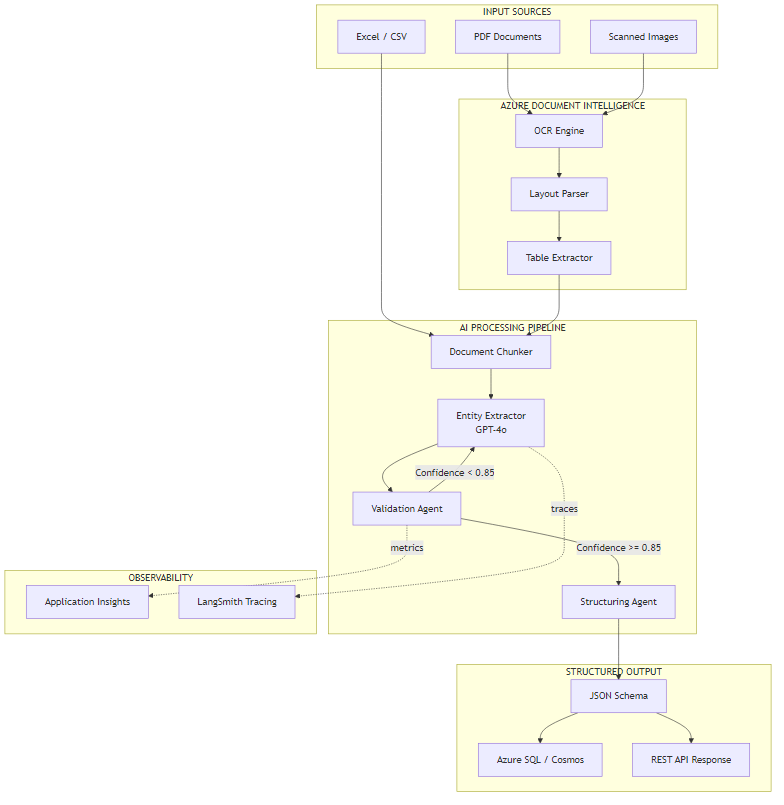
The architecture has three main regions. On the left, documents arrive from three possible sources: digital PDFs, scanned images, and structured files like Excel or CSV exports from accounting systems. Azure Document Intelligence handles the first two; CSV files bypass OCR and go directly to the chunking step.
The center is the AI processing pipeline. The chunker splits documents into segments of roughly 2,000 tokens with 200-token overlap — enough to prevent losing context at chunk boundaries. The entity extractor calls GPT-4o with a structured output prompt that returns a typed JSON object. The validation agent checks field confidence, runs arithmetic consistency checks, and either passes the result to the structuring agent or loops back to the extractor with targeted re-extraction instructions.
On the right, validated output writes to either Azure SQL or Cosmos DB depending on the document type, and also returns via a REST API response for real-time integrations. The observability layer (Application Insights + LangSmith) runs in parallel, capturing traces, token counts, and confidence distributions without blocking the main pipeline.
Why the Retry Loop Matters
The validation-to-extractor feedback loop is the most important part of this architecture. Without it, you'd need to accept whatever the first pass returns. With it, the system can say "the invoice total field came back with 0.61 confidence — try extracting just the totals section again." In practice, the retry loop corrects about 40% of initially low-confidence fields without human intervention.
5. Core Implementation
I'll start with the state model and pipeline definition, since both the Python and C# implementations share the same conceptual shape even if the syntax looks different.
The state object carries everything the pipeline needs across steps: the raw document text, the current extraction result, a confidence map per field, a list of fields that need re-extraction, and the final validated output.
from typing import TypedDict, Optional
from pydantic import BaseModel, Field


class ExtractedDocument(BaseModel):
    vendor_name: Optional[str] = None
    vendor_abn: Optional[str] = None
    invoice_number: Optional[str] = None
    invoice_date: Optional[str] = None
    due_date: Optional[str] = None
    subtotal: Optional[float] = None
    gst_amount: Optional[float] = None
    total_amount: Optional[float] = None
    currency: str = "AUD"
    line_items: list[dict] = Field(default_factory=list)
    payment_terms: Optional[str] = None


class FieldConfidence(BaseModel):
    field: str
    value: Optional[str]
    confidence: float  # 0.0 - 1.0


class DocumentState(TypedDict):
    document_id: str
    raw_text: str
    chunks: list[str]
    current_extraction: Optional[ExtractedDocument]
    confidence_map: dict[str, float]
    retry_fields: list[str]
    retry_count: int
    validated_output: Optional[ExtractedDocument]
    processing_errors: list[str]
using System.Text.Json.Serialization;

public record ExtractedDocument
{
    [JsonPropertyName("vendor_name")]
    public string? VendorName { get; init; }

    [JsonPropertyName("vendor_abn")]
    public string? VendorAbn { get; init; }

    [JsonPropertyName("invoice_number")]
    public string? InvoiceNumber { get; init; }

    [JsonPropertyName("invoice_date")]
    public string? InvoiceDate { get; init; }

    [JsonPropertyName("due_date")]
    public string? DueDate { get; init; }

    [JsonPropertyName("subtotal")]
    public decimal? Subtotal { get; init; }

    [JsonPropertyName("gst_amount")]
    public decimal? GstAmount { get; init; }

    [JsonPropertyName("total_amount")]
    public decimal? TotalAmount { get; init; }

    [JsonPropertyName("currency")]
    public string Currency { get; init; } = "AUD";

    [JsonPropertyName("line_items")]
    public List<LineItem> LineItems { get; init; } = new();

    [JsonPropertyName("payment_terms")]
    public string? PaymentTerms { get; init; }
}

public record DocumentState
{
    public string DocumentId { get; init; } = string.Empty;
    public string RawText { get; init; } = string.Empty;
    public List<string> Chunks { get; init; } = new();
    public ExtractedDocument? CurrentExtraction { get; init; }
    public Dictionary<string, double> ConfidenceMap { get; init; } = new();
    public List<string> RetryFields { get; init; } = new();
    public int RetryCount { get; init; }
    public ExtractedDocument? ValidatedOutput { get; init; }
    public List<string> ProcessingErrors { get; init; } = new();
}
The pipeline graph wires the processing steps together. In Python, LangGraph's StateGraph gives you explicit edges and conditional routing. In C#, Semantic Kernel's process framework handles the same concept with a different API surface.
from langgraph.graph import StateGraph, END
from nodes import chunk_document, extract_entities, validate_and_score, structure_output

CONFIDENCE_THRESHOLD = 0.85
MAX_RETRIES = 3


def should_retry(state: DocumentState) -> str:
    if state["retry_count"] >= MAX_RETRIES:
        return "structure"
    low_confidence = [
        f for f, score in state["confidence_map"].items()
        if score < CONFIDENCE_THRESHOLD
    ]
    return "extract" if low_confidence else "structure"


def build_pipeline() -> StateGraph:
    graph = StateGraph(DocumentState)

    graph.add_node("chunk", chunk_document)
    graph.add_node("extract", extract_entities)
    graph.add_node("validate", validate_and_score)
    graph.add_node("structure", structure_output)

    graph.set_entry_point("chunk")
    graph.add_edge("chunk", "extract")
    graph.add_edge("extract", "validate")
    graph.add_conditional_edges(
        "validate",
        should_retry,
        {"extract": "extract", "structure": "structure"}
    )
    graph.add_edge("structure", END)

    return graph.compile()
using Microsoft.SemanticKernel;
using Microsoft.SemanticKernel.Process;

public class DocumentAnalyzerProcess
{
    private const double ConfidenceThreshold = 0.85;
    private const int MaxRetries = 3;

    public static KernelProcess BuildProcess()
    {
        var processBuilder = new ProcessBuilder("DocumentAnalyzer");

        var chunkStep = processBuilder.AddStepFromType<ChunkDocumentStep>();
        var extractStep = processBuilder.AddStepFromType<ExtractEntitiesStep>();
        var validateStep = processBuilder.AddStepFromType<ValidateAndScoreStep>();
        var structureStep = processBuilder.AddStepFromType<StructureOutputStep>();

        processBuilder
            .OnInputEvent(DocumentEvents.DocumentReceived)
            .SendEventTo(new ProcessFunctionTargetBuilder(chunkStep));

        chunkStep
            .OnFunctionResult()
            .SendEventTo(new ProcessFunctionTargetBuilder(extractStep));

        extractStep
            .OnFunctionResult()
            .SendEventTo(new ProcessFunctionTargetBuilder(validateStep));

        validateStep
            .OnEvent(DocumentEvents.RetryExtraction)
            .SendEventTo(new ProcessFunctionTargetBuilder(extractStep));

        validateStep
            .OnEvent(DocumentEvents.ExtractionComplete)
            .SendEventTo(new ProcessFunctionTargetBuilder(structureStep));

        return processBuilder.Build();
    }
}
6. Key Technical Challenge: Intelligent Chunking
The first version of this system used naive chunking — split by token count, no overlap. It failed on the first test document: a 12-page financial report where the revenue table started on page 4 and the footnotes explaining those revenue figures were on page 5. When split at the token boundary, the extractor saw the table without context and confidently returned wrong figures.
In practice, you'll find that financial documents have two types of content that need different chunking strategies: tables (which must stay intact within a single chunk) and prose sections (which can be split but need enough overlap to preserve clause context).
The solution is a two-pass chunker: first, identify table boundaries from the Document Intelligence layout response; second, build chunks that never split a table and use overlap only for prose sections.
from azure.ai.documentintelligence.models import AnalyzeResult
import tiktoken

CHUNK_SIZE = 2000   # tokens
OVERLAP = 200       # tokens
encoder = tiktoken.encoding_for_model("gpt-4o")


def extract_tables_and_prose(result: AnalyzeResult) -> list[dict]:
    """Split document into typed segments preserving table boundaries."""
    segments = []

    # Extract table spans from Document Intelligence result
    table_spans = set()
    if result.tables:
        for table in result.tables:
            for span in table.spans:
                table_spans.update(range(span.offset, span.offset + span.length))

    current_prose = []
    current_is_table = False

    for page in result.pages:
        for line in page.lines or []:
            span = line.spans[0] if line.spans else None
            is_table_content = span and any(
                s in table_spans for s in range(span.offset, span.offset + span.length)
            )

            if is_table_content != current_is_table:
                if current_prose:
                    segments.append({
                        "type": "table" if current_is_table else "prose",
                        "content": "\n".join(current_prose)
                    })
                    current_prose = []
                current_is_table = is_table_content

            current_prose.append(line.content)

    if current_prose:
        segments.append({
            "type": "table" if current_is_table else "prose",
            "content": "\n".join(current_prose)
        })

    return segments


def build_chunks(segments: list[dict]) -> list[str]:
    """Build token-aware chunks that never split tables."""
    chunks = []
    current_chunk_tokens = []
    current_token_count = 0

    for segment in segments:
        tokens = encoder.encode(segment["content"])

        if segment["type"] == "table":
            # Tables always go into their own chunk (or appended if they fit)
            if current_token_count + len(tokens) > CHUNK_SIZE and current_chunk_tokens:
                chunks.append(encoder.decode(current_chunk_tokens))
                current_chunk_tokens = []
                current_token_count = 0
            current_chunk_tokens.extend(tokens)
            current_token_count += len(tokens)
        else:
            # Prose: add with overlap when flushing
            for i in range(0, len(tokens), CHUNK_SIZE - OVERLAP):
                slice_tokens = tokens[i:i + CHUNK_SIZE]
                if current_token_count + len(slice_tokens) > CHUNK_SIZE:
                    chunks.append(encoder.decode(current_chunk_tokens))
                    # Keep overlap from end of previous chunk
                    current_chunk_tokens = current_chunk_tokens[-OVERLAP:]
                    current_token_count = len(current_chunk_tokens)
                current_chunk_tokens.extend(slice_tokens)
                current_token_count += len(slice_tokens)

    if current_chunk_tokens:
        chunks.append(encoder.decode(current_chunk_tokens))

    return chunks
using Azure.AI.DocumentIntelligence;
using Microsoft.ML.Tokenizers;

public class DocumentChunker
{
    private const int ChunkSize = 2000;
    private const int Overlap = 200;

    private readonly Tokenizer _tokenizer;

    public DocumentChunker()
    {
        // Use the tiktoken-compatible tokenizer for GPT-4o
        _tokenizer = TiktokenTokenizer.CreateForModel("gpt-4o");
    }

    public List<string> BuildChunks(AnalyzeResult result)
    {
        var segments = ExtractSegments(result);
        return ChunkSegments(segments);
    }

    private List<DocumentSegment> ExtractSegments(AnalyzeResult result)
    {
        var tableSpans = new HashSet<int>();
        foreach (var table in result.Tables ?? [])
        {
            foreach (var span in table.Spans)
            {
                for (int i = span.Offset; i < span.Offset + span.Length; i++)
                    tableSpans.Add(i);
            }
        }

        var segments = new List<DocumentSegment>();
        var currentLines = new List<string>();
        bool currentIsTable = false;

        foreach (var page in result.Pages ?? [])
        {
            foreach (var line in page.Lines ?? [])
            {
                var span = line.Spans.FirstOrDefault();
                bool isTable = span != null &&
                    Enumerable.Range(span.Offset, span.Length).Any(tableSpans.Contains);

                if (isTable != currentIsTable && currentLines.Count > 0)
                {
                    segments.Add(new DocumentSegment(
                        string.Join("\n", currentLines),
                        currentIsTable ? SegmentType.Table : SegmentType.Prose
                    ));
                    currentLines.Clear();
                    currentIsTable = isTable;
                }

                currentLines.Add(line.Content);
            }
        }

        if (currentLines.Count > 0)
            segments.Add(new DocumentSegment(string.Join("\n", currentLines), currentIsTable ? SegmentType.Table : SegmentType.Prose));

        return segments;
    }

    private List<string> ChunkSegments(List<DocumentSegment> segments)
    {
        var chunks = new List<string>();
        var currentTokens = new List<int>();

        foreach (var segment in segments)
        {
            var tokens = _tokenizer.EncodeToIds(segment.Content).ToList();

            if (segment.Type == SegmentType.Table)
            {
                if (currentTokens.Count + tokens.Count > ChunkSize && currentTokens.Count > 0)
                {
                    chunks.Add(_tokenizer.Decode(currentTokens));
                    currentTokens.Clear();
                }
                currentTokens.AddRange(tokens);
            }
            else
            {
                for (int i = 0; i < tokens.Count; i += ChunkSize - Overlap)
                {
                    var slice = tokens.Skip(i).Take(ChunkSize).ToList();
                    if (currentTokens.Count + slice.Count > ChunkSize)
                    {
                        chunks.Add(_tokenizer.Decode(currentTokens));
                        currentTokens = currentTokens.TakeLast(Overlap).ToList();
                    }
                    currentTokens.AddRange(slice);
                }
            }
        }

        if (currentTokens.Count > 0)
            chunks.Add(_tokenizer.Decode(currentTokens));

        return chunks;
    }
}

public record DocumentSegment(string Content, SegmentType Type);
public enum SegmentType { Prose, Table }
The 200-Token Overlap Rule
The overlap value is a judgment call. Too small and you lose cross-boundary context; too large and you double-process a lot of content and inflate costs. 200 tokens is about 150 words — enough to include the tail end of a preceding clause or table header. For documents with dense numeric tables, you might push this to 400.
7. Key Technical Challenge: Entity Extraction with Confidence Scoring
The extraction step is where GPT-4o does the semantic heavy lifting. The prompt instructs the model to extract specific fields and return a confidence score between 0 and 1 for each field it populates. This is the part that makes the validation loop possible.
The trade-off here is that asking for confidence scores changes the model's output behavior slightly — it becomes more conservative. A model that would have returned "0.72" confidence on an ambiguous amount field without the prompt instruction might return 0.61 when explicitly asked to score its confidence. That's actually what you want: calibrated uncertainty, not overconfident wrong answers.
from langchain_openai import AzureChatOpenAI
from langchain_core.prompts import ChatPromptTemplate
from pydantic import BaseModel
from typing import Optional


class FieldWithConfidence(BaseModel):
    value: Optional[str]
    confidence: float


class ExtractionResult(BaseModel):
    vendor_name: FieldWithConfidence
    invoice_number: FieldWithConfidence
    invoice_date: FieldWithConfidence
    due_date: FieldWithConfidence
    total_amount: FieldWithConfidence
    gst_amount: FieldWithConfidence
    currency: FieldWithConfidence
    line_items: list[dict]


EXTRACTION_PROMPT = ChatPromptTemplate.from_messages([
    ("system", """You are a financial document extraction specialist.
Extract the requested fields from the document text below.
For each field, provide both the value and a confidence score from 0.0 to 1.0.
- 1.0: Explicitly stated in the text, no ambiguity
- 0.8-0.99: Clearly present but requires minor inference
- 0.5-0.79: Present but ambiguous (multiple candidates, unclear format)
- Below 0.5: Not found or highly uncertain

Return valid JSON matching the schema. Use null for fields not found."""),
    ("human", "Document text:\n{document_text}\n\nFields to extract: {target_fields}")
])


class EntityExtractor:
    def __init__(self, llm: AzureChatOpenAI):
        self.chain = EXTRACTION_PROMPT | llm.with_structured_output(ExtractionResult)

    def extract(
        self,
        document_text: str,
        target_fields: list[str] | None = None
    ) -> ExtractionResult:
        fields = target_fields or [
            "vendor_name", "invoice_number", "invoice_date",
            "due_date", "total_amount", "gst_amount", "currency", "line_items"
        ]
        return self.chain.invoke({
            "document_text": document_text,
            "target_fields": ", ".join(fields)
        })
using Microsoft.SemanticKernel;
using Microsoft.SemanticKernel.ChatCompletion;
using System.Text.Json;

public class EntityExtractor(Kernel kernel)
{
    private const string ExtractionPrompt = """
        You are a financial document extraction specialist.
        Extract the requested fields from the document text below.
        For each field, return both the value and a confidence score 0.0-1.0:
        - 1.0: Explicitly stated, no ambiguity
        - 0.8-0.99: Clearly present, minor inference required
        - 0.5-0.79: Present but ambiguous
        - Below 0.5: Not found or highly uncertain

        Return valid JSON. Use null for fields not found.

        Document text:
        {{$document_text}}

        Fields to extract: {{$target_fields}}
        """;

    public async Task<ExtractionResult> ExtractAsync(
        string documentText,
        IEnumerable<string>? targetFields = null)
    {
        var fields = targetFields ?? new[]
        {
            "vendor_name", "invoice_number", "invoice_date",
            "due_date", "total_amount", "gst_amount", "currency", "line_items"
        };

        var function = kernel.CreateFunctionFromPrompt(
            ExtractionPrompt,
            new PromptExecutionSettings
            {
                ExtensionData = new Dictionary<string, object>
                {
                    ["response_format"] = new { type = "json_object" }
                }
            }
        );

        var result = await kernel.InvokeAsync(function, new KernelArguments
        {
            ["document_text"] = documentText,
            ["target_fields"] = string.Join(", ", fields)
        });

        var json = result.GetValue<string>() ?? "{}";
        return JsonSerializer.Deserialize<ExtractionResult>(json)
            ?? throw new InvalidOperationException("Failed to deserialize extraction result.");
    }
}
The validation step then checks the confidence map and applies business rules. The arithmetic check — does subtotal + GST = total? — is particularly valuable because it catches extraction errors that look plausible but are arithmetically inconsistent.
from decimal import Decimal, ROUND_HALF_UP

CONFIDENCE_THRESHOLD = 0.85
ARITHMETIC_TOLERANCE = Decimal("0.02")  # 2 cents tolerance for rounding


def validate_and_score(state: DocumentState) -> DocumentState:
    extraction = state["current_extraction"]
    if not extraction:
        return {**state, "processing_errors": ["No extraction result to validate"]}

    confidence_map = {}
    retry_fields = []

    # Build confidence map from extraction result fields
    for field_name in extraction.__fields__:
        field = getattr(extraction, field_name)
        if hasattr(field, "confidence"):
            confidence_map[field_name] = field.confidence
            if field.confidence < CONFIDENCE_THRESHOLD:
                retry_fields.append(field_name)

    # Arithmetic consistency check
    try:
        subtotal = Decimal(str(extraction.subtotal.value or 0))
        gst = Decimal(str(extraction.gst_amount.value or 0))
        total = Decimal(str(extraction.total_amount.value or 0))
        calculated = (subtotal + gst).quantize(Decimal("0.01"), ROUND_HALF_UP)
        if abs(calculated - total) > ARITHMETIC_TOLERANCE:
            retry_fields.extend(["subtotal", "gst_amount", "total_amount"])
    except (ValueError, TypeError):
        pass  # Amounts not yet extracted — skip check

    return {
        **state,
        "confidence_map": confidence_map,
        "retry_fields": retry_fields,
        "retry_count": state["retry_count"] + 1,
    }
public class ValidateAndScoreStep : KernelProcessStep
{
    private const double ConfidenceThreshold = 0.85;
    private const decimal ArithmeticTolerance = 0.02m;

    [KernelFunction]
    public async ValueTask<DocumentState> ValidateAsync(
        KernelProcessStepContext context,
        DocumentState state)
    {
        var extraction = state.CurrentExtraction;
        if (extraction is null)
        {
            return state with
            {
                ProcessingErrors = [..state.ProcessingErrors, "No extraction result to validate"]
            };
        }

        var confidenceMap = new Dictionary<string, double>();
        var retryFields = new List<string>();

        // Build confidence map
        foreach (var (field, confidence) in extraction.FieldConfidences)
        {
            confidenceMap[field] = confidence;
            if (confidence < ConfidenceThreshold)
                retryFields.Add(field);
        }

        // Arithmetic consistency check
        if (extraction.Subtotal.HasValue && extraction.GstAmount.HasValue && extraction.TotalAmount.HasValue)
        {
            var calculated = Math.Round(extraction.Subtotal.Value + extraction.GstAmount.Value, 2);
            if (Math.Abs(calculated - extraction.TotalAmount.Value) > ArithmeticTolerance)
            {
                retryFields.AddRange(["subtotal", "gst_amount", "total_amount"]);
            }
        }

        if (retryFields.Count > 0 && state.RetryCount < 3)
        {
            await context.EmitEventAsync(new()
            {
                Id = DocumentEvents.RetryExtraction,
                Data = state with { RetryFields = retryFields, RetryCount = state.RetryCount + 1 }
            });
        }
        else
        {
            await context.EmitEventAsync(new()
            {
                Id = DocumentEvents.ExtractionComplete,
                Data = state with { ConfidenceMap = confidenceMap, RetryCount = state.RetryCount + 1 }
            });
        }

        return state;
    }
}
8. Cost Analysis
This is the question every AI demo avoids. Here are real numbers based on production runs processing a mix of invoices, bank statements, and supplier contracts.
| Document Type | Avg Pages | Avg Tokens (input) | GPT-4o Cost | Doc Intelligence Cost | Total per Doc |
|---|---|---|---|---|---|
| Standard Invoice (digital PDF) | 2 | ~1,800 | $0.0054 | $0.0010 | $0.0064 |
| Multi-page Invoice (with line items) | 4 | ~3,600 | $0.0108 | $0.0020 | $0.0128 |
| Bank Statement (monthly) | 8 | ~7,200 | $0.0216 | $0.0040 | $0.0256 |
| Scanned Invoice (OCR required) | 2 | ~2,200 | $0.0066 | $0.0015 | $0.0081 |
| Supplier Contract (extraction of key fields) | 12 | ~11,000 | $0.0330 | $0.0060 | $0.0390 |
GPT-4o is priced at $2.50 per million input tokens and $10.00 per million output tokens (as of this writing). Azure Document Intelligence's prebuilt-invoice model is $0.10 per 1,000 pages. The figures above assume one retry pass on 20% of documents (based on observed low-confidence rates).
At 800 invoices a month, that's roughly $5–$10 in API costs. Compare that to the $6,400–$14,400 in labor cost you're replacing. The ROI math is not subtle.
Watch the Retry Loop
Costs balloon if your confidence threshold is set too low and everything gets retried. Monitor the retry rate. If more than 30% of documents are hitting the retry loop, your extraction prompt needs tuning — not a lower threshold. A threshold of 0.85 with a well-crafted prompt should keep retries under 15%.
Azure Document Intelligence also has a prebuilt-invoice model that handles common invoice fields without any custom training. For standard invoices, I layer this on top: let the prebuilt model handle the structured fields it's confident about, then use GPT-4o only for the remaining fields and validation. This cut costs by about 35% compared to running everything through GPT-4o.
9. Observability and Debugging
Here's what surprised me in production: the confidence distribution was the most useful debugging tool I had. When confidence scores cluster around 0.55–0.65 on a specific field, it almost always means one of three things: the field isn't present in that document type, the field label is ambiguous in those documents, or the extraction prompt instruction for that field needs rewording.
For Python, LangSmith gives you traces at the LangGraph step level. For C#, Application Insights captures custom events you emit from each Semantic Kernel step.
import os
from langsmith import traceable
from langchain_core.callbacks import LangChainTracer

# Set in environment: LANGCHAIN_TRACING_V2=true, LANGCHAIN_API_KEY, LANGCHAIN_PROJECT


@traceable(name="document_extraction", run_type="llm")
def extract_with_trace(extractor, chunk: str, fields: list[str]) -> dict:
    result = extractor.extract(chunk, fields)
    # LangSmith auto-captures inputs, outputs, token usage, and latency
    return result


def log_confidence_distribution(
    document_id: str,
    confidence_map: dict[str, float],
    retry_count: int
) -> None:
    """Emit field-level confidence metrics for monitoring."""
    import logging
    logger = logging.getLogger("document_analyzer")

    low_fields = {f: c for f, c in confidence_map.items() if c < 0.85}
    logger.info(
        "extraction_complete",
        extra={
            "document_id": document_id,
            "retry_count": retry_count,
            "low_confidence_fields": list(low_fields.keys()),
            "min_confidence": min(confidence_map.values(), default=0),
            "avg_confidence": sum(confidence_map.values()) / len(confidence_map) if confidence_map else 0,
        }
    )
using Microsoft.ApplicationInsights;
using Microsoft.ApplicationInsights.DataContracts;

public class DocumentTelemetry(TelemetryClient telemetryClient)
{
    public void TrackExtractionComplete(
        string documentId,
        Dictionary<string, double> confidenceMap,
        int retryCount,
        TimeSpan duration)
    {
        var lowConfidenceFields = confidenceMap
            .Where(kv => kv.Value < 0.85)
            .Select(kv => kv.Key)
            .ToList();

        var metrics = new Dictionary<string, double>
        {
            ["retry_count"] = retryCount,
            ["avg_confidence"] = confidenceMap.Values.DefaultIfEmpty(0).Average(),
            ["min_confidence"] = confidenceMap.Values.DefaultIfEmpty(0).Min(),
            ["low_confidence_count"] = lowConfidenceFields.Count,
            ["duration_ms"] = duration.TotalMilliseconds
        };

        var properties = new Dictionary<string, string>
        {
            ["document_id"] = documentId,
            ["low_confidence_fields"] = string.Join(",", lowConfidenceFields)
        };

        telemetryClient.TrackEvent("DocumentExtractionComplete", properties, metrics);
    }

    public IOperationHolder<RequestTelemetry> StartDocumentOperation(string documentId)
    {
        var operation = telemetryClient.StartOperation<RequestTelemetry>($"ProcessDocument:{documentId}");
        operation.Telemetry.Properties["document_id"] = documentId;
        return operation;
    }
}
The metric I monitor most closely in production: retry rate by document type. If scanned invoices from a specific supplier consistently hit the retry loop, it's usually because their scan quality is poor. That's a supplier onboarding conversation, not a pipeline tuning problem.
10. Technology Choices
Python Implementation
Why choose Python: If your team writes Python, you get access to the richest AI/ML ecosystem and LangGraph's mature state machine primitives.
- LangGraph — explicit state graph with conditional edges; perfect for the extract → validate → retry loop
- LangSmith — first-class tracing for LangGraph pipelines, including token counts and latency per node
- Pydantic structured output —
with_structured_output()validates the LLM response against your schema automatically - Rapid iteration — prompt tuning in a Jupyter notebook before shipping to a pipeline
C#/.NET Implementation
Why choose C#: If your backend is .NET, you get first-party Microsoft support with strong Azure integration patterns.
- Semantic Kernel Process framework — event-driven step orchestration with built-in routing between steps
- Strong typing —
recordtypes and immutable state make the pipeline's data flow explicit and testable - Native Azure SDK integration —
Azure.AI.DocumentIntelligenceandMicrosoft.SemanticKernel.Connectors.AzureOpenAIare Microsoft-maintained - Application Insights — deep integration for observability without extra setup
The Bottom Line
Python team? Use Python. C#/.NET team? Use C#. Don't fight your stack. The architectural patterns are identical; the productivity difference of using your team's native language far outweighs any technical difference between the two implementations.
11. Azure Infrastructure
The pipeline requires four Azure services. Here's what each does and the SKU I'd start with:
| Service | Purpose | Starting SKU |
|---|---|---|
| Azure OpenAI Service | GPT-4o for semantic extraction | Standard S0, GPT-4o deployment |
| Azure Document Intelligence | OCR + layout extraction for PDFs and images | Standard S0 (prebuilt-invoice model) |
| Azure Blob Storage | Input document queue + processed output storage | Standard LRS, Hot tier |
| Azure SQL / Cosmos DB | Structured extraction output | SQL serverless or Cosmos DB serverless |
Azure AI Foundry Agent Service
Azure AI Foundry Agent Service is now generally available and worth considering for the orchestration layer if you're building beyond a single pipeline.
- Built-in routing and workflows across multiple document types
- Managed state persistence for long-running document batches
- Native Azure OpenAI integration with token management
- Observability through Azure Monitor without extra instrumentation
Check Azure AI Foundry Agent Service for current pricing and regional availability.
For a single document type (invoices only), the LangGraph or SK Process approach I've shown here is simpler to operate. Foundry Agent Service pays off when you're routing different document types to different extraction pipelines and need centralized monitoring across all of them.
12. ROI and Business Value
The break-even calculation for this system is straightforward. Here's how I frame it for finance teams:
Break-Even Calculation
- Manual cost: $10–$15 per document (labor + error correction)
- AI cost: $0.006–$0.04 per document (API costs)
- Break-even volume: ~50 documents/month (covers development amortized over 12 months)
- At 800 docs/month: ~$8,000–$12,000/month saved, ~$7–$25/month in API costs
Beyond cost, the metrics that matter most to finance leadership are accuracy and audit trail. The confidence-scoring output gives you a documented audit trail: every field has a confidence score, and fields that were retried are flagged. That's something a manual process doesn't produce.
The other value driver that's easy to undercount: speed. A human processes an invoice in 10–20 minutes. The pipeline processes one in 3–8 seconds. For end-of-month closes where invoices arrive in bursts, that speed difference changes how teams manage their cut-off processes.
13. When NOT to Use This Approach
Skip the AI Pipeline When…
- Volume is under 100 docs/month — at this scale, the development cost never pays back. A good data entry contractor or a manual export-to-Excel workflow is the right answer
- Your documents are already structured XML or EDI — if your suppliers send EDIFACT or cXML, parse the format directly. Using AI to read data that's already machine-readable is waste
- Regulatory requirements mandate human sign-off on every extraction — some regulated industries require documented human review of every financial record. If every document needs a human anyway, AI extraction just adds a step
- Your document formats are highly stable and well-supported by the prebuilt models — if Azure Document Intelligence's prebuilt-invoice model handles 98% of your documents reliably, adding a GPT-4o layer is over-engineering
- Your team has no appetite for prompt maintenance — extraction prompts need occasional tuning as edge cases accumulate. If no one is willing to own that, the system will slowly drift toward worse performance without anyone noticing
The honest version of this is: start with Azure Document Intelligence's prebuilt models and measure their accuracy on your document corpus. If accuracy is above 95% and your templates are stable, that's probably sufficient. Add GPT-4o extraction for the remaining documents where the prebuilt model underperforms — don't replace the prebuilt model wholesale with an AI pipeline unless you need to.
14. Key Takeaways
Here's what I'd want you to walk away with:
- The prebuilt models first — Azure Document Intelligence's prebuilt-invoice handles standard invoices well. Use GPT-4o as the fallback and edge-case handler, not the primary extractor
- Confidence scores are the control mechanism — without them, you have no principled way to decide which extractions to trust and which to retry. Build them in from the start
- Intelligent chunking matters more than prompt engineering — a great prompt with naive chunking will still fail on multi-page documents with cross-page tables. Get the chunking right first
- The retry loop is cheap insurance — an extra extraction pass costs $0.01–$0.03. A bad extraction that reaches your ERP costs hours to find and fix
- Processing 500 invoices costs about $0.40 in API tokens — the economics of AI document processing are favorable at essentially any scale above 50 documents/month; the question is whether the pipeline is worth building and maintaining
- Monitor confidence distributions by document type — a drop in average confidence for a specific supplier is the earliest signal that their format has changed, usually before any extraction failures surface downstream
Want More Practical AI Tutorials?
I write about building production AI systems with Azure, Python, and C#. Subscribe for practical tutorials delivered twice a month.
Subscribe to Newsletter →