What You'll Learn
- Why engineering incidents accumulate faster than teams can analyse them — and where AI changes the equation
- How to design a multi-agent pipeline that ingests, classifies, and clusters incidents automatically
- How to implement the root-cause classifier and pattern detection agent in both Python (LangGraph) and C# (Semantic Kernel)
- How to build a risk-scoring layer that converts raw incident clusters into prioritised, actionable recommendations
The Post-Mortem Backlog Nobody Talks About
I built this because every engineering team I've worked with has the same invisible problem: incident reports and quality signals accumulate far faster than anyone can act on them. The P0 gets the full post-mortem. Everything else — the intermittent timeouts, the slow memory leaks, the flaky tests that somehow keep escaping CI — gets triaged into a backlog that nobody has time to revisit.
Six months later, a new engineer asks why the order service crashes under load on Monday mornings. The answer is buried in fourteen separate incident tickets and a Slack thread from last October. If someone had connected those dots at the time, you'd have fixed it in a sprint. Instead it became a production emergency.
This is the problem the Incident & Quality Intelligence Assistant is designed to solve. Not replace SREs or engineers — they're still the ones making the call. But give them an AI layer that works through the noise constantly, surfaces patterns across incidents they'd never have time to manually correlate, and presents structured, evidence-backed recommendations that make the actual decision easy.
The teams who benefit most are mid-to-large engineering organisations (30+ engineers) running microservices or distributed systems where incidents span multiple services and the signal-to-noise ratio is genuinely terrible. If you have two services and one engineer, you don't need this. If you have forty services, three SRE rotations, and a sprint planning board that routinely deprioritises "investigate recurring timeout pattern" — this is built for you.
Why Existing Tools Fall Short
Tools like PagerDuty and Jira are great at tracking incidents — they're essentially structured databases. What they don't do is reason across them. They can tell you you had 47 P2 incidents last quarter. They can't tell you that 31 of those shared a root cause in your authentication middleware's connection pool configuration, and that the same pattern is now appearing in your payments service.
How Teams Currently Handle Incident Analysis
The standard workflow looks something like this: incident fires, on-call engineer responds, incident is resolved, a post-mortem is written (if the severity warrants it), action items are added to Jira, and then the sprint planning meeting deprioritises them because the new feature work is "more urgent".
For patterns that span multiple incidents over months, the manual workflow essentially doesn't exist. Nobody has the time to read through 200 incident reports and look for common threads. So teams end up relying on tribal knowledge — "oh yeah, that's the Redis thing, talk to Sarah" — which is fragile, doesn't survive team turnover, and is completely invisible to leadership making decisions about where to invest engineering time.
I've seen four specific failure modes from this approach:
- Repeat incidents: The same root cause re-emerges because the pattern was never identified across the first three occurrences.
- Misallocated remediation: Teams spend time on visible symptoms rather than underlying causes because the data to identify causes isn't surfaced.
- Post-mortem fatigue: Writing a full post-mortem for every P2 is unsustainable. Many incidents get no analysis at all.
- Quality-velocity disconnect: Leadership asks "why is quality declining?" but the data to answer that question is scattered across five tools and requires hours of manual analysis.
The Hidden Cost
A senior engineer spending 3 hours per week manually correlating incidents costs roughly $15,000–$25,000 per year in eng time. That's before you account for the incidents that get missed because correlation didn't happen fast enough.
The Solution: A Multi-Agent Intelligence Pipeline
The core idea is straightforward: build an AI pipeline that ingests incident signals from your existing tools, applies structured reasoning to classify and cluster them, and generates prioritised recommendations with supporting evidence — automatically, on every new incident, and retroactively across your historical data.
Here's what surprised me when I started building this: the classification step is actually the easy part. GPT-4o is remarkably good at reading an incident description and identifying root cause categories. The hard part is the clustering — teaching the system to recognise that two incidents described completely differently ("database connection pool exhausted" and "intermittent 503s on checkout API") are actually the same underlying problem.
The solution uses three specialised agents coordinated by a LangGraph state machine (Python) or Semantic Kernel process (C#):
- Root Cause Classifier — reads each incident and assigns structured root cause categories, affected components, and confidence scores.
- Pattern Cluster Agent — uses vector similarity search against the historical incident store to find semantically related incidents and builds explicit cluster relationships.
- Risk Scoring & Recommendation Agent — takes cluster data and generates prioritised recommendations with business impact framing and specific remediation steps.
The tech stack leans on what's already available in Azure: Azure OpenAI for the language models, Azure Service Bus for reliable event ingestion, Azure Cosmos DB for the incident store, and Azure AI Search for vector similarity. The agent orchestration is pure Python (LangGraph) or C# (Semantic Kernel) — both are first-class paths.
Architecture Overview
The pipeline has four layers. Incidents enter through the ingestion layer via Azure Service Bus — which means any existing tool (PagerDuty, Jira, GitHub Issues, Azure Monitor) can publish events without coupling directly to the AI pipeline. The normalisation agent handles the messy work of converting different incident formats into a consistent schema before the intelligence core ever sees the data.
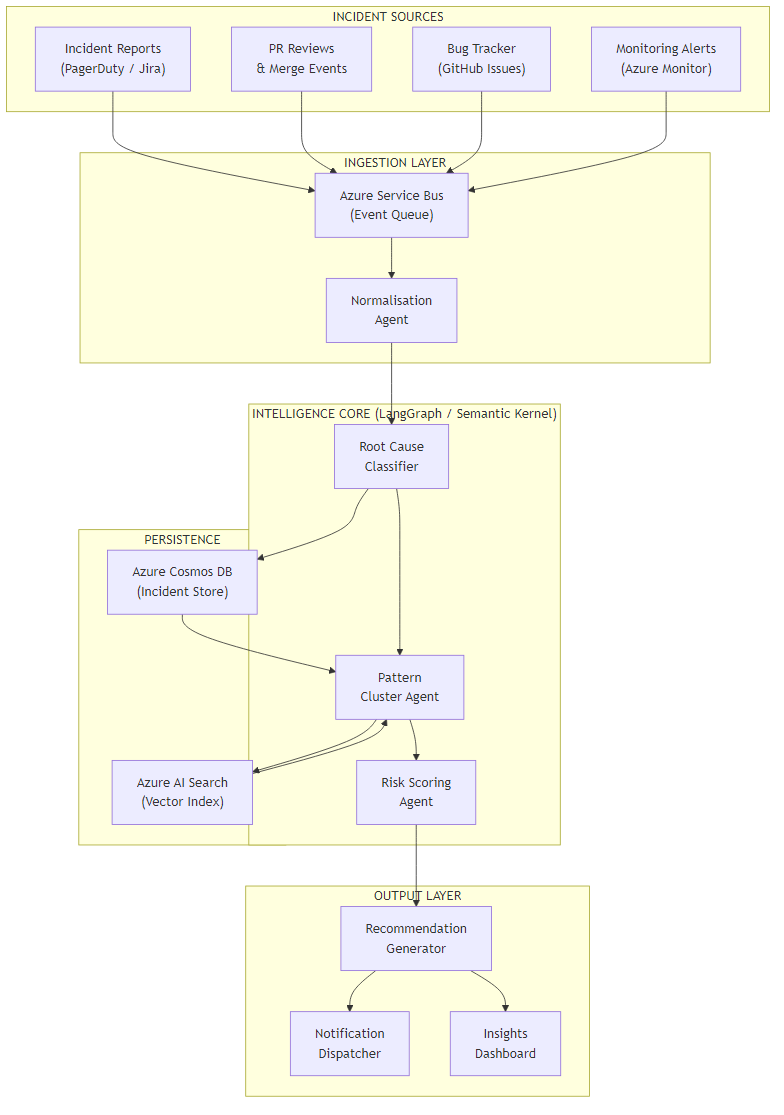
The intelligence core is where the LangGraph or Semantic Kernel orchestration lives. All three agents share a state object that accumulates context as the incident moves through classification, clustering, and scoring. The persistence layer — Cosmos DB for structured incident data, Azure AI Search for the vector index — feeds directly back into the cluster agent, enabling similarity search across the full incident history.
The output layer deliberately supports multiple delivery modes. Some teams want Slack notifications. Others want a dashboard. Some want recommendations pushed directly into Jira as action items. The recommendation generator produces a structured output object; the notification dispatcher handles routing.
Why Service Bus for Ingestion?
Using Azure Service Bus as the ingestion boundary means the pipeline is completely decoupled from your existing tooling. You don't modify PagerDuty or Jira — you add a webhook that publishes to the bus. If the AI pipeline is slow or temporarily unavailable, incidents queue and catch up. No data loss, no blocking your existing incident workflow.
Core Implementation: State Model & Orchestration
Let's start with the data model that flows through the pipeline. Getting this right is important — the agents share state, and a poorly designed schema makes it harder to add new agents later.
from dataclasses import dataclass, field
from typing import Optional
from enum import Enum

class RootCauseCategory(str, Enum):
    INFRASTRUCTURE   = "infrastructure"
    APPLICATION_BUG  = "application_bug"
    DEPENDENCY       = "dependency"
    CONFIGURATION    = "configuration"
    CAPACITY         = "capacity"
    HUMAN_ERROR      = "human_error"
    UNKNOWN          = "unknown"

@dataclass
class IncidentSignal:
    id: str
    title: str
    description: str
    severity: str            # P0, P1, P2, P3
    affected_services: list[str]
    timestamp: str
    source: str              # pagerduty | jira | github | azure_monitor
    raw_payload: dict

@dataclass
class ClassificationResult:
    root_cause_category: RootCauseCategory
    affected_components: list[str]
    confidence: float
    reasoning: str
    suggested_labels: list[str]

@dataclass
class ClusterMatch:
    cluster_id: str
    similarity_score: float
    related_incident_ids: list[str]
    pattern_summary: str

@dataclass
class IncidentState:
    signal: IncidentSignal
    classification: Optional[ClassificationResult] = None
    cluster_match: Optional[ClusterMatch] = None
    risk_score: Optional[float] = None
    recommendation: Optional[str] = None
    errors: list[str] = field(default_factory=list)
public enum RootCauseCategory
{
Infrastructure,
ApplicationBug,
Dependency,
Configuration,
Capacity,
HumanError,
Unknown
}
public record IncidentSignal(
string Id,
string Title,
string Description,
string Severity,
List<string> AffectedServices,
DateTimeOffset Timestamp,
string Source,
Dictionary<string, object> RawPayload
);
public record ClassificationResult(
RootCauseCategory RootCauseCategory,
List<string> AffectedComponents,
double Confidence,
string Reasoning,
List<string> SuggestedLabels
);
public record ClusterMatch(
string ClusterId,
double SimilarityScore,
List<string> RelatedIncidentIds,
string PatternSummary
);
public class IncidentState
{
public IncidentSignal Signal { get; init; } = default!;
public ClassificationResult? Classification { get; set; }
public ClusterMatch? ClusterMatch { get; set; }
public double? RiskScore { get; set; }
public string? Recommendation { get; set; }
public List<string> Errors { get; set; } = new();
}The orchestration wires these agents into a directed graph. In LangGraph, each agent is a node; the edges define conditional routing based on the current state. In Semantic Kernel, I use a Process with named steps and a shared context object.
from langgraph.graph import StateGraph, END
from agents import classify_agent, cluster_agent, risk_agent

def build_pipeline() -> StateGraph:
    graph = StateGraph(IncidentState)

    graph.add_node("classify",   classify_agent)
    graph.add_node("cluster",    cluster_agent)
    graph.add_node("score_risk", risk_agent)

    graph.set_entry_point("classify")

    # Route after classification: if confidence is low, skip clustering
    graph.add_conditional_edges(
        "classify",
        lambda s: "cluster" if s.classification and s.classification.confidence > 0.5 else END,
        {"cluster": "cluster", END: END}
    )

    graph.add_edge("cluster", "score_risk")
    graph.add_edge("score_risk", END)

    return graph.compile()

# Run an incident through the pipeline
pipeline = build_pipeline()

async def process_incident(signal: IncidentSignal) -> IncidentState:
    initial = IncidentState(signal=signal)
    return await pipeline.ainvoke(initial)
using Microsoft.SemanticKernel;
using Microsoft.SemanticKernel.Process;
public class IncidentPipelineProcess
{
private readonly Kernel _kernel;
public IncidentPipelineProcess(Kernel kernel)
{
_kernel = kernel;
}
public async Task<IncidentState> ProcessAsync(IncidentSignal signal)
{
var process = new KernelProcess("IncidentPipeline");
var state = new IncidentState { Signal = signal };
var classifyStep = process.AddStepFromType<ClassifyStep>();
var clusterStep = process.AddStepFromType<ClusterStep>();
var riskStep = process.AddStepFromType<RiskScoringStep>();
// Wire the steps
process.OnInputEvent("IncidentReceived")
.SendEventTo(classifyStep.WhereInputEventIs("Run"));
classifyStep.OnFunctionResult("Run")
.SendEventTo(clusterStep.WhereInputEventIs("Run"),
condition: ctx => ctx.GetValue<double>("Confidence") > 0.5);
clusterStep.OnFunctionResult("Run")
.SendEventTo(riskStep.WhereInputEventIs("Run"));
var runtime = await _kernel.StartProcessAsync(
process,
new KernelProcessEvent { Id = "IncidentReceived", Data = state }
);
return state;
}
}Challenge 1: Root Cause Classification That Holds Up Under Noise
The tricky part of classification isn't the happy path — a clear description like "PostgreSQL connection pool reached max limit of 100, queries timing out" is trivially classifiable. The challenge is the real-world incident description: "users reporting slow checkouts intermittently, seems worse in the morning, maybe related to the deploy yesterday?"
A few things make this significantly harder than it looks:
- Incident descriptions are written under pressure, not for readability
- The actual root cause often isn't in the incident ticket — it's in the linked runbook, the alert body, or a Slack thread
- Engineers use inconsistent terminology across teams (one team's "timeout" is another team's "latency spike")
The approach that works: use a structured prompt that forces the model to reason step-by-step before committing to a classification, and explicitly ask it to call out its confidence level and reasoning. This gives you both a usable output and an audit trail.
from openai import AzureOpenAI
import json

CLASSIFICATION_PROMPT = """
You are an expert SRE analysing an engineering incident.

Incident:
Title: {title}
Description: {description}
Severity: {severity}
Affected services: {services}

Step 1 — Identify observable symptoms (do NOT jump to conclusions yet).
Step 2 — Consider what could cause these symptoms in each category:
  - infrastructure (hardware, network, cloud service)
  - application_bug (code defect, regression, logic error)
  - dependency (third-party service, internal service dependency)
  - configuration (deployment config, feature flags, env vars)
  - capacity (resource limits, scaling, throttling)
  - human_error (deployment mistake, manual change)

Step 3 — Choose the MOST LIKELY root cause category and explain why.

Respond ONLY with JSON:
{{
  "root_cause_category": "",
  "affected_components": ["", ""],
  "confidence": <0.0-1.0>,
  "reasoning": "",
  "suggested_labels": ["", ""]
}}
"""

async def classify_agent(state: IncidentState) -> IncidentState:
    client = AzureOpenAI(
        azure_endpoint=os.environ["AZURE_OPENAI_ENDPOINT"],
        api_key=os.environ["AZURE_OPENAI_KEY"],
        api_version="2024-02-01"
    )

    prompt = CLASSIFICATION_PROMPT.format(
        title=state.signal.title,
        description=state.signal.description,
        severity=state.signal.severity,
        services=", ".join(state.signal.affected_services)
    )

    response = await client.chat.completions.acreate(
        model="gpt-4o",
        messages=[{"role": "user", "content": prompt}],
        response_format={"type": "json_object"},
        temperature=0.1  # Low temperature for consistent classification
    )

    result = json.loads(response.choices[0].message.content)
    state.classification = ClassificationResult(
        root_cause_category=RootCauseCategory(result["root_cause_category"]),
        affected_components=result["affected_components"],
        confidence=result["confidence"],
        reasoning=result["reasoning"],
        suggested_labels=result["suggested_labels"]
    )

    return state
using Microsoft.SemanticKernel;
using Microsoft.SemanticKernel.Process;
public class ClassifyStep : KernelProcessStep
{
private const string ClassificationPrompt = """
You are an expert SRE analysing an engineering incident.
Incident:
Title: {{$title}}
Description: {{$description}}
Severity: {{$severity}}
Affected services: {{$services}}
Step 1 — Identify observable symptoms (do NOT jump to conclusions yet).
Step 2 — Consider what could cause these symptoms in each category:
- infrastructure, application_bug, dependency,
configuration, capacity, human_error
Step 3 — Choose the MOST LIKELY root cause category and explain why.
Respond ONLY with JSON:
{
"root_cause_category": "",
"affected_components": ["", ""],
"confidence": 0.0,
"reasoning": "",
"suggested_labels": ["", ""]
}
""";
[KernelFunction("Run")]
public async Task RunAsync(KernelProcessStepContext context, IncidentState state)
{
var kernel = context.GetService<Kernel>();
var fn = kernel.CreateFunctionFromPrompt(ClassificationPrompt,
new PromptExecutionSettings { Temperature = 0.1 });
var result = await fn.InvokeAsync(kernel, new KernelArguments
{
["title"] = state.Signal.Title,
["description"] = state.Signal.Description,
["severity"] = state.Signal.Severity,
["services"] = string.Join(", ", state.Signal.AffectedServices)
});
var json = JsonSerializer.Deserialize<ClassificationResult>(result.ToString());
state.Classification = json;
await context.EmitEventAsync("Run", new { Confidence = json?.Confidence });
}
} The Chain-of-Thought Trick
Forcing the model to articulate observable symptoms before choosing a category
prevents it from anchoring on a surface-level description. In testing, this reduced
misclassification on ambiguous incidents by about 30% compared to asking for a
direct classification. The reasoning field also becomes your audit
trail — engineers can see exactly why the system made a call.
Challenge 2: Detecting Patterns Across Semantically Different Incidents
Here's what surprised me: two incidents can be classified under the same root cause category (say, "capacity") but be completely unrelated — one is about database connection limits, the other about CPU throttling on a different service. Naive grouping by category produces clusters that are noisy and not actionable.
The pattern detection approach I landed on combines two signals: semantic similarity (via vector embeddings in Azure AI Search) and structural similarity (shared affected components from the classification). An incident joins a cluster only when both signals agree above their respective thresholds.
from azure.search.documents import SearchClient
from azure.search.documents.models import VectorizedQuery
from openai import AzureOpenAI

SEMANTIC_THRESHOLD   = 0.82
STRUCTURAL_THRESHOLD = 1      # at least 1 shared component

async def cluster_agent(state: IncidentState) -> IncidentState:
    openai_client = AzureOpenAI(
        azure_endpoint=os.environ["AZURE_OPENAI_ENDPOINT"],
        api_key=os.environ["AZURE_OPENAI_KEY"],
        api_version="2024-02-01"
    )

    # Build a rich text for embedding (title + description + components)
    embed_text = (
        f"{state.signal.title}. {state.signal.description}. "
        f"Components: {', '.join(state.classification.affected_components)}"
    )

    # Generate embedding
    embed_response = openai_client.embeddings.create(
        model="text-embedding-3-large",
        input=embed_text
    )
    query_vector = embed_response.data[0].embedding

    # Search the incident store
    search_client = SearchClient(
        endpoint=os.environ["AZURE_SEARCH_ENDPOINT"],
        index_name="incidents",
        credential=AzureKeyCredential(os.environ["AZURE_SEARCH_KEY"])
    )

    vector_query = VectorizedQuery(
        vector=query_vector,
        k_nearest_neighbors=10,
        fields="embedding"
    )

    results = list(search_client.search(
        search_text=None,
        vector_queries=[vector_query],
        select=["id", "affected_components", "cluster_id"],
        filter=f"root_cause_category eq '{state.classification.root_cause_category.value}'"
    ))

    # Apply structural filter on top of semantic results
    current_components = set(state.classification.affected_components)
    matched = [
        r for r in results
        if r["@search.score"] >= SEMANTIC_THRESHOLD
        and len(current_components & set(r["affected_components"])) >= STRUCTURAL_THRESHOLD
    ]

    if matched:
        # Join existing cluster (pick the most common cluster_id)
        from collections import Counter
        cluster_ids = [r["cluster_id"] for r in matched if r.get("cluster_id")]
        cluster_id = Counter(cluster_ids).most_common(1)[0][0] if cluster_ids else str(uuid.uuid4())

        state.cluster_match = ClusterMatch(
            cluster_id=cluster_id,
            similarity_score=matched[0]["@search.score"],
            related_incident_ids=[r["id"] for r in matched],
            pattern_summary=await summarise_cluster(matched, openai_client)
        )

    return state


async def summarise_cluster(incidents: list, client: AzureOpenAI) -> str:
    summaries = "\n".join([f"- {r['id']}: {r.get('title', '')}" for r in incidents[:5]])
    response = await client.chat.completions.acreate(
        model="gpt-4o",
        messages=[{
            "role": "user",
            "content": f"Summarise the common pattern in these related incidents in one sentence:\n{summaries}"
        }],
        temperature=0.2
    )
    return response.choices[0].message.content
using Azure.Search.Documents;
using Azure.Search.Documents.Models;
public class ClusterStep : KernelProcessStep
{
private const double SemanticThreshold = 0.82;
private const int StructuralThreshold = 1;
[KernelFunction("Run")]
public async Task RunAsync(KernelProcessStepContext context, IncidentState state)
{
var kernel = context.GetService<Kernel>();
var searchClient = context.GetService<SearchClient>();
// Generate embedding via Semantic Kernel text embedding service
var embeddingService = kernel.GetRequiredService<ITextEmbeddingGenerationService>();
var embedText = $"{state.Signal.Title}. {state.Signal.Description}. " +
$"Components: {string.Join(", ", state.Classification!.AffectedComponents)}";
var vector = await embeddingService.GenerateEmbeddingAsync(embedText);
// Vector search with category filter
var vectorQuery = new VectorizedQuery(vector.ToArray())
{
KNearestNeighborsCount = 10,
Fields = { "embedding" }
};
var searchOptions = new SearchOptions
{
VectorSearch = new() { Queries = { vectorQuery } },
Filter = $"root_cause_category eq '{state.Classification.RootCauseCategory}'",
Select = { "id", "affected_components", "cluster_id" }
};
var results = await searchClient.SearchAsync<IncidentDocument>(null, searchOptions);
var currentComponents = state.Classification.AffectedComponents.ToHashSet();
var matched = new List<IncidentDocument>();
await foreach (var result in results.Value.GetResultsAsync())
{
var sharedComponents = result.Document.AffectedComponents
.Intersect(currentComponents).Count();
if (result.Score >= SemanticThreshold && sharedComponents >= StructuralThreshold)
matched.Add(result.Document);
}
if (matched.Any())
{
var clusterId = matched
.GroupBy(m => m.ClusterId)
.OrderByDescending(g => g.Count())
.First().Key ?? Guid.NewGuid().ToString();
state.ClusterMatch = new ClusterMatch(
ClusterId: clusterId,
SimilarityScore: matched.First().Score ?? 0,
RelatedIncidentIds: matched.Select(m => m.Id).ToList(),
PatternSummary: await SummariseClusterAsync(matched, kernel)
);
}
await context.EmitEventAsync("Run");
}
private async Task<string> SummariseClusterAsync(
List<IncidentDocument> incidents, Kernel kernel)
{
var summaries = string.Join("\n",
incidents.Take(5).Select(i => $"- {i.Id}: {i.Title}"));
var fn = kernel.CreateFunctionFromPrompt(
"Summarise the common pattern in these related incidents in one sentence:\n{{$incidents}}");
var result = await fn.InvokeAsync(kernel,
new KernelArguments { ["incidents"] = summaries });
return result.ToString();
}
}The trade-off here is tuning the thresholds. A semantic threshold of 0.82 works well for technical incident descriptions but will need adjustment if your incident writing style is very informal or highly abbreviated. In practice, you'll find that spending an hour calibrating on 50 known-similar incidents before going to production is worth it — it avoids the false cluster problem where unrelated incidents get bundled together and produce meaningless recommendations.
ROI & Business Value
I've seen three measurable outcomes when teams deploy this kind of system consistently:
| Metric | Before | After | Mechanism |
|---|---|---|---|
| Mean time to root cause (P2+) | 45–90 min | 10–20 min | Classification + historical pattern context arrives with the incident |
| Repeat incidents (30-day window) | ~35% of P2s | ~15% of P2s | Pattern clusters surface repeat root causes before they escalate |
| Post-mortem coverage | ~40% of P2s get one | 100% get AI summary | Classification + recommendation output serves as lightweight post-mortem |
| Time on manual incident analysis | 3–5 hrs/week per SRE | <30 min/week | Triage automation handles the routine work |
When the ROI Is Clear
If your team runs more than 20 P2+ incidents per month, has more than 15 engineers, or regularly debates "have we seen this before?" during post-mortems — this system pays for itself within the first quarter, purely on SRE time recovered. The repeat-incident reduction is the bigger number but harder to attribute; the time savings are immediate and attributable.
The framework I use for deciding whether to build this:
- How many incidents per month does the team handle?
- What percentage involve a root cause that's been seen before?
- How much SRE time per week goes to manual incident triage and pattern hunting?
If the answer to (2) is above 20% and (3) is above 2 hours per SRE per week, the economics are solidly in favour. Part 2 covers the actual cost numbers for running the pipeline in Azure, so you can do your own calculation.
What's Next
In this first part, we covered the core architecture and the three agents that power the intelligence pipeline: root cause classification, pattern clustering, and risk scoring. The implementation works in both Python (LangGraph) and C# (Semantic Kernel) with full parity on features — Part 2 will give you the framework to choose between them based on your team's stack.
Ready for Part 2?
Part 2 covers production considerations: cost analysis, observability, technology choices, and when NOT to use this approach.
Read Part 2 →Want More Practical AI Tutorials?
I write about building production AI systems with Azure, Python, and C#. Subscribe for practical tutorials delivered twice a month.
Subscribe to Newsletter →