What You'll Learn
- How to design an AI agent that reasons across demand signals, stock levels, and supplier options to make dynamic reorder decisions
- A hybrid demand forecasting approach that combines statistical baselines with LLM contextual reasoning
- Multi-supplier scoring logic with composite scoring across price, lead time, and reliability
- Real token cost numbers: per-SKU analysis and daily fleet costs for 1,000+ item catalogues
- Observability wiring with Azure Monitor and Application Insights, including decision tracing for auditability
The Inventory Problem No One Talks About
I built this because a client showed me their inventory spreadsheet. It had 847 SKUs, each with a hand-tuned "reorder at X, order Y" rule. Some of those rules were from 2019. The business had changed — new suppliers, different seasonality, post-pandemic demand patterns — but nobody had updated the spreadsheet. They were losing roughly 4% of revenue to stockouts and had about $180,000 in dead stock sitting in their warehouse.
The tricky part is that this isn't unusual. Most retail and distribution businesses with 200+ SKUs hit a version of this problem. Static reorder points work when demand is flat and suppliers are reliable. In practice, neither is true. Demand shifts seasonally, promotional calendars disrupt baselines, and supplier lead times have variance that simple safety stock formulas undercount.
The standard fix — hire a planner to review items weekly — doesn't scale. A good inventory analyst can meaningfully review maybe 50–80 SKUs per day. At 500 SKUs that's a full-time job just for replenishment decisions. At 2,000 SKUs it's a team.
What I wanted to build was an agent that runs daily, reviews every SKU in the catalogue, and makes smart reorder recommendations — with reasoning you can inspect. Not a black-box ML model that outputs a number, but a reasoning system that can tell you why it's recommending a 200-unit order from Supplier B instead of Supplier A this week.
This article walks through how I built it. The stack is Azure OpenAI (GPT-4o as the decision engine), LangGraph for Python orchestration, and Semantic Kernel for the C# equivalent. The principles apply regardless of which you choose.
What Businesses Are Actually Doing
Before building anything, I spent time understanding the status quo. Most mid-market companies land in one of three patterns.
Pattern 1: ERP min/max with manual overrides. The ERP fires a reorder suggestion when stock drops below a configured minimum. A planner reviews it, adjusts the quantity, approves or dismisses it. The minimum was set during implementation and reviewed only when something breaks. The planner spends most of their time on high-value SKUs; the long tail runs on autopilot.
Pattern 2: ABC classification with tiered attention. A items get weekly review, B items monthly, C items quarterly. This is better, but the classification is static. An item can shift from C to A during a product launch or promotional period and the planning team won't notice until stock runs out.
Pattern 3: Demand planning software with manual exceptions. Tools like SAP IBP or Kinaxis provide statistical forecasts. The problem is they require clean, structured data and dedicated planning resources to tune the models. Most SMBs don't have either.
The Real Costs
Industry benchmarks put inventory carrying costs at 20–30% of average inventory value per year. For a company with $1M in inventory, that's $200–300K annually just to hold stock. Add 4–8% revenue loss from stockouts and the number becomes significant very quickly.
The spreadsheet problem isn't lazy planning — it's a capacity problem. There are more SKUs than human attention can handle.
The existing approaches share a common limitation: they're reactive to current stock levels, not predictive about demand trajectory. They also treat each SKU independently, missing the opportunity to optimise across a supplier relationship (e.g., consolidating orders from the same supplier to hit volume discounts).
The Agent Approach
Here's what surprised me when I started building: the hard part isn't the forecasting. You can get a reasonable statistical forecast from a moving average. The hard part is reasoning about conflicting signals and making a defensible decision under uncertainty.
That's exactly what LLMs are good at. The agent's job isn't to do the math — it's to reason about which math to trust, when to override statistical signals with contextual knowledge, and how to make trade-offs between cost and risk across multiple suppliers.
The agent has five tools:
- demand_forecast — returns a weekly demand estimate plus a confidence level and any contextual adjustments
- check_inventory — returns current stock, pending orders, and days-of-supply remaining
- score_suppliers — ranks available suppliers for a SKU across price, lead time, and reliability
- create_purchase_order — writes a draft PO to the queue for human review
- send_alert — flags urgent situations (critical stockout risk, supplier reliability deterioration)
For each SKU in the review queue, the agent calls these tools in sequence, reasons about the results, and either creates a purchase order recommendation or logs a "no action needed" with its reasoning. Every decision is traced.
Why an Agent Instead of a Pure ML Model?
A pure demand forecasting model tells you what demand will be. It doesn't tell you which supplier to use, whether to consolidate orders, or whether a current low-stock situation is urgent given what's already on order. Those decisions require reasoning across multiple data sources — which is the agent's job. The LLM handles the reasoning; the statistical model handles the math. Neither does the other's job well.
Architecture Overview
The system has four layers: data sources, the agent orchestrator, the tool layer, and output handling.
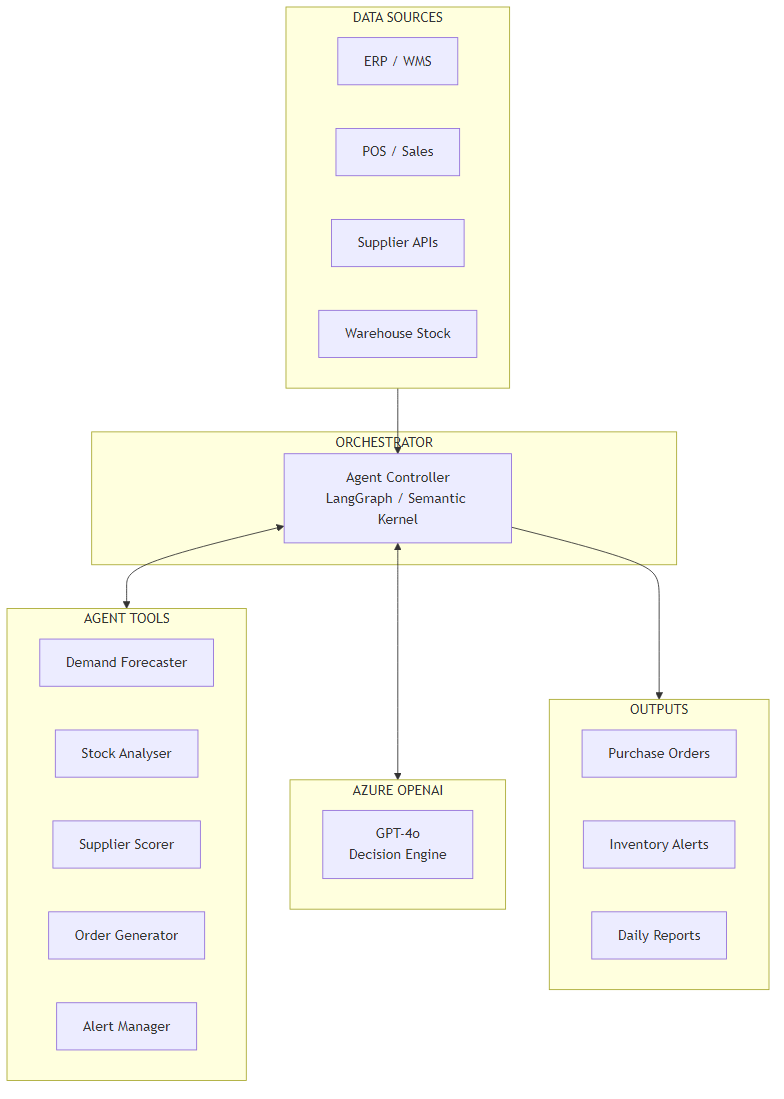
Data flows in from three sources: the ERP (current stock, pending orders, product catalogue), the POS or order management system (sales history, sales velocity), and supplier APIs or a curated supplier database (pricing, lead times, MOQs, reliability data). In many deployments the ERP and POS are the same system — the important thing is that both stock state and sales history are available.
The Agent Controller is a LangGraph graph (Python) or Semantic Kernel kernel (C#). It receives a list of SKUs to review, sets up the system prompt with business context (current date, any active promotions, service level targets), and begins the tool-calling loop for each item.
The tool layer is where the actual work happens. Each tool is a focused function with a clear contract: take structured inputs, return structured outputs. The LLM calls tools in sequence — it doesn't batch calls or parallelize unless the tool explicitly supports it. In practice this means a typical 50-SKU review run involves roughly 150–200 tool calls.
Outputs go to three places: purchase orders are written to a queue (human-reviewed before submission), alerts go to the operations team via whatever notification channel is in use (email, Slack, Teams), and daily reports are written to a blob store for trend analysis.
Core Implementation
State and Data Models
I start with the data models because they define the contract between all parts of the system. The key types are InventoryItem (a single SKU's current state) and AgentState (the mutable state carried through the LangGraph run).
from dataclasses import dataclass, field
from typing import Optional
from datetime import datetime

@dataclass
class InventoryItem:
    sku: str
    name: str
    current_stock: int
    reorder_point: int
    max_stock: int
    unit_cost: float
    avg_daily_sales: float
    lead_time_days: int
    pending_orders: int = 0
    category: str = ""
    supplier_ids: list[str] = field(default_factory=list)
    last_updated: datetime = field(default_factory=datetime.utcnow)

@dataclass
class AgentState:
    items_to_review: list[InventoryItem]
    purchase_orders: list[dict] = field(default_factory=list)
    alerts: list[dict] = field(default_factory=list)
    decisions_log: list[dict] = field(default_factory=list)
    analysis_complete: bool = False
    token_count: int = 0
    messages: list = field(default_factory=list)

@dataclass
class PurchaseOrder:
    sku: str
    supplier_id: str
    quantity: int
    unit_price: float
    expected_delivery_days: int
    reasoning: str
    confidence: str
    created_at: datetime = field(default_factory=datetime.utcnow)
public record InventoryItem(
string Sku,
string Name,
int CurrentStock,
int ReorderPoint,
int MaxStock,
decimal UnitCost,
double AvgDailySales,
int LeadTimeDays,
int PendingOrders = 0,
string Category = "",
List<string>? SupplierIds = null
);
public class AgentState
{
public List<InventoryItem> ItemsToReview { get; set; } = new();
public List<PurchaseOrder> PurchaseOrders { get; set; } = new();
public List<InventoryAlert> Alerts { get; set; } = new();
public List<DecisionLog> DecisionsLog { get; set; } = new();
public bool AnalysisComplete { get; set; }
public int TokenCount { get; set; }
}
public record PurchaseOrder(
string Sku,
string SupplierId,
int Quantity,
decimal UnitPrice,
int ExpectedDeliveryDays,
string Reasoning,
string Confidence,
DateTime CreatedAt
);Agent Orchestrator Setup
The orchestrator sets up the LLM with tools and wires the graph. The system prompt is important: it tells the agent what role it's playing, what the current business context is, and what its decision criteria are. I inject current date, active promotions, and service level targets at runtime.
import os
from langchain_openai import AzureChatOpenAI
from langgraph.graph import StateGraph, END
from langgraph.prebuilt import ToolNode
from langchain_core.messages import SystemMessage, HumanMessage

llm = AzureChatOpenAI(
    azure_deployment="gpt-4o",
    azure_endpoint=os.environ["AZURE_OPENAI_ENDPOINT"],
    api_key=os.environ["AZURE_OPENAI_API_KEY"],
    api_version="2024-08-01-preview",
    temperature=0.1,
    max_tokens=4096,
)

tools = [demand_forecast, check_inventory, score_suppliers,
         create_purchase_order, send_alert]
llm_with_tools = llm.bind_tools(tools)

SYSTEM_PROMPT = """You are an inventory optimization agent. Your job is to review
inventory items and make reorder recommendations.

For each item:
1. Check current inventory levels and days of supply remaining
2. Forecast demand for the next 14 days
3. If stock may run out within (lead time + 7 days safety), score available suppliers
4. Create a purchase order recommendation for the best supplier
5. Send an alert if any item is critically low (< 3 days supply)

Today is {today}. Service level target: {slt}% fill rate.
Active promotions: {promotions}

Always provide clear reasoning for every decision. When uncertain, flag it."""

def agent_node(state: AgentState) -> AgentState:
    if not state.messages:
        items_summary = "\n".join(
            f"- {item.sku}: {item.name} ({item.current_stock} units in stock)"
            for item in state.items_to_review
        )
        state.messages = [
            SystemMessage(content=SYSTEM_PROMPT.format(
                today=datetime.utcnow().strftime("%Y-%m-%d"),
                slt=95,
                promotions="None active"
            )),
            HumanMessage(content=f"Review these inventory items:\n{items_summary}")
        ]
    response = llm_with_tools.invoke(state.messages)
    state.messages.append(response)
    return state

def should_continue(state: AgentState) -> str:
    last = state.messages[-1]
    if hasattr(last, "tool_calls") and last.tool_calls:
        return "tools"
    return END

graph = StateGraph(AgentState)
graph.add_node("agent", agent_node)
graph.add_node("tools", ToolNode(tools))
graph.set_entry_point("agent")
graph.add_conditional_edges("agent", should_continue)
graph.add_edge("tools", "agent")
app = graph.compile()
public class InventoryOrchestratorService
{
private readonly Kernel _kernel;
private readonly IConfiguration _configuration;
public InventoryOrchestratorService(
IConfiguration configuration,
InventoryTools inventoryTools,
SupplierTools supplierTools)
{
_configuration = configuration;
_kernel = Kernel.CreateBuilder()
.AddAzureOpenAIChatCompletion(
deploymentName: "gpt-4o",
endpoint: configuration["AzureOpenAI:Endpoint"]!,
apiKey: configuration["AzureOpenAI:ApiKey"]!)
.Build();
_kernel.Plugins.AddFromObject(inventoryTools, "InventoryTools");
_kernel.Plugins.AddFromObject(supplierTools, "SupplierTools");
}
public async Task<AgentState> RunAsync(
List<InventoryItem> items,
string promotions = "None active",
int serviceLevelTarget = 95)
{
var settings = new OpenAIPromptExecutionSettings
{
ToolCallBehavior = ToolCallBehavior.AutoInvokeKernelFunctions,
Temperature = 0.1,
MaxTokens = 4096
};
var itemsSummary = string.Join("\n",
items.Select(i => $"- {i.Sku}: {i.Name} ({i.CurrentStock} units in stock)"));
var prompt = $"""
You are an inventory optimization agent. Today is {DateTime.UtcNow:yyyy-MM-dd}.
Service level target: {serviceLevelTarget}% fill rate.
Active promotions: {promotions}
Review these inventory items and create purchase order recommendations:
{itemsSummary}
For each item: check inventory, forecast demand, score suppliers if reorder needed,
create PO recommendations, and send alerts for critical items.
""";
var result = await _kernel.InvokePromptAsync(
prompt, new KernelArguments(settings));
return ParseAgentResult(result.ToString(), items);
}
}Key Technical Challenge #1: Demand Forecasting with LLM Reasoning
The tricky part with demand forecasting in this context is not building a forecast — it's knowing when to trust it. A simple 90-day weighted moving average is a solid baseline. The problem is that it will systematically underestimate demand before a promotion, overestimate it after a seasonal peak, and be completely wrong if the item was recently launched or was out-of-stock for part of the measurement window (a common issue — you can't sell what you don't have, so the historical sales data is censored).
My solution is a hybrid approach: the statistical model produces a baseline, and the LLM enriches it with contextual reasoning. The tool fetches a context object that includes any active or upcoming promotions, seasonality flags, and a brief item description. The LLM then decides whether to adjust the baseline and by how much — and it has to justify the adjustment.
import numpy as np
from langchain_core.tools import tool
from langchain_openai import AzureChatOpenAI
import json

# Separate lightweight LLM for enrichment to control costs
enrichment_llm = AzureChatOpenAI(
    azure_deployment="gpt-4o-mini",
    azure_endpoint=os.environ["AZURE_OPENAI_ENDPOINT"],
    api_key=os.environ["AZURE_OPENAI_API_KEY"],
    api_version="2024-08-01-preview",
    temperature=0,
)

@tool
async def demand_forecast(sku: str, days_ahead: int = 14) -> dict:
    """Forecast weekly demand for a SKU using historical sales plus context enrichment."""
    sales_data = await get_historical_sales(sku, lookback_days=90)
    context = await get_item_context(sku)  # promotions, seasonality, stockout flags

    # Statistical baseline: weighted 3-week moving average (most recent week = 50%)
    weeks = [np.sum(sales_data[i*7:(i+1)*7]) for i in range(3)]
    weights = np.array([0.5, 0.3, 0.2])
    baseline_weekly = float(np.dot(weights, weeks[::-1]))  # reverse so recent=first

    # Detect censored data (stockout periods) — adjust baseline upward
    stockout_days = context.get("stockout_days_in_window", 0)
    if stockout_days > 0:
        # If we were out of stock 10 of 90 days, our observed sales are ~89% of true demand
        baseline_weekly = baseline_weekly / (1 - stockout_days / 90)

    enrichment_prompt = f"""
SKU {sku} ({context.get('name', '')}) has a statistical demand baseline of
{baseline_weekly:.1f} units/week.

Context:
- Category: {context.get('category', 'unknown')}
- Upcoming promotions: {context.get('upcoming_promotions', 'none')}
- Seasonality note: {context.get('seasonality_note', 'none')}
- Recent trend: {context.get('trend_direction', 'stable')}

Should the forecast be adjusted? Reply ONLY with valid JSON:
{{"adjusted": true/false, "multiplier": 1.0, "confidence": "high/medium/low", "reason": "..."}}
"""
    response = await enrichment_llm.ainvoke(enrichment_prompt)
    try:
        adjustment = json.loads(response.content)
    except json.JSONDecodeError:
        adjustment = {"adjusted": False, "multiplier": 1.0, "confidence": "medium", "reason": "Parse error"}

    forecast_weekly = baseline_weekly * adjustment["multiplier"]

    return {
        "sku": sku,
        "baseline_weekly": round(baseline_weekly, 1),
        "forecast_weekly": round(forecast_weekly, 1),
        "forecast_14day": round(forecast_weekly * 2, 0),
        "confidence": adjustment["confidence"],
        "adjusted": adjustment["adjusted"],
        "adjustment_reason": adjustment.get("reason", ""),
    }
[KernelFunction("demand_forecast")]
[Description("Forecast weekly demand for a SKU using historical sales plus context enrichment")]
public async Task<DemandForecast> ForecastDemandAsync(string sku, int daysAhead = 14)
{
var salesData = await _salesRepository.GetHistoricalSalesAsync(sku, lookbackDays: 90);
var context = await _contextService.GetItemContextAsync(sku);
// Weighted 3-week moving average (most recent week = 50%)
double[] weights = [0.5, 0.3, 0.2];
double[] weeklyTotals = Enumerable.Range(0, 3)
.Select(i => (double)salesData.Skip(i * 7).Take(7).Sum(s => s.Quantity))
.Reverse() // most recent first
.ToArray();
double baselineWeekly = weights.Zip(weeklyTotals).Sum(x => x.First * x.Second);
// Adjust for censored data (stockout periods)
if (context.StockoutDaysInWindow > 0)
baselineWeekly = baselineWeekly / (1 - context.StockoutDaysInWindow / 90.0);
// LLM enrichment using a lighter model (gpt-4o-mini) to control costs
var enrichmentPrompt = $"""
SKU {sku} ({context.Name}) baseline: {baselineWeekly:F1} units/week.
Category: {context.Category}
Upcoming promotions: {context.UpcomingPromotions ?? "none"}
Seasonality: {context.SeasonalityNote ?? "none"}
Trend: {context.TrendDirection}
Should the forecast be adjusted? Reply ONLY with valid JSON:
{{"adjusted": true/false, "multiplier": 1.0, "confidence": "high/medium/low", "reason": "..."}}
""";
var adjustment = await _enrichmentLlm.GetStructuredResponseAsync<ForecastAdjustment>(enrichmentPrompt);
double forecastWeekly = baselineWeekly * adjustment.Multiplier;
return new DemandForecast(
Sku: sku,
BaselineWeekly: Math.Round(baselineWeekly, 1),
ForecastWeekly: Math.Round(forecastWeekly, 1),
Forecast14Day: (int)Math.Round(forecastWeekly * 2),
Confidence: adjustment.Confidence,
Adjusted: adjustment.Adjusted,
AdjustmentReason: adjustment.Reason
);
}In practice, you'll find the LLM enrichment helps most in two scenarios: upcoming promotions (where the multiplier can be 1.5–2.5x) and seasonality transitions (where flat moving averages miss the inflection). For stable, non-promotional items, the adjustment is almost always "no change" — and that's fine. The enrichment call still costs tokens, which is why I use gpt-4o-mini for this step rather than the full gpt-4o.
Key Technical Challenge #2: Multi-Supplier Optimization
The second challenge is supplier selection. Most SKUs in a real catalogue have at least two or three potential suppliers, each with different pricing, lead times, minimum order quantities, and reliability records. Choosing the wrong one adds days to your replenishment cycle or leaves you with a high-cost order you could have placed cheaper elsewhere.
The trade-off here is explicit: lead time vs price vs reliability. A cheaper supplier who takes 21 days to deliver is the wrong choice when you're 10 days from stockout. A supplier with a 95% on-time delivery rate is worth a price premium if you're managing a high-velocity item where a stockout costs $500/day in lost margin.
I encode these trade-offs as a composite scoring function. The weights — 35% price, 40% lead time, 25% reliability — are configurable per business context. For some clients it makes sense to weight reliability higher; for others operating in competitive markets, price is the dominant factor.
@tool
async def score_suppliers(
    sku: str,
    quantity_needed: int,
    urgency: str = "normal"  # "normal" | "urgent" | "critical"
) -> list[dict]:
    """Rank available suppliers for a SKU. Returns scored list, best first."""
    suppliers = await get_suppliers_for_sku(sku)
    if not suppliers:
        return []

    max_price = max(s.unit_price for s in suppliers)

    # Adjust weights based on urgency
    if urgency == "critical":
        weights = {"price": 0.15, "lead_time": 0.65, "reliability": 0.20}
    elif urgency == "urgent":
        weights = {"price": 0.25, "lead_time": 0.50, "reliability": 0.25}
    else:
        weights = {"price": 0.35, "lead_time": 0.40, "reliability": 0.25}

    scored = []
    for supplier in suppliers:
        # Normalised 0–100 scores
        price_score = 100 * (1 - supplier.unit_price / max_price)
        lead_score = max(0.0, 100 * (1 - supplier.avg_lead_days / 30))
        reliability_score = supplier.on_time_delivery_rate * 100

        # MOQ check — disqualify if we can't meet minimum
        can_fulfill = quantity_needed >= supplier.min_order_qty
        qty_to_order = max(quantity_needed, supplier.min_order_qty)

        composite = (
            price_score * weights["price"] +
            lead_score * weights["lead_time"] +
            reliability_score * weights["reliability"]
        )

        scored.append({
            "supplier_id": supplier.id,
            "name": supplier.name,
            "composite_score": round(composite, 1),
            "unit_price": supplier.unit_price,
            "recommended_qty": qty_to_order,
            "total_cost": round(qty_to_order * supplier.unit_price, 2),
            "lead_time_days": supplier.avg_lead_days,
            "reliability_pct": f"{supplier.on_time_delivery_rate:.0%}",
            "meets_moq": can_fulfill,
            "urgency_applied": urgency,
        })

    return sorted(scored, key=lambda x: x["composite_score"], reverse=True)
[KernelFunction("score_suppliers")]
[Description("Rank available suppliers for a SKU by composite score (price, lead time, reliability)")]
public async Task<List<SupplierScore>> ScoreSuppliersAsync(
string sku,
int quantityNeeded,
string urgency = "normal")
{
var suppliers = await _supplierRepository.GetSuppliersForSkuAsync(sku);
if (!suppliers.Any()) return new List<SupplierScore>();
double maxPrice = suppliers.Max(s => (double)s.UnitPrice);
// Weight urgency shifts trade-off toward lead time for critical situations
(double priceW, double leadW, double relW) = urgency switch {
"critical" => (0.15, 0.65, 0.20),
"urgent" => (0.25, 0.50, 0.25),
_ => (0.35, 0.40, 0.25)
};
var scored = suppliers.Select(supplier => {
double priceScore = 100 * (1 - (double)supplier.UnitPrice / maxPrice);
double leadScore = Math.Max(0, 100 * (1 - supplier.AvgLeadDays / 30.0));
double relScore = supplier.OnTimeDeliveryRate * 100;
double composite = priceScore * priceW + leadScore * leadW + relScore * relW;
int qtyToOrder = Math.Max(quantityNeeded, supplier.MinOrderQty);
return new SupplierScore(
SupplierId: supplier.Id,
Name: supplier.Name,
CompositeScore: Math.Round(composite, 1),
UnitPrice: supplier.UnitPrice,
RecommendedQty: qtyToOrder,
TotalCost: supplier.UnitPrice * qtyToOrder,
LeadTimeDays: supplier.AvgLeadDays,
ReliabilityPct: $"{supplier.OnTimeDeliveryRate:P0}",
MeetsMoq: quantityNeeded >= supplier.MinOrderQty,
UrgencyApplied: urgency
);
});
return scored.OrderByDescending(s => s.CompositeScore).ToList();
}The urgency parameter is important. The LLM determines urgency from its inventory check — if days-of-supply remaining is less than lead time plus two days, it passes critical. This shifts the scoring heavily toward lead time, which means the agent will sometimes recommend a more expensive supplier specifically because they can deliver faster. The LLM always surfaces this reasoning in the purchase order notes so the human reviewer understands why.
Cost Analysis
Here's what this costs to run. I'll give you real numbers rather than ranges.
A single SKU review involves roughly three to four tool calls. Each tool call involves an LLM invocation with the agent's full conversation history in the prompt. For a medium-complexity item (one demand forecast call with enrichment, one inventory check, one supplier score with three suppliers), you're looking at approximately 1,800–2,400 input tokens and 300–500 output tokens per SKU.
Real Token Costs (GPT-4o, May 2026 Pricing)
Per SKU: ~2,200 input + ~400 output = roughly $0.0055 + $0.0040 = $0.0095 per SKU (under one cent)
100 SKUs: ~$0.95 per run
1,000 SKUs daily: ~$9.50/day, ~$285/month
Enrichment LLM (gpt-4o-mini): adds ~$0.0003 per SKU — negligible.
The demand forecast enrichment step uses gpt-4o-mini specifically to reduce this cost. If you ran the enrichment with gpt-4o, your per-SKU cost would roughly double. For most items the enrichment decision is straightforward ("no adjustment needed") — mini handles it fine.
Infrastructure costs are modest. An Azure Function running the daily batch uses consumption pricing — for a 1,000-SKU run taking ~12 minutes, you're looking at pennies. Cosmos DB for state storage (current stock snapshots, agent decision logs) at roughly 10KB per item adds maybe $15/month. Total infrastructure outside Azure OpenAI is typically $30–60/month for a mid-market deployment.
from langchain_core.callbacks import BaseCallbackHandler

# GPT-4o pricing as of mid-2026 — update if pricing changes
GPT4O_INPUT_PER_TOKEN  = 0.0000025   # $2.50 / 1M input tokens
GPT4O_OUTPUT_PER_TOKEN = 0.00001     # $10.00 / 1M output tokens

class CostTrackingCallback(BaseCallbackHandler):
    def __init__(self):
        self.prompt_tokens = 0
        self.completion_tokens = 0
        self.llm_calls = 0

    def on_llm_end(self, response, **kwargs):
        usage = response.llm_output.get("token_usage", {})
        self.prompt_tokens     += usage.get("prompt_tokens", 0)
        self.completion_tokens += usage.get("completion_tokens", 0)
        self.llm_calls += 1

    @property
    def total_tokens(self) -> int:
        return self.prompt_tokens + self.completion_tokens

    @property
    def estimated_cost_usd(self) -> float:
        return (
            self.prompt_tokens * GPT4O_INPUT_PER_TOKEN +
            self.completion_tokens * GPT4O_OUTPUT_PER_TOKEN
        )

    def summary(self) -> dict:
        return {
            "llm_calls": self.llm_calls,
            "prompt_tokens": self.prompt_tokens,
            "completion_tokens": self.completion_tokens,
            "estimated_cost_usd": round(self.estimated_cost_usd, 4),
        }
public class CostTrackingFilter : IFunctionInvocationFilter
{
// GPT-4o pricing as of mid-2026
private const decimal InputCostPerToken = 0.0000025m;
private const decimal OutputCostPerToken = 0.00001m;
public int PromptTokens { get; private set; }
public int CompletionTokens { get; private set; }
public int LlmCalls { get; private set; }
public async Task OnFunctionInvocationAsync(
FunctionInvocationContext context,
Func<FunctionInvocationContext, Task> next)
{
await next(context);
if (context.Result?.Metadata?.TryGetValue("Usage", out var usage) == true
&& usage is CompletionsUsage u)
{
PromptTokens += u.PromptTokens;
CompletionTokens += u.CompletionTokens;
LlmCalls++;
}
}
public int TotalTokens => PromptTokens + CompletionTokens;
public decimal EstimatedCostUsd =>
PromptTokens * InputCostPerToken + CompletionTokens * OutputCostPerToken;
public object Summary() => new {
LlmCalls,
PromptTokens,
CompletionTokens,
EstimatedCostUsd = Math.Round(EstimatedCostUsd, 4)
};
}Observability and Debugging
The question I get asked most after demos: "How do I know why the agent made a specific recommendation?" This is the auditability problem, and it's particularly important for purchase order systems because someone has to sign off on a $50,000 order run.
The approach I use is two-layer: OpenTelemetry spans capture the overall run metrics (SKUs reviewed, orders created, tokens consumed, cost), and structured decision logs capture the per-SKU reasoning chain. Every purchase order recommendation includes a reasoning field populated by the LLM explaining, in plain English, why it recommended that quantity from that supplier.
from opentelemetry import trace
from opentelemetry.sdk.trace import TracerProvider
from azure.monitor.opentelemetry import configure_azure_monitor
import structlog

configure_azure_monitor(
    connection_string=os.environ["APPLICATIONINSIGHTS_CONNECTION_STRING"]
)

tracer = trace.get_tracer("inventory-optimizer", version="1.0.0")
log = structlog.get_logger()

async def run_agent_with_tracing(
    items: list[InventoryItem],
    run_id: str | None = None
) -> AgentState:
    run_id = run_id or str(uuid.uuid4())

    with tracer.start_as_current_span("inventory-optimization-run") as span:
        span.set_attribute("run.id", run_id)
        span.set_attribute("items.count", len(items))
        span.set_attribute("run.timestamp", datetime.utcnow().isoformat())

        tracker = CostTrackingCallback()

        try:
            result = await app.ainvoke(
                AgentState(items_to_review=items),
                config={"callbacks": [tracker], "run_id": run_id}
            )

            span.set_attribute("orders.created", len(result.purchase_orders))
            span.set_attribute("alerts.sent", len(result.alerts))
            span.set_attribute("tokens.total", tracker.total_tokens)
            span.set_attribute("cost.usd", tracker.estimated_cost_usd)

            log.info(
                "inventory_run_complete",
                run_id=run_id,
                items_reviewed=len(items),
                orders_created=len(result.purchase_orders),
                **tracker.summary()
            )
            return result

        except Exception as e:
            span.record_exception(e)
            span.set_status(trace.StatusCode.ERROR, str(e))
            log.error("inventory_run_failed", run_id=run_id, error=str(e))
            raise
public class InventoryOptimizationOrchestrator
{
private readonly TelemetryClient _telemetry;
private readonly ILogger<InventoryOptimizationOrchestrator> _logger;
private readonly InventoryOrchestratorService _orchestrator;
public async Task<AgentState> RunWithTracingAsync(
List<InventoryItem> items,
string? runId = null)
{
runId ??= Guid.NewGuid().ToString();
using var operation = _telemetry.StartOperation<RequestTelemetry>(
"inventory-optimization-run");
operation.Telemetry.Properties["RunId"] = runId;
operation.Telemetry.Properties["ItemCount"] = items.Count.ToString();
var costFilter = new CostTrackingFilter();
_orchestrator.Kernel.FunctionInvocationFilters.Add(costFilter);
try
{
var state = await _orchestrator.RunAsync(items);
_telemetry.TrackMetric("inventory.orders_created", state.PurchaseOrders.Count);
_telemetry.TrackMetric("inventory.alerts_sent", state.Alerts.Count);
_telemetry.TrackMetric("inventory.tokens_used", costFilter.TotalTokens);
_telemetry.TrackMetric("inventory.cost_usd", (double)costFilter.EstimatedCostUsd);
_logger.LogInformation(
"Inventory run {RunId} complete: {Orders} orders, {Alerts} alerts, " +
"{Tokens} tokens, ${Cost:F4} cost",
runId, state.PurchaseOrders.Count, state.Alerts.Count,
costFilter.TotalTokens, costFilter.EstimatedCostUsd);
return state;
}
catch (Exception ex)
{
_telemetry.TrackException(ex, new Dictionary<string, string> {
["RunId"] = runId, ["ItemCount"] = items.Count.ToString()
});
throw;
}
}
}In practice, you'll find that the Azure Application Insights Live Metrics view gives you a real-time window into runs as they execute — useful during initial deployment when you're watching the agent for the first time. Once it's stable, the daily run summary metrics are enough to spot anomalies (e.g., token cost suddenly doubles because a context object is returning a very long promotion description).
Technology Choices
Python Implementation
Why choose Python: If your team is Python-first, you get the richest AI/ML ecosystem and the fastest path to a working agent.
- LangGraph ecosystem — first-class support for agentic loops, state management, and tool use with minimal boilerplate
- Rapid iteration — Jupyter notebooks for prototyping demand forecast logic before wiring it into the agent
- Statistical libraries — numpy, scipy, statsmodels for the baseline demand forecasting before LLM enrichment
- Community — most AI agent tutorials and examples are Python-first; easier to find answers when you hit edge cases
C#/.NET Implementation
Why choose C#: If your ERP integration layer, existing replenishment workflows, or supplier connectors are in .NET, C# gives you native integration without an additional service boundary.
- Semantic Kernel — Microsoft's first-party agent framework, well-maintained, strong Azure OpenAI integration
- Enterprise patterns — dependency injection, strong typing, and existing .NET integration packages for common ERPs (SAP, Dynamics, Oracle)
- Azure native — first-party SDKs for Cosmos DB, Service Bus, Application Insights; everything feels consistent
- Production-ready — .NET's performance characteristics and tooling are better suited for high-frequency runs against large catalogues
The Bottom Line
Python team? Use Python — LangGraph is excellent for this pattern. C#/.NET team? Use C# — Semantic Kernel handles the agent loop cleanly and your ERP connectors are likely already there. Don't fight your stack.
Azure Infrastructure
The minimal production setup requires five Azure services:
- Azure OpenAI — GPT-4o for agent reasoning, GPT-4o-mini for demand enrichment. Deploy to the region with the lowest latency to your application tier.
- Azure Functions — Timer trigger for the daily batch run. Consumption plan is fine for most deployments; switch to Dedicated if your run consistently exceeds 10 minutes.
- Azure Cosmos DB — Inventory state snapshots, agent decision logs, purchase order history. NoSQL works well here because the schema varies by item type.
- Azure Service Bus — Outbound queue for purchase order recommendations. The downstream review and approval workflow reads from this queue.
- Azure Monitor + Application Insights — Run metrics, cost tracking, error alerting. Set a cost alert at $50/day to catch runaway token consumption before it becomes expensive.
Azure AI Foundry Agent Service
Azure AI Foundry Agent Service is now generally available and worth evaluating as an alternative to self-managed LangGraph or Semantic Kernel orchestration.
- Built-in agent routing and multi-step workflow management
- Managed state persistence across runs
- Native Azure OpenAI integration with no credential management overhead
- Observability through Azure Monitor without additional wiring
Check Azure AI Foundry Agent Service for current pricing and feature availability.
ROI and Business Value
The ROI case for inventory optimization is unusually straightforward because the problem is well-quantified on both sides.
ROI Framework
Stockout reduction: If the agent catches 30% of near-miss stockouts that the static system would have missed, and your average stockout costs $800 in lost margin (conservative for a mid-velocity item), a company experiencing 50 stockout events/year saves $12,000 from this alone.
Dead stock reduction: Better demand forecasting reduces over-ordering. A 15% reduction in excess inventory on a $500K catalogue frees $75K in working capital — which has a cost if it's financed.
Analyst time: If the agent handles 90% of routine reorder decisions, a planner who previously spent 4 hours/day on replenishment can redirect that time to supplier relationship management and exception handling.
The typical breakeven for a 500-SKU deployment is around 2–3 months, assuming the system is catching stockouts and reducing over-ordering at anything close to benchmark rates. The $285/month in token costs is rarely the constraint — the constraint is the integration effort to connect to your ERP and get clean historical data.
When NOT to Build This
I want to be honest about where this approach doesn't make sense, because I've seen teams spend three months building an AI agent when a simple Excel formula would have worked fine.
Skip the Agent If:
- You have fewer than 100 SKUs. A human planner can review 100 items in an hour. The agent's marginal value is low and the integration cost is high.
- Demand is very predictable. A bakery with stable daily orders doesn't need LLM reasoning — a simple lead-time formula works perfectly. Add AI where there is genuine uncertainty to reason about.
- You don't have clean historical data. The demand forecasting baseline requires at least 60–90 days of clean sales history per SKU. If your ERP data is messy, fix the data problem first.
- Your ERP already handles this well. If your existing system is producing accurate reorder suggestions and your stockout rate is under 2%, the ROI on an AI replacement is marginal.
- You need real-time decisions. This agent is designed for daily batch runs. If you need sub-second inventory decisions (e.g., flash sale stock allocation), this architecture is wrong.
The simpler alternatives to evaluate first: improve your ERP's reorder rules with better seasonality configurations, run a monthly manual review of your top 20 high-velocity items, or use a lightweight demand planning tool like Lokad or Inventory Planner before committing to a custom AI agent.
Key Takeaways
- Static reorder points fail seasonally. The AI agent's value is not raw computation — it's the ability to reason about contextual signals (promotions, trends, supplier reliability) that static min/max rules ignore entirely.
- Use LLMs for reasoning, statistics for math. The demand forecasting baseline is a weighted moving average. The LLM's job is to decide when to adjust it and why — not to calculate it from scratch.
- Urgency changes the supplier scoring weights. A critical-low item needs the fastest supplier, not the cheapest. The composite scoring function's dynamic weights encode this trade-off explicitly.
- Per-SKU token cost is under one cent. For 1,000 SKUs daily, expect $9–10/day in OpenAI costs. This is genuinely cheap relative to the value at stake.
- Auditability is not optional. Every purchase order recommendation needs a
reasoningfield. Buyers who review agent recommendations will reject them without explanation, regardless of how accurate they are. - Don't build this for small catalogues. Under 100 SKUs, the integration effort exceeds the return. The sweet spot is 200–5,000 SKUs where human attention can't scale but the domain is well-structured enough for an agent to navigate.
Want More Practical AI Tutorials?
I write about building production AI systems with Azure, Python, and C#. Subscribe for practical tutorials delivered twice a month.
Subscribe to Newsletter →