What You'll Learn
- How to design a multi-agent pipeline that converts a product brief into a full launch package
- How to wire LangGraph (Python) and Semantic Kernel (C#) for coordinated content generation
- How to use Azure AI Search as a RAG layer for brand voice consistency
- How to handle multi-channel adaptation without losing the core narrative
The Launch Day Scramble
I built this because I watched a product launch almost fall apart — and not for the reasons you'd expect. The product was solid. The engineering team had shipped on time. The problem was everything that came after: the press release was drafted by someone who didn't fully understand the product, the LinkedIn post contradicted the email announcement, and the blog post read like it was written by a different company entirely.
This is a pattern I've seen repeat across startups and mid-market SaaS companies. The engineering side of a launch is disciplined and well-tooled. The narrative side is still largely artisanal — a scramble of Slack threads, Google Docs, and last-minute briefing calls with agencies who bill by the hour and ask the same questions every time.
The people who feel this most acutely are marketing directors running lean teams, startup CTOs who double as head of communications, and content teams trying to coordinate across PR agencies, social media managers, and executives who all have strong opinions but no shared source of truth.
What they all need is a system that starts from one authoritative product brief and produces a coherent launch package — press release, blog post, social posts, email announcement — where every piece tells the same story in the right register for its channel. That's what this article is about.
The tricky part is that "coherent" is harder than it sounds when you're generating content with LLMs. Without careful architecture, you end up with agents that hallucinate differentiators, drift from the brand voice, or produce LinkedIn posts that are technically accurate but tonally all wrong. Getting that right requires more than a single prompt. It requires a pipeline.
How Teams Do This Today (And Why It Breaks)
The current baseline for most marketing teams involves some combination of: a product brief document that lives in Confluence, a briefing call with a PR agency or freelance copywriter, multiple rounds of review and revision, and manual reformatting for each channel. On a good day, this takes a week. On a typical day, it takes two to three weeks and produces content that still needs executive re-approval at the last minute.
The Real Cost
A mid-market PR agency retainer runs $5,000–$15,000 per month. A single product launch often consumes 40+ hours of agency time across briefings, drafts, revisions, and approvals. That's before you factor in internal review cycles that pull senior people away from other work.
The specific failure modes I've seen most often:
- Narrative fragmentation — The press release emphasises cost savings, the blog post emphasises developer experience, and the social posts emphasise ease of use. All three are true, but none of them reinforce each other.
- Brand voice drift — When different people write different assets, the voice shifts. Formal in the press release, casual on Twitter, somewhere confused in between on LinkedIn.
- Slow iteration — If the product positioning changes mid-launch (which it always does), regenerating all assets manually takes days.
- Knowledge loss — The briefing call happens once. What was said gets partially captured in notes. The next launch starts from scratch.
The issue isn't that people are bad at their jobs. It's that the workflow has no shared memory, no single source of narrative truth, and no mechanism for enforcing consistency across channels. Those are exactly the problems a well-designed multi-agent system can solve.
The Architecture of a Launch Studio
The core concept is simple: one input (a product brief), one pipeline, one coherent output package. The pipeline has four specialist agents, each responsible for a distinct transformation of the content.
The Mental Model
Think of it like a traditional PR agency, but with explicit handoffs. A strategist does the research, a messaging director sets the narrative pillars, a copywriter adapts those pillars for each channel, and an editor checks everything against the brand guidelines. The difference is that each handoff is explicit, repeatable, and logged.
The four agents:
- Research Agent — Takes the product brief and retrieves relevant market context: who the competitors are, what the current narrative landscape looks like, what problems are top of mind for the target audience. This uses Azure AI Search over a regularly updated market research corpus.
- Narrative Architect — Synthesises the research and the brief into three to five messaging pillars. These pillars are the shared truth that all downstream content must align with.
- Content Adaptor — Takes the messaging pillars and generates channel-specific content for each output format: press release (formal, inverted pyramid), blog post (educational, first-person), LinkedIn (conversational, hook-first), Twitter/X (punchy, 280 chars), email (direct, single CTA).
- Brand Consistency Checker — Validates each piece of generated content against brand guidelines retrieved from Azure AI Search. If content fails (wrong tone, prohibited terms, missing required elements), it routes back to the Narrative Architect with specific feedback.
The tech stack: Azure OpenAI GPT-4o as the underlying model, LangGraph for Python orchestration, Semantic Kernel for the C# implementation, Azure AI Search for the RAG layers (both market research and brand guidelines), and Azure AI Foundry Agent Service for managed deployment.
Architecture Overview
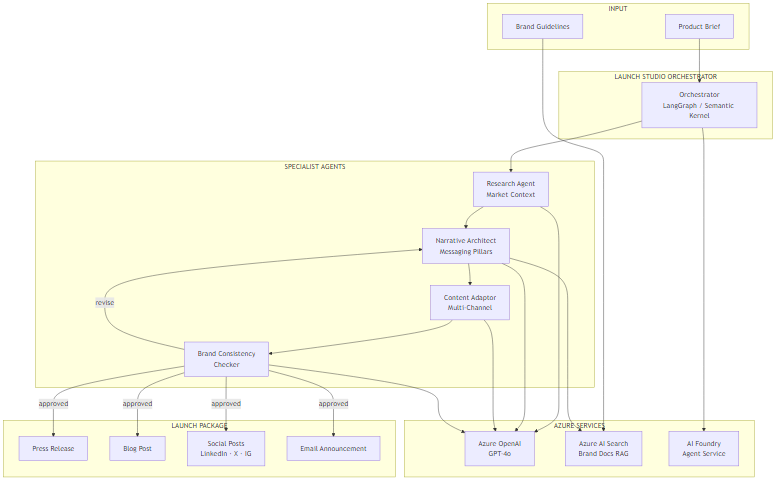
The flow is deliberately linear with one conditional branch. The Research Agent feeds directly into the Narrative Architect — this ordering matters because you want the messaging pillars grounded in market reality, not just product features. The Content Adaptor then works from those pillars, not the raw brief, which is how you enforce narrative coherence across channels.
The Brand Consistency Checker introduces the only loop in the graph. If content passes brand review, the pipeline exits and the launch package is assembled. If it fails, the checker returns structured feedback to the Narrative Architect, which revises the pillars and the cycle repeats. In practice, this rarely runs more than twice — the first revision almost always resolves the issue.
Azure AI Search serves two distinct roles here: one index for market research documents (competitor analyses, industry reports, audience surveys), and a separate index for brand guidelines (voice guide, prohibited terms, required boilerplate, approved examples). Keeping these separate lets you update each independently without cross-contamination.
Core Implementation: State and Orchestration
The state model carries everything through the pipeline. Every agent reads from and writes to this shared state, which makes the workflow both inspectable and debuggable.
from typing import TypedDict, List, Annotated
import operator

class LaunchStudioState(TypedDict):
    # Inputs
    product_brief: str
    target_audience: str
    launch_date: str

    # Research phase
    market_research: str
    competitor_context: str

    # Narrative phase
    messaging_pillars: List[str]
    key_differentiators: List[str]

    # Content generation
    press_release: str
    blog_post: str
    social_posts: dict[str, str]   # channel -> content
    email_announcement: str

    # Brand validation
    brand_approved: bool
    brand_feedback: str
    revision_count: int
public class LaunchStudioState
{
// Inputs
public string ProductBrief { get; set; } = string.Empty;
public string TargetAudience { get; set; } = string.Empty;
public string LaunchDate { get; set; } = string.Empty;
// Research phase
public string MarketResearch { get; set; } = string.Empty;
public string CompetitorContext { get; set; } = string.Empty;
// Narrative phase
public List<string> MessagingPillars { get; set; } = new();
public List<string> KeyDifferentiators { get; set; } = new();
// Content generation
public string PressRelease { get; set; } = string.Empty;
public string BlogPost { get; set; } = string.Empty;
public Dictionary<string, string> SocialPosts { get; set; } = new();
public string EmailAnnouncement { get; set; } = string.Empty;
// Brand validation
public bool BrandApproved { get; set; }
public string BrandFeedback { get; set; } = string.Empty;
public int RevisionCount { get; set; }
}The orchestration graph wires these agents together. In Python with LangGraph, this is explicit: you define nodes, edges, and conditional routing. In C# with Semantic Kernel, the agent framework gives you a different abstraction, but the logic maps directly.
from langgraph.graph import StateGraph, END
from langchain_openai import AzureChatOpenAI

def route_after_brand_check(state: LaunchStudioState) -> str:
    if state["brand_approved"]:
        return "approved"
    if state["revision_count"] >= 3:
        # Safety valve — avoid infinite loops
        return "approved"
    return "revise"

def build_launch_studio():
    graph = StateGraph(LaunchStudioState)

    graph.add_node("research", research_agent)
    graph.add_node("narrative_architect", narrative_agent)
    graph.add_node("content_adaptor", content_adaptor_agent)
    graph.add_node("brand_checker", brand_checker_agent)

    graph.set_entry_point("research")
    graph.add_edge("research", "narrative_architect")
    graph.add_edge("narrative_architect", "content_adaptor")
    graph.add_edge("content_adaptor", "brand_checker")
    graph.add_conditional_edges(
        "brand_checker",
        route_after_brand_check,
        {
            "approved": END,
            "revise": "narrative_architect"
        }
    )

    return graph.compile()
public class LaunchStudioOrchestrator
{
private readonly ResearchAgent _research;
private readonly NarrativeArchitectAgent _narrative;
private readonly ContentAdaptorAgent _adaptor;
private readonly BrandCheckerAgent _brandChecker;
public LaunchStudioOrchestrator(
ResearchAgent research,
NarrativeArchitectAgent narrative,
ContentAdaptorAgent adaptor,
BrandCheckerAgent brandChecker)
{
_research = research;
_narrative = narrative;
_adaptor = adaptor;
_brandChecker = brandChecker;
}
public async Task<LaunchStudioState> RunAsync(LaunchStudioState state)
{
state = await _research.RunAsync(state);
do
{
state = await _narrative.RunAsync(state);
state = await _adaptor.RunAsync(state);
state = await _brandChecker.RunAsync(state);
state.RevisionCount++;
}
while (!state.BrandApproved && state.RevisionCount < 3);
return state;
}
}Challenge #1 — Brand Voice Consistency via RAG
Here's what surprised me: the hardest part isn't generating good content in isolation. GPT-4o is genuinely excellent at writing press releases and blog posts. The hard part is ensuring that content generated by four separate agents in sequence all sounds like it was written by the same company.
The naive approach is to put your brand guidelines in the system prompt of every agent. This works, to a point. But brand guidelines are long — a proper voice guide with examples, prohibited terms, and tone variations by channel can easily run 10,000 words. You don't want all of that in every prompt, and more importantly, you want to retrieve the most relevant sections for each specific content type.
The solution is to index your brand guidelines in Azure AI Search and retrieve only the relevant chunks for each agent's task. The Narrative Architect retrieves sections about positioning and core messaging. The Content Adaptor retrieves channel-specific tone guidance. The Brand Checker retrieves the full validation checklist.
from langchain_openai import AzureOpenAIEmbeddings
from langchain_community.vectorstores.azuresearch import AzureSearch
import os

def get_brand_context(query: str, top_k: int = 3) -> str:
    embeddings = AzureOpenAIEmbeddings(
        azure_deployment="text-embedding-ada-002",
        azure_endpoint=os.environ["AZURE_OPENAI_ENDPOINT"],
        api_key=os.environ["AZURE_OPENAI_API_KEY"]
    )

    vector_store = AzureSearch(
        azure_search_endpoint=os.environ["AZURE_SEARCH_ENDPOINT"],
        azure_search_key=os.environ["AZURE_SEARCH_KEY"],
        index_name="brand-guidelines",
        embedding_function=embeddings.embed_query
    )

    docs = vector_store.similarity_search(query, k=top_k)
    return "\n\n".join(doc.page_content for doc in docs)

def narrative_agent(state: LaunchStudioState) -> dict:
    brand_context = get_brand_context(
        query=f"messaging pillars positioning {state['product_brief'][:200]}"
    )

    llm = AzureChatOpenAI(
        azure_deployment="gpt-4o",
        azure_endpoint=os.environ["AZURE_OPENAI_ENDPOINT"],
        api_key=os.environ["AZURE_OPENAI_API_KEY"],
        temperature=0.3
    )

    response = llm.invoke([
        {"role": "system", "content": f"""You are a narrative strategist.
Brand guidelines context:
{brand_context}

Market research:
{state['market_research']}

Extract 3-5 distinct messaging pillars. Each pillar: one sentence,
benefit-led, differentiated from competitors."""},
        {"role": "user", "content": state["product_brief"]}
    ])

    pillars = [line.strip() for line in response.content.split("\n")
               if line.strip() and line.strip()[0].isdigit()]

    return {
        "messaging_pillars": pillars,
        "revision_count": state.get("revision_count", 0)
    }
using Azure.Search.Documents;
using Azure.Search.Documents.Models;
using Microsoft.SemanticKernel;
using System.ComponentModel;
public class BrandContextPlugin
{
private readonly SearchClient _searchClient;
private readonly AzureOpenAITextEmbeddingGenerationService _embeddings;
public BrandContextPlugin(SearchClient searchClient,
AzureOpenAITextEmbeddingGenerationService embeddings)
{
_searchClient = searchClient;
_embeddings = embeddings;
}
[KernelFunction("get_brand_context")]
[Description("Retrieves relevant brand guidelines for a given content task")]
public async Task<string> GetBrandContextAsync(string query, int topK = 3)
{
var vectors = await _embeddings.GenerateEmbeddingsAsync(new[] { query });
var queryVector = vectors[0].ToArray();
var searchOptions = new SearchOptions
{
VectorSearch = new VectorSearchOptions
{
Queries =
{
new VectorizedQuery(queryVector)
{
KNearestNeighborsCount = topK,
Fields = { "content_vector" }
}
}
},
Size = topK
};
var results = await _searchClient.SearchAsync<BrandDocument>(
searchText: null, options: searchOptions);
var context = new System.Text.StringBuilder();
await foreach (var result in results.Value.GetResultsAsync())
context.AppendLine(result.Document.Content);
return context.ToString();
}
}The Trade-off Here
RAG retrieval adds latency — around 300–500ms per call with Azure AI Search at the S1 tier. For a launch studio that generates a complete package in one go, this is acceptable. If you were doing real-time generation (e.g., auto-responding to journalist inquiries), you'd want to cache brand context at session start instead of retrieving per agent.
Challenge #2 — Multi-Channel Adaptation Without Narrative Drift
The Content Adaptor is where most implementations go wrong. The temptation is to give each channel its own independent prompt with the product brief as input. This produces content that reads well in isolation but contradicts itself across channels — because each channel's LLM call is effectively reasoning from scratch.
The trade-off here is between narrative coherence and channel authenticity. You want each piece to feel native to its channel (a LinkedIn post should not read like a press release excerpt), but you also need every piece to reinforce the same messaging pillars. The solution is to make the pillars explicit input to every channel prompt, and to specify format constraints precisely so the LLM doesn't improvise.
CHANNEL_SPECS = {
    "press_release": {
        "max_words": 600,
        "style": "Formal third-person. Inverted pyramid structure. "
                 "Lead with the most newsworthy claim.",
        "must_include": [
            "FOR IMMEDIATE RELEASE header",
            "quote from a company spokesperson",
            "company boilerplate paragraph",
            "press contact details placeholder"
        ]
    },
    "blog_post": {
        "max_words": 800,
        "style": "Educational first-person plural ('we built', 'we found'). "
                 "Problem-solution-outcome structure.",
        "must_include": [
            "opening paragraph that leads with the problem",
            "at least one concrete example or use case",
            "a clear next step for the reader"
        ]
    },
    "linkedin": {
        "max_chars": 1300,
        "style": "Conversational professional. Hook on first line. "
                 "No jargon. Line breaks between paragraphs.",
        "must_include": [
            "hook line (standalone, no lead-in)",
            "3-5 bullet point insights",
            "call to action linking to blog post"
        ]
    },
    "email": {
        "max_words": 250,
        "style": "Direct and benefit-first. One idea per sentence.",
        "must_include": [
            "subject line on first line",
            "preview text on second line",
            "single clear CTA button label"
        ]
    }
}

def content_adaptor_agent(state: LaunchStudioState) -> dict:
    llm = AzureChatOpenAI(
        azure_deployment="gpt-4o",
        azure_endpoint=os.environ["AZURE_OPENAI_ENDPOINT"],
        api_key=os.environ["AZURE_OPENAI_API_KEY"],
        temperature=0.5
    )

    pillars_text = "\n".join(f"- {p}" for p in state["messaging_pillars"])
    outputs = {}

    for channel, spec in CHANNEL_SPECS.items():
        limit = (f"{spec['max_words']} words max"
                 if "max_words" in spec
                 else f"{spec['max_chars']} characters max")

        must_include = "\n".join(f"  - {item}" for item in spec["must_include"])

        response = llm.invoke([{
            "role": "system",
            "content": f"""Generate {channel} content for a product launch.

MESSAGING PILLARS (every piece of content must reinforce these):
{pillars_text}

FORMAT REQUIREMENTS:
- Style: {spec['style']}
- Limit: {limit}
- Must include:
{must_include}

Do NOT introduce new claims not present in the messaging pillars."""
        }, {
            "role": "user",
            "content": f"Product: {state['product_brief']}\nAudience: {state['target_audience']}"
        }])

        outputs[channel] = response.content

    return {
        "press_release": outputs["press_release"],
        "blog_post": outputs["blog_post"],
        "social_posts": {"linkedin": outputs["linkedin"]},
        "email_announcement": outputs["email"]
    }
public record ChannelSpec(
int? MaxWords,
int? MaxChars,
string Style,
string[] MustInclude
);
public class ContentAdaptorAgent
{
private readonly Kernel _kernel;
private static readonly Dictionary<string, ChannelSpec> ChannelSpecs = new()
{
["press_release"] = new(600, null,
"Formal third-person. Inverted pyramid. Lead with the most newsworthy claim.",
["FOR IMMEDIATE RELEASE header", "spokesperson quote",
"company boilerplate", "press contact placeholder"]),
["blog_post"] = new(800, null,
"Educational first-person plural. Problem-solution-outcome.",
["problem-led opening", "concrete use case", "clear next step"]),
["linkedin"] = new(null, 1300,
"Conversational professional. Hook on first line. No jargon.",
["standalone hook line", "3-5 bullet insights", "CTA to blog post"]),
["email"] = new(250, null,
"Direct and benefit-first. One idea per sentence.",
["subject line", "preview text", "single CTA label"])
};
public ContentAdaptorAgent(Kernel kernel) => _kernel = kernel;
public async Task<LaunchStudioState> RunAsync(LaunchStudioState state)
{
var pillarsText = string.Join("\n",
state.MessagingPillars.Select(p => $"- {p}"));
foreach (var (channel, spec) in ChannelSpecs)
{
var limit = spec.MaxWords.HasValue
? $"{spec.MaxWords} words max"
: $"{spec.MaxChars} characters max";
var mustInclude = string.Join("\n",
spec.MustInclude.Select(i => $" - {i}"));
var prompt = $"""
Generate {channel} content for a product launch.
MESSAGING PILLARS (reinforce all of these):
{pillarsText}
FORMAT REQUIREMENTS:
- Style: {spec.Style}
- Limit: {limit}
- Must include:
{mustInclude}
Product: {state.ProductBrief}
Audience: {state.TargetAudience}
Do NOT introduce claims not in the messaging pillars.
""";
var result = await _kernel.InvokePromptAsync(prompt);
state.SocialPosts[channel] = result.ToString();
}
state.PressRelease = state.SocialPosts["press_release"];
state.BlogPost = state.SocialPosts["blog_post"];
state.EmailAnnouncement = state.SocialPosts["email"];
return state;
}
}In practice, you'll find that the most important parameter here isn't the style description — it's the explicit prohibition at the end: "Do NOT introduce new claims not present in the messaging pillars." Without that, GPT-4o will helpfully add claims it infers from context. Those inferred claims are often plausible but unapproved, which is exactly what a brand checker should catch.
Where This Actually Pays Off
The honest answer is: this pays off most for teams that launch frequently and operate with small content teams. If you're doing one major product launch per quarter with a dedicated agency, the overhead of maintaining the system may not be justified. But if you're a SaaS company doing monthly feature releases, or a startup where the CTO is also writing the press releases, the ROI is real.
Where the Value Comes From
Speed — A full launch package (press release, blog post, LinkedIn post, email) generates in under 3 minutes, versus 3–14 days manually. The first draft is genuinely usable, not a starting point for major rewrites.
Consistency — Every channel reinforces the same messaging pillars because they all share the same source of narrative truth. Brand drift across channels drops to near zero.
Institutional memory — The product brief becomes the canonical input. When positioning changes, you update the brief and regenerate. The market research index accumulates over time, so later launches benefit from earlier research.
Cost reduction — At $0.10–$0.20 per complete launch package in LLM costs (more on this in Part 2), the economics are hard to argue with compared to agency rates.
When This Doesn't Work
This system produces polished first drafts, not final copy. Executive quotes still need a human. Strategic positioning decisions — what to lead with, what to downplay — still need a human who understands competitive context. Think of this as a very capable first-draft machine, not an end-to-end replacement for communication strategy.
The ROI framework I use: if a human writer would spend more than 4 hours producing the same assets, AI generation is likely worth it for the first draft. At GPT-4o rates, 4 hours of a $60/hr writer's time ($240) versus $0.15 in LLM costs is a 1,600x cost difference on materials alone — even accounting for review and refinement time.
| Launch Type | Manual Time | AI-Assisted Time | Best Fit? |
|---|---|---|---|
| Monthly feature release | 3–5 days | 2–4 hours | Excellent |
| Quarterly major launch | 2–4 weeks | 2–3 days | Good |
| Annual flagship launch | 6–12 weeks | 1–2 weeks | Moderate |
| Crisis comms | Hours | Not recommended | Avoid |
What's Next
Part 1 covered the core architecture: the four-agent pipeline, the brand voice RAG layer, and the multi-channel content adaptation strategy. You have enough here to build a working prototype that generates a coherent launch package from a product brief.
Part 2 gets into the production realities: what does a full launch package actually cost in Azure OpenAI tokens, how do you trace and debug a multi-agent workflow when something goes wrong, and — importantly — when should you not use this approach at all.
Ready for Part 2?
Part 2 covers production considerations: cost analysis, observability, and when NOT to use this approach.
Read Part 2 →Want More Practical AI Tutorials?
I write about building production AI systems with Azure, Python, and C#. Subscribe for practical tutorials delivered twice a month.
Subscribe to Newsletter →