In Part 1, we built the case for multi-agent architecture. Now comes the hard part: making it work in production without burning through your budget.
Demo code is easy. You spin up a LangGraph workflow, wire up some agents, and show a stakeholder a successful conversation. Everyone's impressed. Then someone asks: "What does this cost to run?"
Multi-agent systems have a cost profile that surprises teams used to single-prompt chatbots. Each conversation turn might trigger 3-4 LLM calls instead of 1. Each call adds latency. State persistence needs infrastructure. Debugging requires tracing through multiple agents.
None of this means multi-agent is wrong. It means you need to understand the trade-offs before your first invoice arrives.
What You'll Learn
- Real cost breakdown: tokens, latency, infrastructure
- Observability patterns for multi-agent debugging
- LangGraph vs Semantic Kernel: which to choose
- Azure services and pricing considerations
- When to avoid multi-agent entirely
Cost Reality: Token Counts & $/Conversation
Let's trace the token usage through a typical 3-turn shopping conversation.
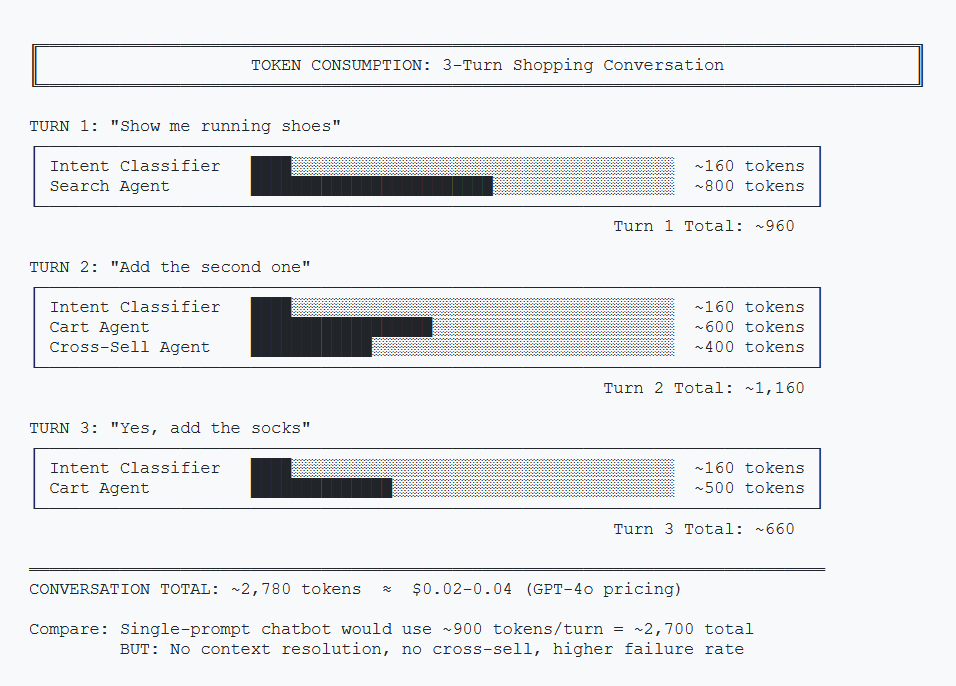
Token Breakdown per Turn
| Component | Input Tokens | Output Tokens | Notes |
|---|---|---|---|
| Intent Classifier | ~150 | ~10 | Runs every turn |
| Search Agent | ~500 | ~300 | Includes RAG context |
| Cart Agent | ~400 | ~200 | Includes recently_shown |
| Cross-Sell Agent | ~300 | ~150 | Triggered after cart ops |
| Per Turn (avg) | ~600 | ~300 | ~900 tokens/turn |
Monthly Cost Estimate
Using Azure OpenAI GPT-4o pricing (as of January 2026):
| Scenario | Conversations/Day | Turns/Conversation | Monthly Cost |
|---|---|---|---|
| Low Volume | 100 | 3 | ~$25-40 |
| Medium Volume | 1,000 | 4 | ~$300-450 |
| High Volume | 10,000 | 5 | ~$4,000-6,000 |
Compare this to a single-prompt chatbot at roughly 1/3 the cost. The question is whether the improved conversion rate justifies the 3x token spend.
Cost Optimization Tips
- Use GPT-4o-mini for classification. The intent classifier doesn't need GPT-4's reasoning power.
- Cache common queries. "What's in my cart?" doesn't need an LLM call every time.
- Batch vector searches. One search call returning 5 products is cheaper than 5 calls returning 1 each.
Observability: Tracing Through Agents
When a conversation goes wrong, you need to answer: Which agent failed? Why? What was the state at that point?
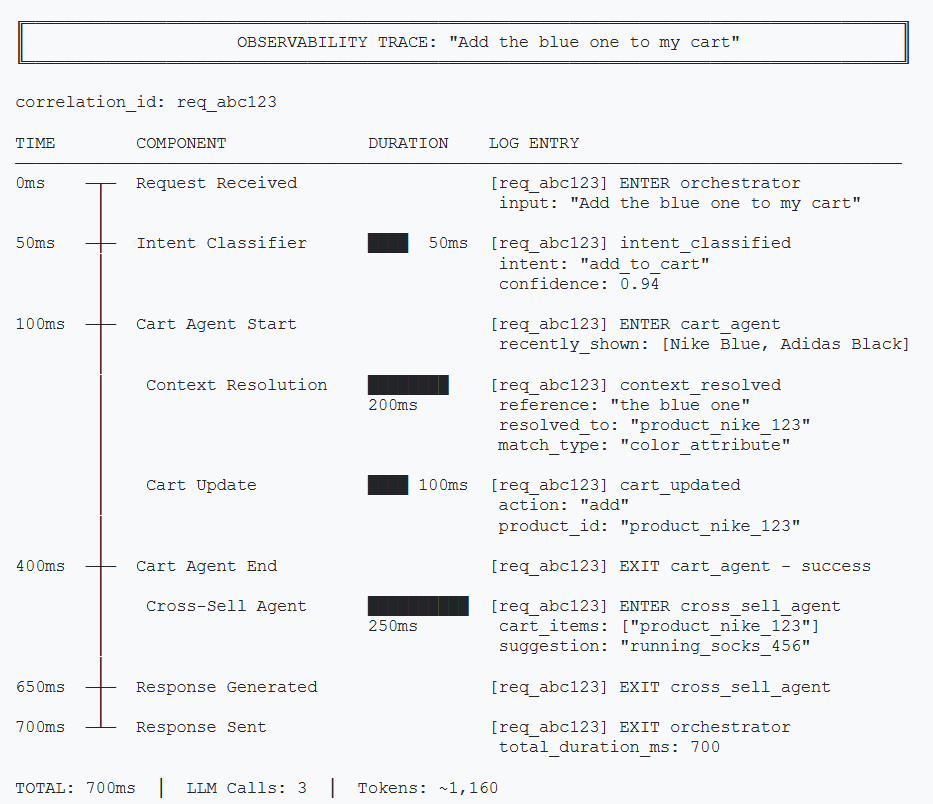
Correlation IDs
Every request needs a unique ID that follows it through all agents.
import uuid
import logging
from functools import wraps

def trace_agent(agent_name: str):
    """Decorator to add tracing to agent methods."""
    def decorator(func):
        @wraps(func)
        async def wrapper(state: ConversationState, *args, **kwargs):
            correlation_id = state.get("correlation_id", str(uuid.uuid4()))
            logger = logging.getLogger(agent_name)

            logger.info(f"[{correlation_id}] ENTER {agent_name}")

            try:
                result = await func(state, *args, **kwargs)
                logger.info(f"[{correlation_id}] EXIT {agent_name} - success")
                return result
            except Exception as e:
                logger.error(f"[{correlation_id}] EXIT {agent_name} - error: {e}")
                raise

        return wrapper
    return decorator

# Usage
@trace_agent("cart_agent")
async def handle_cart_operation(state: ConversationState):
    pass
public class TracingMiddleware
{
private readonly ILogger _logger;
public async Task<T> TraceAsync<T>(
string agentName,
string correlationId,
Func<Task<T>> agentAction)
{
_logger.LogInformation(
"[{CorrelationId}] ENTER {AgentName}",
correlationId, agentName);
try
{
var result = await agentAction();
_logger.LogInformation(
"[{CorrelationId}] EXIT {AgentName} - success",
correlationId, agentName);
return result;
}
catch (Exception ex)
{
_logger.LogError(ex,
"[{CorrelationId}] EXIT {AgentName} - error",
correlationId, agentName);
throw;
}
}
}
// Usage
await _tracing.TraceAsync("cart_agent", correlationId,
() => HandleCartOperationAsync(state));Structured Logging
Log the right data at each step:
# Intent classification
logger.info({
    "event": "intent_classified",
    "correlation_id": correlation_id,
    "input_message": last_message[:100],
    "classified_intent": intent,
    "duration_ms": duration
})

# Context resolution
logger.info({
    "event": "context_resolved",
    "correlation_id": correlation_id,
    "reference": "the blue one",
    "resolved_to": "product_123",
    "candidates_count": len(recently_shown),
    "duration_ms": duration
})
// Intent classification
_logger.LogInformation(
"Intent classified: {Event} {CorrelationId} {Intent} {DurationMs}",
new {
Event = "intent_classified",
CorrelationId = correlationId,
InputMessage = message[..Math.Min(100, message.Length)],
ClassifiedIntent = intent,
DurationMs = duration
});
// Context resolution
_logger.LogInformation(
"Context resolved: {Event} {CorrelationId} {Reference} {ResolvedTo}",
new {
Event = "context_resolved",
CorrelationId = correlationId,
Reference = "the blue one",
ResolvedTo = "product_123",
CandidatesCount = recentlyShown.Count,
DurationMs = duration
});What to Monitor
- Intent classification accuracy: Sample and manually review 1% of classifications
- Context resolution success rate: How often does "the blue one" actually resolve?
- Agent latency percentiles: P50, P95, P99 per agent
- Escalation triggers: What patterns lead to "talk to human"?
Framework Choice: LangGraph vs Semantic Kernel
Two frameworks dominate multi-agent orchestration: LangGraph (Python) and Semantic Kernel (C#/.NET). Here's how they compare.
| Aspect | LangGraph | Semantic Kernel |
|---|---|---|
| Language | Python | C#, Python (beta) |
| Paradigm | Graph-based state machine | Plugin-based orchestration |
| State Management | Built-in, typed | Manual via context |
| Routing | Declarative edges | Planner-based (LLM decides) |
| Azure Integration | Via langchain-azure | Native, first-party |
| Learning Curve | Moderate (graphs) | Moderate (plugins) |
| Production Maturity | Good | Excellent (Microsoft-backed) |
LangGraph (Python)
Why choose LangGraph: If your team writes Python, LangGraph is the natural choice for multi-agent orchestration.
- Explicit routing control — you define the state machine, not the LLM
- Graph-based mental model — visualize complex flows as nodes and edges
- LangChain ecosystem — integrates with existing LangChain tools and chains
# LangGraph: Explicit routing
workflow.add_conditional_edges(
    "classify_intent",
    lambda state: state["current_intent"],
    {
        "product_search": "search",
        "add_to_cart": "cart",
    },
)
Semantic Kernel (C#/.NET)
Why choose Semantic Kernel: If your backend is C#/.NET, Semantic Kernel is purpose-built for your stack with first-party Microsoft support.
- Native Azure integration — first-party support, Microsoft-maintained
- Plugin architecture — familiar pattern for .NET developers
- Enterprise-ready — production-proven at scale with Microsoft backing
// Semantic Kernel: Plugin-based
public class CartPlugin
{
    [KernelFunction("add_to_cart")]
    [Description("Adds a product to the shopping cart")]
    public async Task<string> AddToCartAsync(
        Kernel kernel,
        [Description("Product ID")] string productId)
    {
        // Cart logic here
    }
}

// Register and let the planner decide
kernel.Plugins.AddFromType<CartPlugin>();
The Bottom Line
This is primarily a language decision. Both frameworks are production-ready and well-supported.
Python team? Use LangGraph. C#/.NET team? Use Semantic Kernel. Don't fight your stack.
Azure Infrastructure
Here's what you need to run multi-agent in Azure, with approximate pricing.
| Service | Purpose | Starting Price |
|---|---|---|
| Azure OpenAI | LLM calls (GPT-4o, GPT-4o-mini) | Pay-per-token |
| Azure AI Search | Vector + keyword search for RAG | ~$75/month (Basic) |
| Azure Redis Cache | Conversation state persistence | ~$16/month (Basic) |
| Azure Container Apps | Hosting the orchestrator | ~$20/month (low traffic) |
| Azure Monitor | Logging, tracing, alerts | Pay-per-GB ingested |
Azure AI Foundry Agent Service
Azure AI Foundry Agent Service is now generally available, providing managed orchestration for multi-agent systems—an alternative to self-hosting LangGraph or building custom orchestration.
Key features:
- Built-in agent routing and multi-agent workflows
- Managed state persistence
- Native Azure OpenAI integration
- Observability through Azure Monitor
- Computer Use and Browser Automation tools (preview)
Check Azure AI Foundry Agent Service for current pricing and features.
When NOT to Use Multi-Agent
Multi-agent isn't always the answer. Here's when simpler approaches win.
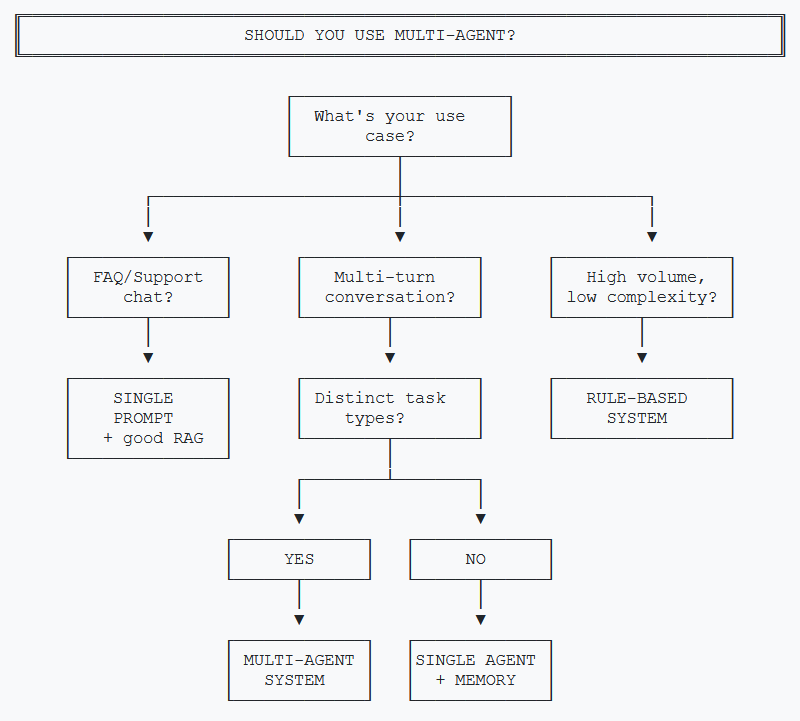
Skip Multi-Agent When:
- You're building FAQ/support chat. Single prompt with good retrieval handles this fine.
- Conversations are single-turn. No context to maintain means no need for state management.
- Tasks don't overlap. If users either search OR check out but never both, separate simple bots work better.
- Volume is under 100 conversations/day. The engineering investment won't pay off.
- Latency is critical (<500ms). Multi-agent adds 2-3x latency from sequential LLM calls.
The Single-Agent-With-Memory Alternative
For many use cases, a single agent with proper conversation memory handles 80% of what multi-agent does, at 50% of the cost and complexity.
# Sometimes this is enough
response = await llm.chat([
    {"role": "system", "content": COMPREHENSIVE_PROMPT},
    *conversation_history,  # Last 10 messages
    {"role": "user", "content": user_message}
])
// Sometimes this is enough
var chatHistory = new ChatHistory(COMPREHENSIVE_PROMPT);
foreach (var msg in conversationHistory.TakeLast(10))
chatHistory.Add(msg);
chatHistory.AddUserMessage(userMessage);
var response = await chatCompletion.GetChatMessageContentAsync(
chatHistory);Multi-agent shines when tasks are fundamentally different (search vs cart vs recommendations), not just different topics within one task.
Interactive Demo Concept
Want to show stakeholders how multi-agent works without building a full backend? Here's a client-side demo approach.
Demo Architecture
A static HTML page with hardcoded conversation flows. User selects from pre-defined messages, and the page shows:
- Which agent handled the request
- The state changes that occurred
- The response generated
// Simplified demo logic (no actual LLM calls)
const DEMO_FLOWS = {
    "show me running shoes": {
        agent: "Search Agent",
        stateChanges: {
            recently_shown: ["Nike Air Zoom", "Adidas Ultra", "Brooks Ghost"]
        },
        response: "Here are 3 options: 1) Nike Air Zoom..."
    },
    "add the first one": {
        agent: "Cart Agent",
        stateChanges: {
            cart: { items: ["Nike Air Zoom"], total: 129 }
        },
        response: "Added Nike Air Zoom to your cart."
    }
};

function handleUserMessage(message) {
    const flow = DEMO_FLOWS[message.toLowerCase()];
    showAgentBadge(flow.agent);
    animateStateChanges(flow.stateChanges);
    displayResponse(flow.response);
}
This isn't a real implementation—it's a communication tool. It helps non-technical stakeholders understand the flow without requiring backend infrastructure.
Key Takeaways
- Cost scales with complexity. Budget 3x tokens compared to single-prompt. Use cheaper models for classification.
- Observability is non-negotiable. Correlation IDs and structured logging are the difference between debugging and guessing.
- Framework choice depends on ecosystem. LangGraph for explicit Python control, Semantic Kernel for Azure/.NET shops.
- Know when to stop. Single-agent-with-memory handles 80% of cases. Multi-agent is for fundamentally different tasks that need isolation.
The Honest Truth
Multi-agent is powerful but not magic. It's more expensive, more complex, and harder to debug than simple approaches. Use it when the business value justifies the investment—not because it's architecturally elegant.
This concludes the two-part series on multi-agent AI systems. For questions or feedback, reach out on LinkedIn.
Want More Practical AI Tutorials?
I write about building production AI systems with Azure, Python, and C#. Subscribe for practical tutorials delivered twice a month.
Subscribe to Newsletter →