Most companies' internal knowledge is scattered across dozens of tools, and employees spend roughly 20% of their working time just searching for information they need to do their jobs.
If you have ever worked in a company with more than fifty people, you know the feeling. The onboarding doc lives in Confluence, but the updated version is actually in someone's Google Drive. The deployment runbook is in a Slack thread from six months ago. The API contract is in a PDF that got emailed around. And the person who really knows how the billing system works left the company last quarter.
This is the knowledge silo problem, and it gets worse as companies grow. Wikis go stale within weeks of being written. Tribal knowledge stays locked in people's heads. New hires spend their first month just figuring out where things are, not actually learning how things work.
Existing search tools don't solve this because they're keyword-based. Confluence search, SharePoint search, Slack search — they all work by matching the exact words you type. If you search for "how to deploy the payment service" but the document says "release process for billing microservice," you get nothing. Ctrl+F doesn't work across systems, and keyword search doesn't understand what you actually mean.
In this article, I'll show you how to build a RAG-based internal knowledge bot using Azure OpenAI, Azure AI Search, and either LangChain (Python) or Semantic Kernel (C#). We will cover the architecture, document ingestion pipeline, chunking strategy, and hybrid retrieval — everything you need to go from scattered documents to a bot that actually answers questions with cited sources.
What You'll Learn
- How RAG (Retrieval-Augmented Generation) works and why it beats fine-tuning for internal knowledge
- Document chunking strategies and their impact on retrieval quality
- Hybrid search combining BM25 keyword matching with vector similarity
- Core implementation in both Python (LangChain) and C# (Semantic Kernel)
- How to calculate ROI before committing engineering resources
Current Approach & Why It Fails
Let me paint the typical picture. Your company has Confluence for documentation, SharePoint for policies, Slack for real-time communication, and maybe a handful of Google Docs, Notion pages, or internal wikis floating around. Each of these tools has its own search, and none of them talk to each other.
The baseline experience looks like this: an engineer needs to know how to configure the staging environment. They search Confluence for "staging setup" and get forty results sorted by most recently modified. Half of them are from two years ago and reference infrastructure that no longer exists. They try Slack search next, find a thread where someone answered this question three months ago, but the thread references a doc that has since been moved. Twenty minutes later, they message a senior engineer directly and get the answer in two sentences.
The core limitations of keyword-based search are straightforward:
- No semantic understanding — searching "how to handle customer refunds" won't find a document titled "Return Processing Workflow"
- No cross-source answers — the answer might require combining information from a Confluence page and a Slack thread
- Results ranked by recency, not relevance — the most recently edited document is not necessarily the most useful one
- No synthesis — even when results are relevant, the user still has to read through multiple documents and piece together an answer
The cost of this is real and quantifiable. If the average knowledge worker earns $120,000 per year and spends 20% of their time searching for information, that's $24,000 per employee per year spent on searching. For a team of 100, that's $2.4 million annually. Even if you could cut that search time by 30%, you would save $720,000 — more than enough to justify building a knowledge bot.
Don't Skip the Baseline Measurement
Before building anything, survey your team. How long do they spend searching for information each day? Which sources do they check? What questions come up repeatedly? Without baseline metrics, you cannot measure improvement or justify the investment.
The Solution: Retrieval-Augmented Generation
RAG stands for Retrieval-Augmented Generation, and the concept is straightforward: instead of asking an LLM to answer questions from its training data (which doesn't include your internal documents), you first retrieve relevant document chunks from your own knowledge base and then pass those chunks to the LLM as context for generating an answer.
How RAG Works in Three Steps
- Retrieve — Search your document store for chunks relevant to the user's question using hybrid search (keyword + vector similarity)
- Augment — Inject those retrieved chunks into the LLM prompt as context
- Generate — The LLM generates an answer grounded in the retrieved documents, citing its sources
Why RAG instead of fine-tuning? Three reasons. First, RAG stays current without retraining — when a document is updated, the new version gets re-indexed and immediately available. Fine-tuning requires retraining the model every time your knowledge base changes. Second, RAG answers cite their sources, so users can verify the answer by clicking through to the original document. Fine-tuned models hallucinate with confidence and give you no way to check. Third, RAG requires no ML expertise to maintain — it's an engineering problem, not a data science problem.
Our tech stack for this project:
| Component | Technology | Purpose |
|---|---|---|
| LLM (Generation) | Azure OpenAI GPT-4o | Answer generation from retrieved context |
| Embeddings | Azure OpenAI text-embedding-3-large | Convert text chunks to vectors |
| Vector Store | Azure AI Search | Hybrid retrieval (BM25 + vector) |
| Orchestration (Python) | LangChain | Document loading, chunking, chain composition |
| Orchestration (C#) | Semantic Kernel | Document processing, memory, chain composition |
I chose Azure AI Search over standalone vector databases like Pinecone or Weaviate because it supports hybrid search natively — combining BM25 keyword matching with vector similarity in a single query. This matters because, as we will see later, pure vector search and pure keyword search each miss cases that the other catches.
Architecture Overview
Before diving into code, let me give you the full picture. The system has two pipelines: an ingestion pipeline that runs offline to process documents, and a query pipeline that runs in real time when users ask questions.
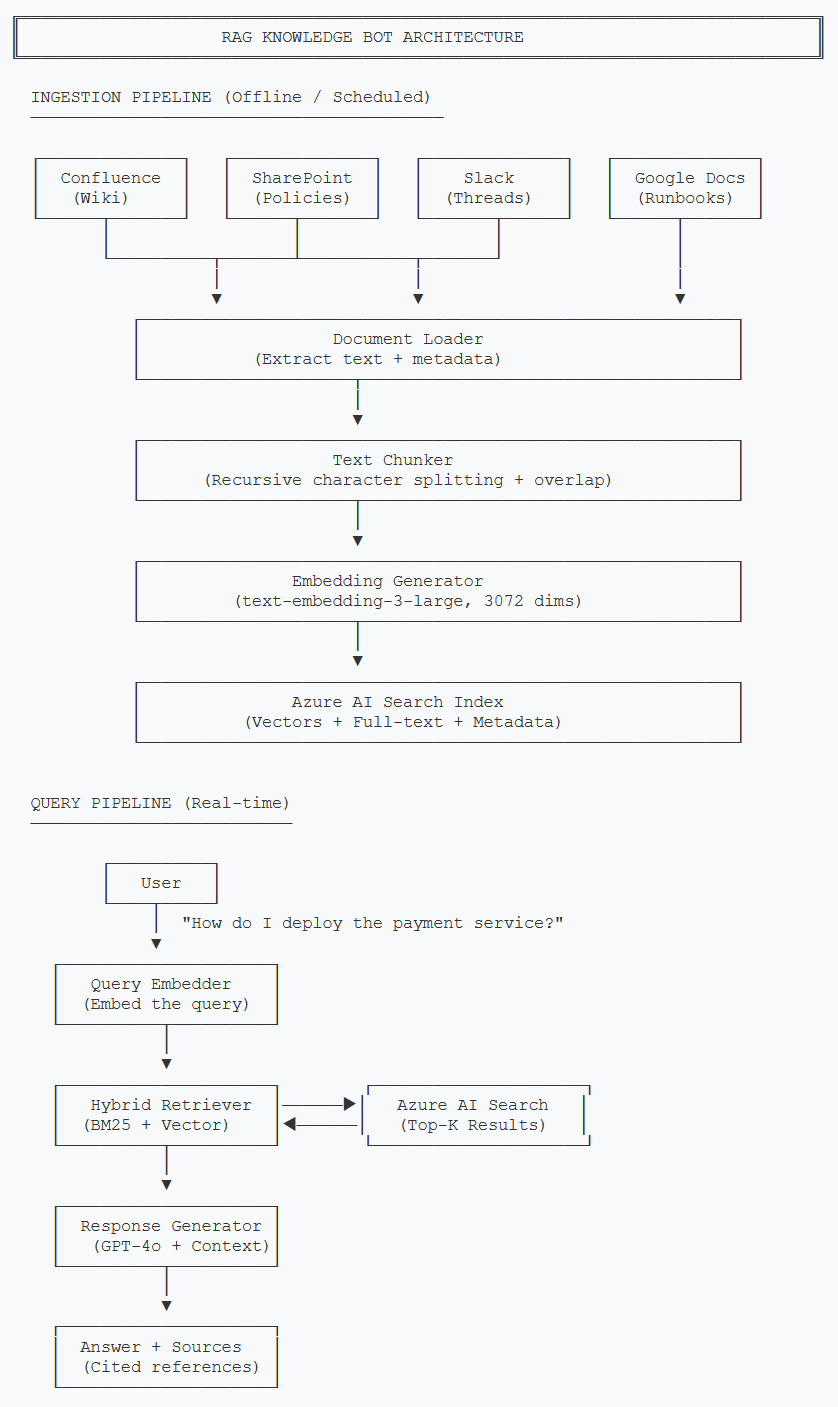
Two-pipeline architecture: ingestion runs on a schedule, query pipeline responds in real time
The ingestion pipeline is the part most teams underestimate. Getting documents out of Confluence and SharePoint, handling different formats (HTML, PDF, Markdown, plain text), preserving useful metadata like author, last-modified date, and source URL — this is where 60% of the work lives. The query pipeline is comparatively straightforward once your documents are indexed properly.
Let me walk through each component:
- Document Loader — Extracts raw text and metadata from each source system. Each source needs its own connector (Confluence API, SharePoint Graph API, Slack API, etc.)
- Text Chunker — Splits documents into smaller pieces. This is more nuanced than it sounds, and I'll cover the strategy in detail below.
- Embedding Generator — Converts each chunk into a 3072-dimensional vector using text-embedding-3-large.
- Azure AI Search — Stores both the vector embeddings and the original text, enabling hybrid search.
- Hybrid Retriever — Combines keyword (BM25) and vector similarity search using Reciprocal Rank Fusion.
- Response Generator — Takes the top-K retrieved chunks, injects them as context, and asks GPT-4o to generate an answer with source citations.
Core Implementation
Let's start with the data model. Every document chunk that flows through our system needs a consistent structure — the original text, its vector embedding, metadata about where it came from, and a unique identifier.
Document Model
from dataclasses import dataclass, field
from typing import List, Optional
import hashlib

@dataclass
class DocumentChunk:
    """Represents a single chunk of a document ready for indexing."""
    chunk_id: str
    content: str
    embedding: Optional[List[float]] = None
    source_url: str = ""
    source_title: str = ""
    source_type: str = ""  # "confluence", "sharepoint", "slack"
    author: str = ""
    last_modified: str = ""
    chunk_index: int = 0
    total_chunks: int = 0

    @staticmethod
    def generate_id(source_url: str, chunk_index: int) -> str:
        """Generate a deterministic ID for deduplication."""
        raw = f"{source_url}::chunk::{chunk_index}"
        return hashlib.sha256(raw.encode()).hexdigest()[:16]


@dataclass
class QueryResult:
    """A single result from hybrid search."""
    chunk: DocumentChunk
    score: float
    match_type: str  # "vector", "keyword", "hybrid"


@dataclass
class KnowledgeBotResponse:
    """The final response returned to the user."""
    answer: str
    sources: List[QueryResult]
    confidence: float  # 0.0 to 1.0
    query: str
using System.Security.Cryptography;
using System.Text;
namespace KnowledgeBot.Models;
/// <summary>
/// Represents a single chunk of a document ready for indexing.
/// </summary>
public class DocumentChunk
{
public string ChunkId { get; set; } = string.Empty;
public string Content { get; set; } = string.Empty;
public float[]? Embedding { get; set; }
public string SourceUrl { get; set; } = string.Empty;
public string SourceTitle { get; set; } = string.Empty;
public string SourceType { get; set; } = string.Empty;
public string Author { get; set; } = string.Empty;
public string LastModified { get; set; } = string.Empty;
public int ChunkIndex { get; set; }
public int TotalChunks { get; set; }
/// <summary>
/// Generate a deterministic ID for deduplication.
/// </summary>
public static string GenerateId(string sourceUrl, int chunkIndex)
{
var raw = $"{sourceUrl}::chunk::{chunkIndex}";
var hash = SHA256.HashData(Encoding.UTF8.GetBytes(raw));
return Convert.ToHexString(hash)[..16].ToLower();
}
}
/// <summary>
/// A single result from hybrid search.
/// </summary>
public class QueryResult
{
public DocumentChunk Chunk { get; set; } = new();
public double Score { get; set; }
public string MatchType { get; set; } = "hybrid";
}
/// <summary>
/// The final response returned to the user.
/// </summary>
public class KnowledgeBotResponse
{
public string Answer { get; set; } = string.Empty;
public List<QueryResult> Sources { get; set; } = new();
public double Confidence { get; set; }
public string Query { get; set; } = string.Empty;
}Notice the generate_id method. By using a deterministic hash of the source
URL and chunk index, we can re-ingest documents without creating duplicates. When a
Confluence page gets updated, we re-chunk it, generate the same IDs, and the updated
chunks replace the old ones in the index.
Embedding Generation
Next, we need to convert text chunks into vector embeddings. I'm using
text-embedding-3-large which produces 3072-dimensional vectors. It's more
expensive than text-embedding-3-small (1536 dimensions), but the retrieval
quality difference is significant for technical documentation where precision matters.
from openai import AzureOpenAI
from typing import List
import os

class EmbeddingService:
    """Generate embeddings using Azure OpenAI."""

    def __init__(self):
        self.client = AzureOpenAI(
            azure_endpoint=os.getenv("AZURE_OPENAI_ENDPOINT"),
            api_key=os.getenv("AZURE_OPENAI_API_KEY"),
            api_version="2024-06-01"
        )
        self.model = "text-embedding-3-large"

    def embed_text(self, text: str) -> List[float]:
        """Generate embedding for a single text string."""
        response = self.client.embeddings.create(
            input=text,
            model=self.model
        )
        return response.data[0].embedding

    def embed_batch(self, texts: List[str], batch_size: int = 16) -> List[List[float]]:
        """Generate embeddings for a batch of texts.

        Azure OpenAI has a limit of 16 texts per request
        for text-embedding-3-large.
        """
        all_embeddings = []
        for i in range(0, len(texts), batch_size):
            batch = texts[i:i + batch_size]
            response = self.client.embeddings.create(
                input=batch,
                model=self.model
            )
            all_embeddings.extend(
                [item.embedding for item in response.data]
            )
        return all_embeddings
using Azure;
using Azure.AI.OpenAI;
using OpenAI.Embeddings;
namespace KnowledgeBot.Services;
/// <summary>
/// Generate embeddings using Azure OpenAI.
/// </summary>
public class EmbeddingService
{
private readonly EmbeddingClient _client;
private const int BatchSize = 16;
public EmbeddingService(IConfiguration config)
{
var azureClient = new AzureOpenAIClient(
new Uri(config["AzureOpenAI:Endpoint"]!),
new AzureKeyCredential(config["AzureOpenAI:ApiKey"]!)
);
_client = azureClient.GetEmbeddingClient("text-embedding-3-large");
}
/// <summary>
/// Generate embedding for a single text string.
/// </summary>
public async Task<float[]> EmbedTextAsync(string text)
{
var result = await _client.GenerateEmbeddingAsync(text);
return result.Value.ToFloats().ToArray();
}
/// <summary>
/// Generate embeddings for a batch of texts.
/// Azure OpenAI limits to 16 texts per request.
/// </summary>
public async Task<List<float[]>> EmbedBatchAsync(IList<string> texts)
{
var allEmbeddings = new List<float[]>();
for (int i = 0; i < texts.Count; i += BatchSize)
{
var batch = texts.Skip(i).Take(BatchSize).ToList();
var result = await _client.GenerateEmbeddingsAsync(batch);
allEmbeddings.AddRange(
result.Value.Select(e => e.ToFloats().ToArray())
);
}
return allEmbeddings;
}
}The batch processing matters more than you might expect. If you have 10,000 document chunks, embedding them one at a time takes roughly 45 minutes. Batching at 16 per request cuts that to under 5 minutes. Always batch your embedding calls during ingestion.
Key Challenge #1: Chunking Strategy
Chunking is the single most impactful decision in a RAG system, and getting it wrong will silently degrade your retrieval quality. The challenge: chunk too large and you include irrelevant noise that confuses the LLM. Chunk too small and you lose the context needed to give a coherent answer.
I tested three chunking strategies on a corpus of 2,000 internal documents and measured retrieval precision (did we find the right chunks?) at the top-5 results:
| Strategy | Chunk Size | Overlap | Precision@5 | Notes |
|---|---|---|---|---|
| Fixed-size | 500 chars | 0 | 0.52 | Splits mid-sentence, loses context |
| Fixed-size | 1000 chars | 200 | 0.68 | Better, but still splits awkwardly |
| Recursive character | 800 chars | 200 | 0.78 | Respects paragraph boundaries |
| Recursive character | 1200 chars | 200 | 0.74 | Too much noise per chunk |
| Recursive character | 800 chars | 150 | 0.81 | Best balance for technical docs |
The recursive character text splitter works by trying to split on the largest natural boundary first (double newline for paragraph breaks), then falling back to single newlines, then sentences, then individual characters. The overlap ensures that if a concept spans a chunk boundary, both chunks contain enough context to be useful.
from langchain.text_splitter import RecursiveCharacterTextSplitter
from typing import List

class DocumentChunker:
    """Split documents into chunks optimized for retrieval."""

    def __init__(
        self,
        chunk_size: int = 800,
        chunk_overlap: int = 150
    ):
        self.splitter = RecursiveCharacterTextSplitter(
            chunk_size=chunk_size,
            chunk_overlap=chunk_overlap,
            separators=["\n\n", "\n", ". ", " ", ""],
            length_function=len,
        )

    def chunk_document(
        self,
        text: str,
        source_url: str,
        metadata: dict
    ) -> List[DocumentChunk]:
        """Split a document into chunks with metadata."""
        raw_chunks = self.splitter.split_text(text)
        chunks = []

        for i, content in enumerate(raw_chunks):
            chunk = DocumentChunk(
                chunk_id=DocumentChunk.generate_id(source_url, i),
                content=content,
                source_url=source_url,
                source_title=metadata.get("title", ""),
                source_type=metadata.get("source_type", ""),
                author=metadata.get("author", ""),
                last_modified=metadata.get("last_modified", ""),
                chunk_index=i,
                total_chunks=len(raw_chunks),
            )
            chunks.append(chunk)

        return chunks
using KnowledgeBot.Models;
namespace KnowledgeBot.Services;
/// <summary>
/// Split documents into chunks optimized for retrieval.
/// </summary>
public class DocumentChunker
{
private readonly int _chunkSize;
private readonly int _chunkOverlap;
private static readonly string[] Separators =
["\n\n", "\n", ". ", " ", ""];
public DocumentChunker(int chunkSize = 800, int chunkOverlap = 150)
{
_chunkSize = chunkSize;
_chunkOverlap = chunkOverlap;
}
/// <summary>
/// Split a document into chunks with metadata.
/// </summary>
public List<DocumentChunk> ChunkDocument(
string text,
string sourceUrl,
Dictionary<string, string> metadata)
{
var rawChunks = RecursiveSplit(text);
var chunks = new List<DocumentChunk>();
for (int i = 0; i < rawChunks.Count; i++)
{
chunks.Add(new DocumentChunk
{
ChunkId = DocumentChunk.GenerateId(sourceUrl, i),
Content = rawChunks[i],
SourceUrl = sourceUrl,
SourceTitle = metadata.GetValueOrDefault("title", ""),
SourceType = metadata.GetValueOrDefault("source_type", ""),
Author = metadata.GetValueOrDefault("author", ""),
LastModified = metadata.GetValueOrDefault("last_modified", ""),
ChunkIndex = i,
TotalChunks = rawChunks.Count,
});
}
return chunks;
}
private List<string> RecursiveSplit(string text)
{
var results = new List<string>();
RecursiveSplitInternal(text, 0, results);
return results;
}
private void RecursiveSplitInternal(
string text, int separatorIndex, List<string> results)
{
if (text.Length <= _chunkSize)
{
if (!string.IsNullOrWhiteSpace(text))
results.Add(text.Trim());
return;
}
if (separatorIndex >= Separators.Length)
{
// Last resort: hard split with overlap
for (int i = 0; i < text.Length; i += _chunkSize - _chunkOverlap)
{
var end = Math.Min(i + _chunkSize, text.Length);
var chunk = text[i..end].Trim();
if (!string.IsNullOrWhiteSpace(chunk))
results.Add(chunk);
}
return;
}
var separator = Separators[separatorIndex];
var parts = text.Split(separator);
var current = "";
foreach (var part in parts)
{
var candidate = string.IsNullOrEmpty(current)
? part
: current + separator + part;
if (candidate.Length > _chunkSize)
{
if (!string.IsNullOrWhiteSpace(current))
RecursiveSplitInternal(current, separatorIndex + 1, results);
current = part;
}
else
{
current = candidate;
}
}
if (!string.IsNullOrWhiteSpace(current))
RecursiveSplitInternal(current, separatorIndex + 1, results);
}
}One thing I want to call out: the chunk size that works best depends on your documents. Technical runbooks with step-by-step instructions do better with smaller chunks (600-800 chars). Policy documents and meeting notes do better with larger chunks (1000-1200 chars). If your knowledge base has a mix, 800 with 150 overlap is a reliable starting point, but always measure retrieval quality on your own data.
Key Challenge #2: Hybrid Retrieval
Here's a problem I didn't anticipate until I saw it in practice. Pure vector search is great at understanding that "how to deploy the payment service" and "release process for billing microservice" mean the same thing. But it completely misses exact matches. If someone searches for "ERROR_CODE_4012", vector search might return chunks about error handling in general, while keyword search would instantly find the specific document that mentions that error code.
The reverse is also true. Keyword search for "how do I set up my dev environment" will struggle because the document might be titled "Local Development Configuration Guide" with none of those exact words.
Hybrid search solves this by running both searches in parallel and combining the results using Reciprocal Rank Fusion (RRF). Here's how RRF works:
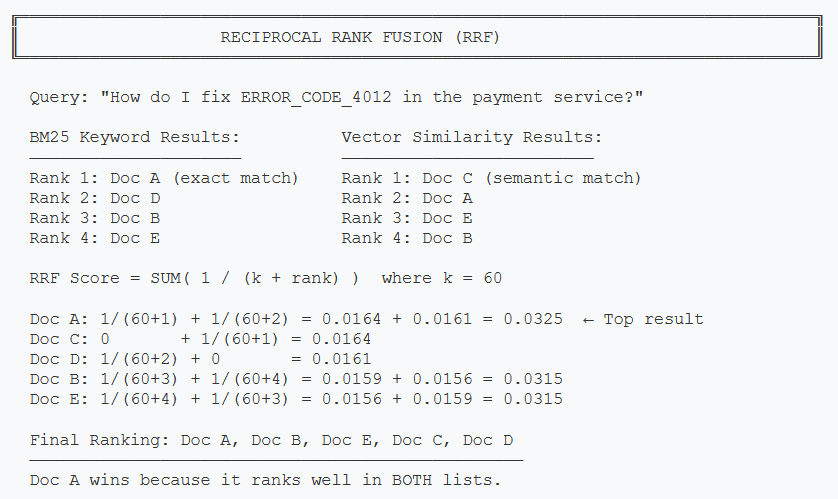
RRF combines rankings from keyword and vector search, favoring documents that appear in both result sets
Azure AI Search handles RRF natively, so you don't have to implement the scoring yourself. Here's how to set up hybrid search:
from azure.search.documents import SearchClient
from azure.search.documents.models import (
    VectorizableTextQuery,
    QueryType,
)
from azure.core.credentials import AzureKeyCredential
from typing import List
import os

class HybridSearchService:
    """Hybrid search combining BM25 keyword + vector similarity."""

    def __init__(self, embedding_service: EmbeddingService):
        self.embedding_service = embedding_service
        self.search_client = SearchClient(
            endpoint=os.getenv("AZURE_SEARCH_ENDPOINT"),
            index_name="knowledge-base",
            credential=AzureKeyCredential(
                os.getenv("AZURE_SEARCH_API_KEY")
            ),
        )

    def hybrid_search(
        self,
        query: str,
        top_k: int = 5,
        min_score: float = 0.02,
    ) -> List[QueryResult]:
        """Execute hybrid search (BM25 + vector) with RRF ranking."""
        # Generate query embedding
        query_embedding = self.embedding_service.embed_text(query)

        # Execute hybrid search - Azure AI Search handles RRF
        results = self.search_client.search(
            search_text=query,  # BM25 keyword search
            vector_queries=[
                VectorizableTextQuery(
                    text=query,
                    k_nearest_neighbors=top_k * 2,
                    fields="embedding",
                )
            ],
            query_type=QueryType.SEMANTIC,
            top=top_k,
            select=[
                "chunk_id", "content", "source_url",
                "source_title", "source_type", "author",
            ],
        )

        query_results = []
        for result in results:
            if result["@search.score"] >= min_score:
                chunk = DocumentChunk(
                    chunk_id=result["chunk_id"],
                    content=result["content"],
                    source_url=result["source_url"],
                    source_title=result["source_title"],
                    source_type=result["source_type"],
                    author=result["author"],
                )
                query_results.append(QueryResult(
                    chunk=chunk,
                    score=result["@search.score"],
                    match_type="hybrid",
                ))

        return query_results
using Azure;
using Azure.Search.Documents;
using Azure.Search.Documents.Models;
using KnowledgeBot.Models;
namespace KnowledgeBot.Services;
/// <summary>
/// Hybrid search combining BM25 keyword + vector similarity.
/// </summary>
public class HybridSearchService
{
private readonly SearchClient _searchClient;
private readonly EmbeddingService _embeddingService;
public HybridSearchService(
IConfiguration config,
EmbeddingService embeddingService)
{
_embeddingService = embeddingService;
_searchClient = new SearchClient(
new Uri(config["AzureSearch:Endpoint"]!),
"knowledge-base",
new AzureKeyCredential(config["AzureSearch:ApiKey"]!)
);
}
/// <summary>
/// Execute hybrid search (BM25 + vector) with RRF ranking.
/// </summary>
public async Task<List<QueryResult>> HybridSearchAsync(
string query,
int topK = 5,
double minScore = 0.02)
{
// Generate query embedding
var queryEmbedding = await _embeddingService.EmbedTextAsync(query);
// Configure hybrid search options
var options = new SearchOptions
{
Size = topK,
QueryType = SearchQueryType.Semantic,
Select = {
"chunk_id", "content", "source_url",
"source_title", "source_type", "author"
},
VectorSearch = new()
{
Queries =
{
new VectorizedQuery(queryEmbedding)
{
KNearestNeighborsCount = topK * 2,
Fields = { "embedding" }
}
}
}
};
// Execute hybrid search - Azure AI Search handles RRF
var response = await _searchClient.SearchAsync<SearchDocument>(
query, options);
var results = new List<QueryResult>();
await foreach (var result in response.Value.GetResultsAsync())
{
if (result.Score >= minScore)
{
results.Add(new QueryResult
{
Chunk = new DocumentChunk
{
ChunkId = result.Document["chunk_id"].ToString()!,
Content = result.Document["content"].ToString()!,
SourceUrl = result.Document["source_url"].ToString()!,
SourceTitle = result.Document["source_title"].ToString()!,
SourceType = result.Document["source_type"].ToString()!,
Author = result.Document["author"].ToString()!,
},
Score = result.Score ?? 0,
MatchType = "hybrid"
});
}
}
return results;
}
}A couple of things to note here. The min_score threshold filters out
low-confidence matches. Without it, you will always get top_k results even
if they are completely irrelevant, and passing irrelevant chunks to the LLM leads to
hallucinated answers. I found 0.02 to be a reasonable default for Azure AI Search's RRF
scores, but tune this based on your data.
Response Generation
Once we have our retrieved chunks, we pass them as context to GPT-4o for answer generation. The system prompt is critical here — it needs to tell the model to only answer from the provided context and to cite sources.
from openai import AzureOpenAI
from typing import List
import os

SYSTEM_PROMPT = """You are an internal knowledge assistant. Answer the
user's question using ONLY the provided context documents. Follow these
rules strictly:

1. Only use information from the provided context
2. If the context doesn't contain enough information, say so clearly
3. Cite your sources using [Source: title] format
4. Be concise but thorough
5. If multiple sources give conflicting information, note the conflict
   and cite the most recently modified source
"""

class ResponseGenerator:
    """Generate answers grounded in retrieved documents."""

    def __init__(self):
        self.client = AzureOpenAI(
            azure_endpoint=os.getenv("AZURE_OPENAI_ENDPOINT"),
            api_key=os.getenv("AZURE_OPENAI_API_KEY"),
            api_version="2024-06-01",
        )

    def generate(
        self,
        query: str,
        results: List[QueryResult],
    ) -> KnowledgeBotResponse:
        """Generate an answer from retrieved chunks."""
        # Format context from search results
        context_parts = []
        for i, result in enumerate(results, 1):
            context_parts.append(
                f"[Source {i}: {result.chunk.source_title}]\n"
                f"{result.chunk.content}\n"
            )
        context = "\n---\n".join(context_parts)

        # Generate response with GPT-4o
        response = self.client.chat.completions.create(
            model="gpt-4o",
            messages=[
                {"role": "system", "content": SYSTEM_PROMPT},
                {"role": "user", "content": (
                    f"Context:\n{context}\n\n"
                    f"Question: {query}"
                )},
            ],
            temperature=0.1,  # Low temp for factual answers
            max_tokens=1000,
        )

        return KnowledgeBotResponse(
            answer=response.choices[0].message.content,
            sources=results,
            confidence=max(r.score for r in results) if results else 0.0,
            query=query,
        )
using Azure;
using Azure.AI.OpenAI;
using OpenAI.Chat;
using KnowledgeBot.Models;
namespace KnowledgeBot.Services;
/// <summary>
/// Generate answers grounded in retrieved documents.
/// </summary>
public class ResponseGenerator
{
private readonly ChatClient _chatClient;
private const string SystemPrompt = """
You are an internal knowledge assistant. Answer the user's
question using ONLY the provided context documents. Follow
these rules strictly:
1. Only use information from the provided context
2. If the context doesn't contain enough information, say so
3. Cite your sources using [Source: title] format
4. Be concise but thorough
5. If multiple sources conflict, note it and cite the most
recently modified source
""";
public ResponseGenerator(IConfiguration config)
{
var azureClient = new AzureOpenAIClient(
new Uri(config["AzureOpenAI:Endpoint"]!),
new AzureKeyCredential(config["AzureOpenAI:ApiKey"]!)
);
_chatClient = azureClient.GetChatClient("gpt-4o");
}
/// <summary>
/// Generate an answer from retrieved chunks.
/// </summary>
public async Task<KnowledgeBotResponse> GenerateAsync(
string query,
List<QueryResult> results)
{
// Format context from search results
var contextParts = results.Select((r, i) =>
$"[Source {i + 1}: {r.Chunk.SourceTitle}]\n{r.Chunk.Content}"
);
var context = string.Join("\n---\n", contextParts);
// Generate response with GPT-4o
var options = new ChatCompletionOptions
{
Temperature = 0.1f, // Low temp for factual answers
MaxOutputTokenCount = 1000,
};
var messages = new List<ChatMessage>
{
new SystemChatMessage(SystemPrompt),
new UserChatMessage(
$"Context:\n{context}\n\nQuestion: {query}")
};
var response = await _chatClient.CompleteChatAsync(
messages, options);
return new KnowledgeBotResponse
{
Answer = response.Value.Content[0].Text,
Sources = results,
Confidence = results.Any()
? results.Max(r => r.Score) : 0,
Query = query,
};
}
}I'm using temperature=0.1 instead of 0 for the response generator. Fully
deterministic responses (temperature=0) sometimes produce overly rigid, robotic answers.
A tiny amount of temperature gives the model room to phrase things naturally while still
staying grounded in the context.
ROI & Business Value
I always push back on AI projects that can't show a clear return on investment. RAG-based knowledge bots are one of the few AI use cases where the ROI math is straightforward because you're replacing a measurable existing cost: employee time spent searching for information.
ROI Calculation Framework
Inputs (measure these first):
- Number of knowledge workers: N
- Average time spent searching per day: T hours (survey your team)
- Average fully-loaded salary: S per year
- Expected search time reduction: R (conservative: 30%, optimistic: 50%)
Annual savings formula:
Savings = N x T x (R / 100) x (S / 2080) x 260
(2080 = working hours/year, 260 = working days/year)
Example: 100 employees, 1 hour/day searching, $120K salary, 30% reduction
100 x 1 x 0.30 x ($120,000 / 2080) x 260 = $450,000 saved per year
Implementation cost estimate:
- Engineering: 2-3 months, 1-2 engineers = $60K-$120K
- Azure costs: ~$2,000-$5,000/month for GPT-4o + AI Search + Embeddings
- First-year total: ~$120K-$180K
Payback period: 3-5 months for a 100-person team. This gets even better at scale because Azure costs grow slowly relative to team size.
Beyond direct time savings, there are second-order benefits that are harder to quantify but very real:
- Reduced duplicate questions — New hires stop pinging senior engineers with the same questions
- Knowledge preservation — When someone leaves, their documented knowledge is still retrievable
- Faster onboarding — New team members can self-serve answers from day one
- Better documentation incentives — When people see their docs surfacing in bot answers, they write better docs
I generally recommend this project for companies with 50+ employees and 1,000+ documents in their knowledge base. Below that threshold, the implementation effort outweighs the benefit — just use a well-organized Notion workspace instead.
What's Next
In this article, we covered the full architecture of a RAG-based internal knowledge bot: the two-pipeline design (ingestion and query), document chunking strategies with empirical precision measurements, embedding generation with Azure OpenAI, and hybrid retrieval using BM25 + vector search with Reciprocal Rank Fusion. We also built the core services in both Python and C# so you can work in whichever ecosystem fits your team.
But we skipped some important production concerns that can make or break this system in the real world.
Part 2: Production Considerations
- Cost analysis — Detailed Azure cost breakdown by team size and usage patterns
- Observability — Logging, tracing, and monitoring your RAG pipeline
- Evaluation framework — How to measure retrieval quality and answer accuracy over time
- When NOT to use RAG — Cases where simpler approaches work better
- Production hardening — Rate limiting, error handling, caching, and incremental re-indexing
This article demonstrates RAG architecture and core implementation concepts. Production code would need error handling, retry logic, rate limiting, and proper secret management. All Azure services mentioned are available in the Azure free tier or pay-as-you-go pricing.
Want More Practical AI Tutorials?
I write about building production AI systems with Azure, Python, and C#. Subscribe for practical tutorials delivered twice a month.
Subscribe to Newsletter →