Building the RAG pipeline was the easy part. Keeping it running in production without burning through your Azure budget? That is where the real engineering begins.
In Part 1, we built a RAG-based internal knowledge bot from the ground up. We covered document chunking strategies, embedding generation with Azure OpenAI, hybrid retrieval using Azure AI Search, and the response generation pipeline. If you have not read Part 1 yet, I would recommend starting there since this article builds directly on those foundations.
But here is the thing I have learned shipping RAG systems to production: the architecture is maybe 30% of the work. The other 70% is answering hard questions that nobody talks about in tutorials. How much will this cost at scale? How do I know when retrieval quality degrades? Should I even be using RAG for this use case?
In this article, I will tackle those production realities head-on. We will look at real cost numbers, build observability into the pipeline, compare technology choices, and — perhaps most importantly — discuss when RAG is the wrong tool for the job.
What You'll Learn
- Real cost breakdown for Azure OpenAI RAG systems at different scales
- How to add tracing and observability to every stage of the RAG pipeline
- A decision framework for choosing Python vs. C# for your implementation
- When NOT to use RAG — and what to use instead
Cost Analysis: What RAG Actually Costs
Let me be honest: one of the first questions any stakeholder will ask is "how much does this cost?" And vague answers like "it depends" are not going to cut it. So here is a real breakdown based on Azure OpenAI pricing as of early 2026.
Per-Query Token Economics
Every RAG query involves two LLM calls: one for embedding the query, and one for generating the answer. Here is how the tokens break down for a typical knowledge bot query:
- Query embedding: ~500 tokens (text-embedding-3-large at $0.00013/1K tokens) = ~$0.000065
- Context injection: ~2,000 tokens of retrieved chunks sent as input to GPT-4o ($2.50/1M input tokens) = ~$0.005
- Answer generation: ~500 tokens of output from GPT-4o ($10.00/1M output tokens) = ~$0.005
That puts a single query at roughly $0.008 to $0.01. Not bad for one query. But multiply that by thousands of employees asking questions daily, and the numbers add up fast.
Monthly Cost Estimates by Scale
| Scale | Queries/Day | Azure OpenAI (Tokens) | Azure AI Search | Blob Storage (100 GB) | Estimated Monthly Total |
|---|---|---|---|---|---|
| Small team | 100 | ~$24 | $75 (Basic) | $2 | ~$101 |
| Department | 1,000 | ~$240 | $250 (Standard S1) | $2 | ~$492 |
| Enterprise | 10,000 | ~$2,400 | $500 (Standard S2) | $2 | ~$2,902 |
Watch Out for Long Documents
These estimates assume ~2,000 tokens of context per query. If your chunking strategy sends 5,000+ tokens of context (or users ask follow-up questions that carry conversation history), your per-query cost can triple. I have seen teams blow through their monthly budget in a week because they were injecting entire documents instead of relevant chunks. Always monitor your token usage in the first two weeks after launch.
Observability and Debugging
RAG pipelines have a unique debugging challenge: when the answer is wrong, you need to figure out whether the problem was in retrieval (wrong chunks), in the prompt (ambiguous instructions), or in the model (hallucination). Without structured observability, you are flying blind.
Tracing Every Pipeline Stage
I instrument every stage of the RAG pipeline with structured traces. Each query gets a correlation ID that follows it from the initial request through embedding, retrieval, and generation. This makes it possible to reconstruct exactly what happened for any given query after the fact.
import logging
import time
import uuid
from dataclasses import dataclass, field
from typing import List, Optional

logger = logging.getLogger("rag_pipeline")

@dataclass
class PipelineTrace:
    """Captures timing and metadata for each RAG pipeline stage."""
    correlation_id: str = field(default_factory=lambda: str(uuid.uuid4()))
    stages: List[dict] = field(default_factory=list)

    def start_stage(self, name: str) -> dict:
        stage = {
            "name": name,
            "start_time": time.perf_counter(),
            "end_time": None,
            "metadata": {},
        }
        self.stages.append(stage)
        return stage

    def end_stage(self, stage: dict, **metadata):
        stage["end_time"] = time.perf_counter()
        stage["duration_ms"] = (
            (stage["end_time"] - stage["start_time"]) * 1000
        )
        stage["metadata"].update(metadata)

    def log_summary(self):
        total_ms = sum(s.get("duration_ms", 0) for s in self.stages)
        logger.info(
            "Pipeline complete",
            extra={
                "correlation_id": self.correlation_id,
                "total_duration_ms": round(total_ms, 2),
                "stages": [
                    {
                        "name": s["name"],
                        "duration_ms": round(s.get("duration_ms", 0), 2),
                        **s["metadata"],
                    }
                    for s in self.stages
                ],
            },
        )


async def traced_rag_query(query: str, search_client, llm_client):
    """Execute a RAG query with full pipeline tracing."""
    trace = PipelineTrace()

    # Stage 1: Embed the query
    stage = trace.start_stage("embedding")
    query_vector = await llm_client.embed(query)
    trace.end_stage(stage, token_count=len(query.split()))

    # Stage 2: Retrieve relevant chunks
    stage = trace.start_stage("retrieval")
    results = await search_client.hybrid_search(
        query=query, vector=query_vector, top_k=5
    )
    trace.end_stage(
        stage,
        chunks_returned=len(results),
        top_score=results[0].score if results else 0,
    )

    # Stage 3: Generate answer
    stage = trace.start_stage("generation")
    context = "\n\n".join([r.content for r in results])
    answer = await llm_client.generate(query=query, context=context)
    trace.end_stage(stage, output_tokens=len(answer.split()))

    trace.log_summary()
    return answer
using System.Diagnostics;
using Microsoft.Extensions.Logging;
public class PipelineTrace
{
public string CorrelationId { get; } = Guid.NewGuid().ToString();
private readonly List<StageTrace> _stages = new();
private readonly ILogger _logger;
public PipelineTrace(ILogger logger) => _logger = logger;
public StageTrace StartStage(string name)
{
var stage = new StageTrace(name);
_stages.Add(stage);
return stage;
}
public void LogSummary()
{
var totalMs = _stages.Sum(s => s.DurationMs);
_logger.LogInformation(
"Pipeline complete. CorrelationId={CorrelationId}, " +
"TotalMs={TotalMs}, Stages={StageCount}",
CorrelationId, Math.Round(totalMs, 2), _stages.Count);
foreach (var stage in _stages)
{
_logger.LogInformation(
" Stage={Name}, DurationMs={Ms}, Metadata={Meta}",
stage.Name, Math.Round(stage.DurationMs, 2),
stage.Metadata);
}
}
}
public class StageTrace : IDisposable
{
public string Name { get; }
public double DurationMs { get; private set; }
public Dictionary<string, object> Metadata { get; } = new();
private readonly Stopwatch _sw = Stopwatch.StartNew();
public StageTrace(string name) => Name = name;
public void AddMetadata(string key, object value)
=> Metadata[key] = value;
public void Dispose()
{
_sw.Stop();
DurationMs = _sw.Elapsed.TotalMilliseconds;
}
}
// Usage in a RAG query handler
public class TracedRagQueryHandler
{
private readonly ISearchClient _searchClient;
private readonly ILlmClient _llmClient;
private readonly ILogger<TracedRagQueryHandler> _logger;
public TracedRagQueryHandler(
ISearchClient searchClient,
ILlmClient llmClient,
ILogger<TracedRagQueryHandler> logger)
{
_searchClient = searchClient;
_llmClient = llmClient;
_logger = logger;
}
public async Task<string> ExecuteAsync(string query)
{
var trace = new PipelineTrace(_logger);
// Stage 1: Embed the query
float[] queryVector;
using (var stage = trace.StartStage("embedding"))
{
queryVector = await _llmClient.EmbedAsync(query);
stage.AddMetadata("token_count", query.Split().Length);
}
// Stage 2: Retrieve relevant chunks
List<SearchResult> results;
using (var stage = trace.StartStage("retrieval"))
{
results = await _searchClient.HybridSearchAsync(
query, queryVector, topK: 5);
stage.AddMetadata("chunks_returned", results.Count);
stage.AddMetadata("top_score",
results.FirstOrDefault()?.Score ?? 0);
}
// Stage 3: Generate answer
string answer;
using (var stage = trace.StartStage("generation"))
{
var context = string.Join("\n\n",
results.Select(r => r.Content));
answer = await _llmClient.GenerateAsync(query, context);
stage.AddMetadata("output_tokens", answer.Split().Length);
}
trace.LogSummary();
return answer;
}
}Key Metrics to Track
Once you have tracing in place, here are the metrics I watch on a dashboard. These tell you both whether the system is healthy and whether answer quality is degrading over time:
| Metric | What It Tells You | Healthy Range |
|---|---|---|
| Retrieval latency (p50 / p95) | How fast chunks are returned from the index | p50 < 100ms, p95 < 300ms |
| Top chunk relevance score | Whether the best match is actually relevant | > 0.75 for the top result |
| Chunk hit rate | Percentage of queries where at least one chunk scores above threshold | > 85% |
| Generation latency (p50 / p95) | Time-to-first-token and total generation time | p50 < 2s, p95 < 5s |
| Token usage per query | Cost efficiency and context window usage | < 3,000 tokens total |
I strongly recommend setting up alerts when chunk hit rate drops below 80% or retrieval latency exceeds 500ms. These are early warning signs that either your index needs updating or your chunking strategy is not aligned with how users actually phrase their questions.
Technology Choices: Python vs. C#
Both Part 1 and this article show code in Python and C# because the reality is that most organizations are not greenfield. You are building RAG into an existing ecosystem, and the language choice matters more for operational reasons than technical ones.
Why Choose Python
Python is the default language for AI/ML development, and for good reason. The LangChain ecosystem gives you pre-built integrations for nearly every vector store, LLM provider, and document loader you can think of. If your team has data scientists or ML engineers, they are already writing Python. Rapid prototyping is significantly faster — I can get a working RAG proof-of-concept running in an afternoon with LangChain and FAISS.
The trade-off is that Python services can require more operational overhead in
production. You will need to manage async properly (everything should be
async/await), and deployment to Azure Functions or Container Apps requires
a bit more configuration than a .NET equivalent.
Why Choose C#
If you are in an enterprise .NET shop, C# with Semantic Kernel is a compelling choice. Microsoft builds Semantic Kernel in-house, which means Azure integration is first-class — Azure AI Search connectors, Azure OpenAI clients, and managed identity support all work out of the box. The type system catches errors at compile time that Python would only surface at runtime, which matters when you are building a system that hundreds of employees depend on.
Semantic Kernel's plugin architecture also maps cleanly to the agent pattern. Each RAG capability (search, summarize, generate) becomes a plugin that you can compose and test independently.
Decision Framework
| Factor | Lean Python | Lean C# |
|---|---|---|
| Team expertise | Data science / ML background | .NET / enterprise development |
| Ecosystem needs | LangChain, HuggingFace, FAISS | Semantic Kernel, Azure SDK |
| Performance profile | IO-bound (fine with async Python) | High-throughput, low-latency |
| Azure integration depth | Good (via SDKs) | Native (Semantic Kernel is Microsoft) |
| Prototyping speed | Fastest (notebooks, REPL) | Moderate (compile step, boilerplate) |
| Production reliability | Good (with discipline) | Excellent (type safety, tooling) |
My recommendation: Prototype in Python, then evaluate whether to keep it or port to C# based on your team's operational comfort. The RAG logic itself is nearly identical in both languages — it is the deployment and maintenance story that differs.
Azure Infrastructure
A production RAG knowledge bot requires several Azure services working together. Here is the infrastructure I recommend, along with why each piece exists.
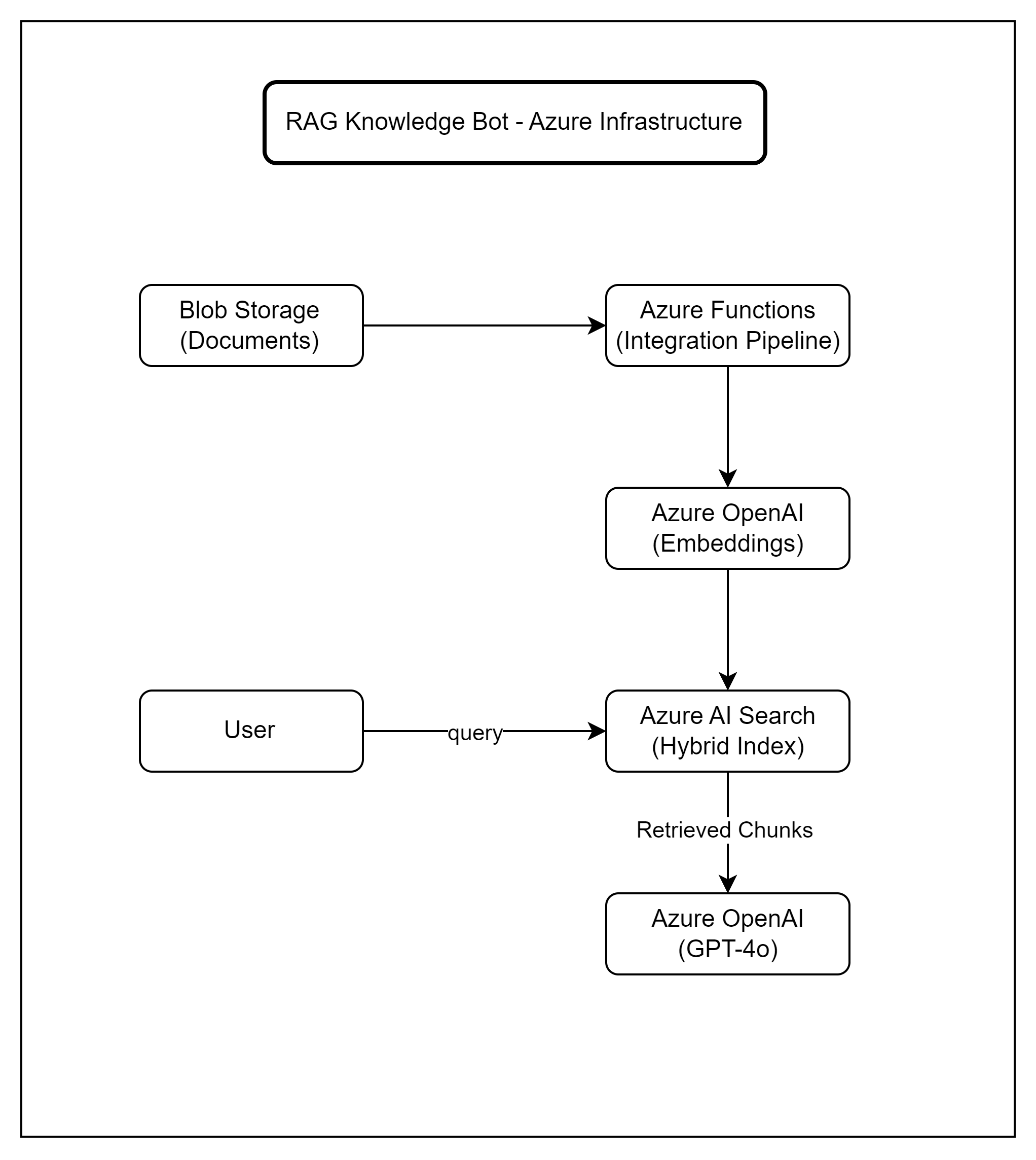
Document ingestion pipeline feeds into the search index; user queries flow through retrieval and generation
- Azure Blob Storage — Source of truth for all documents. Upload PDFs, Word docs, or Markdown files here. Azure Functions triggers on new blobs to kick off the ingestion pipeline.
- Azure Functions — Runs the chunking and embedding pipeline. A blob trigger fires when new documents arrive, splits them into chunks, generates embeddings, and pushes them to the search index.
- Azure OpenAI — Hosts both text-embedding-3-large (for embeddings) and GPT-4o (for answer generation). Use managed identity for authentication — no API keys in your code.
- Azure AI Search — Stores the vector index and supports hybrid (vector + keyword) retrieval. This is the core of the retrieval pipeline we built in Part 1.
For teams that want to reduce operational complexity, Azure AI Foundry Agent Service offers a managed alternative that handles orchestration, memory, and tool use out of the box. It is worth evaluating if you want to avoid managing the infrastructure yourself, though you trade some customization for convenience.
Infrastructure as Code
I recommend defining all of this in Bicep or Terraform from day one. RAG systems have enough moving parts that manual portal setup becomes a liability quickly. Here is a quick example of provisioning the core resources.
# config.py - Environment configuration for the RAG pipeline
import os
from dataclasses import dataclass

@dataclass
class RagConfig:
    """Central configuration for all Azure services."""
    # Azure OpenAI
    openai_endpoint: str = os.getenv("AZURE_OPENAI_ENDPOINT", "")
    openai_deployment: str = os.getenv("AZURE_OPENAI_DEPLOYMENT", "gpt-4o")
    embedding_deployment: str = os.getenv(
        "AZURE_EMBEDDING_DEPLOYMENT", "text-embedding-3-large"
    )

    # Azure AI Search
    search_endpoint: str = os.getenv("AZURE_SEARCH_ENDPOINT", "")
    search_index: str = os.getenv("AZURE_SEARCH_INDEX", "knowledge-index")

    # Azure Blob Storage
    storage_connection: str = os.getenv("AZURE_STORAGE_CONNECTION", "")
    storage_container: str = os.getenv("AZURE_STORAGE_CONTAINER", "documents")

    # Pipeline settings
    chunk_size: int = int(os.getenv("CHUNK_SIZE", "512"))
    chunk_overlap: int = int(os.getenv("CHUNK_OVERLAP", "50"))
    retrieval_top_k: int = int(os.getenv("RETRIEVAL_TOP_K", "5"))

    # Scaling
    max_concurrent_embeddings: int = int(
        os.getenv("MAX_CONCURRENT_EMBEDDINGS", "10")
    )
    rate_limit_rpm: int = int(os.getenv("RATE_LIMIT_RPM", "60"))


# Usage
config = RagConfig()
print(f"Search index: {config.search_index}")
print(f"Chunk size: {config.chunk_size} tokens")
// RagConfig.cs - Environment configuration for the RAG pipeline
public class RagConfig
{
// Azure OpenAI
public string OpenAiEndpoint { get; set; } = "";
public string OpenAiDeployment { get; set; } = "gpt-4o";
public string EmbeddingDeployment { get; set; }
= "text-embedding-3-large";
// Azure AI Search
public string SearchEndpoint { get; set; } = "";
public string SearchIndex { get; set; } = "knowledge-index";
// Azure Blob Storage
public string StorageConnection { get; set; } = "";
public string StorageContainer { get; set; } = "documents";
// Pipeline settings
public int ChunkSize { get; set; } = 512;
public int ChunkOverlap { get; set; } = 50;
public int RetrievalTopK { get; set; } = 5;
// Scaling
public int MaxConcurrentEmbeddings { get; set; } = 10;
public int RateLimitRpm { get; set; } = 60;
}
// In Program.cs or Startup.cs
builder.Services.Configure<RagConfig>(
builder.Configuration.GetSection("Rag"));
// appsettings.json
// {
// "Rag": {
// "OpenAiEndpoint": "https://your-instance.openai.azure.com/",
// "SearchEndpoint": "https://your-search.search.windows.net",
// "SearchIndex": "knowledge-index",
// "ChunkSize": 512,
// "RetrievalTopK": 5
// }
// }For scaling, keep in mind that Azure OpenAI has rate limits measured in tokens-per-minute (TPM). At the enterprise scale (10,000 queries/day), you will likely need a provisioned throughput deployment rather than pay-as-you-go to avoid throttling during peak hours.
When NOT to Use RAG
This might be the most important section of this article. I have seen teams spend months building RAG systems for problems that had simpler, cheaper, and more reliable solutions. Here is when I would steer you away from RAG.
RAG Is Probably the Wrong Choice When...
- Small document sets (<50 documents): If your entire knowledge base is a few dozen pages, full-text search with a simple keyword index will give you faster, cheaper, and more deterministic results. You do not need embeddings and vector search for a 30-page FAQ.
- Highly structured data: If the answers live in a database with well-defined schemas (product catalogs, employee directories, inventory systems), write a SQL query or build an API. RAG adds unnecessary complexity and introduces the risk of hallucinated answers from data that should be exact.
- Real-time data requirements: RAG has an inherent ingestion lag. Documents need to be chunked, embedded, and indexed before they are searchable. If your users need answers from data that changes every few minutes (live dashboards, trading systems), RAG will always be behind.
- Compliance-critical answers: When you need deterministic, auditable answers — like regulatory compliance questions or legal interpretations — RAG's probabilistic nature is a liability. The same question can produce slightly different answers depending on which chunks are retrieved and how the model synthesizes them. For these cases, curated FAQ systems or decision trees are safer.
- Budget constraints under $50/month: At very low volumes with tight budgets, the Azure AI Search basic tier alone ($75/month) may exceed your entire budget. Consider a simpler embedding-only approach with FAISS stored in-memory if you are building for a small team.
None of this means RAG is bad. It means RAG is a tool, and like any tool, it has a sweet spot. That sweet spot is medium-to-large unstructured document collections where users ask natural language questions and expect synthesized answers. If your use case fits that description, RAG is excellent. If it does not, save yourself the engineering effort.
Quick Decision Checklist
def should_use_rag(
    doc_count: int,
    data_is_structured: bool,
    needs_real_time: bool,
    needs_deterministic: bool,
    monthly_budget: float,
) -> dict:
    """Simple decision helper for RAG vs. alternatives."""
    reasons_against = []

    if doc_count < 50:
        reasons_against.append(
            "Small doc set - consider full-text search instead"
        )
    if data_is_structured:
        reasons_against.append(
            "Structured data - use SQL/API queries instead"
        )
    if needs_real_time:
        reasons_against.append(
            "Real-time needs - RAG has ingestion lag"
        )
    if needs_deterministic:
        reasons_against.append(
            "Deterministic answers needed - use curated FAQ"
        )
    if monthly_budget < 100:
        reasons_against.append(
            "Budget too low for Azure AI Search + OpenAI"
        )

    use_rag = len(reasons_against) == 0
    return {
        "recommend_rag": use_rag,
        "reasons_against": reasons_against,
        "alternative": (
            "RAG is a good fit!" if use_rag
            else f"Consider alternatives: {reasons_against[0]}"
        ),
    }


# Example usage
result = should_use_rag(
    doc_count=500,
    data_is_structured=False,
    needs_real_time=False,
    needs_deterministic=False,
    monthly_budget=300,
)
print(result)
# {"recommend_rag": True, "alternative": "RAG is a good fit!"}
public record RagDecision(
bool RecommendRag,
List<string> ReasonsAgainst,
string Alternative);
public static class RagAdvisor
{
/// <summary>
/// Simple decision helper for RAG vs. alternatives.
/// </summary>
public static RagDecision ShouldUseRag(
int docCount,
bool dataIsStructured,
bool needsRealTime,
bool needsDeterministic,
decimal monthlyBudget)
{
var reasons = new List<string>();
if (docCount < 50)
reasons.Add(
"Small doc set - consider full-text search");
if (dataIsStructured)
reasons.Add(
"Structured data - use SQL/API queries");
if (needsRealTime)
reasons.Add(
"Real-time needs - RAG has ingestion lag");
if (needsDeterministic)
reasons.Add(
"Deterministic answers needed - use curated FAQ");
if (monthlyBudget < 100)
reasons.Add(
"Budget too low for Azure AI Search + OpenAI");
var useRag = reasons.Count == 0;
var alt = useRag
? "RAG is a good fit!"
: $"Consider alternatives: {reasons[0]}";
return new RagDecision(useRag, reasons, alt);
}
}
// Example usage
var result = RagAdvisor.ShouldUseRag(
docCount: 500,
dataIsStructured: false,
needsRealTime: false,
needsDeterministic: false,
monthlyBudget: 300m);
Console.WriteLine(result.Alternative);
// "RAG is a good fit!"Key Takeaways
- Know your costs upfront: At ~$0.008 per query, a RAG knowledge bot is affordable for most teams. But token costs scale linearly, and long context windows can multiply your bill fast. Monitor from day one.
- Observability is not optional: Instrument every stage of the pipeline with correlation IDs and structured logging. When answer quality degrades, you need to pinpoint whether the issue is in retrieval, context assembly, or generation.
- Choose your language based on your team: Python for speed and ecosystem breadth, C# for enterprise integration and type safety. The RAG logic itself is nearly identical in both.
- Right-size your infrastructure: Start with Azure AI Search Basic tier and pay-as-you-go OpenAI. Scale up to Standard tier and provisioned throughput only when query volume demands it.
- Be honest about whether you need RAG: Small document sets, structured data, and compliance-critical use cases often have simpler solutions. RAG shines for large unstructured collections with natural language queries.
The Production Readiness Test
Before shipping your RAG knowledge bot to real users, make sure you can answer "yes" to all of these:
- Can you trace any query from input to output with a single correlation ID?
- Do you have alerts for retrieval quality degradation (chunk hit rate, relevance scores)?
- Have you load-tested at 2x your expected peak query volume?
- Is your infrastructure defined in code (Bicep, Terraform, or ARM templates)?
- Do you have a document re-ingestion pipeline for when content is updated?
If you missed Part 1, that is where we built the core RAG pipeline — chunking, embedding, hybrid retrieval, and response generation. Together, these two articles give you a complete picture: the architecture to build it and the operational knowledge to run it.
This article covers production considerations for RAG systems. Actual costs may vary based on your Azure region, usage patterns, and pricing tier. Always validate with the Azure pricing calculator for your specific workload.
Want More Practical AI Tutorials?
I write about building production AI systems with Azure, Python, and C#. Subscribe for practical tutorials delivered twice a month.
Subscribe to Newsletter →