What You'll Learn
- How to build a multi-step agent pipeline that extracts, scores, and ranks resumes against a job description
- Why evidence-cited scoring prevents hallucinated candidate endorsements — and how to implement it
- Hybrid PDF extraction: when to use native text parsing versus Azure Document Intelligence for scanned resumes
- The real cost breakdown — $0.02 per resume end-to-end using GPT-4o with structured outputs
- When NOT to use AI screening and the simpler alternatives worth considering first
1. The Problem with Volume Hiring
I built this because I watched a recruiter friend spend an entire Thursday screening 140 resumes for a mid-level software engineering role. By Friday she had a shortlist of 12. The 128 she rejected had each taken 20 to 35 minutes to read and evaluate against a four-page job description. The 12 she kept weren't necessarily the best candidates — they were the ones who survived her attention after four hours of focus had degraded into keyword pattern-matching.
The problem isn't that recruiters are bad at their jobs. The problem is that human attention is finite, resume volume at scale is hostile to careful evaluation, and applicant tracking systems (ATS) — the standard tooling for this problem — aren't much better. Traditional ATS platforms like Workday, Greenhouse, and Lever use keyword matching. They look for the presence of specific strings: "React", "5 years experience", "Bachelor's degree". They don't understand that "led the rebuild of a legacy monolith into event-driven microservices" is stronger evidence of senior engineering ability than "microservices" appearing in a bullet point.
An AI agent changes this. Not by replacing recruiter judgment — but by doing the first pass accurately, at scale, in seconds, and returning a ranked shortlist with evidence for each score so a human can interrogate the reasoning rather than redo the work.
This article walks through the full build: state design, PDF extraction, the scoring prompt that prevents hallucinations, orchestration with LangGraph and Semantic Kernel, observability, and honest cost numbers. Everything you need to put this in production, not just run it in a notebook.
2. Current Approach and Its Limits
Most organisations handling volume hiring use one of three approaches, each with a specific failure mode.
ATS keyword matching is the most common. The recruiter defines required skills, and the system filters to resumes containing those strings. The failure mode is bidirectional: candidates who write "TypeScript" fail the filter for a role that listed "JavaScript" as a requirement; candidates who stuff their resume with keywords pass a filter they shouldn't. Keyword matching optimises for gaming the system, not for finding the best person.
Manual screening at volume is accurate for the first 20 resumes and degrades from there. Research on interviewer fatigue shows that evaluation quality drops measurably after 90 minutes of consecutive review. For a role receiving 100 applications, that means the bottom half of the stack is assessed by a cognitively depleted reader making worse decisions. The candidates who applied on day one are systematically disadvantaged — a selection bias baked into the process.
Outsourced screening trades recruiter time for vendor cost. At $5 to $15 per resume screened, a 150-applicant role costs $750 to $2,250 in screening fees before a single interview is booked. The quality is inconsistent, the turnaround is 24 to 72 hours, and you are still dependent on human reviewers working through the same volume problem.
3. The Agent Approach
The core insight is that resume screening is not a single task — it is a pipeline of three distinct tasks that happen to be performed in sequence: extraction (what does this resume actually say?), evaluation (how well does it match this role?), and ranking (given all candidates, who rises to the top?). Collapsing these into a single prompt — "read this resume and tell me if the candidate is a good fit" — is why naive implementations produce inconsistent results. The model is being asked to do too much at once, with no intermediate state to interrogate.
The agent approach separates these into discrete steps, each with a specific input, output, and quality gate. Between steps, state is persisted. If step 2 produces a suspicious score, you can inspect the step 1 extraction without re-running the model. If a new job description comes in, you can rerun only steps 2 and 3 against already-extracted profiles. The pipeline is composable.
Tech stack:
- Azure OpenAI GPT-4o — extraction and scoring. The structured outputs feature (JSON schema enforcement) is essential for step 1 reliability.
- Python: LangGraph for pipeline orchestration, pypdf and Azure Document Intelligence for PDF handling, Pydantic for schema validation.
- C#: Semantic Kernel for orchestration and prompt execution, PdfPig for native PDF text extraction, Azure.AI.DocumentIntelligence SDK.
- Azure Cosmos DB — persisting agent state and candidate profiles between pipeline steps.
- Azure Blob Storage — incoming resume file storage with event-triggered processing.
4. Architecture Overview
The pipeline runs as five logical stages. Resumes arrive from any source — email attachment, applicant portal upload, or bulk file drop into Blob Storage. An Azure Function triggers on new blob uploads and invokes the screening pipeline.
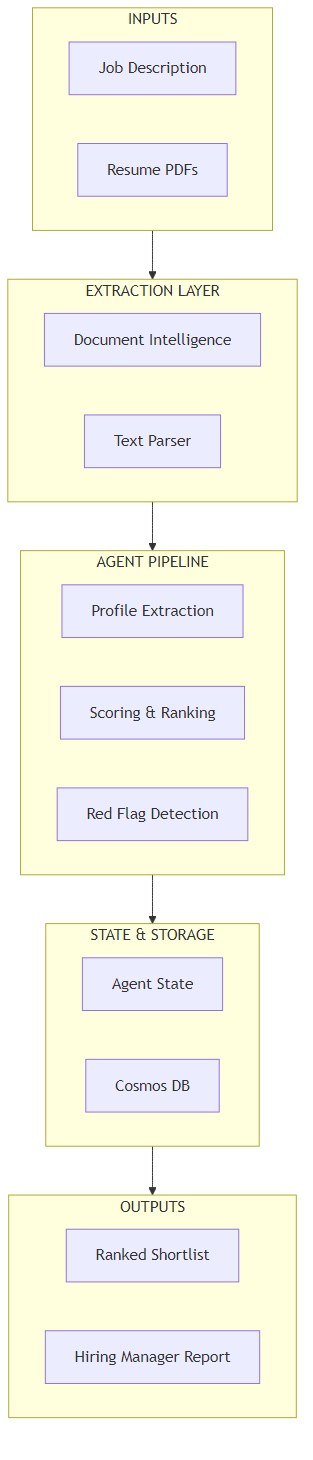
Here's what happens at each stage:
- Ingestion: PDF arrives in Blob Storage. A blob-triggered Azure Function fires and enqueues the resume with the active job description ID for processing.
- Extraction: The pipeline first attempts native text extraction (fast, free, handles most PDFs). If the extracted text is too short — a signal the PDF is scanned or image-based — it falls back to Azure Document Intelligence's prebuilt-read model. The output is raw text, normalised to plain UTF-8.
- Profile extraction: GPT-4o with structured output enforcement extracts a typed
CandidateProfileobject — name, years of experience, skills, education, previous roles. This runs against the raw text only, with no reference to the job description. Keeping extraction and scoring separate prevents the model from selectively extracting information that supports a high score. - Scoring: A second GPT-4o call evaluates the extracted profile against the job description. Every score requires a cited quote from the resume text. Scores without evidence are invalid.
- Output: The ranked shortlist is written back to Cosmos DB and surfaced via a lightweight dashboard or webhook to the hiring manager's tool of choice.
5. Core Implementation
State Model
The state object flows through every step of the pipeline. Keeping it typed is non-negotiable — loose dictionaries cause silent failures when a downstream step assumes a field exists that wasn't populated by an upstream step.
from typing import TypedDict, List, Optional
from pydantic import BaseModel, Field


class CandidateProfile(BaseModel):
    full_name: str = Field(description="Candidate's full name")
    years_experience: float = Field(description="Total years of relevant experience")
    skills: List[str] = Field(description="Technical and professional skills")
    highest_education: str = Field(description="Highest qualification and field")
    previous_roles: List[str] = Field(description="Job titles, most recent first")


class CriterionScore(BaseModel):
    score: int = Field(ge=0, le=10, description="Score 0-10")
    evidence: str = Field(description="Quoted text from resume justifying score")


class ScoringResult(BaseModel):
    technical_fit: CriterionScore
    experience_level: CriterionScore
    education_match: CriterionScore
    red_flags: List[str] = Field(default_factory=list)

    @property
    def composite_score(self) -> float:
        return (
            self.technical_fit.score * 0.5 +
            self.experience_level.score * 0.35 +
            self.education_match.score * 0.15
        )


class CandidateState(TypedDict):
    resume_text: str
    job_description: str
    candidate_id: str
    extracted_profile: Optional[dict]
    scores: Optional[dict]
    composite_score: Optional[float]
    error: Optional[str]
using System.Text.Json.Serialization;
public record CandidateProfile(
string FullName,
double YearsExperience,
List<string> Skills,
string HighestEducation,
List<string> PreviousRoles
);
public record CriterionScore(
[property: JsonPropertyName("score")] int Score,
[property: JsonPropertyName("evidence")] string Evidence
);
public record ScoringResult(
CriterionScore TechnicalFit,
CriterionScore ExperienceLevel,
CriterionScore EducationMatch,
List<string> RedFlags
)
{
public double CompositeScore =>
TechnicalFit.Score * 0.5 +
ExperienceLevel.Score * 0.35 +
EducationMatch.Score * 0.15;
}
public record CandidateState(
string ResumeText,
string JobDescription,
string CandidateId,
CandidateProfile? Profile = null,
ScoringResult? Scores = null,
string? Error = null
);Pipeline Orchestration
In Python, LangGraph wires the steps into a directed graph. Each node is a function that receives the current state and returns an updated state. In C#, Semantic Kernel pipelines sequence the prompt functions with the same state object passed through each invocation.
from langgraph.graph import StateGraph, END


def build_screening_pipeline() -> StateGraph:
    graph = StateGraph(CandidateState)

    graph.add_node("extract_text", extract_pdf_text)
    graph.add_node("extract_profile", extract_candidate_profile)
    graph.add_node("score", score_candidate)
    graph.add_node("compute_rank", compute_composite_score)

    graph.set_entry_point("extract_text")
    graph.add_edge("extract_text", "extract_profile")
    graph.add_edge("extract_profile", "score")
    graph.add_edge("score", "compute_rank")
    graph.add_edge("compute_rank", END)

    return graph.compile()


async def screen_batch(
    resume_blobs: list[bytes],
    job_description: str
) -> list[CandidateState]:
    pipeline = build_screening_pipeline()
    results = []

    for i, pdf_bytes in enumerate(resume_blobs):
        initial_state: CandidateState = {
            "resume_text": pdf_bytes,  # raw bytes; extract_text node processes
            "job_description": job_description,
            "candidate_id": f"candidate-{i}",
            "extracted_profile": None,
            "scores": None,
            "composite_score": None,
            "error": None,
        }
        final_state = await pipeline.ainvoke(initial_state)
        results.append(final_state)

    # Sort by composite score descending; errors go to the bottom
    return sorted(
        results,
        key=lambda s: s.get("composite_score") or -1,
        reverse=True
    )
using Microsoft.SemanticKernel;
public class ResumeScreeningPipeline
{
private readonly Kernel _kernel;
private readonly PdfExtractor _extractor;
public ResumeScreeningPipeline(Kernel kernel, PdfExtractor extractor)
{
_kernel = kernel;
_extractor = extractor;
}
public async Task<List<CandidateState>> ScreenBatchAsync(
List<byte[]> resumeBlobs,
string jobDescription)
{
var results = new List<CandidateState>();
for (int i = 0; i < resumeBlobs.Count; i++)
{
var state = new CandidateState(
ResumeText: string.Empty,
JobDescription: jobDescription,
CandidateId: $"candidate-{i}"
);
state = await ExtractTextAsync(state, resumeBlobs[i]);
state = await ExtractProfileAsync(state);
state = await ScoreCandidateAsync(state);
results.Add(state);
}
return results
.OrderByDescending(s => s.Scores?.CompositeScore ?? -1)
.ToList();
}
}6. Key Challenge #1 — Handling Inconsistent PDFs
Here's what surprised me when I first built this: roughly 30% of resumes submitted in real hiring rounds are either scanned images embedded in PDF containers, or are PDFs generated from tools (certain versions of Word for Mac, Google Docs on older browsers) that produce technically valid PDFs with text that cannot be extracted by a standard library. The extracted text is either empty or garbled.
A single extraction strategy fails this 30%. The fix is a two-step hybrid approach: attempt fast, free native text extraction first, and fall back to Azure Document Intelligence only when the native extraction produces insufficient text. Document Intelligence is accurate on scanned documents but costs $1.50 per 1,000 pages — so you don't want to route every resume through it.
import io
import pypdf
from azure.ai.documentintelligence import DocumentIntelligenceClient
from azure.ai.documentintelligence.models import AnalyzeDocumentRequest
from azure.core.credentials import AzureKeyCredential

# Minimum character count to consider native extraction successful
NATIVE_EXTRACTION_MIN_CHARS = 300


def extract_pdf_text(state: CandidateState) -> CandidateState:
    pdf_bytes: bytes = state["resume_text"]  # raw bytes passed in initial state

    text = _try_native_extraction(pdf_bytes)
    if not text:
        text = _extract_via_document_intelligence(pdf_bytes)

    return {**state, "resume_text": text}


def _try_native_extraction(pdf_bytes: bytes) -> str:
    try:
        reader = pypdf.PdfReader(io.BytesIO(pdf_bytes))
        pages = [page.extract_text() or "" for page in reader.pages]
        text = "\n\n".join(pages).strip()
        return text if len(text) >= NATIVE_EXTRACTION_MIN_CHARS else ""
    except Exception:
        return ""


def _extract_via_document_intelligence(pdf_bytes: bytes) -> str:
    client = DocumentIntelligenceClient(
        endpoint=os.environ["DOCUMENT_INTELLIGENCE_ENDPOINT"],
        credential=AzureKeyCredential(os.environ["DOCUMENT_INTELLIGENCE_KEY"]),
    )
    poller = client.begin_analyze_document(
        "prebuilt-read",
        AnalyzeDocumentRequest(bytes_source=pdf_bytes),
    )
    result = poller.result()
    return "\n\n".join(page.content for page in result.pages)
using UglyToad.PdfPig;
using Azure;
using Azure.AI.DocumentIntelligence;
public class PdfExtractor
{
private const int NativeExtractionMinChars = 300;
private readonly DocumentIntelligenceClient? _docClient;
public PdfExtractor(DocumentIntelligenceClient? docClient = null)
{
_docClient = docClient;
}
public async Task<string> ExtractAsync(byte[] pdfBytes)
{
var nativeText = TryNativeExtraction(pdfBytes);
if (!string.IsNullOrEmpty(nativeText))
return nativeText;
if (_docClient is null)
throw new InvalidOperationException(
"Scanned PDF detected but DocumentIntelligenceClient is not configured.");
return await ExtractViaDocumentIntelligenceAsync(pdfBytes);
}
private static string TryNativeExtraction(byte[] pdfBytes)
{
try
{
using var document = PdfDocument.Open(pdfBytes);
var text = string.Join("\n\n",
document.GetPages().Select(p => p.Text));
return text.Trim().Length >= NativeExtractionMinChars ? text.Trim() : string.Empty;
}
catch { return string.Empty; }
}
private async Task<string> ExtractViaDocumentIntelligenceAsync(byte[] pdfBytes)
{
var operation = await _docClient!.AnalyzeDocumentAsync(
WaitUntil.Completed,
"prebuilt-read",
BinaryData.FromBytes(pdfBytes));
return string.Join("\n\n",
operation.Value.Pages.Select(p => p.Content));
}
}A real resume — even a single-page one — will have at least 400 characters of extractable text. If native extraction returns less than 300, it's almost certainly a scanned image PDF where the "text" layer is blank or corrupt. Setting the threshold too high (e.g., 1,000 chars) would incorrectly route short but valid CVs to Document Intelligence; too low (e.g., 50 chars) would miss PDFs where only the header extracted cleanly.
7. Key Challenge #2 — Scoring Without Hallucination
The first version of my scoring prompt asked the model to "rate the candidate on a scale of 1-10 for each criterion." The results were confident and useless. The model would return a technical fit score of 8 for a candidate whose resume showed no evidence of the required stack. When I asked why, the reasoning was circular: "The candidate appears technically capable based on their experience." That's not evidence — it's a rephrasing of the score.
The fix is a structural constraint: the model must quote text from the resume before it is allowed to assign a score. If it cannot find a quote, the score must be 0 and the evidence field must say "Not found in resume." This isn't a vibe check — it's a verifiable claim. A human reviewer can open the PDF and confirm or refute every score in under 60 seconds.
from langchain_openai import AzureChatOpenAI
from langchain_core.prompts import ChatPromptTemplate

SCORING_SYSTEM = """You are evaluating a candidate resume against a job description.
RULES:
1. Score each criterion 0–10.
2. For each score, provide the EXACT text from the resume that justifies it.
   Quote it verbatim — do not paraphrase.
3. If you cannot find evidence for a criterion, score it 0 and set
   evidence to "Not found in resume".
4. List any red flags: unexplained gaps, frequent short tenures (under 12 months),
   claimed seniority not supported by the described responsibilities.

Return ONLY valid JSON matching this schema — no commentary:
{schema}"""

SCORING_HUMAN = """Job Description:
{job_description}

Candidate Profile (extracted):
{profile_json}"""


def score_candidate(state: CandidateState) -> CandidateState:
    llm = AzureChatOpenAI(
        azure_deployment="gpt-4o",
        azure_endpoint=os.environ["AZURE_OPENAI_ENDPOINT"],
        api_version="2024-08-01-preview",
        temperature=0,  # deterministic scoring
    )
    structured_llm = llm.with_structured_output(ScoringResult)

    prompt = ChatPromptTemplate.from_messages([
        ("system", SCORING_SYSTEM.format(schema=ScoringResult.model_json_schema())),
        ("human", SCORING_HUMAN),
    ])

    chain = prompt | structured_llm
    result: ScoringResult = chain.invoke({
        "job_description": state["job_description"],
        "profile_json": json.dumps(state["extracted_profile"], indent=2),
    })

    return {
        **state,
        "scores": result.model_dump(),
        "composite_score": result.composite_score,
    }
using Microsoft.SemanticKernel;
using Microsoft.SemanticKernel.Connectors.OpenAI;
public class CandidateScorer
{
private const string ScoringPrompt = """
You are evaluating a candidate resume against a job description.
RULES:
1. Score each criterion 0-10.
2. For each score, provide the EXACT text from the resume that justifies it.
Quote it verbatim, never paraphrase.
3. If you cannot find evidence, score 0 and set evidence to "Not found in resume".
4. List red flags: unexplained gaps, short tenures under 12 months,
seniority claims not backed by described responsibilities.
Return ONLY valid JSON matching the ScoringResult schema.
Job Description: {{$jobDescription}}
Candidate Profile: {{$profile}}
""";
public async Task<ScoringResult> ScoreAsync(
string jobDescription,
string profileJson,
Kernel kernel)
{
var function = KernelFunctionFactory.CreateFromPrompt(
ScoringPrompt,
new OpenAIPromptExecutionSettings
{
Temperature = 0,
ResponseFormat = typeof(ScoringResult),
});
var result = await kernel.InvokeAsync(function, new()
{
["jobDescription"] = jobDescription,
["profile"] = profileJson,
});
return JsonSerializer.Deserialize<ScoringResult>(result.ToString())
?? throw new InvalidOperationException("Scoring returned null result");
}
}8. Cost Analysis
I'll give you real numbers, not approximations. All figures are based on the May 2026 Azure OpenAI pricing for GPT-4o.
| Operation | Tokens (avg per resume) | Cost per resume |
|---|---|---|
| Profile extraction (input: resume text) | ~1,800 input tokens | $0.0045 |
| Profile extraction (output: structured JSON) | ~400 output tokens | $0.006 |
| Scoring (input: profile + JD) | ~2,200 input tokens | $0.0055 |
| Scoring (output: scores + evidence) | ~600 output tokens | $0.009 |
| Document Intelligence (scanned PDFs only, ~30%) | $1.50 / 1,000 pages × 30% | $0.00045 |
| Total per resume | ~$0.021 |
| Scale | AI Compute Cost | Recruiter Manual Equivalent |
|---|---|---|
| 10 resumes | $0.21 | ~$280 (3.5 hrs at $80/hr) |
| 100 resumes | $2.10 | ~$2,800 (35 hrs) |
| 500 resumes | $10.50 | ~$14,000 (175 hrs) |
The in-practice conclusion: a single hiring round that uses this system — even a small one at 50 resumes — recovers the build cost in recruiter time saved. The system pays for itself the first time it runs.
9. Observability and Debugging
The most common failure mode in production is silent: a resume gets processed, a score is returned, and the score is wrong — but nothing logged the intermediate state that would tell you why. I've been burned by this. Adding structured tracing before you go live is not optional.
Both implementations use Azure Application Insights for distributed tracing. Each pipeline step emits a span with the step name, input/output sizes, and the composite score at completion. When a score looks suspicious, I can pull the trace for that candidate ID and see exactly what text was extracted, what profile was built, and what score justifications were returned — without re-running the model.
from azure.monitor.opentelemetry import configure_azure_monitor
from opentelemetry import trace

configure_azure_monitor(
    connection_string=os.environ["APPLICATIONINSIGHTS_CONNECTION_STRING"]
)
tracer = trace.get_tracer("resume-screening")


def extract_candidate_profile(state: CandidateState) -> CandidateState:
    with tracer.start_as_current_span("extract_profile") as span:
        span.set_attribute("candidate.id", state["candidate_id"])
        span.set_attribute("resume.text.length", len(state["resume_text"]))

        # ... profile extraction logic ...

        span.set_attribute("profile.skills.count", len(profile.skills))
        span.set_attribute("profile.years_experience", profile.years_experience)
        return {**state, "extracted_profile": profile.model_dump()}


def score_candidate(state: CandidateState) -> CandidateState:
    with tracer.start_as_current_span("score_candidate") as span:
        span.set_attribute("candidate.id", state["candidate_id"])

        # ... scoring logic ...

        span.set_attribute("score.technical_fit", result.technical_fit.score)
        span.set_attribute("score.composite", result.composite_score)
        span.set_attribute("score.red_flags.count", len(result.red_flags))
        return {**state, "scores": result.model_dump(),
                "composite_score": result.composite_score}
using System.Diagnostics;
using Microsoft.Extensions.Logging;
public class ResumeScreeningPipeline
{
private static readonly ActivitySource _activitySource =
new("ResumeScreening", "1.0.0");
private readonly ILogger<ResumeScreeningPipeline> _logger;
public async Task<CandidateState> ExtractProfileAsync(CandidateState state)
{
using var activity = _activitySource.StartActivity("ExtractProfile");
activity?.SetTag("candidate.id", state.CandidateId);
activity?.SetTag("resume.text.length", state.ResumeText.Length);
try
{
// ... profile extraction logic ...
activity?.SetTag("profile.skills.count", profile.Skills.Count);
activity?.SetTag("profile.years_experience", profile.YearsExperience);
return state with { Profile = profile };
}
catch (Exception ex)
{
activity?.SetStatus(ActivityStatusCode.Error, ex.Message);
_logger.LogError(ex, "Profile extraction failed for {CandidateId}",
state.CandidateId);
return state with { Error = ex.Message };
}
}
public async Task<CandidateState> ScoreCandidateAsync(CandidateState state)
{
using var activity = _activitySource.StartActivity("ScoreCandidate");
activity?.SetTag("candidate.id", state.CandidateId);
// ... scoring logic ...
activity?.SetTag("score.technical_fit", scores.TechnicalFit.Score);
activity?.SetTag("score.composite", scores.CompositeScore);
activity?.SetTag("score.red_flags.count", scores.RedFlags.Count);
return state with { Scores = scores };
}
}In practice, you'll find that the two most useful things to log are: (1) the character count of extracted text — a sudden drop to under 200 characters signals a new scanned PDF source you haven't seen before; and (2) the red flags list — patterns in red flags across a batch often surface problems with the job description itself, not the candidates.
10. Technology Choices
Python Implementation
Why choose Python: If your team writes Python, you get the richest AI/ML ecosystem and the fastest iteration cycle. LangGraph in particular gives you a clean, auditable representation of the pipeline as a graph — you can visualise it, checkpoint it, and re-enter mid-pipeline after a failure without reprocessing already-completed steps.
- LangGraph — explicit state machine; checkpointing built in; easy to add conditional edges (e.g., route to different scoring criteria based on role type)
- Pydantic structured outputs — LLM output validated against a schema at the SDK level; malformed responses raise a typed exception rather than a silent parsing error
- pypdf — fast, no external dependencies; handles the majority of machine-generated PDFs
C#/.NET Implementation
Why choose C#: If your backend is .NET — which is common in enterprises that also use Azure — you get first-party Microsoft support, strong typing throughout, and the ability to integrate directly with existing ASP.NET Core services, Azure Functions, and authentication middleware without a language boundary.
- Semantic Kernel — Microsoft-maintained; designed for enterprise patterns; native dependency injection support; Azure Monitor integration without additional wiring
- PdfPig — open source, managed NuGet package; no native dependencies; handles most machine-generated PDFs correctly
- Record types — immutable state with
with-expression updates mirrors the LangGraph state pattern cleanly
The Bottom Line
Python team? Use Python + LangGraph. The graph visualisation alone saves hours of debugging. C#/.NET team? Use Semantic Kernel. Don't fight your stack — the AI capabilities are equivalent; the operational overhead of crossing a language boundary is not worth it.
11. Azure Infrastructure
The minimal production setup for this system requires five Azure services:
| Service | Purpose | SKU |
|---|---|---|
| Azure OpenAI | GPT-4o for extraction and scoring | Pay-as-you-go; no reserved capacity needed at low volume |
| Azure Document Intelligence | Scanned PDF text extraction | S0 ($1.50/1,000 pages); only triggered for scanned PDFs |
| Azure Blob Storage | Resume file storage; event trigger source | LRS Standard; typically under $5/month |
| Azure Cosmos DB | Agent state and candidate profile persistence | Serverless; cheapest at variable/low request volume |
| Azure Functions | Blob-triggered pipeline invocation | Consumption plan; free under 1M executions/month |
Azure AI Foundry Agent Service
Azure AI Foundry Agent Service is now generally available and provides managed orchestration for AI agent pipelines without managing the underlying infrastructure yourself.
- Built-in thread and state management — replaces the Cosmos DB persistence layer
- Native Azure OpenAI integration with automatic retry and rate limiting
- Observability through Azure Monitor without additional SDK wiring
- Worth evaluating if you're starting fresh; adds operational cost but removes infrastructure management
Check Azure AI Foundry Agent Service for current pricing and regional availability.
12. ROI and Business Value
The ROI calculation is unusually clean for an AI project, because the baseline cost is unambiguous. Recruiters track their time. HR teams know their cost-per-hire. The comparison is direct.
- Time-to-shortlist — from application deadline to shortlist delivered. Baseline this before go-live. Most teams see it drop from 3–5 days to 2–4 hours.
- Shortlist-to-interview conversion rate — what percentage of AI-shortlisted candidates get invited to interview? If it's lower than your manual baseline, investigate the scoring criteria, not the AI.
- Score agreement rate — after interviews, ask hiring managers to rate each candidate they met. Compare against the AI composite score. Agreement above 70% indicates the scoring criteria are calibrated correctly.
- Red flag precision — track which flagged candidates were advanced anyway and why. The false flag rate tells you whether your red flag rules are too aggressive.
The system pays for itself when a single engineer-week of build time recovers more than that in recruiter hours within the first quarter. For any team running more than three hiring rounds per year, this threshold is reliably crossed.
13. When NOT to Use This Approach
- You hire fewer than 20 people per year. At that volume, manual screening takes 10–15 hours annually. The build time is not justified. A well-structured Google Form and a spreadsheet is the right tool.
- Your role is highly contextual and the job description can't capture what "good" looks like. Senior leadership roles, creative positions, and roles where cultural fit is the primary filter don't map well to extractable criteria. The AI will score confidently against criteria that aren't the real criteria.
- Your jurisdiction has specific legal requirements about automated decision-making in hiring. The EU AI Act classifies recruitment AI as high-risk. If you operate in the EU, get legal advice before deploying automated screening, even in a "human in the loop" configuration.
- You haven't defined what "good" looks like in writing. The scoring prompt requires specific, measurable criteria. "Strong communicator" cannot be extracted from a resume. "Led cross-functional projects with 5+ stakeholders" can. If you can't define the criteria, the AI will invent them — and they won't be right.
The simpler alternative for low-volume or criteria-ambiguous roles: a structured screening form submitted alongside the resume, evaluated manually. The form forces applicants to address the actual criteria directly, reducing the resume-reading problem to a much smaller comparison task. It is not AI, but it is more effective than AI applied to the wrong problem.
14. Key Takeaways
- Separate extraction from scoring. Running both in one prompt produces inconsistent results. Two steps with typed intermediate state gives you auditability and the ability to rerun scoring against new criteria without re-extracting.
- Require evidence citation in your scoring prompt. "Score 7 because the candidate seems experienced" is useless. "Score 7 — resume states 'led rebuild of monolith to microservices serving 4M users'" is auditable and defensible.
- Use hybrid PDF extraction. Native text parsing handles ~70% of resumes for free. Azure Document Intelligence covers the scanned 30% at $0.00045 per resume. Both are necessary; neither alone is sufficient.
- The real cost is $0.02 per resume. A 100-candidate screen costs $2 in compute. The manual equivalent is $2,800 in recruiter time. The economic case is unambiguous once you're past 20 resumes per role.
- Choose your stack, not the "best" framework. LangGraph and Semantic Kernel produce equivalent results for this use case. The right choice is whichever one your team already knows.
- Don't build this for low-volume hiring or ambiguous criteria. The system scores what you tell it to score. If you can't define the criteria in a prompt, the system will define them for you — incorrectly.
Want More Practical AI Tutorials?
I write about building production AI systems with Azure, Python, and C#. Subscribe for practical tutorials delivered twice a month.
Subscribe to Newsletter →