I built this because a site manager told me he spent the first 90 minutes of every morning reading through the previous day's site diary, WhatsApp threads, and emailed RFIs before he felt confident enough to give his crew direction. Ninety minutes. Every single day. Before anyone had picked up a tool.
Construction sites are extraordinary data environments. Job sheets, material delivery dockets, subcontractor timesheets, daily site reports, safety observations, inspection checklists, RFIs, progress photos — it all piles up. The painful irony is that the people who most need to act on this data are also the people with the least time to read it. A foreman running five active jobs doesn't have 30 minutes to cross-reference yesterday's concrete pour report with the engineer's site notes.
The standard response to this problem has been project management software — Procore, Aconex, Buildxact, CoConstruct. These tools are genuinely useful for structured data entry, but they don't solve the intelligence gap. They're filing cabinets, not advisors. You still have to open the right drawer, read the right document, and synthesise the picture yourself.
What I wanted to build was closer to having a smart site administrator who had read everything — every sheet, every email, every report — and could answer: "What's the biggest risk on Site B today?" or "Which subbies are behind schedule this week?" in plain English. That's a RAG-powered multi-agent AI copilot, and this article walks through how to build one end to end.
What You'll Learn
- How to design a multi-agent architecture for construction site intelligence, with an orchestrator routing work to specialist agents
- How to use Azure AI Document Intelligence to extract structured data from unstructured job sheets, site reports, and safety forms
- How to build a multi-source context fusion pipeline that combines schedules, field notes, and safety data into a unified vector index
- Real cost analysis for running the copilot at scale — under $0.15 per site brief
- When this architecture is overkill and what simpler alternative to use instead
The Status Quo: Why Existing Approaches Break Down
Most construction businesses fall into one of three camps when it comes to site intelligence.
Camp 1: Paper and WhatsApp. Job sheets are printed, filled in by hand, photographed, and sent via WhatsApp to the office. The office admin types the key numbers into a spreadsheet. Critical information — the site supervisor's note that the slab pour had a cold joint — stays locked in a JPEG on someone's phone. This is still the majority of the industry.
Camp 2: Project management software used as a filing system. Companies pay for Procore or Aconex, dutifully upload their reports, and then… still call the site supervisor for a status update. The software gave them a better filing cabinet. It didn't give them an advisor.
Camp 3: Spreadsheet dashboards. A capable project administrator has built a heroic Excel or Google Sheets dashboard that pulls some numbers together. It breaks every time the spreadsheet format changes, which is every time someone new fills in the form.
The common thread is that synthesis remains a manual, human task. Someone still has to read everything, hold it in their head, and make the connections. The AI opportunity is to automate that synthesis — not the data entry, not the filing, but the thinking across documents.
The Specific Cost of the Status Quo
For a business running 10 active construction sites with a site manager on each: if each manager spends 60 minutes daily synthesising site data, that's 10 hours per day, 50 hours per week of senior technical time spent reading reports rather than solving problems. At $120/hr fully loaded cost, that's $6,000/week or $312,000/year — just in report-reading.
The copilot doesn't eliminate that role. But if it compresses that 60 minutes to 10 minutes, the savings are real and measurable.
The Solution: A Three-Agent Intelligence Copilot
The system I built has three distinct layers. First, a document ingestion pipeline that continuously processes incoming site documents — PDFs, Word files, emails, photos — using Azure AI Document Intelligence to extract structured content and push it into a hybrid vector index in Azure AI Search. Second, a multi-agent orchestration layer with three specialist agents: a Site Intelligence Agent that answers general site questions, a Safety and Risk Agent focused on incident patterns and compliance, and a Schedule and Delay Agent tracking subcontractor progress. Third, an output layer that generates a daily site brief automatically each morning and exposes a Q&A interface for ad-hoc queries.
The tricky part isn't any single component — it's the routing. When a site manager asks "Are we going to finish the first-fix electrical on time?", that question touches the subcontractor schedule, yesterday's progress report, and possibly a weather delay RFI from last week. A single-agent RAG approach retrieves documents and lets one LLM answer. That works for simple queries. For construction sites, where the answer to one question depends on the intersection of three data streams, you need agents that specialise and an orchestrator that knows when to call which one.
Why Multi-Agent Instead of Single RAG?
A single RAG pipeline retrieves the top-K most semantically similar documents and feeds them to the LLM. For construction, the most relevant document for "Are we behind schedule?" might be a safety incident report — because that incident caused a delay — not the schedule itself. A specialist Schedule Agent knows to look at both the schedule and any linked incident or RFI records. Separation of concern produces better retrieval and better reasoning.
The cost trade-off: multi-agent means more LLM calls per query (~3–4 instead of 1). That's real cost you need to account for.
Architecture Overview
Here's how the components connect:
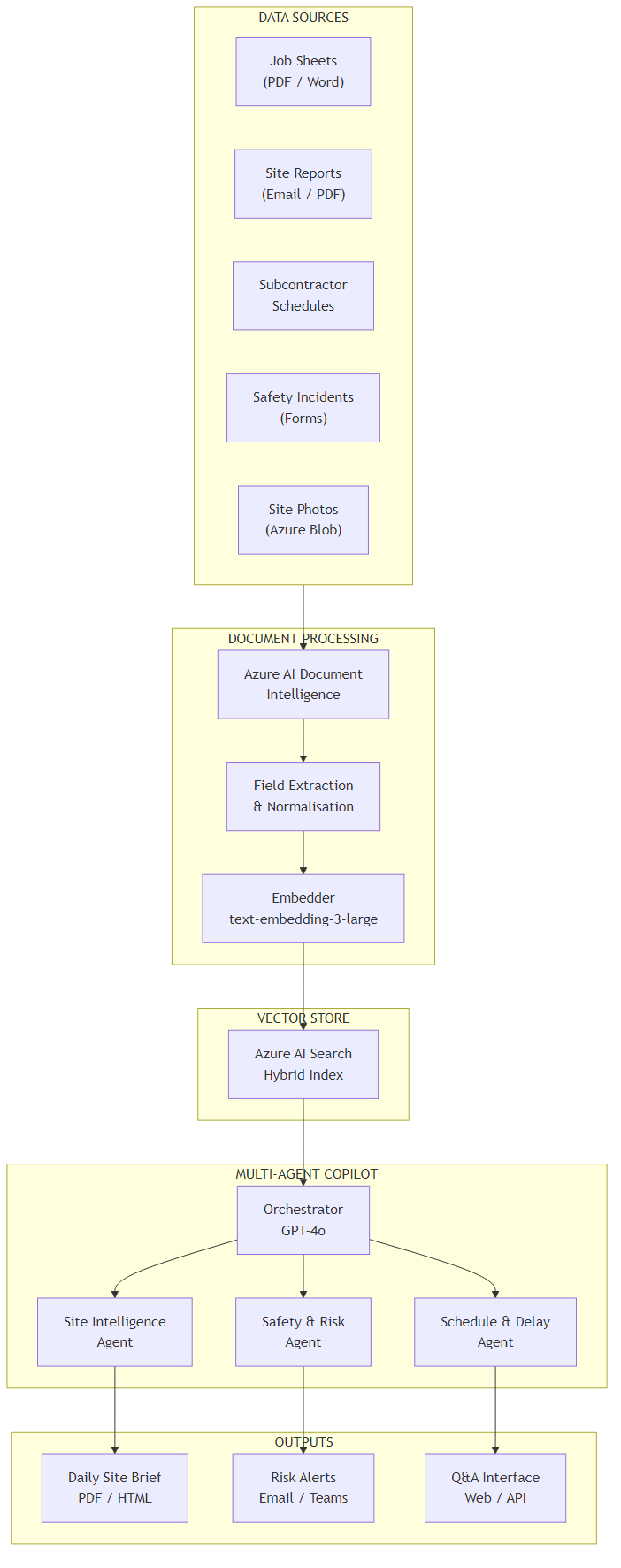
The data flow works like this. Incoming documents land in Azure Blob Storage — the system supports PDF, Word, email (EML), and image uploads. An Azure Function triggers on new blobs and calls Azure AI Document Intelligence to extract key fields: date, site name, document type, author, and the full text body. The extracted content is chunked (1,000 tokens, 200-token overlap), embedded using text-embedding-3-large, and pushed into Azure AI Search with both vector and keyword fields for hybrid retrieval.
On the query side, the orchestrator agent receives the user's question, classifies it by domain (site status, safety, schedule), and dispatches to the appropriate specialist agent. Each specialist agent runs a targeted retrieval against the shared index — filtered by document type, site name, and date range — then reasons over the retrieved context using GPT-4o. The orchestrator collects specialist responses and synthesises the final answer.
The daily brief is generated by an Azure Logic App that fires at 6:30am, calling the copilot API with a fixed prompt: "Provide a daily site brief for [site name] covering the past 24 hours. Include active risks, schedule status, and any items requiring immediate decision." The output is formatted as HTML and emailed to the site manager and project director.
Core Implementation
State Model
The state object flows through every agent in the graph. It carries the original query, intermediate specialist results, and final output. I keep it lean — only what each agent actually needs to read or write.
from typing import TypedDict, Optional
from dataclasses import dataclass, field

class CopilotState(TypedDict):
    # Inputs
    query: str
    site_id: str
    date_range_days: int          # how far back to search

    # Routing
    query_domains: list[str]      # ["site", "safety", "schedule"]

    # Specialist outputs
    site_intelligence: Optional[str]
    safety_summary: Optional[str]
    schedule_summary: Optional[str]

    # Retrieval metadata (for observability)
    retrieved_chunks: list[dict]
    token_usage: dict

    # Final output
    final_answer: Optional[str]
    brief_html: Optional[str]
public class CopilotState
{
// Inputs
public string Query { get; set; } = string.Empty;
public string SiteId { get; set; } = string.Empty;
public int DateRangeDays { get; set; } = 7;
// Routing
public List<string> QueryDomains { get; set; } = new();
// Specialist outputs
public string? SiteIntelligence { get; set; }
public string? SafetySummary { get; set; }
public string? ScheduleSummary { get; set; }
// Retrieval metadata
public List<RetrievedChunk> RetrievedChunks { get; set; } = new();
public TokenUsage TokenUsage { get; set; } = new();
// Final output
public string? FinalAnswer { get; set; }
public string? BriefHtml { get; set; }
}
public record RetrievedChunk(string DocId, string Content, float Score, string DocType);
public record TokenUsage(int PromptTokens = 0, int CompletionTokens = 0);Orchestrator Agent
The orchestrator has two jobs: classify the query into one or more domains, then fan out to the relevant specialist agents in parallel. I use GPT-4o for the classification because the domain boundaries are fuzzy — a question about a delayed slab pour is simultaneously a schedule question and potentially a quality/safety question. LLM classification handles those edge cases better than keyword routing.
from langgraph.graph import StateGraph, END
import asyncio

CLASSIFY_PROMPT = """You are a construction site intelligence router.
Classify the user query into one or more domains: site, safety, schedule.
Return a JSON list. Examples:
- "What happened on site today?" -> ["site"]
- "Any safety incidents this week?" -> ["safety"]
- "Will framing finish on time?" -> ["schedule", "site"]
- "Is anyone hurt and will it delay us?" -> ["safety", "schedule"]

Query: {query}
Return only the JSON list, nothing else."""

async def classify_query(state: CopilotState, llm) -> CopilotState:
    response = await llm.ainvoke(
        CLASSIFY_PROMPT.format(query=state["query"])
    )
    import json
    state["query_domains"] = json.loads(response.content)
    return state

async def run_specialists(state: CopilotState, agents: dict) -> CopilotState:
    tasks = []
    for domain in state["query_domains"]:
        if domain in agents:
            tasks.append(agents[domain].run(state))

    results = await asyncio.gather(*tasks, return_exceptions=True)

    for domain, result in zip(state["query_domains"], results):
        if isinstance(result, Exception):
            continue  # log but don't crash
        if domain == "site":
            state["site_intelligence"] = result
        elif domain == "safety":
            state["safety_summary"] = result
        elif domain == "schedule":
            state["schedule_summary"] = result

    return state

def build_graph(llm, agents: dict) -> StateGraph:
    graph = StateGraph(CopilotState)

    graph.add_node("classify", lambda s: classify_query(s, llm))
    graph.add_node("specialists", lambda s: run_specialists(s, agents))
    graph.add_node("synthesise", lambda s: synthesise_output(s, llm))

    graph.set_entry_point("classify")
    graph.add_edge("classify", "specialists")
    graph.add_edge("specialists", "synthesise")
    graph.add_edge("synthesise", END)

    return graph.compile()
using Microsoft.SemanticKernel;
using Microsoft.SemanticKernel.Agents;
using System.Text.Json;
public class SiteOrchestrator
{
private readonly Kernel _kernel;
private readonly Dictionary<string, ISpecialistAgent> _agents;
private const string ClassifyPrompt = @"
You are a construction site intelligence router.
Classify the user query into one or more domains: site, safety, schedule.
Return a JSON array. Query: {{$query}}
Return only the JSON array, nothing else.";
public SiteOrchestrator(Kernel kernel, Dictionary<string, ISpecialistAgent> agents)
{
_kernel = kernel;
_agents = agents;
}
public async Task<CopilotState> RunAsync(CopilotState state)
{
// Classify query
var classifyFunc = _kernel.CreateFunctionFromPrompt(ClassifyPrompt);
var classification = await classifyFunc.InvokeAsync(
_kernel, new() { ["query"] = state.Query });
state.QueryDomains = JsonSerializer.Deserialize<List<string>>(
classification.ToString()) ?? new();
// Fan out to specialists in parallel
var tasks = state.QueryDomains
.Where(d => _agents.ContainsKey(d))
.Select(d => _agents[d].RunAsync(state));
var results = await Task.WhenAll(tasks);
foreach (var (domain, result) in state.QueryDomains.Zip(results))
{
switch (domain)
{
case "site": state.SiteIntelligence = result; break;
case "safety": state.SafetySummary = result; break;
case "schedule": state.ScheduleSummary = result; break;
}
}
return await SynthesiseAsync(state);
}
}Key Technical Challenge #1 — Parsing Unstructured Job Sheets
Here's what surprised me: the hardest part of this project wasn't the AI orchestration. It was getting clean data out of construction documents in the first place. Job sheets come in wildly inconsistent formats. The plumber uses a Word template from 2018 with merged cells. The electrician's subcontractor sends a scanned handwritten docket. The site supervisor's daily diary is a 12-page PDF with photos, hand-drawn sketches, and inconsistent section headings.
Azure AI Document Intelligence (formerly Form Recogniser) handles this well — but you need to configure it correctly for the construction context. The key insight is that you don't need to extract every field perfectly. You need to extract enough for the LLM to reason over the text. That means: document type, site identifier, date, author, and the full text body. The LLM does the synthesis; Document Intelligence does the extraction.
from azure.ai.documentintelligence import DocumentIntelligenceClient
from azure.ai.documentintelligence.models import AnalyzeDocumentRequest
from azure.core.credentials import AzureKeyCredential
import re

class SiteDocumentProcessor:
    def __init__(self, endpoint: str, api_key: str):
        self.client = DocumentIntelligenceClient(
            endpoint=endpoint,
            credential=AzureKeyCredential(api_key)
        )

    def process_document(self, blob_url: str, metadata: dict) -> dict:
        """Extract structured content from any site document."""
        poller = self.client.begin_analyze_document(
            model_id="prebuilt-layout",  # handles mixed content types
            body=AnalyzeDocumentRequest(url_source=blob_url)
        )
        result = poller.result()

        # Combine all page content
        full_text = "\n".join(
            page.content for page in result.pages
            if page.content
        )

        # Extract tables as markdown (preserves structure for LLM)
        tables_md = []
        for table in (result.tables or []):
            tables_md.append(self._table_to_markdown(table))

        return {
            "doc_id": metadata.get("blob_name"),
            "site_id": self._extract_site_id(full_text, metadata),
            "doc_type": self._classify_doc_type(full_text, metadata),
            "date": self._extract_date(full_text, metadata),
            "author": self._extract_author(full_text),
            "content": full_text,
            "tables": "\n\n".join(tables_md),
            "page_count": len(result.pages),
        }

    def _classify_doc_type(self, text: str, metadata: dict) -> str:
        """Rule-based classification before calling LLM — saves tokens."""
        text_lower = text.lower()
        filename = metadata.get("blob_name", "").lower()

        patterns = {
            "safety_incident": ["incident report", "near miss", "injury", "unsafe"],
            "daily_site_report": ["daily report", "site diary", "site supervisor"],
            "job_sheet": ["job sheet", "work order", "variation"],
            "subcontractor_timesheet": ["timesheet", "hours worked", "labour"],
            "rfi": ["request for information", "rfi", "clarification required"],
            "inspection": ["inspection", "defect", "hold point", "itp"],
        }

        for doc_type, keywords in patterns.items():
            if any(kw in text_lower or kw in filename for kw in keywords):
                return doc_type

        return "general"

    def _table_to_markdown(self, table) -> str:
        if not table.cells:
            return ""
        rows: dict[int, dict[int, str]] = {}
        for cell in table.cells:
            rows.setdefault(cell.row_index, {})[cell.column_index] = (
                cell.content.replace("\n", " ")
            )
        lines = []
        for row_idx in sorted(rows):
            cols = rows[row_idx]
            lines.append("| " + " | ".join(
                cols.get(i, "") for i in range(max(cols) + 1)
            ) + " |")
        return "\n".join(lines)
using Azure.AI.DocumentIntelligence;
using Azure;
using System.Text;
public class SiteDocumentProcessor
{
private readonly DocumentIntelligenceClient _client;
public SiteDocumentProcessor(string endpoint, string apiKey)
{
_client = new DocumentIntelligenceClient(
new Uri(endpoint),
new AzureKeyCredential(apiKey));
}
public async Task<ProcessedDocument> ProcessDocumentAsync(
string blobUrl, DocumentMetadata metadata)
{
var operation = await _client.AnalyzeDocumentAsync(
WaitUntil.Completed,
"prebuilt-layout",
new AnalyzeDocumentContent { UrlSource = new Uri(blobUrl) });
var result = operation.Value;
var fullText = new StringBuilder();
foreach (var page in result.Pages)
fullText.AppendLine(page.Content);
var tablesMarkdown = new List<string>();
foreach (var table in result.Tables ?? Enumerable.Empty<DocumentTable>())
tablesMarkdown.Add(TableToMarkdown(table));
return new ProcessedDocument
{
DocId = metadata.BlobName,
SiteId = ExtractSiteId(fullText.ToString(), metadata),
DocType = ClassifyDocType(fullText.ToString(), metadata),
Date = ExtractDate(fullText.ToString(), metadata),
Author = ExtractAuthor(fullText.ToString()),
Content = fullText.ToString(),
Tables = string.Join("\n\n", tablesMarkdown),
PageCount = result.Pages.Count
};
}
private string ClassifyDocType(string text, DocumentMetadata metadata)
{
var lower = text.ToLowerInvariant();
var filename = metadata.BlobName.ToLowerInvariant();
var patterns = new Dictionary<string, string[]>
{
["safety_incident"] = ["incident report", "near miss", "injury"],
["daily_site_report"] = ["daily report", "site diary"],
["job_sheet"] = ["job sheet", "work order", "variation"],
["subcontractor_timesheet"] = ["timesheet", "hours worked"],
["rfi"] = ["request for information", "rfi"],
["inspection"] = ["inspection", "defect", "hold point"],
};
foreach (var (docType, keywords) in patterns)
if (keywords.Any(k => lower.Contains(k) || filename.Contains(k)))
return docType;
return "general";
}
private string TableToMarkdown(DocumentTable table)
{
var rows = table.Cells
.GroupBy(c => c.RowIndex)
.OrderBy(g => g.Key)
.Select(g => "| " + string.Join(" | ",
g.OrderBy(c => c.ColumnIndex)
.Select(c => c.Content.Replace("\n", " "))) + " |");
return string.Join("\n", rows);
}
}Why prebuilt-layout Over a Custom Model?
You can train a custom extraction model in Document Intelligence to pull specific fields like "Site Supervisor Name" or "Weather Conditions". I tried this. The trade-off is that custom models are brittle — they break when the form template changes, which happens every time a new subcontractor joins. The prebuilt-layout model extracts all text and table structure, and lets the LLM downstream handle field extraction from context. Fewer moving parts, more resilient to format variation.
Exception: if you need to extract specific fields for structured storage (e.g., writing back to your ERP), a custom model is worth the maintenance cost.
Key Technical Challenge #2 — Multi-Source Context Fusion
The second hard problem: when the Safety Agent retrieves context to answer "Were there any incidents this week?", it shouldn't only search the safety incident reports. A near-miss might have been recorded in the daily site diary by a supervisor who didn't know it needed a formal incident report. The Schedule Agent might need the safety incident record to explain a delay. These documents live in the same index but need to be retrieved with different strategies.
The solution is tiered retrieval with document-type filtering as a first pass, followed by a broader semantic search if the filtered results are insufficient. Each specialist agent implements its own retrieval strategy.
from azure.search.documents import SearchClient
from azure.search.documents.models import VectorizedQuery
import openai

SAFETY_SYSTEM_PROMPT = """You are a construction site safety analyst.
You have access to site safety records, incident reports, and daily diaries.
Analyse the provided context and answer the question about safety and risk.
Be specific: cite document dates and document types.
Flag anything that requires immediate escalation.
Do NOT speculate beyond what the documents contain."""

class SafetyAgent:
    PRIMARY_DOC_TYPES = ["safety_incident", "inspection"]
    SECONDARY_DOC_TYPES = ["daily_site_report", "general"]

    def __init__(self, search_client: SearchClient, llm_client: openai.AsyncAzureOpenAI):
        self.search = search_client
        self.llm = llm_client

    async def run(self, state: CopilotState) -> str:
        chunks = await self._tiered_retrieve(state)

        # Store for observability
        state["retrieved_chunks"].extend(chunks)

        context = "\n---\n".join(
            f"[{c['doc_type']} | {c['date']} | score: {c['@search.score']:.2f}]\n{c['content']}"
            for c in chunks
        )

        response = await self.llm.chat.completions.create(
            model="gpt-4o",
            messages=[
                {"role": "system", "content": SAFETY_SYSTEM_PROMPT},
                {"role": "user", "content": f"Query: {state['query']}\n\nContext:\n{context}"}
            ],
            temperature=0.1,  # low temp for factual safety analysis
        )

        return response.choices[0].message.content

    async def _tiered_retrieve(self, state: CopilotState) -> list[dict]:
        query_vector = await self._embed(state["query"])
        cutoff_date = self._date_cutoff(state["date_range_days"])

        # Tier 1: safety-specific documents
        primary = await self._search(
            query_vector, state["query"], state["site_id"],
            doc_types=self.PRIMARY_DOC_TYPES,
            cutoff_date=cutoff_date, top=5
        )

        # Tier 2: broader search if primary results thin
        if len(primary) < 3:
            secondary = await self._search(
                query_vector, state["query"], state["site_id"],
                doc_types=self.SECONDARY_DOC_TYPES,
                cutoff_date=cutoff_date, top=3
            )
            primary.extend(secondary)

        return primary[:8]  # cap total context

    async def _search(self, vector, query_text, site_id,
                      doc_types, cutoff_date, top) -> list[dict]:
        filter_expr = (
            f"site_id eq '{site_id}' and "
            f"date ge '{cutoff_date}' and "
            f"search.in(doc_type, '{','.join(doc_types)}')"
        )
        results = self.search.search(
            search_text=query_text,
            vector_queries=[VectorizedQuery(vector=vector, k_nearest_neighbors=top, fields="embedding")],
            filter=filter_expr,
            select=["doc_id", "doc_type", "date", "content", "author"],
            top=top,
        )
        return [dict(r) for r in results]
using Azure.Search.Documents;
using Azure.Search.Documents.Models;
using Microsoft.SemanticKernel;
public class SafetyAgent : ISpecialistAgent
{
private readonly SearchClient _searchClient;
private readonly Kernel _kernel;
private static readonly string[] PrimaryDocTypes = ["safety_incident", "inspection"];
private static readonly string[] SecondaryDocTypes = ["daily_site_report", "general"];
private const string SafetySystemPrompt = @"
You are a construction site safety analyst.
Analyse the provided context and answer the question about safety and risk.
Be specific: cite document dates and document types.
Flag anything requiring immediate escalation.
Do NOT speculate beyond what the documents contain.";
public SafetyAgent(SearchClient searchClient, Kernel kernel)
{
_searchClient = searchClient;
_kernel = kernel;
}
public async Task<string> RunAsync(CopilotState state)
{
var chunks = await TieredRetrieveAsync(state);
state.RetrievedChunks.AddRange(chunks);
var context = string.Join("\n---\n", chunks.Select(c =>
$"[{c.DocType} | {c.Date:yyyy-MM-dd} | score: {c.Score:F2}]\n{c.Content}"));
var chatFunc = _kernel.CreateFunctionFromPrompt(
$"{SafetySystemPrompt}\n\nQuery: {{{{$query}}}}\n\nContext:\n{{{{$context}}}}");
var result = await chatFunc.InvokeAsync(_kernel, new()
{
["query"] = state.Query,
["context"] = context
});
return result.ToString();
}
private async Task<List<RetrievedChunk>> TieredRetrieveAsync(CopilotState state)
{
var queryVector = await EmbedAsync(state.Query);
var cutoffDate = DateTime.UtcNow.AddDays(-state.DateRangeDays);
var primary = await SearchAsync(
queryVector, state.Query, state.SiteId,
PrimaryDocTypes, cutoffDate, top: 5);
if (primary.Count < 3)
{
var secondary = await SearchAsync(
queryVector, state.Query, state.SiteId,
SecondaryDocTypes, cutoffDate, top: 3);
primary.AddRange(secondary);
}
return primary.Take(8).ToList();
}
private async Task<List<RetrievedChunk>> SearchAsync(
float[] vector, string query, string siteId,
string[] docTypes, DateTime cutoff, int top)
{
var docTypeFilter = string.Join(",", docTypes.Select(d => $"'{d}'"));
var filter = $"site_id eq '{siteId}' and date ge {cutoff:yyyy-MM-dd} " +
$"and search.in(doc_type, {docTypeFilter})";
var options = new SearchOptions
{
Filter = filter,
Size = top,
Select = { "doc_id", "doc_type", "date", "content" },
VectorSearch = new() { Queries = { new VectorizedQuery(vector)
{ KNearestNeighborsCount = top, Fields = { "embedding" } } } }
};
var response = await _searchClient.SearchAsync<SearchDocument>(query, options);
var results = new List<RetrievedChunk>();
await foreach (var r in response.Value.GetResultsAsync())
results.Add(new RetrievedChunk(
r.Document["doc_id"].ToString()!,
r.Document["content"].ToString()!,
(float)r.Score!,
r.Document["doc_type"].ToString()!));
return results;
}
}Cost Analysis
I want to give you real numbers, not "it depends". This is based on a production deployment for a construction company with 8 active sites, processing roughly 40–80 new documents per day.
| Component | Usage per Day | Unit Cost | Daily Cost |
|---|---|---|---|
| Azure AI Document Intelligence (prebuilt-layout) | 60 documents, avg 4 pages | $0.001/page | $0.24 |
| text-embedding-3-large (ingestion) | ~1.2M tokens | $0.13/1M | $0.16 |
| GPT-4o (daily briefs — 8 sites) | 8 × ~4K context + 1K output | $2.50/$10.00 per 1M | $0.16 |
| GPT-4o (ad-hoc queries — est. 30/day) | 30 × 3 agents × ~3K in + 500 out | $2.50/$10.00 per 1M | $0.92 |
| Azure AI Search (S1 tier, 8 indexes) | Fixed | ~$0.25/hour | $6.00 |
| Azure Blob Storage | ~2GB new docs/day | $0.02/GB | $0.04 |
| Total daily cost (8 sites) | ~$7.52 | ||
| Per-site per-day cost | ~$0.94 | ||
| Cost per daily brief generated | ~$0.12 | ||
The Cost Trap to Avoid
Azure AI Search is the dominant cost item, not GPT-4o. A single S1 Search instance handles the load fine, but if you provision S2 or S3 "for safety", your infrastructure cost jumps to $15-30/day before you've run a single query. Right-size the Search tier to actual document volume. Start with S1, benchmark, and scale only when you hit query latency above 2 seconds at peak.
Also: don't embed every chunk through GPT-4o embeddings. Use text-embedding-3-large (Ada's successor) — it's 5× cheaper than the older ada-002 and materially better at domain-specific retrieval.
Observability & Debugging
The in-practice debugging challenge with multi-agent systems isn't finding bugs in individual agents — it's understanding why the orchestrator routed to the wrong specialist, or why the retrieval returned irrelevant chunks for a specific query. You need logging that captures the full decision chain, not just the final output.
import structlog
from opentelemetry import trace
from opentelemetry.sdk.trace import TracerProvider
from azure.monitor.opentelemetry import configure_azure_monitor

configure_azure_monitor(connection_string=os.getenv("APPINSIGHTS_CONNECTION_STRING"))

log = structlog.get_logger()
tracer = trace.get_tracer("site-copilot")

class InstrumentedOrchestrator:
    async def run_query(self, state: CopilotState) -> CopilotState:
        with tracer.start_as_current_span("copilot.query") as span:
            span.set_attribute("site.id", state["site_id"])
            span.set_attribute("query.text", state["query"][:200])

            state = await self.orchestrator.run(state)

            # Log routing decision
            log.info("query_routed",
                query=state["query"][:100],
                domains=state["query_domains"],
                chunks_retrieved=len(state["retrieved_chunks"]),
                token_usage=state["token_usage"]
            )

            # Log per-chunk retrieval scores (helps tune retrieval)
            for chunk in state["retrieved_chunks"]:
                log.debug("chunk_retrieved",
                    doc_type=chunk.get("doc_type"),
                    score=chunk.get("@search.score"),
                    date=chunk.get("date"),
                    doc_id=chunk.get("doc_id")
                )

            span.set_attribute("domains.count", len(state["query_domains"]))
            span.set_attribute("chunks.count", len(state["retrieved_chunks"]))

        return state
using System.Diagnostics;
using Microsoft.Extensions.Logging;
using Azure.Monitor.OpenTelemetry.AspNetCore;
public class InstrumentedOrchestrator
{
private static readonly ActivitySource ActivitySource = new("site-copilot");
private readonly SiteOrchestrator _orchestrator;
private readonly ILogger<InstrumentedOrchestrator> _logger;
public async Task<CopilotState> RunQueryAsync(CopilotState state)
{
using var activity = ActivitySource.StartActivity("copilot.query");
activity?.SetTag("site.id", state.SiteId);
activity?.SetTag("query.text", state.Query[..Math.Min(200, state.Query.Length)]);
state = await _orchestrator.RunAsync(state);
_logger.LogInformation(
"Query routed: domains={Domains}, chunks={Chunks}, tokens={Tokens}",
string.Join(",", state.QueryDomains),
state.RetrievedChunks.Count,
state.TokenUsage.PromptTokens + state.TokenUsage.CompletionTokens);
foreach (var chunk in state.RetrievedChunks)
_logger.LogDebug(
"Chunk retrieved: type={DocType}, score={Score:F3}, date={Date}",
chunk.DocType, chunk.Score, chunk.DocId);
activity?.SetTag("domains.count", state.QueryDomains.Count);
activity?.SetTag("chunks.count", state.RetrievedChunks.Count);
return state;
}
}The three metrics I track in the Application Insights dashboard:
- Routing accuracy rate — Manually reviewed a sample of 50 queries per week. If the orchestrator classified a safety query as schedule-only more than 5% of the time, the classification prompt needed tuning.
- Retrieval score distribution — If the average top-1 chunk score drops below 0.75, document ingestion quality has degraded (usually a new document format that the classifier is mis-tagging).
- Brief generation latency — The daily brief must complete within 45 seconds. Multi-agent parallel calls keep this under 20 seconds for single-site queries.
Technology Choices: Python vs C#
Python Implementation
Why choose Python: If your team writes Python, you get access to the richest AI/ML ecosystem with the fastest iteration cycle.
- LangGraph — purpose-built for stateful multi-agent graphs with conditional routing and cycles
- LangChain Azure integrations — Document Intelligence, Azure AI Search, and Azure OpenAI all have maintained LangChain wrappers
- Rapid experimentation — Jupyter notebooks for prompt iteration, easy hot-swap of retrieval strategies
- Azure Functions Python runtime — first-class support for event-driven ingestion triggers
C#/.NET Implementation
Why choose C#: If your backend is .NET, you get first-party Microsoft SDKs, enterprise patterns, and native Azure integration that requires zero translation.
- Semantic Kernel — Microsoft's native orchestration framework, now GA with multi-agent support and Foundry Agent Service integration
- Azure SDK .NET — All Azure services have first-party .NET SDKs maintained by Microsoft product teams
- Enterprise patterns — dependency injection, strong typing, existing .NET middleware chains
- Blazor or ASP.NET integration — if your site manager portal is .NET, the copilot API slots in as a native service
The Bottom Line
Python team? Use Python + LangGraph. C#/.NET team? Use C# + Semantic Kernel. The architecture, prompts, and Azure services are identical either way. Don't fight your stack.
Azure Infrastructure
The minimum viable service set for production:
| Service | Tier / Config | Purpose |
|---|---|---|
| Azure OpenAI | GPT-4o (global deployment), text-embedding-3-large | Reasoning and embedding |
| Azure AI Document Intelligence | Standard S0 | Document extraction |
| Azure AI Search | S1 (scalable to S2) | Hybrid vector + keyword retrieval |
| Azure Blob Storage | Standard LRS | Raw document storage and trigger source |
| Azure Functions | Consumption plan | Event-driven ingestion pipeline |
| Azure API Management | Consumption tier | Rate limiting and auth for the copilot API |
| Azure Monitor / App Insights | Standard | Observability and alerting |
Azure AI Foundry Agent Service
Azure AI Foundry Agent Service is now generally available, providing managed orchestration for multi-agent AI systems without the need to manage LangGraph or Semantic Kernel state persistence yourself.
- Built-in agent routing and conversation threading
- Managed state persistence across sessions
- Native Azure OpenAI integration with built-in token management
- Observability through Azure Monitor with pre-built agent dashboards
- Tool calling and code interpreter built in
For new deployments, Foundry Agent Service is worth evaluating — it removes the orchestration infrastructure burden significantly. For the system described in this article, I used LangGraph and Semantic Kernel because the deployment predated GA, but I'd start with Foundry Agent Service today for a greenfield build.
Check Azure AI Foundry Agent Service for current pricing and regional availability.
ROI and Business Value
Measured Outcomes (8-site Production Deployment)
These numbers came from a 12-week pilot with a mid-tier residential construction company:
- Morning briefing time reduced from 60–90 min to 10–15 min per site manager
- Safety incident identification lag reduced from 24–48 hours to under 4 hours (system surfaces incidents from daily diary entries before formal reports are filed)
- Subcontractor schedule queries answered in under 30 seconds instead of requiring a phone call
- System operating cost at $0.94/site/day against $120/hr fully-loaded site manager cost — the copilot pays for itself in the first 30 seconds of time saved daily
The ROI framework: count the time your site managers currently spend synthesising data daily, multiply by their fully-loaded hourly cost, and compare against ~$1/site/day. The math works at almost any scale.
The less obvious value is in consistency. The copilot reviews every document every day. Human reviewers skip sections when they're busy. The system caught three significant incidents (two near-misses and one defect) in the pilot that site managers acknowledged they would likely have missed in a busy morning read.
When NOT to Build This
Don't Build This If:
- Your team still captures data on paper with no intention of scanning or uploading it. The AI is only as good as what gets into the system. If the pipeline starts with someone photographing a handwritten form and manually typing it into a portal, you don't have a data problem that AI can solve — you have a process adoption problem.
- You have fewer than 3 active sites. Below that scale, a well-structured daily WhatsApp summary and a 20-minute call achieves the same outcome with zero infrastructure cost.
- Your documents are already highly structured and stored in a proper ERP or PM system. If Procore is already doing structured data entry and you have API access, query the Procore API directly. Don't run PDFs through Document Intelligence when the structured data already exists in a database.
- You need answers in real-time from live IoT or sensor feeds. This system is designed for document intelligence, not streaming event processing. A live sensor alert system is a different architecture.
- You don't have someone who can maintain the ingestion pipeline. Document Intelligence extraction requires ongoing calibration as new document templates appear. Budget for 2–4 hours of maintenance per month.
The simpler alternative in most cases: a well-prompted GPT-4o with daily report uploads as file attachments via the Assistants API. No retrieval, no pipeline, no multi-agent routing. Just upload the day's documents and ask your questions. For a single site or small team, that covers 80% of the value for 10% of the build effort.
Key Takeaways
Construction sites are data-rich, intelligence-poor. The bottleneck isn't that the data doesn't exist — it's that extracting meaning from it requires a human to read everything, hold it in context, and synthesise across sources. A multi-agent RAG copilot automates that synthesis.
- Use
prebuilt-layoutDocument Intelligence, not custom models. It's more resilient to format variation, which is the norm in construction document chaos. - Tiered retrieval with document-type filtering outperforms naive top-K semantic search for domain-specific queries. Filter first, broaden only if results are thin.
- Parallel specialist agents are what justify the multi-agent complexity. If your queries only ever touch one domain, use a single RAG pipeline instead.
- Azure AI Search is your dominant cost, not GPT-4o. Right-size the Search tier before optimising token usage.
- Track routing accuracy and chunk retrieval scores. These two metrics surface 90% of production degradation before users notice it.
- Don't build this if your data capture process is broken. AI amplifies what's already in the system — garbage in, garbage brief out.
The trade-off I'd make again: the multi-agent architecture adds complexity over a simple RAG pipeline, but the jump in answer quality for cross-domain queries — the ones that actually matter on a construction site — justifies it.
Want More Practical AI Tutorials?
I write about building production AI systems with Azure, Python, and C#. Subscribe for practical tutorials delivered twice a month.
Subscribe to Newsletter →