Your e-commerce site probably has a chatbot. It probably uses keyword search. And it probably frustrates your customers more than it helps them.
Here's the pattern I see repeatedly: A company adds a chatbot to their site. They connect it to their product database. Customers ask questions, the bot searches for keywords, and returns... technically correct but practically useless results.
"Gift for my nephew who likes dinosaurs" returns zero results because no product contains those exact words. "Add the blue one to my cart" fails because the bot doesn't remember what it just showed. "Something waterproof for hiking" triggers a keyword match on "waterproof" and shows phone cases alongside hiking gear.
The cost isn't just in lost sales. It's in the engineering hours spent patching edge cases. It's in the customer support tickets that pile up. It's in the A/B tests that show chatbot users convert worse than those who just browse.
Multi-agent AI solves this by doing what good teams do: specialization. Instead of one confused bot trying to do everything, you deploy specialists that each do one thing well.
What You'll Learn
- Why "chatbot + keyword search" fails in real deployments
- The business case for multi-agent architecture
- How to orchestrate agents with LangGraph
- Real conversation patterns and edge cases
- When multi-agent is worth the investment
The Traditional Trap: Chatbot + Keyword Search
Let me show you what "good enough" actually looks like in production.
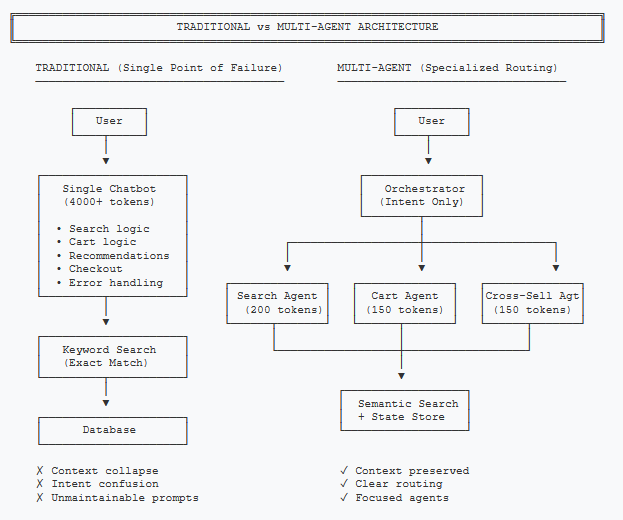
A typical e-commerce chatbot architecture looks like this: User message comes in, gets processed by a single LLM with a long system prompt, which generates a search query for your product database, and returns results. Simple. Works in demos. Falls apart in production.
Problem 1: The Context Collapse
When a customer says "add the blue one," your traditional chatbot has no idea what "the blue one" refers to. The conversation might have been:
The bot doesn't maintain context about what it just showed. Every turn starts fresh. This isn't a bug—it's how most chatbot implementations work because maintaining state is expensive and complex.
Problem 2: The Intent Confusion
A single prompt handling search, cart operations, recommendations, and checkout inevitably gets confused. "Show me your best hiking boots and add one to my cart" contains two intents. Traditional bots either pick one (frustrating the customer) or hallucinate a response that addresses neither.
Problem 3: The Maintenance Nightmare
Every edge case means expanding the system prompt. Every expansion makes the model less reliable. Six months in, you have a 4,000-token system prompt that nobody understands, and changes in one area break behavior in another.
The Hidden Cost
One retail client tracked their chatbot's "escalation rate"—conversations that ended with the customer clicking "Talk to Human." It was 34%. That's 34% of chatbot interactions that created support tickets rather than resolving them.
Multi-Agent Value Prop: Specialization = Conversion
Multi-agent architecture applies a simple principle: specialists outperform generalists at complex tasks.
Instead of one bot doing everything poorly, you deploy:
- A Search Agent that only handles product discovery. It understands natural language queries, uses semantic search, and formats results conversationally.
- A Cart Agent that only handles cart operations. It maintains context about recently shown products, resolves references like "the second one," and manages the cart state.
- A Cross-Sell Agent that only handles recommendations. It activates after cart additions and suggests complementary items.
- An Orchestrator that routes requests to the right specialist. It's the only component that needs to understand intent.
Each agent has a focused system prompt. The Search Agent's prompt is 200 tokens about product presentation. The Cart Agent's prompt is 150 tokens about context resolution. No 4,000-token monstrosities.
Why This Works Better
Reliability: Constrained prompts produce predictable outputs. When the intent classifier says "add_to_cart," the Cart Agent receives exactly the context it needs. No confusion about whether it should also search or recommend.
Debuggability: When something breaks, you know exactly where. Intent misclassified? Fix the classifier. Wrong product resolved? Check the Cart Agent's context. Traditional bots fail in opaque ways.
Iteration Speed: Improve the Search Agent without touching cart logic. Add a new Checkout Agent without retraining anything else. Each specialist can be optimized independently.
The Business Impact
Specialization enables context-aware interactions. When customers can say "add it" and the system knows what "it" means, conversion rates improve. When recommendations are contextual rather than generic, average order value increases.
The question isn't whether multi-agent costs more to build. It's whether your current chatbot is generating value or generating support tickets.
Architecture Overview
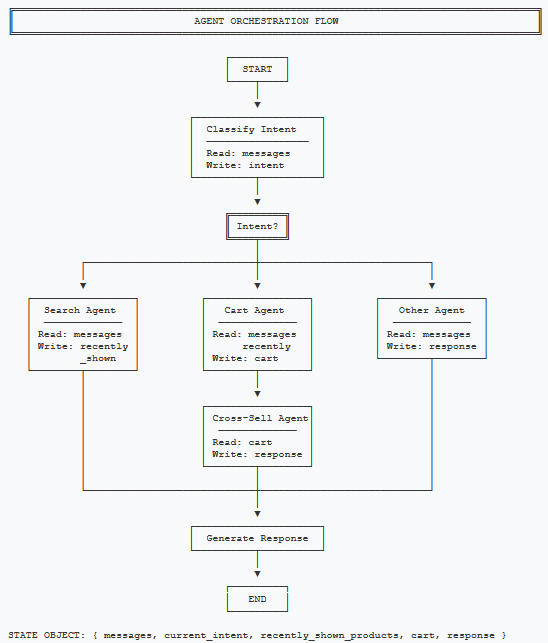
The architecture follows a hub-and-spoke pattern. The Orchestrator sits at the center, classifying intent and routing to specialized agents.
Components
| Component | Responsibility | State Access |
|---|---|---|
| Orchestrator | Intent classification, routing | Read: messages, Write: current_intent |
| Search Agent | Product discovery via RAG | Read: messages, Write: recently_shown, response |
| Cart Agent | Cart ops, context resolution | Read: messages, recently_shown, Write: cart, response |
| Cross-Sell Agent | Complementary recommendations | Read: cart, Write: response |
State Design
The conversation state is the contract between agents. Each agent reads what it needs and writes what others might need.
from typing import TypedDict, List

class ConversationState(TypedDict):
    session_id: str
    messages: List[dict]           # Conversation history
    current_intent: str            # Classified intent
    recently_shown_products: List[dict]  # For context resolution
    cart: dict                     # Current cart state
    last_agent: str                # Which agent handled last
    response: str                  # Final response to user
public class ConversationState
{
public string SessionId { get; set; } = string.Empty;
public List<ChatMessage> Messages { get; set; } = new();
public string CurrentIntent { get; set; } = string.Empty;
public List<Product> RecentlyShownProducts { get; set; } = new();
public Cart Cart { get; set; } = new();
public string LastAgent { get; set; } = string.Empty;
public string Response { get; set; } = string.Empty;
}The recently_shown_products field is crucial. It's what enables "add the
blue one" to work. The Search Agent populates it; the Cart Agent reads it.
Why LangGraph?
LangGraph provides three things we need:
- State management: The state object flows through nodes automatically
- Conditional routing: Route based on classified intent
- Graph structure: Define flows declaratively, not imperatively
You could build this with raw Python and if/else statements. LangGraph just makes the flow explicit and debuggable.
Orchestration
The orchestrator defines how requests flow through the system. Here's the implementation in both LangGraph (Python) and Semantic Kernel (C#).
from langgraph.graph import StateGraph, END

def build_shopping_assistant() -> StateGraph:
    workflow = StateGraph(ConversationState)

    # Add agent nodes
    workflow.add_node("classify_intent", classify_intent)
    workflow.add_node("search", handle_product_search)
    workflow.add_node("cart", handle_cart_operation)
    workflow.add_node("cross_sell", handle_cross_sell)
    workflow.add_node("respond", generate_response)

    workflow.set_entry_point("classify_intent")

    # Route based on intent
    workflow.add_conditional_edges(
        "classify_intent",
        lambda state: state["current_intent"],
        {
            "product_search": "search",
            "add_to_cart": "cart",
            "view_cart": "cart",
            "checkout": "respond",
        },
    )

    workflow.add_edge("cart", "cross_sell")
    workflow.add_edge("cross_sell", "respond")
    workflow.add_edge("search", "respond")
    workflow.add_edge("respond", END)

    return workflow.compile()
public class ShoppingOrchestrator
{
private readonly Kernel _kernel;
private readonly IntentClassifier _classifier;
public ShoppingOrchestrator(Kernel kernel)
{
_kernel = kernel;
_classifier = new IntentClassifier(kernel);
// Register agent plugins
_kernel.Plugins.AddFromType<ProductSearchPlugin>();
_kernel.Plugins.AddFromType<CartPlugin>();
_kernel.Plugins.AddFromType<CrossSellPlugin>();
}
public async Task<string> ProcessAsync(ConversationState state)
{
var intent = await _classifier.ClassifyAsync(
state.Messages.Last().Content);
return intent switch
{
"product_search" => await SearchAsync(state),
"add_to_cart" => await CartThenCrossSellAsync(state),
"view_cart" => await ViewCartAsync(state),
_ => await GenerateResponseAsync(state)
};
}
}Intent Classification
The classifier is deliberately simple. It uses a constrained prompt with low temperature to produce predictable outputs.
INTENT_PROMPT = """Classify the user's intent into ONE category:

- product_search: Looking for products
- add_to_cart: Wants to add item to cart
- view_cart: Wants to see their cart
- checkout: Ready to complete purchase

Respond with ONLY the category name."""

async def classify_intent(state: ConversationState) -> ConversationState:
    last_message = state["messages"][-1]["content"]

    intent = await llm.chat([
        {"role": "system", "content": INTENT_PROMPT},
        {"role": "user", "content": last_message}
    ], temperature=0, max_tokens=20)

    state["current_intent"] = intent.strip().lower()
    return state
public class IntentClassifier
{
private const string IntentPrompt = """
Classify the user's intent into ONE category:
- product_search: Looking for products
- add_to_cart: Wants to add item to cart
- view_cart: Wants to see their cart
- checkout: Ready to complete purchase
Respond with ONLY the category name.
""";
private readonly IChatCompletionService _chat;
public async Task<string> ClassifyAsync(string message)
{
var settings = new OpenAIPromptExecutionSettings
{
Temperature = 0,
MaxTokens = 20
};
var history = new ChatHistory(IntentPrompt);
history.AddUserMessage(message);
var result = await _chat.GetChatMessageContentAsync(
history, settings);
return result.Content?.Trim().ToLower() ?? "product_search";
}
}Notice: temperature=0 and max_tokens=20. We're not asking the
LLM to be creative. We're asking it to classify. Constrained outputs make routing
reliable.
Why Constrained Prompts Matter
The classifier can only return four values. Any other output is a bug we can catch and handle. Compare this to a traditional chatbot where the model might return anything—and often does.
Real Conversations: Edge Cases That Matter
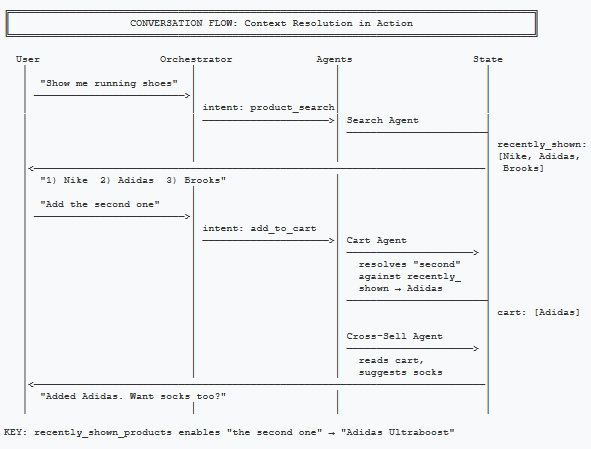
Theory is nice. Let's see how the system handles real-world conversation patterns.
Edge Case 1: The Ambiguous Add
What happened: The Search Agent stored the three products in
recently_shown_products. When the customer said "the second one," the Cart
Agent resolved that reference against the stored list. The Cross-Sell Agent then added a
contextual recommendation.
Edge Case 2: The Mind-Changer
What happened: The customer changed their mind mid-conversation. The intent classifier recognized "show me" as a new search, not a cart operation. The cart retains the Nike shoes (they didn't say "remove"), but the conversation pivoted naturally.
Edge Case 3: The Failed Resolution
What happened: The context resolution failed—no product in
recently_shown_products matched "green." Instead of hallucinating, the Cart
Agent acknowledged the failure and offered alternatives. This is a designed behavior,
not an accident.
Failure Handling Matters
Multi-agent systems fail in predictable ways. When context resolution fails, you know exactly why (no matching product). When intent classification fails, you can log it and improve the classifier. Traditional chatbots fail in opaque, unreproducible ways.
Failure Patterns & Recovery
Every system fails. The question is whether failures are recoverable. Here are the common failure modes and how to handle them.
Pattern 1: Intent Misclassification
Symptom: Customer says "What shoes go with this?" after adding pants, but it routes to Search instead of Cross-Sell.
Solution: Add context to the classifier. Pass the last action, not just the last message.
async def classify_intent(state: ConversationState) -> ConversationState:
    last_message = state["messages"][-1]["content"]
    last_action = state.get("last_agent", "none")

    # Include context about what just happened
    context = f"Last action: {last_action}\nUser message: {last_message}"

    intent = await llm.chat([
        {"role": "system", "content": INTENT_PROMPT},
        {"role": "user", "content": context}
    ], temperature=0, max_tokens=20)

    state["current_intent"] = intent.strip().lower()
    return state
public async Task<string> ClassifyAsync(
string message, string lastAgent)
{
// Include context about what just happened
var context = $"Last action: {lastAgent}\nUser message: {message}";
var settings = new OpenAIPromptExecutionSettings
{
Temperature = 0,
MaxTokens = 20
};
var history = new ChatHistory(IntentPrompt);
history.AddUserMessage(context);
var result = await _chat.GetChatMessageContentAsync(
history, settings);
return result.Content?.Trim().ToLower() ?? "product_search";
}Pattern 2: Context Window Overflow
Symptom: recently_shown_products grows indefinitely,
eventually causing token limits.
Solution: Limit the list to the last N products (typically 10). Old products fall off.
MAX_RECENT_PRODUCTS = 10

def update_recently_shown(state: ConversationState, products: List[dict]):
    state["recently_shown_products"] = (
        state.get("recently_shown_products", []) + products
    )[-MAX_RECENT_PRODUCTS:]
private const int MaxRecentProducts = 10;
public void UpdateRecentlyShown(
ConversationState state, List<Product> products)
{
state.RecentlyShownProducts.AddRange(products);
if (state.RecentlyShownProducts.Count > MaxRecentProducts)
{
state.RecentlyShownProducts = state.RecentlyShownProducts
.TakeLast(MaxRecentProducts)
.ToList();
}
}Pattern 3: Agent Timeout
Symptom: The Search Agent takes too long (slow vector search, LLM latency).
Solution: Wrap agent calls in timeout handlers. Fall back to cached results or apologize gracefully.
import asyncio

async def handle_product_search(state: ConversationState) -> ConversationState:
    try:
        result = await asyncio.wait_for(
            search_agent.process(state),
            timeout=5.0  # 5 second limit
        )
        return result
    except asyncio.TimeoutError:
        state["response"] = "Search is taking longer than expected. Try a simpler query?"
        return state
public async Task<ConversationState> HandleProductSearchAsync(
ConversationState state)
{
using var cts = new CancellationTokenSource(
TimeSpan.FromSeconds(5));
try
{
return await _searchAgent.ProcessAsync(state, cts.Token);
}
catch (OperationCanceledException)
{
state.Response = "Search is taking longer than expected. " +
"Try a simpler query?";
return state;
}
}These patterns aren't unique to multi-agent systems. The difference is that failures are isolated. A Search Agent timeout doesn't break the Cart Agent.
ROI Framework: When Multi-Agent Pays Off
Multi-agent architecture costs more to build than a simple chatbot. When is that investment justified?
Use Multi-Agent When:
- Conversations have multiple turns. If customers typically ask one question and leave, single-prompt works fine. If they browse, compare, and add to cart over 5+ turns, you need context management.
- You have distinct task types. Search, cart, recommendations, and checkout are fundamentally different. Specialization pays off.
- Reliability matters more than cost. If a failed interaction means a lost $500 sale, invest in architecture that fails gracefully.
- You need to iterate quickly. If the business wants weekly improvements to search without risking cart functionality, separation enables speed.
Stick with Simple When:
- You're answering FAQs. "What are your shipping rates?" doesn't need agent orchestration.
- Volume is low. At 100 conversations/day, manual support might be cheaper than building agents.
- Tasks don't overlap. If customers either search OR manage their cart but never both in one session, you can build simpler flows.
The ROI Calculation
Cost side: Multi-agent adds 2-3x development time. Each turn makes 2-4 LLM calls instead of 1. You need state persistence (Redis/database).
Value side: Measure escalation rate (conversations ending in "talk to human"), conversion rate for chatbot users vs non-users, and average order value when cross-sell agent is active.
If your current chatbot has >20% escalation rate and you have >1,000 conversations/day, multi-agent likely pays for itself in reduced support costs alone.
Key Takeaways
- Traditional chatbot + search fails because it can't maintain context, handle multiple intents, or scale without becoming unmaintainable.
- Specialization beats generalization. Four focused agents outperform one confused bot.
- State design enables context.
recently_shown_productsis what makes "add the blue one" work. - Constrained prompts enable reliability. Intent classification with temperature=0 and limited outputs produces predictable routing.
- Failures become debuggable. When you know which agent failed and why, you can fix it.
Up Next: Part 2
In Part 2: Multi-Agent Systems in Production, we cover the hard parts: cost management, observability, framework choices (LangGraph vs Semantic Kernel), and when multi-agent is overkill.
This article focuses on concepts and architecture. Production implementations need error handling, rate limiting, and proper state persistence. See Part 2 for production considerations.
Want More Practical AI Tutorials?
I write about building production AI systems with Azure, Python, and C#. Subscribe for practical tutorials delivered twice a month.
Subscribe to Newsletter →