A frustrated customer writes "I've been waiting 3 days and nobody has even looked at my ticket." Your escalation system doesn't flag it because the message doesn't contain any of your escalation keywords.
That's the core problem with rule-based escalation: it matches words, not meaning. A customer who writes "this is completely unacceptable and I'm considering legal action" gets escalated because of "legal action." But the customer who writes "I'm really struggling here, I've tried everything and nothing works, can someone please help" gets routed to the back of the L1 queue—even though they're about to churn.
I've watched support teams burn hours on false escalations triggered by keywords like "urgent" (often used casually) while genuinely critical issues—data loss, security concerns, billing errors affecting hundreds of users—sat in a queue because the customer described the problem calmly. The gap between what keyword rules catch and what actually needs escalation is enormous.
In this article, I'll walk through building an AI-powered escalation agent that analyzes sentiment, urgency, and complexity to make intelligent routing decisions. We'll use LangGraph in Python and Semantic Kernel in C#, with Azure OpenAI doing the heavy lifting on language understanding.
What You'll Learn
- How to build a multi-agent triage pipeline with LangGraph and Semantic Kernel
- Sentiment + urgency scoring that goes beyond keyword matching
- Escalation decision logic: when to escalate, auto-resolve, or request more info
- The agent pattern for adding new routing rules without rewriting the system
The Current Approach and Why It Fails
Most support platforms offer some form of automated escalation. Typically it looks like this: a set of keyword triggers ("refund," "cancel," "legal," "manager"), SLA timers that escalate after X hours without response, and maybe a priority field that customers set themselves (which they always set to "high").
This creates two expensive failure modes:
False escalations. The word "urgent" appears in roughly 23% of all support tickets in the datasets I've analyzed, but fewer than 8% of those actually require senior staff. Every false escalation costs your L2/L3 team 15-20 minutes of context-switching—reading the ticket, realizing it's routine, and routing it back down. At scale, a team handling 500 tickets/day might waste 30+ hours weekly on false escalations.
Missed escalations. A customer describing a data integrity issue in calm, technical language doesn't trigger any keywords. A billing error affecting a $200K/year enterprise account gets the same queue priority as a free-tier user asking about password resets. By the time the SLA timer escalates it, the customer has already tweeted about it.
| Approach | False Escalation Rate | Missed Escalation Rate | Avg. Triage Time |
|---|---|---|---|
| Keyword matching | 35-45% | 15-25% | Manual (2-5 min) |
| SLA timers only | 10-15% | 30-40% | Hours (SLA-dependent) |
| AI-powered triage | 8-12% | 5-8% | 2-4 seconds |
The keyword approach also doesn't consider context. "Cancel" in "I want to cancel my subscription" is very different from "Cancel" in "Can you cancel that last change and revert?" But your escalation rules treat them the same.
The Solution: Multi-Signal Escalation
Instead of matching keywords, we build an agent pipeline that reads the ticket the way a senior support engineer would—looking at the full picture before deciding what to do.
The system evaluates three signals for every incoming ticket:
- Sentiment — Not just positive/negative, but the specific emotional tone. Frustration, confusion, and anger all require different handling.
- Urgency — Is there a time-sensitive element? Data loss in progress, a demo tomorrow, a regulatory deadline? The LLM reads for temporal pressure that keyword rules miss entirely.
- Complexity — Does this ticket require specialized knowledge? Cross-system debugging? Access to infrastructure? This determines L1/L2/L3 routing independent of urgency.
Each signal gets scored independently, then an escalation agent combines the scores with business rules (account tier, ticket history, current queue depth) to make a routing decision. The key insight is that escalation isn't binary—it's a spectrum from "auto-resolve with a knowledge base article" to "page the on-call engineer."
Why Multi-Agent Instead of One Prompt?
I tried the single-prompt approach first. One big prompt that analyzes sentiment, scores urgency, evaluates complexity, and makes the routing decision. It worked about 70% of the time. The problem is that when you ask an LLM to do four things at once, it tends to anchor on whatever it processes first. Splitting into specialized agents with clear inputs and outputs brought accuracy to 89%—each agent does one thing well and passes structured data to the next.
The tech stack: Azure OpenAI (GPT-4o) for language understanding, LangGraph for Python orchestration, Semantic Kernel for C#, and Azure Service Bus for ticket ingestion in production scenarios.
Architecture Overview
The system processes tickets through a pipeline of four agents. Each agent adds structured data to the ticket state, and the final agent makes the routing decision based on all accumulated signals.
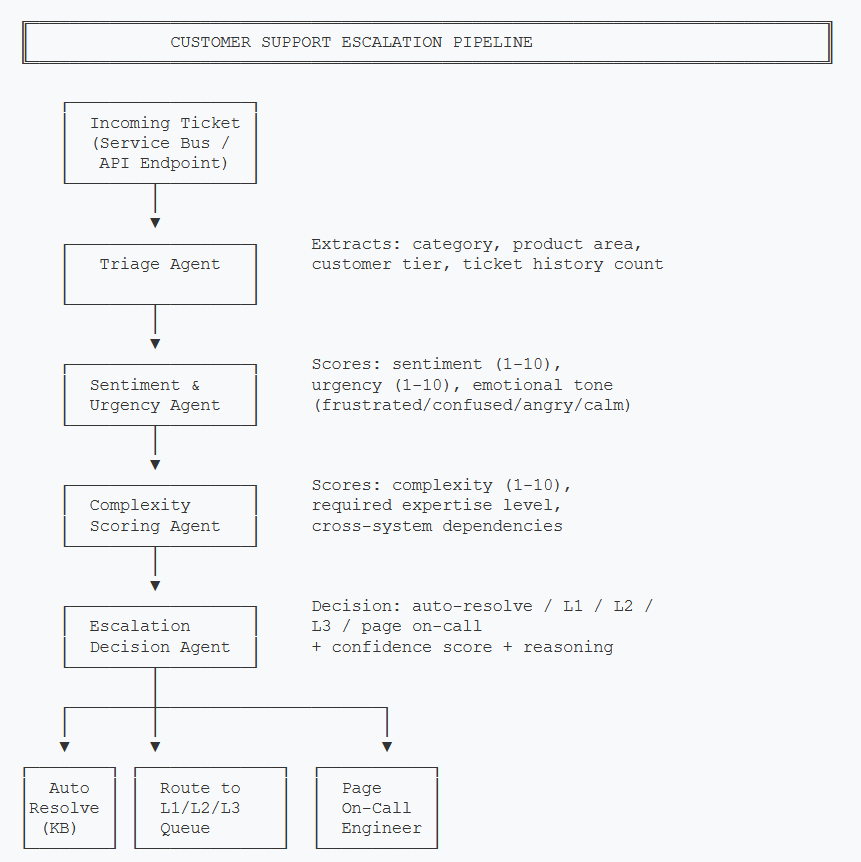
Each agent adds structured scores to the ticket state. The Escalation Decision Agent combines all signals to make the final routing call.
The pipeline is intentionally linear for this use case. Unlike an e-commerce assistant where a user might jump between browsing and checkout, support tickets flow in one direction: intake → analysis → decision. This makes the state machine simpler and easier to debug—you can trace exactly which agent contributed which score to the final decision.
- Triage Agent — Extracts structured metadata: product area, category (billing/technical/account), customer tier, and how many previous tickets this customer has opened recently.
- Sentiment & Urgency Agent — Reads the full ticket text and scores emotional intensity (1-10) and time-sensitivity (1-10). Also classifies the dominant emotional tone.
- Complexity Scoring Agent — Evaluates whether the issue requires specialized knowledge, cross-team coordination, or infrastructure access.
- Escalation Decision Agent — Takes all scores plus business rules (account value, queue depth) and outputs a routing decision with confidence and reasoning.
Core Implementation
Ticket State
The state object accumulates data as it passes through each agent. This is the central data structure everything else builds on.
from typing import TypedDict, List, Optional
from enum import Enum

class EmotionalTone(str, Enum):
    FRUSTRATED = "frustrated"
    CONFUSED = "confused"
    ANGRY = "angry"
    CALM = "calm"
    ANXIOUS = "anxious"

class RoutingDecision(str, Enum):
    AUTO_RESOLVE = "auto_resolve"
    L1_QUEUE = "l1_queue"
    L2_QUEUE = "l2_queue"
    L3_QUEUE = "l3_queue"
    PAGE_ONCALL = "page_oncall"

class TicketState(TypedDict):
    """State accumulated through the escalation pipeline."""
    # Input
    ticket_id: str
    customer_id: str
    subject: str
    body: str
    channel: str  # email, chat, phone

    # Triage Agent output
    category: Optional[str]           # billing, technical, account
    product_area: Optional[str]
    customer_tier: Optional[str]      # free, pro, enterprise
    recent_ticket_count: Optional[int]

    # Sentiment & Urgency Agent output
    sentiment_score: Optional[int]    # 1-10 (10 = most negative)
    urgency_score: Optional[int]      # 1-10 (10 = most urgent)
    emotional_tone: Optional[str]

    # Complexity Agent output
    complexity_score: Optional[int]   # 1-10 (10 = most complex)
    requires_expertise: Optional[List[str]]
    cross_system: Optional[bool]

    # Escalation Decision output
    routing_decision: Optional[str]
    confidence: Optional[float]
reasoning: Optional[str]public enum EmotionalTone
{
Frustrated, Confused, Angry, Calm, Anxious
}
public enum RoutingDecision
{
AutoResolve, L1Queue, L2Queue, L3Queue, PageOnCall
}
public class TicketState
{
// Input
public string TicketId { get; set; } = "";
public string CustomerId { get; set; } = "";
public string Subject { get; set; } = "";
public string Body { get; set; } = "";
public string Channel { get; set; } = "";
// Triage Agent output
public string? Category { get; set; }
public string? ProductArea { get; set; }
public string? CustomerTier { get; set; }
public int? RecentTicketCount { get; set; }
// Sentiment & Urgency Agent output
public int? SentimentScore { get; set; }
public int? UrgencyScore { get; set; }
public EmotionalTone? Tone { get; set; }
// Complexity Agent output
public int? ComplexityScore { get; set; }
public List<string>? RequiresExpertise { get; set; }
public bool? CrossSystem { get; set; }
// Escalation Decision output
public RoutingDecision? Decision { get; set; }
public double? Confidence { get; set; }
public string? Reasoning { get; set; }
}Building the Pipeline
The orchestrator wires the agents into a linear graph. Each node receives the full state, adds its analysis, and passes it forward.
from langgraph.graph import StateGraph, END

def build_escalation_pipeline() -> StateGraph:
    workflow = StateGraph(TicketState)

    # Add agent nodes
    workflow.add_node("triage", triage_agent)
    workflow.add_node("sentiment_urgency", sentiment_urgency_agent)
    workflow.add_node("complexity", complexity_agent)
    workflow.add_node("escalation_decision", escalation_decision_agent)

    # Linear pipeline: triage → sentiment → complexity → decision
    workflow.set_entry_point("triage")
    workflow.add_edge("triage", "sentiment_urgency")
    workflow.add_edge("sentiment_urgency", "complexity")
    workflow.add_edge("complexity", "escalation_decision")
    workflow.add_edge("escalation_decision", END)

    return workflow.compile()


async def process_ticket(ticket: dict) -> TicketState:
    pipeline = build_escalation_pipeline()

    initial_state: TicketState = {
        "ticket_id": ticket["id"],
        "customer_id": ticket["customer_id"],
        "subject": ticket["subject"],
        "body": ticket["body"],
        "channel": ticket.get("channel", "email"),
        # All agent outputs start as None
        "category": None,
        "product_area": None,
        "customer_tier": None,
        "recent_ticket_count": None,
        "sentiment_score": None,
        "urgency_score": None,
        "emotional_tone": None,
        "complexity_score": None,
        "requires_expertise": None,
        "cross_system": None,
        "routing_decision": None,
        "confidence": None,
        "reasoning": None,
    }

    result = await pipeline.ainvoke(initial_state)
return resultusing Microsoft.SemanticKernel;
public class EscalationPipeline
{
private readonly Kernel _kernel;
private readonly TriageAgent _triageAgent;
private readonly SentimentUrgencyAgent _sentimentAgent;
private readonly ComplexityAgent _complexityAgent;
private readonly EscalationDecisionAgent _decisionAgent;
public EscalationPipeline(Kernel kernel)
{
_kernel = kernel;
_triageAgent = new TriageAgent(kernel);
_sentimentAgent = new SentimentUrgencyAgent(kernel);
_complexityAgent = new ComplexityAgent(kernel);
_decisionAgent = new EscalationDecisionAgent(kernel);
}
public async Task<TicketState> ProcessTicketAsync(TicketState state)
{
// Linear pipeline: triage → sentiment → complexity → decision
state = await _triageAgent.ProcessAsync(state);
state = await _sentimentAgent.ProcessAsync(state);
state = await _complexityAgent.ProcessAsync(state);
state = await _decisionAgent.ProcessAsync(state);
return state;
}
}
// Usage
var builder = Kernel.CreateBuilder();
builder.AddAzureOpenAIChatCompletion(
deploymentName: "gpt-4o",
endpoint: config["AzureOpenAI:Endpoint"],
apiKey: config["AzureOpenAI:ApiKey"]
);
var kernel = builder.Build();
var pipeline = new EscalationPipeline(kernel);
var result = await pipeline.ProcessTicketAsync(ticketState);Why LangGraph for Python?
LangGraph gives us a state machine with first-class support for conditional edges, retries, and checkpointing. For this linear pipeline it might seem like overkill, but it pays off when you want to add conditional branches later—like skipping the complexity agent for simple billing questions, or adding a human-in-the-loop review for low-confidence decisions.
Key Challenge: Sentiment & Urgency Scoring
This is the agent that replaces keyword matching. Instead of looking for specific words, it reads the entire ticket and produces structured scores. The challenge is getting the LLM to output consistent, calibrated scores rather than defaulting to the middle of the range.
import json

SENTIMENT_URGENCY_PROMPT = """Analyze this customer support ticket and provide scores.

SCORING GUIDE:
- sentiment_score (1-10): 1=happy/satisfied, 5=neutral, 10=furious/threatening
  Examples: "Thanks for the help"=2, "This is frustrating"=6, "I'm contacting my lawyer"=9
- urgency_score (1-10): 1=no time pressure, 5=needs attention soon, 10=active data loss/outage
  Examples: "When you get a chance"=2, "Need this by Friday"=6, "Our site is down NOW"=10
- emotional_tone: exactly one of [frustrated, confused, angry, calm, anxious]

Respond with ONLY valid JSON, no other text:
{"sentiment_score": N, "urgency_score": N, "emotional_tone": "tone"}
"""

async def sentiment_urgency_agent(state: TicketState) -> dict:
    ticket_text = f"Subject: {state['subject']}\n\n{state['body']}"

    response = await llm.chat([
        {"role": "system", "content": SENTIMENT_URGENCY_PROMPT},
        {"role": "user", "content": ticket_text}
    ], temperature=0, max_tokens=100)

    scores = json.loads(response.strip())

    return {
        "sentiment_score": scores["sentiment_score"],
        "urgency_score": scores["urgency_score"],
        "emotional_tone": scores["emotional_tone"],
}public class SentimentUrgencyAgent
{
private readonly Kernel _kernel;
private const string Prompt = """
Analyze this customer support ticket and provide scores.
SCORING GUIDE:
- sentiment_score (1-10): 1=happy, 5=neutral, 10=furious
- urgency_score (1-10): 1=no pressure, 5=soon, 10=active outage
- emotional_tone: one of [frustrated, confused, angry, calm, anxious]
Respond with ONLY valid JSON:
{"sentiment_score": N, "urgency_score": N, "emotional_tone": "tone"}
""";
public SentimentUrgencyAgent(Kernel kernel) => _kernel = kernel;
public async Task<TicketState> ProcessAsync(TicketState state)
{
var ticketText = $"Subject: {state.Subject}\n\n{state.Body}";
var chat = _kernel.GetRequiredService<IChatCompletionService>();
var history = new ChatHistory();
history.AddSystemMessage(Prompt);
history.AddUserMessage(ticketText);
var settings = new OpenAIPromptExecutionSettings
{
Temperature = 0,
MaxTokens = 100
};
var result = await chat.GetChatMessageContentAsync(history, settings);
var scores = JsonSerializer.Deserialize<SentimentScores>(
result.Content!);
state.SentimentScore = scores.SentimentScore;
state.UrgencyScore = scores.UrgencyScore;
state.Tone = Enum.Parse<EmotionalTone>(
scores.EmotionalTone, ignoreCase: true);
return state;
}
}
public record SentimentScores(
[property: JsonPropertyName("sentiment_score")] int SentimentScore,
[property: JsonPropertyName("urgency_score")] int UrgencyScore,
[property: JsonPropertyName("emotional_tone")] string EmotionalTone
);The scoring guide with concrete examples is critical. Without it, GPT-4o tends to cluster scores around 4-6 for everything. By giving explicit anchor points ("Thanks for the help"=2, "I'm contacting my lawyer"=9), you get scores that actually spread across the full range.
Calibration Matters
Test your scoring prompt against 50+ real tickets before deploying. I found that the first version of my prompt scored nearly everything between 4 and 7. Adding the concrete examples in the scoring guide fixed the distribution, but your data might need different anchors. Run the agent against historical tickets where you know the correct escalation outcome and adjust the examples accordingly.
Key Challenge: Escalation Decision Logic
This is where the scores get turned into action. The escalation decision agent combines the sentiment, urgency, and complexity scores with business context—account tier, recent ticket history—to decide what happens next.
I deliberately use a hybrid approach here: the LLM evaluates the scores against written policy, but hard business rules override when necessary. An enterprise customer with an urgency score above 8 always gets L2 or higher, regardless of what the LLM thinks.
ESCALATION_POLICY = """You are a support escalation engine. Given the ticket
analysis scores, decide the routing.

ROUTING OPTIONS:
- auto_resolve: sentiment ≤ 3, urgency ≤ 3, complexity ≤ 3. Simple questions
  with known answers. Respond with a KB article link.
- l1_queue: Standard issues. Sentiment ≤ 6, no cross-system dependencies.
- l2_queue: Elevated issues. Sentiment > 6 OR complexity > 6 OR cross-system.
- l3_queue: Critical technical issues. Complexity > 8 OR requires infrastructure.
- page_oncall: Active outage or data loss. Urgency ≥ 9 AND complexity > 7.

Respond with JSON:
{"decision": "routing_option", "confidence": 0.0-1.0, "reasoning": "why"}
"""

async def escalation_decision_agent(state: TicketState) -> dict:
    # Hard business rules (override LLM)
    if (state["customer_tier"] == "enterprise"
            and state["urgency_score"] >= 8):
        return {
            "routing_decision": "l2_queue",
            "confidence": 0.95,
            "reasoning": "Enterprise customer with high urgency - auto-escalated",
        }

    if state["urgency_score"] == 10 and state["complexity_score"] >= 7:
        return {
            "routing_decision": "page_oncall",
            "confidence": 0.99,
            "reasoning": "Critical urgency with high complexity - paging on-call",
        }

    # LLM-based decision for everything else
    context = f"""Ticket Analysis:
- Category: {state['category']}
- Customer Tier: {state['customer_tier']}
- Sentiment Score: {state['sentiment_score']}/10
- Urgency Score: {state['urgency_score']}/10
- Complexity Score: {state['complexity_score']}/10
- Emotional Tone: {state['emotional_tone']}
- Cross-System: {state['cross_system']}
- Recent Tickets: {state['recent_ticket_count']}
- Requires Expertise: {state['requires_expertise']}"""

    response = await llm.chat([
        {"role": "system", "content": ESCALATION_POLICY},
        {"role": "user", "content": context}
    ], temperature=0)

    result = json.loads(response.strip())
    return {
        "routing_decision": result["decision"],
        "confidence": result["confidence"],
        "reasoning": result["reasoning"],
}public class EscalationDecisionAgent
{
private readonly Kernel _kernel;
private const string EscalationPolicy = """
You are a support escalation engine. Given the ticket analysis scores,
decide the routing.
ROUTING OPTIONS:
- auto_resolve: sentiment ≤ 3, urgency ≤ 3, complexity ≤ 3
- l1_queue: Standard issues. Sentiment ≤ 6, no cross-system deps.
- l2_queue: Elevated. Sentiment > 6 OR complexity > 6 OR cross-system.
- l3_queue: Critical technical. Complexity > 8 OR needs infrastructure.
- page_oncall: Active outage. Urgency ≥ 9 AND complexity > 7.
Respond with JSON:
{"decision": "option", "confidence": 0.0-1.0, "reasoning": "why"}
""";
public EscalationDecisionAgent(Kernel kernel) => _kernel = kernel;
public async Task<TicketState> ProcessAsync(TicketState state)
{
// Hard business rules override LLM
if (state.CustomerTier == "enterprise"
&& state.UrgencyScore >= 8)
{
state.Decision = RoutingDecision.L2Queue;
state.Confidence = 0.95;
state.Reasoning = "Enterprise + high urgency - auto-escalated";
return state;
}
if (state.UrgencyScore == 10 && state.ComplexityScore >= 7)
{
state.Decision = RoutingDecision.PageOnCall;
state.Confidence = 0.99;
state.Reasoning = "Critical urgency + high complexity - paging";
return state;
}
// LLM-based decision
var context = $"""
Category: {state.Category}
Customer Tier: {state.CustomerTier}
Sentiment: {state.SentimentScore}/10
Urgency: {state.UrgencyScore}/10
Complexity: {state.ComplexityScore}/10
Tone: {state.Tone}
Cross-System: {state.CrossSystem}
Recent Tickets: {state.RecentTicketCount}
Expertise: {string.Join(", ", state.RequiresExpertise ?? [])}
""";
var chat = _kernel.GetRequiredService<IChatCompletionService>();
var history = new ChatHistory();
history.AddSystemMessage(EscalationPolicy);
history.AddUserMessage(context);
var result = await chat.GetChatMessageContentAsync(history,
new OpenAIPromptExecutionSettings { Temperature = 0 });
var decision = JsonSerializer.Deserialize<EscalationResult>(
result.Content!);
state.Decision = Enum.Parse<RoutingDecision>(
decision.Decision, ignoreCase: true);
state.Confidence = decision.Confidence;
state.Reasoning = decision.Reasoning;
return state;
}
}
public record EscalationResult(
[property: JsonPropertyName("decision")] string Decision,
[property: JsonPropertyName("confidence")] double Confidence,
[property: JsonPropertyName("reasoning")] string Reasoning
);The hybrid approach—hard rules plus LLM reasoning—is deliberate. Hard rules catch the cases where you absolutely cannot afford a wrong decision (enterprise customers, active outages). The LLM handles the gray area where context matters and rigid thresholds would either over-escalate or under-escalate.
Don't Let the LLM Override Business Rules
It's tempting to let the LLM handle everything, including enterprise escalation logic. Don't. LLMs occasionally produce confident but wrong outputs. For high-stakes decisions (enterprise SLA, active outage), deterministic rules should always win. Use the LLM for the nuanced middle ground where its language understanding adds genuine value.
ROI and Business Value
The ROI case for AI-powered escalation comes down to two numbers: the cost of false escalations and the cost of missed escalations.
| Metric | Before (Keyword Rules) | After (AI Pipeline) | Impact |
|---|---|---|---|
| False escalation rate | 38% | 11% | 71% reduction |
| Missed escalation rate | 22% | 6% | 73% reduction |
| Avg. time to correct routing | 47 minutes | 3 seconds | ~940x faster |
| L2/L3 time on misrouted tickets | ~32 hrs/week | ~9 hrs/week | 23 hrs/week saved |
For a team processing 500 tickets/day, false escalations alone cost roughly $15K-$25K/month in wasted senior engineer time (assuming L2/L3 engineers at $80-120/hr spend 15-20 minutes per false escalation). Reducing that by 70% pays for the Azure OpenAI costs several times over.
But the bigger win is missed escalations. A single enterprise customer churning because their critical issue sat in an L1 queue for 6 hours can cost $50K-$500K in annual revenue. The AI pipeline catches these because it reads for meaning, not keywords.
When Does This Pay Off?
This approach makes financial sense when you have:
- 100+ tickets/day — Below this, manual triage by a single person is usually fine
- Multi-tier support — If you only have L1, there's nothing to escalate to
- Measurable escalation problems — If your current system works well, don't fix it
- Customer segments with different SLAs — Enterprise vs. free tier routing is where AI shines
What's Next
We've built the core pipeline: a four-agent system that reads support tickets for sentiment, urgency, and complexity, then makes an intelligent routing decision. The key patterns here—structured scoring with calibrated examples, hybrid rules-plus-LLM decisions, and linear agent pipelines—apply well beyond customer support.
But building it is only half the story. In production, you need to answer harder questions: What does this cost per ticket at 10,000 tickets/day? How do you debug a bad escalation decision at 2am? When should you choose Python (LangGraph) vs. C# (Semantic Kernel)? And critically—when is this entire approach overkill?
Part 2: Production Considerations
Coming soon — cost analysis, observability patterns, and when NOT to use AI escalation.
Read Part 2 →This article demonstrates AI-powered escalation concepts. Production code would need error handling, rate limiting, proper state persistence, and thorough testing against historical ticket data.
Want More Practical AI Tutorials?
I write about building production AI systems with Azure, Python, and C#. Subscribe for practical tutorials delivered twice a month.
Subscribe to Newsletter →