In Part 1, we built a four-agent pipeline that reads support tickets for sentiment, urgency, and complexity, then makes intelligent escalation decisions. The architecture works well in a notebook. But "works in a notebook" and "runs in production" are very different things.
This article covers the questions that come after the demo: What does this actually cost? How do you trace a bad escalation decision through four agents at 2am? Should you build this in Python or C#? And most importantly—when should you not build this at all?
Cost Analysis: What This Actually Costs
Every ticket runs through four LLM calls (triage, sentiment/urgency, complexity, and escalation decision). Here's what that looks like with GPT-4o pricing on Azure OpenAI.
Token Costs Per Ticket
| Agent | Avg Input Tokens | Avg Output Tokens | Cost Per Call |
|---|---|---|---|
| Triage Agent | ~350 | ~80 | $0.0021 |
| Sentiment & Urgency | ~450 | ~50 | $0.0025 |
| Complexity Scoring | ~400 | ~70 | $0.0024 |
| Escalation Decision | ~500 | ~100 | $0.0032 |
| Total per ticket | ~1,700 | ~300 | $0.0102 |
Based on GPT-4o pricing: $5.00/1M input tokens, $15.00/1M output tokens (Azure OpenAI, January 2026).
Monthly Cost at Scale
| Daily Volume | Monthly Tickets | LLM Cost/Month | Infrastructure | Total/Month |
|---|---|---|---|---|
| 100/day | 3,000 | $31 | ~$150 | ~$181 |
| 500/day | 15,000 | $153 | ~$250 | ~$403 |
| 2,000/day | 60,000 | $612 | ~$400 | ~$1,012 |
| 10,000/day | 300,000 | $3,060 | ~$800 | ~$3,860 |
Infrastructure costs include Azure Service Bus (Standard tier ~$10/mo), Cosmos DB for state persistence (~$25-100/mo depending on throughput), App Service or Container Apps (~$50-200/mo), and Application Insights (~$30-100/mo).
The Real Cost Comparison
At 500 tickets/day, AI escalation costs ~$403/month. A single L2 engineer spending 6 hours/week on false escalations costs ~$2,400-$3,600/month (at $80-120/hr). If the AI pipeline reduces false escalations by even 50%, it pays for itself several times over. But track this—don't assume it. Measure false escalation rates before and after deployment.
Cost Optimization Strategies
You can reduce LLM costs significantly with a few targeted changes:
- Skip agents for obvious cases. If a ticket subject contains "password reset" and the customer is on the free tier, route directly to L1 without running sentiment analysis. This can skip 20-30% of tickets.
- Use GPT-4o-mini for triage. The triage agent (extracting category, product area) doesn't need GPT-4o's full reasoning. GPT-4o-mini at ~$0.15/1M input tokens cuts the triage step cost by 97%.
- Batch low-priority tickets. Free-tier tickets with no urgency keywords can be batched and processed every 5 minutes instead of individually, reducing API call overhead.
Observability: Tracing Escalation Decisions
When a customer complains that their critical ticket sat in L1 for 3 hours, you need to trace exactly why your AI pipeline made that routing decision. This means logging every agent's input and output, not just the final decision.
import logging
from opentelemetry import trace
from datetime import datetime

tracer = trace.get_tracer("escalation-pipeline")
logger = logging.getLogger("escalation")

async def traced_agent(agent_name: str, agent_fn, state: TicketState):
    """Wrap any agent with tracing and structured logging."""
    with tracer.start_as_current_span(f"agent.{agent_name}") as span:
        span.set_attribute("ticket.id", state["ticket_id"])
        span.set_attribute("agent.name", agent_name)

        start = datetime.utcnow()
        result = await agent_fn(state)
        duration_ms = (datetime.utcnow() - start).total_seconds() * 1000

        # Log structured decision data
        logger.info("agent_completed", extra={
            "ticket_id": state["ticket_id"],
            "agent": agent_name,
            "duration_ms": duration_ms,
            "output": result,
        })

        span.set_attribute("agent.duration_ms", duration_ms)
        return result

# Usage in pipeline
async def triage_with_tracing(state: TicketState) -> dict:
return await traced_agent("triage", triage_agent, state)using System.Diagnostics;
using Microsoft.Extensions.Logging;
public class AgentTracing
{
private static readonly ActivitySource Source =
new("EscalationPipeline");
private readonly ILogger _logger;
public AgentTracing(ILogger<AgentTracing> logger)
=> _logger = logger;
public async Task<TicketState> TraceAgentAsync(
string agentName,
Func<TicketState, Task<TicketState>> agentFn,
TicketState state)
{
using var activity = Source.StartActivity($"agent.{agentName}");
activity?.SetTag("ticket.id", state.TicketId);
activity?.SetTag("agent.name", agentName);
var sw = Stopwatch.StartNew();
var result = await agentFn(state);
sw.Stop();
_logger.LogInformation(
"Agent {Agent} completed for ticket {TicketId} " +
"in {Duration}ms. Decision: {Decision}",
agentName, state.TicketId,
sw.ElapsedMilliseconds, state.Decision);
activity?.SetTag("agent.duration_ms", sw.ElapsedMilliseconds);
return result;
}
}The key insight for escalation observability is that you need to reconstruct the full decision chain. Store each agent's output as a separate event linked by ticket ID. When someone asks "why was this ticket routed to L1?", you should be able to pull up:
- Triage output: category=billing, tier=enterprise, recent_tickets=3
- Sentiment/Urgency: sentiment=4, urgency=5, tone=frustrated
- Complexity: complexity=3, cross_system=false
- Decision: l1_queue, confidence=0.78, reasoning="moderate urgency, low complexity, no cross-system dependencies"
This trace makes it immediately clear what happened. In this example, the urgency score of 5 was borderline—if it had been 6+, the enterprise tier override would have kicked in. That's the kind of insight you need to tune the system.
Dashboards That Matter
Build these three dashboards first:
- Decision distribution: What percentage of tickets go to each routing level? Track daily. Sudden shifts indicate prompt drift or data distribution changes.
- Low-confidence decisions: Tickets where the escalation agent's confidence was below 0.7. These are your edge cases—review them weekly to improve the escalation policy prompt.
- Override rate: How often do human agents manually re-route tickets after the AI decision? This is your ground truth for accuracy.
Why Choose Python (LangGraph) vs. C# (Semantic Kernel)
Both implementations in Part 1 produce the same results. The choice between them is about your team and your existing stack, not about which framework is "better."
| Factor | Python + LangGraph | C# + Semantic Kernel |
|---|---|---|
| Best when | Prototyping, data science team, rapid iteration | Enterprise .NET stack, existing C# services, type safety priority |
| Graph definition | Declarative state machine with visual debugging | Imperative pipeline with DI container integration |
| State management | TypedDict with built-in checkpointing | POCO classes with manual persistence |
| Observability | LangSmith integration, OpenTelemetry | Application Insights native, OpenTelemetry |
| Deployment | Container Apps, Functions (Python) | App Service, Functions (.NET), direct Azure SDK |
| Azure integration | Good (via SDKs) | Native (first-party support) |
| Team ramp-up | Faster for AI/ML engineers | Faster for .NET developers |
For the escalation pipeline specifically, I'd lean toward C# / Semantic Kernel if your support platform is already .NET (ServiceNow integrations, Azure DevOps, Dynamics 365). The type safety on the TicketState class catches mismatches at compile time that Python would only surface at runtime.
I'd lean toward Python / LangGraph if you're iterating on the escalation logic frequently. LangGraph's declarative graph definition makes it easier to experiment with different agent orderings, add conditional branches, and visualize the pipeline. You can also use LangSmith for tracing and prompt debugging during development.
The Hybrid Approach
Some teams prototype in Python and deploy in C#. This works if you have both skill sets. The agent prompts and scoring logic are identical between implementations—only the orchestration code changes. Define your prompts as shared resources (Azure Prompt Flow or even a shared config file) and keep the framework-specific code thin.
Azure Infrastructure
Here's the Azure services needed for a production deployment of the escalation pipeline.
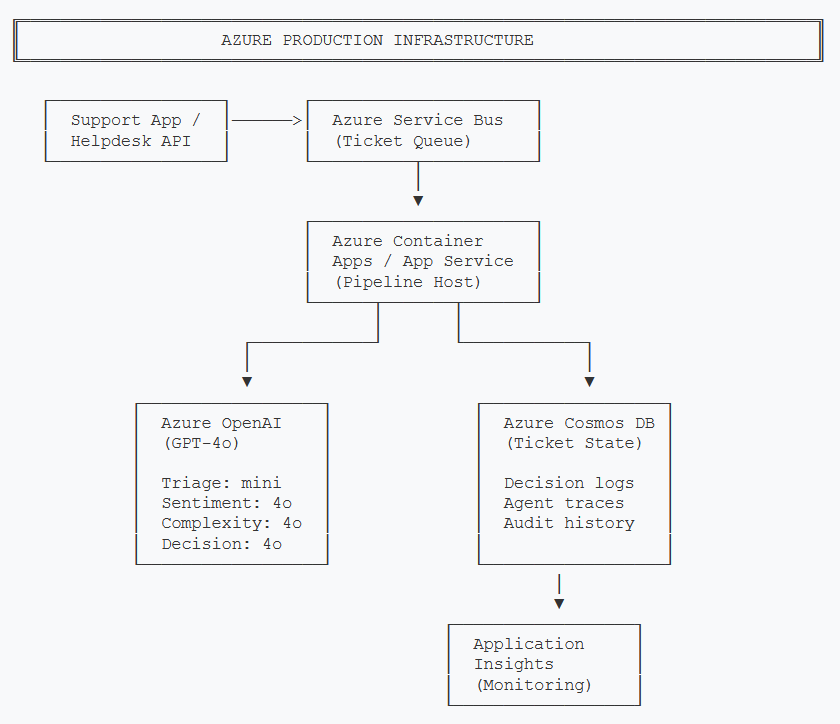
Production Azure infrastructure for the escalation pipeline. Service Bus ingests tickets, Container Apps runs the agent pipeline, Cosmos DB persists state and audit trails.
- Azure OpenAI — GPT-4o for sentiment, complexity, and escalation decisions. GPT-4o-mini for the triage agent (simpler task, 97% cheaper).
- Azure AI Foundry Agent Service — If you want managed multi-agent orchestration instead of self-hosting LangGraph/Semantic Kernel. Provides built-in state management, tracing, and scaling. Worth evaluating if you're running 1,000+ tickets/day.
- Azure Service Bus — Ticket ingestion queue. Provides reliable delivery, dead-letter queues for failed processing, and natural backpressure when the pipeline is under load.
- Azure Cosmos DB — Stores ticket state (the full TicketState object) and escalation audit trails. Partition by customer_id for fast lookups. The decision reasoning field is critical for compliance and debugging.
- Application Insights — Distributed tracing across all four agents, custom metrics for escalation decision distribution, and alerts on anomalies (sudden spike in L3 escalations, for example).
When NOT to Use AI Escalation
This is the section I wish more AI articles included. Not every support team needs AI-powered escalation. Here's when you should stick with simpler approaches.
Skip AI Escalation When:
- You handle fewer than 50 tickets/day. A single senior support person can manually triage this volume in an hour. The AI pipeline adds complexity without meaningful time savings.
- You only have one support tier. If every ticket goes to the same team regardless, routing intelligence adds zero value. Invest in better self-service instead.
- Your escalation rules are simple and working. If "billing tickets go to billing, technical tickets go to engineering" covers 95% of your cases, don't over-engineer it. A regex-based router costs $0/month.
- You don't have 6 months of historical ticket data. You need labeled examples to calibrate the scoring prompts and validate accuracy. Without ground truth, you're guessing whether the AI is better than your current system.
- Your support is fully synchronous (phone/chat only). AI triage adds latency. For live channels where customers are waiting, you need sub-second routing. The 2-4 second pipeline execution time may not be acceptable. Consider a lighter model or a classification-only approach instead.
The honest assessment: AI escalation shines in environments with 200+ tickets/day, multiple support tiers, varying customer SLAs, and a measurable false escalation problem. If that's not you, a well-configured set of rules in your helpdesk platform will outperform this approach at a fraction of the cost and complexity.
Start Simple, Prove Value, Then Automate
If you're uncertain, start with a shadow deployment. Run the AI pipeline alongside your existing rules for 2 weeks without acting on its decisions. Compare the AI's routing against what your human agents actually did. If the AI agrees with the humans 85%+ of the time and catches escalations the rules missed, you have your business case. If not, you've saved yourself from deploying a system that doesn't outperform simpler alternatives.
Key Takeaways
- Cost is manageable: ~$0.01 per ticket with GPT-4o. At 500 tickets/day, that's ~$400/month—far less than the cost of false escalations.
- Observability is non-negotiable: Log every agent's output, not just the final decision. You need the full chain to debug bad routing at 2am.
- Hybrid rules + LLM beats pure LLM: Hard business rules for high-stakes decisions, LLM for the nuanced middle ground.
- Choose your framework by team, not by hype: Python/LangGraph for iteration speed, C#/Semantic Kernel for enterprise .NET integration.
- Know when it's overkill: Under 50 tickets/day or single-tier support? Stick with simple rules.
The escalation pipeline we built in Part 1 solves a real problem—reading tickets for meaning instead of matching keywords. But the difference between a demo and a production system is the operational discipline covered here: cost tracking, observability, and the honesty to know when simpler tools are the right answer.
This article covers production considerations for AI-powered escalation. Actual costs may vary based on Azure region, pricing tier changes, and ticket complexity. Always benchmark against your specific workload.
Want More Practical AI Tutorials?
I write about building production AI systems with Azure, Python, and C#. Subscribe for practical tutorials delivered twice a month.
Subscribe to Newsletter →